Claude Code is Anthropic's agentic coding CLI: a terminal tool that reads your repository, edits files, runs shell commands, and works through multi-step tasks instead of only completing the current line. This guide covers what it actually does session to session — installation, CLAUDE.md, plan mode, hooks, MCP, subagents, and memory — built from running it in production on the Next.js repository this site itself is written in, including the two mistakes in that repo's own configuration that had to be caught and fixed.
Key takeaways
- Claude Code works through visible tool calls — Read, Edit, Bash, and others — that you review before they run, not a black box that silently rewrites files.
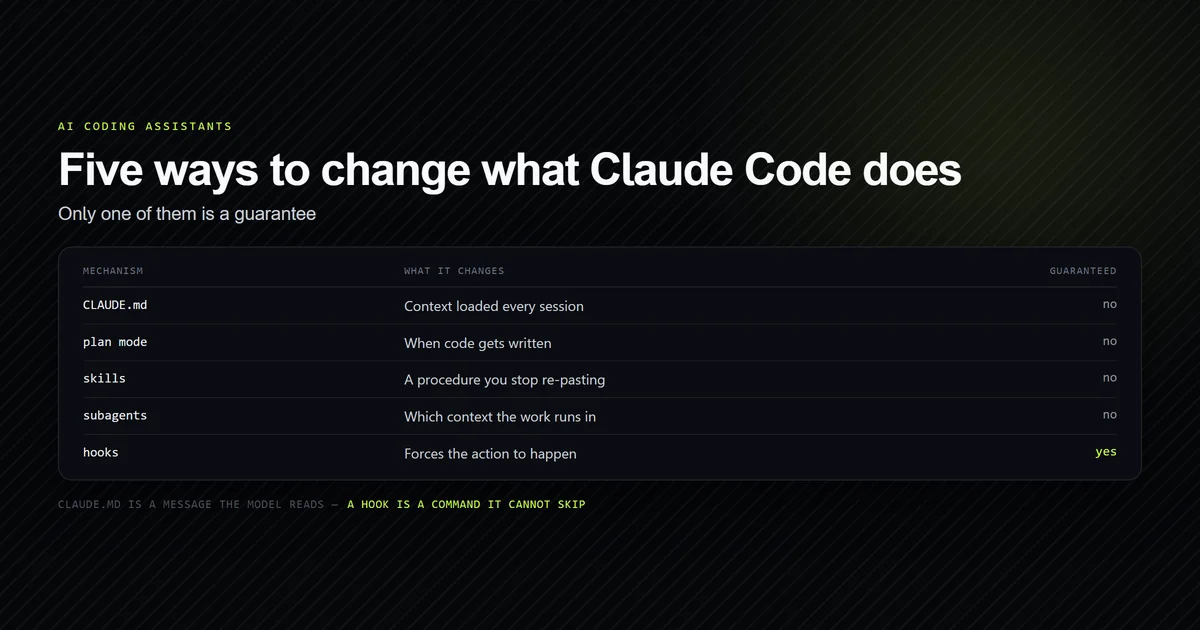
- CLAUDE.md is delivered as a user message the model reads, not enforced configuration; a hook is the only mechanism that guarantees an action happens every time.
- Plan mode separates "figure out the approach" from "write the code," and is the highest-leverage habit for any task with more than one reasonable way to solve it.
- Subagents fork a task into an isolated context so exploratory tool output doesn't fill the main session's context window.
- MCP servers and hooks extend what Claude Code can reach and what it's forced to do, respectively — they solve different problems and aren't interchangeable.
What is Claude Code
Claude Code is a command-line tool, not an IDE plugin — you run claude from a project's
root directory and interact with it in plain English inside the terminal you already use.
Under the hood, every action it takes is a discrete tool call: reading a file, editing a
file, running a bash command, searching the codebase. Each of those calls is visible in the
session, which is the mechanical reason a Claude Code session reads more like a pair
programmer narrating its steps than an autocomplete engine guessing your next token.
That tool-call model is what makes Claude Code agentic rather than merely generative: it
can run npm run typecheck after an edit, read the error, and fix the specific line that
failed, in one uninterrupted task — without you copy-pasting output back into a chat
window. The trade-off is that it needs real information about your specific project to do
that well, which is what CLAUDE.md exists to supply.
Most of what makes a Claude Code guide useful isn't the CLI's basic command surface — that part is small enough to learn in one session. It's the handful of configuration layers that determine whether a given session produces expert-level output or a plausible-looking first draft: how much project context it starts with, whether it stops to confirm an approach before writing code, and which rules are actually enforced versus merely suggested. The rest of this guide works through each of those layers in the order they matter in practice.
Installing and starting a Claude Code session
Claude Code installs as a CLI and runs from your terminal against the current working
directory, so the first real decision is where you launch it from — typically a project's
root, so it has the whole repository in scope. On a brand-new project, the first command
worth running is /init, which scans the repo and drafts a starting CLAUDE.md from what it
can infer: the package manager, the test command, the obvious framework. That draft is a
starting point, not a finished file — see how to set up
CLAUDE.md for the structure that survives real use
instead of just the first session.
From there, a session is conversational: describe the task, Claude proposes and takes action, you review the diff. Multi-step tasks — "add a field, migrate the schema, update the three call sites" — run inside one session with the model tracking its own progress, rather than requiring you to restate context after every single file.
Claude Code also runs non-interactively, in a print mode built for scripts rather than a live terminal conversation — the mechanism that makes it usable inside a CI job instead of only an interactive session you drive by hand. That's a different operating mode from everything else in this guide: no back-and-forth, no plan-mode confirmation, just a single prompt in and a result out, which is why it needs tighter scoping and more guardrails than an interactive session does. Connecting Claude Code to a deployment pipeline covers what that setup actually looks like.
CLAUDE.md: the file Claude Code reads first
CLAUDE.md is a markdown file at your project root that Claude Code loads automatically at the start of every session, holding the facts it can't infer from the code itself — build commands, architectural decisions, and traps specific to your repository. It's delivered as a message Claude reads, not compiled configuration, so adherence is probabilistic rather than absolute: a vague instruction like "write clean code" competes for attention with everything else in context, while a specific one — "never build while the dev server is running, it corrupts the chunk manifest" — tends to get followed because it's concrete and actionable.
The CLAUDE.md running this exact site is 121 lines across ten sections and 8,189 bytes as of
2026-08-11, and two of the instructions in it exist because Claude Code got something wrong
first: a real next build run against a live next dev server once took every route down
with a 500 error that looked exactly like an application bug, and a markdown image syntax
that silently produced a build-time error until the rule banning it went into the file. See
the mistakes worth avoiding in a CLAUDE.md
file for the fuller pattern — a rule that
exists because something specific broke is worth more than a rule written speculatively.
Size is not free. Every line loads on every request, so a CLAUDE.md that grows without being pruned becomes a per-session tax you pay whether or not the rules apply — we measured the context floor this file imposes and found 91% of it was this one document. And when Claude appears to ignore a rule you know is in the file, the cause is usually mechanical rather than probabilistic: why CLAUDE.md gets ignored works through the loading and precedence failures before blaming the model.
Plan mode: when to use it
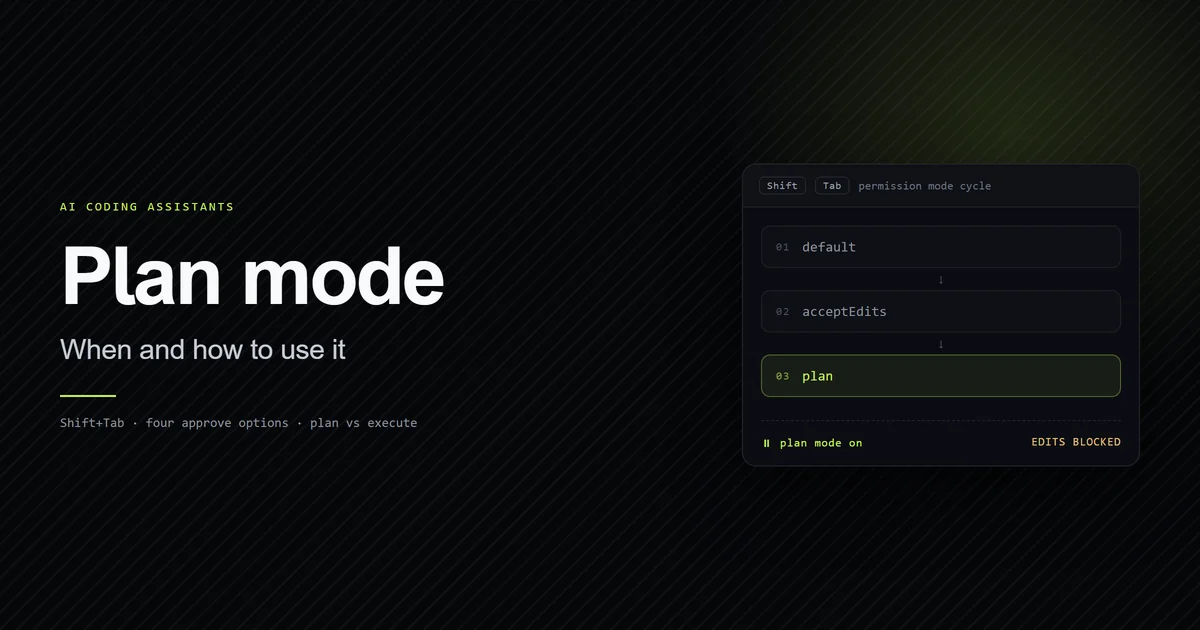
Plan mode makes Claude Code propose an approach and stop before writing any code, so you approve the plan instead of reviewing a diff after the fact. It's the difference between catching a wrong architectural assumption in a two-sentence plan versus catching it in a 400-line diff you now have to unwind. Use it whenever a task has more than one reasonable way to solve it — a refactor, a new feature that touches several files, anything where "just start editing" risks committing to the wrong shape before you've seen it stated plainly.
Skip plan mode for genuinely mechanical work — a one-line bug fix, a rename, a config value change — where there's exactly one correct edit and a plan step just adds a round trip. The full decision rule, including how plan mode interacts with a large CLAUDE.md and when it's worth forcing even for small tasks, is in Claude Code plan mode: when and how to use it. If you work across the desktop app or the VS Code extension rather than the terminal, the control differs on each surface — see how to activate plan mode.
Plan mode is one of six permission modes, and it is not an alternative to auto mode — choosing between the modes covers what each one approves without asking, and why entering auto mode suspends the broadest rules in your allowlist. One thing neither mode does is keep the plan: plans are never written to a file, so copy anything you want to keep out before you accept it.
Planning is not free, either. It costs tokens in three separate
ways — the planning turns themselves,
extended thinking billed as output, and the auto-mode classifier that runs on its own model
rather than your /model selection. And if auto mode is greyed out when you reach for it,
the "unavailable for your plan"
message has four possible causes
ranked by how often each is actually the one.
Slash commands and skills
Slash commands are shortcuts for repeatable prompts — typing /init or a project-defined
command runs a pre-written instruction instead of you retyping it every session. Skills go
further: a skill is a packaged set of instructions for a specific kind of task that Claude
loads into a turn when the request matches what the skill covers, rather than you having to
remember and paste the right process every time. Both exist to keep a team's repeatable
workflows consistent across sessions and across different people running Claude Code
against the same repository. The two have since merged into a single feature — the file
format, the invocation rules, and the context cost are covered in
Claude Code skills and slash commands. For the
full inventory across all three surfaces — shell subcommands, launch flags, and in-session
slash commands — see the
Claude Code command reference, which
also documents the sixteen entries claude --help never mentions.
Subagents: forking work without losing context
A subagent runs a task in an isolated context that inherits the parent session's understanding but keeps its own tool output — file reads, search results, command output — out of the main conversation. That matters because context is finite: a broad, exploratory search across a large codebase can produce far more raw output than the final answer actually needs, and running it as a subagent means only the distilled result comes back, not every intermediate grep.
The practical rule is to fork when you want the answer but not the paper trail — an
open-ended "where does X happen and why" question benefits from a subagent; a task where
you'll need the exact tool output again later usually doesn't. Subagents can also run in
parallel when the questions they're answering don't depend on each other, which is where
the context savings compound: three independent investigations run as three forks return
three short summaries instead of three long transcripts stacked into one session. Writing
your own is a short markdown file with YAML frontmatter;
a practical guide to Claude Code subagents
builds two for this repository and shows the three ways a definition fails without telling you.
What the context saving is actually worth is
measured on those same two definitions —
one parent turn against eight, and a quarter of the parent context, for the same answer and no
reliable saving in dollars. If the search is what you are delegating, note that
the built-in Explore agent never receives your CLAUDE.md.
A fork is not the only way to move work off the critical path: --bg detaches a whole
session and run_in_background detaches a single shell command, and
only one of the two outlives the session.
Delegation goes three levels deeper than one fork, and each level is worth pricing before you reach for it. A subagent can spawn its own, down to a cap of three, enforced in a way nothing announces — nested subagents walks a chain into the ceiling. A script can fan a job across agents deterministically, though on a small job dynamic workflows measured that costing four times what one session charged to do the work itself. And a whole session can be stripped down to a coordinator that has no choice but to delegate, which is what agent teams are: 33 tools reduced to six.
Hooks: automation Claude cannot skip
A hook is a shell command that the harness runs automatically in response to an event — a tool call, a session start, a specific trigger — independent of anything the model decides in that moment. That distinction matters because CLAUDE.md is a request the model usually follows, while a hook always fires. If a rule must hold without exception — a formatter that always runs after a file edit, a check that always blocks a specific command — a hook enforces it in a way a written instruction in CLAUDE.md structurally cannot, because CLAUDE.md competes with everything else in the context window for the model's attention.
Hooks and CLAUDE.md rules aren't competing mechanisms — they're suited to different failure modes. A rule that Claude usually gets right on its own belongs in CLAUDE.md, where it costs nothing to state and adds useful context around the edge cases. A rule that would be genuinely bad if skipped even once — running a formatter, blocking a destructive command, refusing a push to a protected branch — belongs in a hook specifically because it doesn't depend on the model choosing correctly in the moment.
That split is measurable rather than theoretical. Auditing this site's own corpus of 93 articles against 14 written rules found that the five rules backed by a failing build or a failing script had zero violations while the nine that existed only as sentences had 92 — the full audit is in Claude Code not following instructions.
The caveat is that "a hook always fires" is a property of a hook that is wired correctly, and Claude Code will accept several that never run without printing anything at all. We registered a logging hook on every event the binary has and counted what happened, in the hooks tutorial; the two events worth learning first are PreToolUse, the only hook that can stop a tool call, and PostToolUse, which cannot undo one.
The mirror image of that caveat applies to skills, which are the other place people put a standing rule. A skill is offered to the model rather than run for it, and on a machine with 50 skills installed most of them reach the model as a name with no description at all — what a session actually shows about the skills you installed measures the listing budget that causes it. Written as a policy rather than a request, one skill fired 0 times in 5 where the equivalent hook fired 5.
MCP and connecting external tools
The Model Context Protocol (MCP) is how Claude Code connects to external tools and data sources beyond what the base CLI ships with — a database, an internal API, a project management tool — exposed as additional tools the model can call in the same way it calls Read or Bash. Where a hook enforces that something always happens, an MCP server extends what Claude Code can reach in the first place; a project that needs both usually configures them for different problems rather than picking one over the other.
An MCP server is configured once per project or once per machine, then shows up as regular tools inside every session from then on — the model doesn't need to be told an MCP tool exists, it discovers it the same way it discovers Read and Bash. The judgment call is scope: connecting a database MCP server with write access to a production database is a materially different risk than a read-only docs lookup, and that risk lives in what the server itself is allowed to do, not in anything Claude Code's configuration controls.
Before any of that, know where claude mcp add puts what you give it: its default scope is
local, which writes to your home directory and leaves no file in the repository at all —
the measured setup path is one flag long, and the
flag is the whole article.
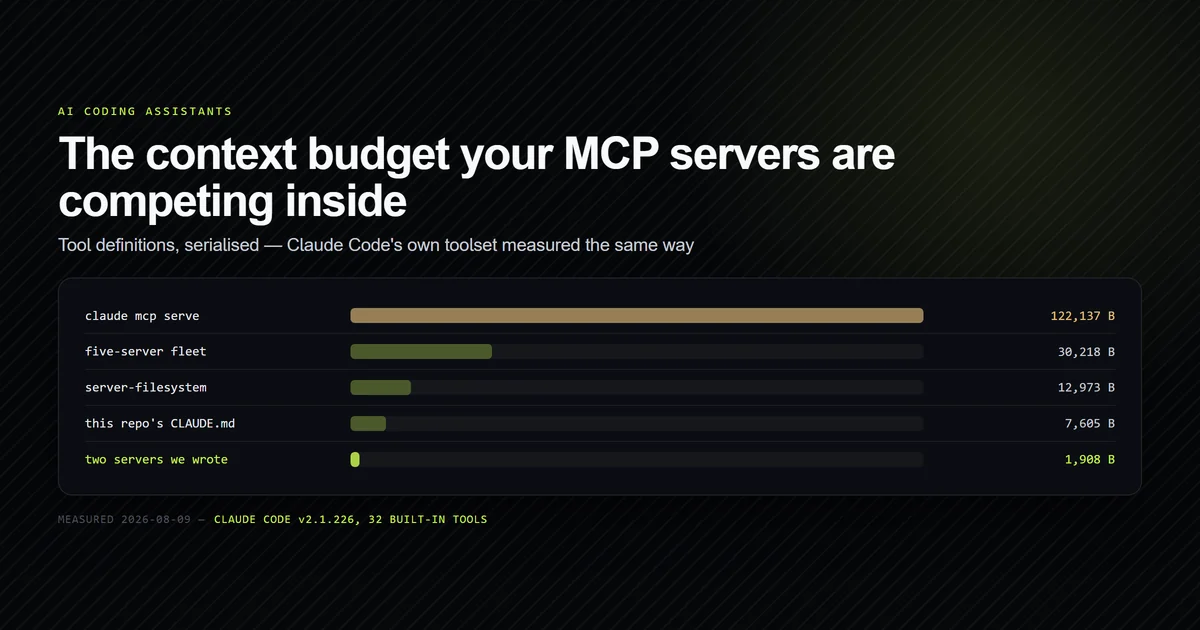
Two practical notes before you add one. The configuration has three scopes with silent precedence between them, which the fields and scopes in mcp.json covers in full; and every connected server's tool definitions occupy context on every request, so the count is a budget rather than a free upgrade — we measured what each MCP server costs before it does any work.
MCP is deep enough to have its own guide rather than a section. Setting up MCP servers with
Claude Code is the full walkthrough, including
the ten-subcommand claude mcp surface and the recovery for a .mcp.json you rejected by
mistake. From there: running several servers at
once covers the naming collisions and the startup
cost of doing it, and building one against your own
codebase is the case where a Next.js project reuses lib/ and
dies on server-only until you pass node --conditions=react-server.
When a server does not come up, the CLI is not much help — it reports ✔ Connected for a
server whose stdout a single console.log has corrupted, and prints one identical
-32000: Connection closed for four unrelated failures. Troubleshooting an MCP server that
is not working separates those four cases.
Memory: what persists between sessions
CLAUDE.md is written by a human and loaded every session unchanged. A separate memory system lets Claude accumulate its own learnings across sessions — corrections a user gave, preferences confirmed by repeated approval — stored per project and summarized into an index file that loads alongside CLAUDE.md at the start of a new session. The distinction worth internalizing: CLAUDE.md is what you decided the model should always know; memory is what the model has learned from working with you specifically, and both are context rather than enforced configuration. Both are re-sent on every turn, so both are a running cost rather than a one-off: across 17 client versions we measured, the instruction set grew 7.8x while the per-turn cost of the client itself fell.
Claude Code pricing and plan tiers
Claude Code is included starting at Claude Pro, not on the free tier — Anthropic's own pricing page lists it as a Pro-and-above feature, alongside session limits that scale by tier. The exact numbers, including where Max's 5x and 20x tiers diverge and what a five-hour session limit means for a working day, are covered in what AI coding assistants actually cost rather than repeated here, since pricing changes fast enough that maintaining it in two places guarantees one of them goes stale.
The other half of the bill is the model tier, and it behaves more simply than the plan structure: Sonnet against Opus is exactly 2.5x on identical work and stays 2.5x whatever your session does, because both tiers bill cache the same way. Which means the tier is a decision about how much of the output you can check, not a knob to tune when a bill looks high.
Claude Code vs Cursor and Copilot
A prior question is worth settling first, because it is the one most people actually have: Claude Code and the Claude desktop app are not competitors but two hosts over one account, and we priced the gap between them at 17,709 tokens of tools and project context in Claude Code vs Claude Desktop.
Claude Code's core difference from Cursor and Copilot is the interface it runs in: a terminal-first CLI against your whole repository, versus an IDE-embedded experience optimized for inline, file-scoped edits. That's not a value judgment — it's a workflow fit question, and the honest answer depends on the shape of the work. Cross-repo refactors, migration tasks, and anything that benefits from running real commands as part of the task lean toward Claude Code's model. Tight, visual, file-at-a-time iteration — watching a diff render inline as you nudge it — leans toward an editor-native tool like Cursor. The full breakdown, including where each one's workflow actually broke down in real use, is in Claude Code vs Cursor: terminal vs editor workflows. If you are still deciding between more than two tools, the full comparison of every major AI coding assistant works through the same choice by execution surface and billing model.
The closest like-for-like alternative is not an editor at all. OpenAI's Codex CLI is the same shape of tool — terminal-first, repo-wide, MCP-speaking — so the comparison turns on configuration rather than capability, and what actually ports between them is the part that costs a day: the two read different instruction filenames, store MCP config in different formats in different places, and neither reports that it found nothing.
Real mistakes running Claude Code in production
Two failures from this exact repository are worth stating plainly, because a guide that
only shows what worked isn't credible. The first: running next build while next dev
was still active silently corrupted the shared .next chunk manifest, and every route —
including public pages that had nothing to do with the change being built — started
returning 500 errors. It looked exactly like an application bug for the better part of an
hour before the actual cause (two processes writing to the same build directory) was
identified. That failure is now a standing rule in the project's own CLAUDE.md, specifically
so it can't happen twice.
The second: next-mdx-remote v6 silently drops any JSX attribute written as an expression.
width={1200} never reaches the component at all — no warning, no error, just a component
missing a prop it needed. The fix was mechanical once found — write width="1200" as a
string — but finding it required noticing a layout shift that had no accompanying error
message anywhere in the build output. Both mistakes are now written into the project's own
standards specifically because they're the kind of failure that looks like something else
until you've hit it once.
A worked example: shipping a change end to end
The production pattern behind this exact article is a reasonable stand-in for how a multi-step Claude Code task runs in practice. Content on this site follows a fixed pipeline: a roadmap document decides what gets written and in what order, a second standards document decides how, and every article is checked against both before it ships. That's not a hypothetical process description — it's the literal sequence this article was produced under, and it maps directly onto how Claude Code handles any task with more than one correct-looking output.
The session starts by reading the governing documents rather than guessing at conventions —
equivalent to Claude Code reading CLAUDE.md before touching a single file. Ambiguity about
scope gets surfaced and resolved before drafting starts, the same function plan mode serves
for a code change: agree on the approach before spending effort on the output. The draft
gets checked against a fixed rule set — heading structure, frontmatter schema, banned
phrasing — the same role a linter or npm run typecheck plays after a code edit: a
mechanical check that catches what review by eye misses. And the last step, before anything
ships, is verifying the build actually succeeds, not just that the content looks right in
isolation.
The pattern that generalizes: front-load the constraints (CLAUDE.md, a style guide, a schema), separate deciding the approach from producing the output, and verify mechanically before treating something as done. A Claude Code guide that only describes the CLI's commands misses this part — the commands are the easy half.
Best practices
- Write CLAUDE.md rules from real failures, not speculation. A rule that exists because something specific broke gets followed; a generic aspiration competes for attention and usually loses.
- Default to plan mode on anything with more than one reasonable approach. Catching a wrong assumption in a two-sentence plan is cheaper than catching it in a full diff.
- Put non-negotiable rules in a hook, not just in CLAUDE.md. Context-based instructions are followed probabilistically; a hook fires every time.
- Fork exploratory work into a subagent when you don't need the intermediate output again. It keeps the main session's context usable for longer.
- Re-verify a standards document against the actual code before trusting it. Docs drift from implementation; the code is the authority when they disagree.
Common mistakes
- Treating CLAUDE.md as enforced configuration. It's a message the model reads and usually follows — not a guarantee. Rules that must always hold belong in a hook.
- Skipping plan mode on genuinely ambiguous tasks. The fastest way to a 400-line diff that has to be unwound is starting to edit before the approach is agreed.
- Writing JSX expression attributes in MDX content Claude Code generates for a next-mdx-remote v6 pipeline. They're silently dropped — string attributes only.
- Running a production build against a live dev server. Shared build directories corrupt, and the resulting errors look nothing like their actual cause.
- Letting CLAUDE.md grow past what's actually load-bearing. Every line competes for the model's attention with every other line; unused instructions dilute the ones that matter.
Conclusion
Claude Code rewards project-specific setup more than any single command does — a CLAUDE.md
built from real failures, plan mode used on genuinely ambiguous tasks, and hooks for the
rules that can't be optional. Start with /init, cut the draft down to what your code
can't already tell it, and add a rule the first time something breaks in a way that looks
like it shouldn't have. For the workflow-fit question against Cursor and Copilot, read the
comparison next; for what a metered plan actually costs once a five-hour session limit is
in play, check current pricing before budgeting a team around it.
Frequently asked questions
What is Claude Code?
How do I start using Claude Code on an existing project?
Is Claude Code a tutorial-friendly tool for beginners?
Does Claude Code replace code review?
What's the difference between CLAUDE.md and a hook?
Can Claude Code run non-interactively, for example in CI?
Muhammad Kashif
Founder and editor of Devventa, covering AI coding assistants, Next.js and the modern AI development stack.