A good Claude Code monorepo setup does not describe every package in one root file. Keep the root CLAUDE.md for repository-wide facts, put divergent commands beside the workspace they govern, and start Claude Code from the smallest directory that contains the task.
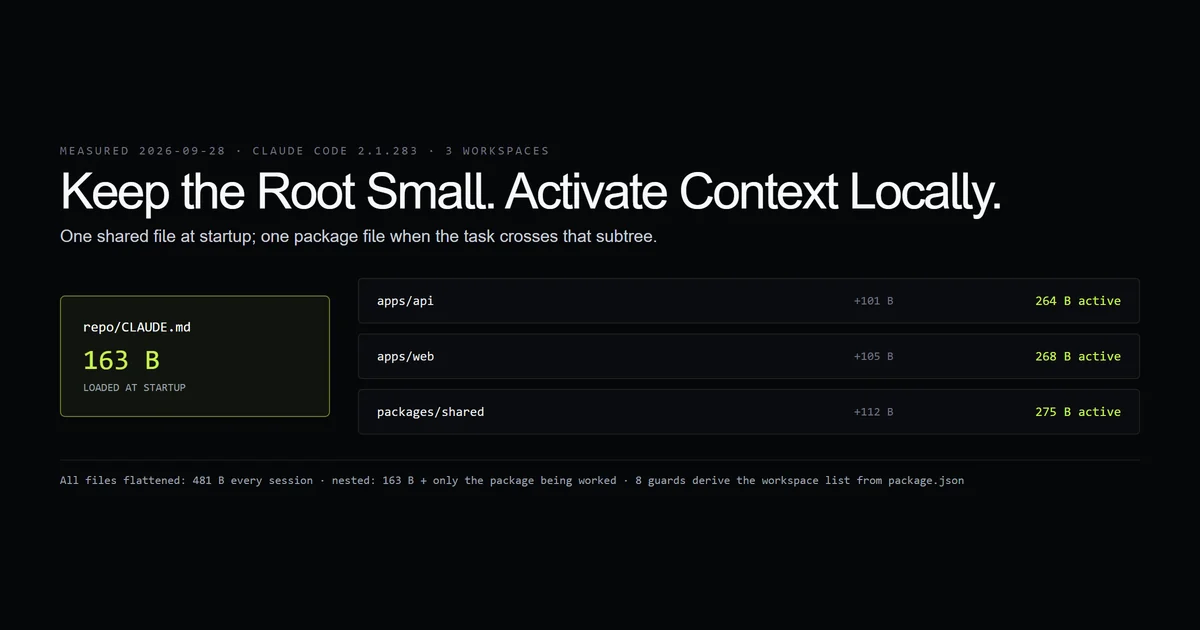
We built a three-workspace npm fixture and a check that computes the instruction surface for each package. The root file is 163 bytes. Flattening all package rules into it would make every session carry 481 bytes; nested files keep startup at 163 bytes and activate only another 101–112 bytes for the package being touched. That is a tiny fixture, so the ratio is the finding, not the byte count.
Key takeaways
- Root
CLAUDE.mdshould contain only rules that are true for every workspace. Package commands and runtimes belong lower in the tree. - The fixture starts with 163 bytes of project instructions, then activates 101–112 bytes for one relevant package instead of loading all 481 bytes together.
- Start at the package for local work and at the root for cross-package work. The working directory is a context decision.
- A workspace check should fail on missing package instructions or undiscovered packages. A monorepo map that silently goes stale is worse than no map.
The short answer
Use a layered instruction tree. The root names the package manager, shared verification sequence, dependency direction, and repository-wide prohibitions. A nested file names only what changes inside that workspace: browser versus Node runtime, its test command, generated directories, and ownership boundaries.
Anthropic's Claude Code memory documentation says files from the working directory upward load at launch, while nested files are discovered when Claude reads within their subtree. That behavior is the useful primitive. The complete Claude Code guide covers the rest of the setup; this page is about arranging it for a large repository.
What Claude Code loads in a monorepo
Claude Code combines instruction files by location. Starting in apps/web makes the repository file and the web file applicable. Starting at the root makes the repository file immediate; package files become relevant as Claude works in those directories.
repo/
├── CLAUDE.md                 # shared commands and architecture
├── apps/
│   ├── web/CLAUDE.md        # browser runtime and web tests
│   └── api/CLAUDE.md        # Node runtime and API tests
└── packages/
    └── shared/CLAUDE.md     # runtime-neutral package rules
The files are additive, not inheritance with a guaranteed override operator. Avoid writing contradictory instructions and hoping the deeper file wins. State the shared rule once, then state only the exception where it applies.
The measured three-workspace fixture
The fixture has two apps and one shared package. Our internal check script discovers workspaces from the root manifest, reads each nested instruction file, and prints the active byte surface.
root CLAUDE.md: 163 bytes (startup)
@fixture/api       apps/api         +101 B nested = 264 B active
@fixture/web       apps/web         +105 B nested = 268 B active
@fixture/shared    packages/shared  +112 B nested = 275 B active
all nested files combined: 481 bytes
8 guards passed.
This does not prove a 64-package monorepo uses fewer model tokens by the same ratio. It proves the repository can encode package rules without making them global, and the checker can detect when the workspace graph and instruction graph diverge.
What belongs in the root CLAUDE.md
The root file should answer four questions Claude would otherwise rediscover on every task:
- 1. Package manager: Which package manager and lockfile are authoritative?
- 2. Verification: Which commands verify the whole repository?
- 3. Dependency direction: Which direction may dependencies flow?
- 4. Generated files: Which files are generated or forbidden to edit?
# Repository rules

- Run checks from the repository root.
- Do not assume every workspace uses the same runtime.
- Change shared packages before their consumers.
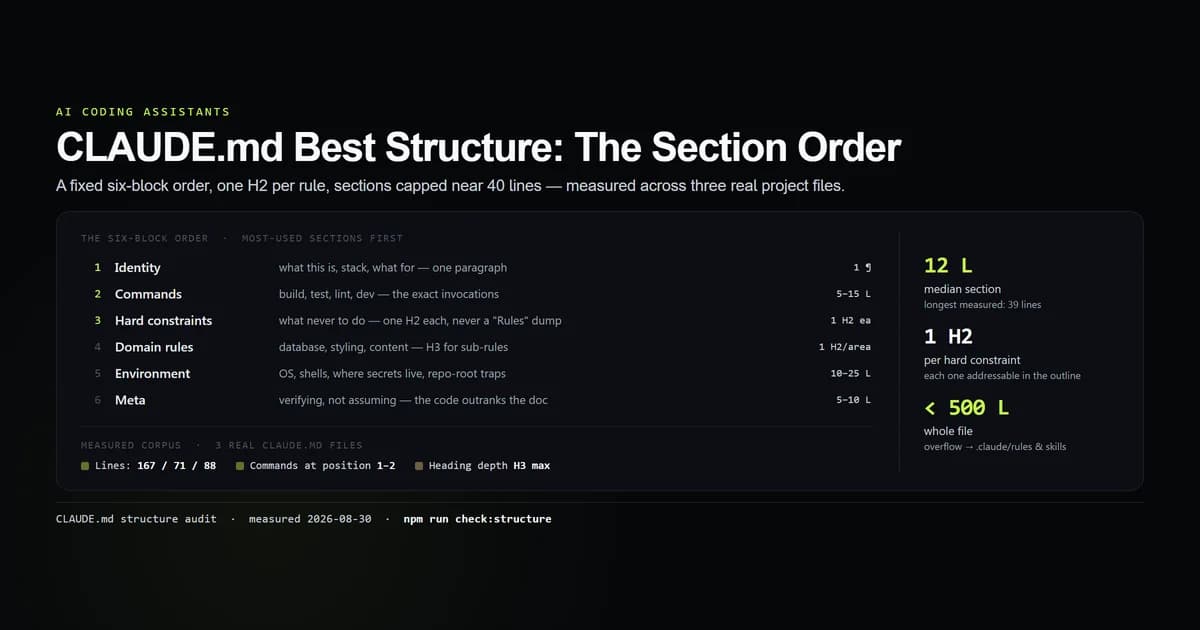
That file is short because architecture diagrams, API catalogues, and package-specific commands are reference material. Put occasional material in a skill or link to a committed document. The measured CLAUDE.md structure guide explains why a short operational file beats a repository encyclopedia.
What belongs in package CLAUDE.md files
A package file should describe differences. The web package in the fixture names its runtime and its exact verification command:
# Web workspace

- This package targets the browser.
- Validate changes with `npm test -w @fixture/web`.
Create a nested file when at least one of these differs: runtime, framework, test command, deployment target, data-access policy, or generated-code boundary. If none differs, do not add the file. Duplication makes a monorepo AI agent reconcile copies that humans will eventually update unevenly.
Start from the smallest useful directory
Start inside apps/web for a web-only fix. Start at the repository root for a change to the workspace manifest, lockfile, shared package, or several consumers. This is not cosmetic: the working directory tells Claude where to begin searching (see the Claude Code CLI reference) and which parent instructions load immediately.
Give the first prompt the same boundaries a reviewer would need:
Fix the failing form test in apps/web. Keep the change inside @fixture/web,
do not edit shared packages, and verify with npm test -w @fixture/web.
If the failure originates outside that workspace, stop and show the dependency.
The last sentence matters. Without it, an agent can turn a local task into a cross-package refactor simply because a broader fix looks cleaner.
Claude Code large repo controls
For a Claude Code large repo, use these controls in order:
- 1. Name the target workspace. This removes ambiguity before exploration starts.
- 2. Paste the failing command output. The TypeScript experiment in Claude Code with TypeScript cut input-side tokens to a third when compiler output replaced file discovery.
- 3. State edit boundaries. Name workspaces that may and may not change.
- 4. Provide one verification command. A root
testcommand that fans out everywhere is expensive when one package test proves the fix. - 5. Audit the workspace map. Re-check which instruction files exist after adding or moving a package.
These reduce accidental breadth. They are not permissions. Use Claude Code's sandbox and allow/deny rules (defined in Claude Code settings) when the boundary must be enforced rather than requested.
Common mistakes
- Putting every package command in the root file. It feels discoverable, but every session pays for irrelevant instructions. Move the command beside its package.
- Copying the same rule into every workspace. The copies drift and may conflict. Keep shared truth at the root.
- Starting every task at the repository root. Local tasks inherit a wider search surface than necessary. Start in the package when the dependency boundary is known.
- Assuming a nested file is a hard boundary. It guides context; it does not prevent edits elsewhere. State the boundary and enforce it with permissions when required.
- Building a checker that trusts a hand-written package list. The first draft of our checker did exactly that, which meant a new workspace could never be reported missing. The shipped version derives the list from
workspacesand then checks every discovered package.
Conclusion
Treat a monorepo as an instruction tree, not one enormous prompt. Keep the root file short and universally true, add nested files only where a package genuinely differs, and launch from the narrowest directory that can contain the change. That gives Claude enough architecture to act without making every package pay for every other package's rules.
Start from the three-workspace layout above, then replace it with your real package graph and make missing local instructions a deliberate choice rather than an accident.
Frequently asked questions
Does Claude Code support monorepos?
Where should CLAUDE.md go in a monorepo?
Should I run Claude Code from the monorepo root?
How do I stop Claude Code reading the whole monorepo?
Can every package have its own CLAUDE.md?

Muhammad Kashif
Founder and editor of Devventa, covering AI coding assistants, Next.js and the modern AI development stack.