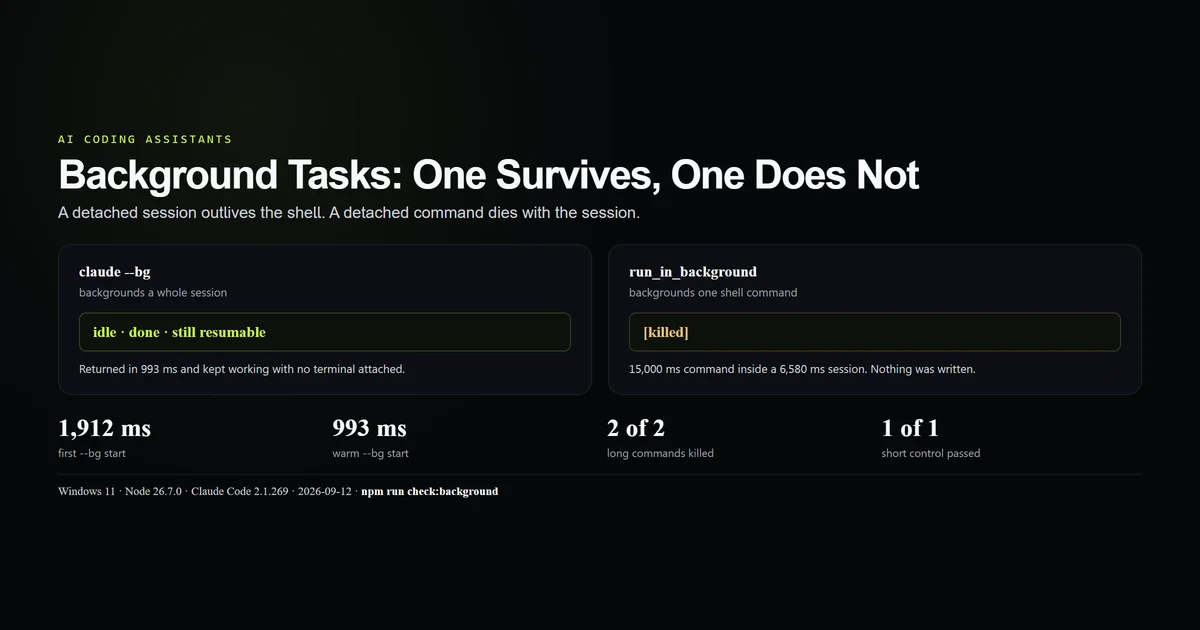
Claude Code has two background mechanisms and they are not variations of one thing. claude --bg detaches the whole agent, which outlives the terminal that started it. The Bash tool's run_in_background detaches one shell command, and that command dies when the session ends: a 15-second job inside a 6.6-second session came back [killed], twice, against a control that passed. This guide separates the two, gives the lifecycle commands for each, and ends with the decision rule. Measured 2026-09-12 on Claude Code 2.1.269, Windows 11, Node 26.7.0.
Key takeaways
claude --bgbackgrounds a session;run_in_backgroundbackgrounds a command. Only the first survives your shell.- A background session returned in 1,912 ms cold and 993 ms once the background service was already running.
- A 15-second command inside a 6.6-second session recorded
[killed]; a 1-second control in a 5.9-second session recordedexited with code 0. - A finished background session reports
idleanddoneand stays resident until you stop it. claude stopremoves a session from the listing but keeps the conversation; we resumed one and it remembered the file it had written.
What Claude Code background tasks are
The phrase covers two unrelated surfaces that happen to share a word. One is a process-level feature of the CLI; the other is a parameter on a tool. The complete guide treats them as separate mechanisms, and running them side by side is the fastest way to see why.
| Surface | Unit | Lifetime | Managed with |
|---|---|---|---|
claude --bg | A whole session | Outlives the launching shell | agents, attach, logs, stop, rm |
run_in_background | One shell command | Dies with the session | BashOutput, KillShell |
Read the table as a question about what you are detaching from. A session detaches from your terminal. A command detaches from the agent's turn, not from the agent.
Backgrounding a whole session
Pass --bg with a prompt and the CLI hands back a short id and four commands:
claude --bg --model sonnet "Read note.txt and write its contents, uppercased, to shout.txt. Then stop."
# → backgrounded · b6382d33
# →   claude agents             list sessions
# →   claude attach b6382d33    open in this terminal
# →   claude logs b6382d33      show recent output
# →   claude stop b6382d33      stop this session
The first invocation printed Starting background service… on stderr and returned in 1,912 ms. The second, with the service warm, returned in 993 ms. Both times the prompt had barely started work; the return is a handoff, not a result.
The session then runs with no terminal attached. Ours wrote shout.txt correctly while the launching shell had already moved on. This is the surface that matters for a long running Claude job — a migration, a corpus-wide edit, an overnight refactor — because nothing about it is tied to the window you started it from.
Backgrounding one command
Inside a session, the Bash tool accepts run_in_background. The agent gets back a task id and a file path instead of output:
Command running in background with ID: bpng2lnp0
Output is being written to: …\<session-id>\tasks\bpng2lnp0.output
That is the whole mechanism. The command is spawned, its output is appended to a file under the session directory, and the agent reads the file later instead of blocking on the process. The session we measured returned its answer in 6,078 ms while the command it started was still running.
This is the right tool for a dev server, a watch process, or a test suite whose output the same conversation will act on — work that belongs to the session and has no reason to outlive it.
The command that did not survive
We asked a print-mode session to start a 15-second command with run_in_background and not wait for it. The session finished first. The output file read:
[killed]
No LONG_DONE, no exit code. To rule out a broken probe we ran three arms:
| Command length | Session duration | Output file | Completed |
|---|---|---|---|
| 15,000 ms | 6,580 ms | [killed] | No |
| 15,000 ms | 6,078 ms | [killed] | No |
| 1,000 ms | 5,860 ms | LONG_DONE then exit code 0 | Yes |
The control completed. The bound is the session's lifetime, not the command's length, and Claude Code kills the child rather than orphaning it. That is defensible behaviour — an abandoned build process is worse than a cancelled one — but it is not what the word background implies, and nothing in the tool result warns you.
Which one to reach for
The decision rule is one question: does the work need to survive this conversation?
- Yes. Use
claude --bgfor overnight jobs, anything you want to close the laptop on, anything you will come back and read. - No. Use
run_in_backgroundfor dev servers, watchers, log tails, and a long test run the same session will interpret. - Neither. Use a foreground tool call. Most work is faster inline, and the measured cost of unnecessary delegation is in the subagents guide.
A background session is a full agent with its own context window, so it is not a cheap way to parallelise a small task. It is a way to stop paying attention.
Reading a background session
The listing command is interactive-only:
claude agents
# → 'claude agents' requires an interactive terminal (stdout is not a TTY) —
# →  use 'claude agents --json' for a machine-readable listing.
claude agents --json is the scriptable form, and it returns more than you asked for. Our listing included the interactive session we were typing in, marked kind: "interactive", alongside the background one. Only background entries carry the short id and a state field, so filter before counting:
claude agents --json | node -e "let s='';process.stdin.on('data',d=>s+=d).on('end',()=>{for(const x of JSON.parse(s))if(x.kind==='background')console.log(x.id,x.status,x.state)})"
# → b6382d33 idle done
Two details are worth internalising. A finished session reports idle and done and is still resident — the process does not exit when the task completes, because a session waits for input by definition. And claude logs replays the terminal buffer, escape sequences and spinner frame included, rather than printing a transcript; for the conversation itself, read the session file described in where Claude Code stores history.
Stopping is reversible. claude stop b6382d33 removed the session from the listing, and a later claude --resume against its full session id answered a question about the file it had written before it was stopped. claude rm is the one that deletes. Anthropic's CLI reference documents the flags; the lifecycle states here are ours.
What did not work
claude agents refused to run at all. Every scripted example in the first draft piped it somewhere, and it exits with a TTY complaint instead. The complaint names its own fix, which is better than most, but it means the obvious listing command is the wrong one for automation.
claude logs was going to be the evidence block. It replays the terminal, so redirecting it to a file produced colour codes, cursor moves and a half-drawn processing spinner. It is a debugging aid for a person, not a log in the tail -f sense.
The kill was almost published as a broken probe. The first 15-second run returned [killed] with no output, which looks exactly like a malformed command. The one-second control is what turned it into a result, and both are committed in the fixture rather than described.
Best practices
- Pick the surface by lifetime, not by duration. A four-hour job that belongs to this conversation is still
run_in_background; a two-minute job you want to walk away from is still--bg. - Filter
claude agents --jsononkind. Your own interactive session is in that array. - Stop sessions you have finished with.
idlemeans resident, and a forgotten agent is a process holding a working directory. - Use
claude rmdeliberately.stopis reversible andrmis not. - Redirect important output to a real file rather than relying on the task file, which is scoped to the session that created it.
- Give background sessions narrow prompts. You are not there to correct them, and correcting one costs a reattach.
Common mistakes
Expecting run_in_background to detach a build. It detaches the turn. The process dies with the session, we measured it twice, and the failure is silent: [killed] in a file nobody reads.
Reading idle as finished and gone. The task is done; the agent is not. It waits for input that will never arrive until you attach or stop it.
Scripting against claude logs. You will be parsing escape sequences. Read the session transcript instead.
Treating --bg as parallelism. Each background session is a full agent with its own window and its own bill. Three of them cost three sessions, not one split three ways.
Forgetting that the first start is slower. The gap between 1,912 ms and 993 ms is the background service warming up. It is not a hang, and re-running the command creates a second session.
Conclusion
Use claude --bg when the work should outlive the terminal and run_in_background when it should not; that single question settles every case. The measurement worth carrying away is the one nothing in the interface tells you — a command started with run_in_background is killed when its session ends, confirmed twice against a control that passed. If you have been using it for anything you intended to walk away from, those jobs have been dying quietly. Move them to a background session and check the output file once.
Frequently asked questions
What are Claude Code background tasks?
Does run_in_background keep running after Claude exits?
How do I run a long running Claude task in the background?
Why does claude agents fail in a script?
Does stopping a background session delete the conversation?
Muhammad Kashif
Founder and editor of Devventa, covering AI coding assistants, Next.js and the modern AI development stack.