An AI coding CI/CD workflow is a normal pipeline with one or more steps that call an AI
coding tool non-interactively — a scripted review, a draft fix, a documentation check —
instead of only running deterministic linters and tests. This guide covers a real GitHub
Actions setup built from this site's own npm run typecheck, npm run lint, and
npm run build scripts, how Claude Code's non-interactive mode fits into that pipeline,
and specifically which steps should stay a suggestion rather than a merge gate. This piece
covers the pipeline layer specifically — for the broader question of
building a Next.js site with AI assistance, including the
guardrails these pipeline checks enforce, start with the cluster guide.
Key takeaways
- Claude Code's non-interactive print mode (
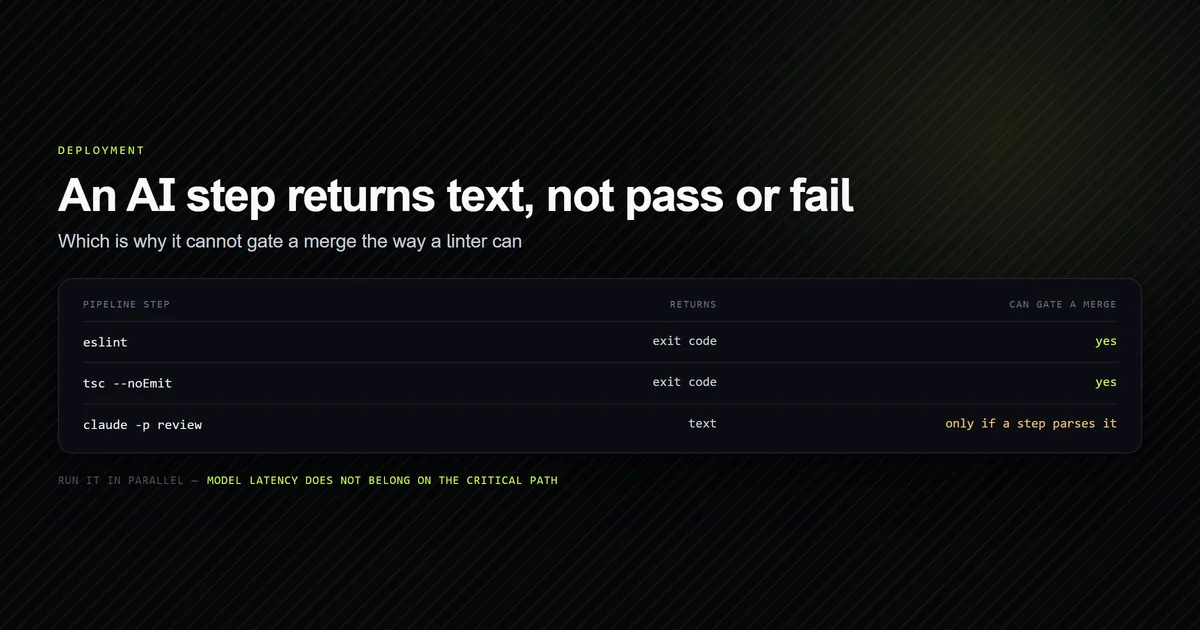
claude -p) is what makes it usable inside a CI job — a single prompt in, a single text response out, no interactive session. - An AI step returns text, not a pass/fail signal — gating a build on it requires a separate step that checks the response for something specific, which a plain linter doesn't need.
- Run AI review steps in parallel with existing checks, not as a blocking prerequisite — model response time is real latency you don't want on your pipeline's critical path.
- Narrow, rule-based checks are safe to gate a merge on; judgment calls belong in a posted comment for a human to weigh, not an automatic failure.
- API keys used in a pipeline need their own scoped credential — never a reused personal development key with broader access than the CI job needs.
What an AI coding CI/CD workflow actually adds
A normal pipeline runs deterministic checks: a type checker either passes or it doesn't, a test either passes or it doesn't. An AI coding CI/CD workflow adds steps that don't reduce to a boolean the same way — a model reading a diff and flagging a style violation, or drafting a fix for a failing test, produces a judgment call phrased as text. That's a genuinely different kind of pipeline step, not a faster linter, and treating it like one — wiring its output straight into a merge gate without checking what it actually returns — is where most automate-deployment-ai setups go wrong on the first attempt.
The steps worth automating are the ones with a narrow, checkable target: does this diff introduce a banned phrase from a style guide, does a new MDX file follow a fixed schema, does a commit message match a required format. Anything requiring broader judgment is better suited to a review comment a human reads than a check that silently blocks a merge.
The best candidates are the failures that produce no error on their own. This site's anchor
validator is one — it exits non-zero on a broken table-of-contents link that next build
reports as perfectly fine, which is exactly the shape of check worth a pipeline step.
The technical SEO guide covers how it works and what else
fails silently.
Running Claude Code non-interactively
Claude Code supports a print mode for exactly this case — claude -p "prompt" sends a
single instruction and returns a single text response, without the back-and-forth of an
interactive terminal session. That's the mechanism that turns Claude Code from something
you drive by hand into something a workflow file can call as a step, the same way it calls
any other CLI tool. See the complete Claude Code guide
for how sessions, CLAUDE.md, and hooks work in the interactive mode this pipeline step
skips entirely.
claude -p "Summarize what changed in this diff and flag anything that touches an admin route."
The output is plain text, which matters for how you wire it into a pipeline: there's no built-in exit code that means "this diff has a problem" the way a failing test has one. Treating the response as a signal to act on — post it as a PR comment, log it as build output, or have a separate step check it for a specific marker string — is a design decision you make around the tool, not something print mode decides for you.
A worked GitHub Actions example
The workflow below runs this site's own checks — the exact commands in package.json that
every article and code change here passes before merge — plus an AI review step in
parallel rather than blocking on it.
name: CI

on:
  pull_request:
    branches: [main]

jobs:
  checks:
    runs-on: ubuntu-latest
    steps:
      - uses: actions/checkout@v4
      - uses: actions/setup-node@v4
        with:
          node-version: 20
      - run: npm ci
      - run: npm run typecheck
      - run: npm run lint
      - run: npm run build

  ai-review:
    runs-on: ubuntu-latest
    steps:
      - uses: actions/checkout@v4
        with:
          fetch-depth: 0
      - run: npm install -g @anthropic-ai/claude-code
      - name: Review diff against style guide
        env:
          ANTHROPIC_API_KEY: ${{ secrets.ANTHROPIC_API_KEY }}
        run: |
          claude -p "Review the changes on this branch against content-rules.md \
          and list any banned phrases or MDX rule violations." > review.txt
      - uses: actions/upload-artifact@v4
        with:
          name: ai-review
          path: review.txt
checks is the deterministic gate — typecheck, lint, build, the same three commands that
guard every change to this repository. ai-review runs alongside it, not after it, and
uploads its output as an artifact rather than failing the job — a human reads it on the PR
rather than the pipeline enforcing whatever it says. Merging to main after both jobs pass
is what triggers the actual deploy on a Vercel-hosted project — see deploying a Next.js
site to Vercel for how that git-integrated step works
once this workflow's checks are green.
An AI code review pipeline step
The narrow version of this — an AI code review pipeline that checks one specific thing well — is the safer default over a broad "review everything" prompt. A prompt scoped to "does this diff violate any rule in our style guide" produces a checkable, specific answer. A prompt scoped to "is this code good" produces prose that's hard to act on programmatically and easy to ignore. Scope the prompt the same way you'd scope a linter rule: one concern per step, not a general-purpose reviewer replacing a human one.
Scope the input deliberately too. A pipeline step sees whatever the runner hands it, and on this repository a third of the modules are complete in their own diff while a tenth are not — so a uniform context budget overspends and underspends in the same run.
A generated test suite is the step most teams reach for next, and it is worth costing before you add it: 8 of the 76 modules here can be tested without a fixture the model invents, and a pipeline that runs 68 tests verifying their own mocks is a green build that means nothing. The prior question is whether anything runs at all without being asked — this repository has 36 checks and zero automated triggers, which is the gap a CI file closes in one commit.
Where automated AI steps should not run unattended
Three categories of pipeline step should stay out of an unattended AI workflow entirely, based on what actually goes wrong when they don't:
Anything that deploys. An AI step drafting a fix is a suggestion; an AI step triggering a production deploy removes the human checkpoint that catches a wrong suggestion before it ships. Keep the deploy trigger on the deterministic checks passing, not on an AI step's output.
Anything touching secrets or infrastructure config. A step that edits environment variables, IAM policy, or DNS records needs a human in the loop every time — the blast radius of a wrong automated edit here is disproportionate to the time saved.
Anything without a clear, checkable target. If you can't state in one sentence what the step is checking for, it's not ready to be a pipeline step yet — it's still a manual review task you're doing with an AI tool's help, which is a different thing than automating it.
Common mistakes
- Gating a merge on free-text AI output with no defined pass condition. Without a specific marker or structured response to check, "the AI didn't like it" isn't a condition a pipeline can act on consistently.
- Putting the AI review step in the critical path. Model response latency added to a blocking prerequisite step slows every PR, even ones the AI step has nothing useful to say about — run it in parallel instead.
- Reusing a personal development API key in CI. A pipeline credential needs its own scope and its own rotation schedule, separate from whatever key you use interactively.
- Automating the deploy trigger itself. Keep the human checkpoint on anything with production blast radius — automate the review, not the release decision.
- Writing one broad "review this code" prompt instead of several narrow ones. A single-purpose check is something you can trust and act on; a general one produces prose that's easy to skim past.
Best practices
- Scope every AI pipeline step to one checkable concern. It keeps the output actionable and the step easy to reason about when it's wrong.
- Run AI steps in parallel with deterministic checks, not before them. Latency from a model call shouldn't sit on your pipeline's critical path.
- Post AI review output as a comment or artifact, not a merge gate, by default. Promote a specific check to a gate only once you trust its false-positive rate.
- Scope pipeline credentials narrowly and store them as secrets. Never commit a key, and never reuse a personal key with broader access than the job needs. The same discipline applies to what the deployed app reads — one token per service, and know which values are frozen at build time.
Conclusion
Start with the deterministic pipeline — type checking, linting, the build — as the actual merge gate, exactly as this site's own CI would if it existed today. Add an AI step alongside it, scoped to one specific, checkable concern, posting output for a human to read rather than blocking on free text. Promote a check to a hard gate only once you trust it, and keep the deploy trigger and anything touching secrets or infrastructure entirely out of unattended automation regardless of how well the review step performs.
Frequently asked questions
Can Claude Code run inside a CI pipeline?
Should an AI code review pipeline block a merge automatically?
What's the difference between automate deployment ai and just adding more CI steps?
Does adding an AI step slow down deployment?
What secrets does a Claude Code CI step need?
Muhammad Kashif
Founder and editor of Devventa, covering AI coding assistants, Next.js and the modern AI development stack.