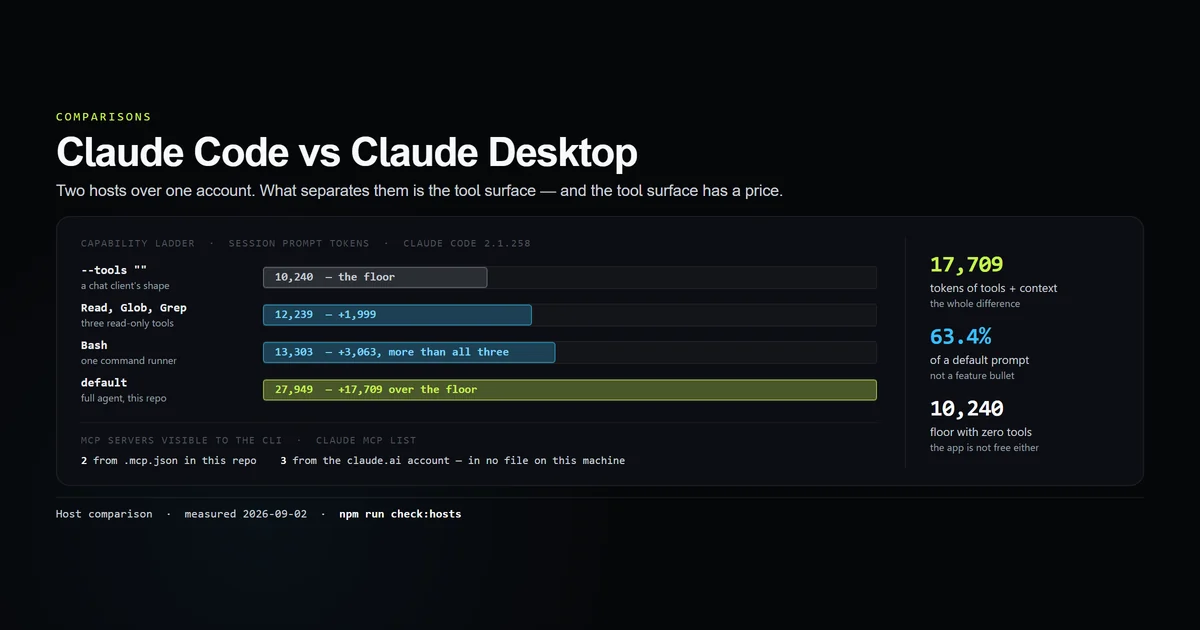
Claude code vs claude desktop reads like a product comparison and is not one. Claude Code is an agent that runs commands and edits files; the desktop app is a chat client for the same models; and the CLI itself also ships inside that desktop app, in the browser, and in IDE extensions. What actually separates the two experiences is the tool surface, and on 2026-09-02 we priced it on one machine: 17,709 tokens, 63.4% of a default Claude Code prompt. Our best AI coding assistant comparison covers the wider field; this is the narrow question of which Claude surface to open.
Key takeaways
- A Claude Code session with no tools at all still costs 10,240 prompt tokens. That is the floor, and it is roughly the shape a chat client runs in.
- Tools plus project context add 17,709 tokens on top of that floor — 63.4% of a default 27,949-token session. That block is the whole difference.
- One
Bashtool costs more than three read-only tools combined: +3,063 tokens against +1,999 forRead,GlobandGreptogether. - The two surfaces share an account layer, not just a login. Three of the five MCP servers our CLI could see came from the claude.ai account, not from any file on the machine.
- Claude Desktop was not installed on our test machine, so nothing here is a side-by-side of outputs. We say what we measured and what we did not.
The short answer
Use Claude Code when the task touches a repository on your disk. Use a chat client when it does not.
That sounds like a truism until you price it. Everything a chat client cannot do — read forty files, run the test suite, read the failure, edit, re-run — lives in a block of tool definitions, and that block is measurable. It is not a small part of the session. It is most of it.
The framing that survives contact with the machine is host, not product. One account, one set of models, one set of connectors; several surfaces over the top, of which exactly one has a shell.
What we could and could not measure
Claude Desktop is not installed on this machine. We checked %APPDATA%/Claude, %LOCALAPPDATA%/AnthropicClaude, %LOCALAPPDATA%/Claude and %LOCALAPPDATA%/Programs, and none of them exist. So there is no side-by-side of two answers to the same prompt in this article, and we are not going to describe one we did not run.
What we did instead is the substitution this site uses whenever a comparison needs a tool we do not have: change the axis to something the machine can actually answer. Claude Code's own flags (documented in the CLI reference) let you strip it down until it has the capabilities of a chat client, and the token counts along that ladder are a direct measurement of what the extra capability weighs.
claude --tools "" -p "Reply with the single word: ok" --output-format json --model haiku
# → 10240 total prompt tokens — a Claude session with no tools at all
Pricing the difference
--tools accepts an explicit list, and "" disables all of them. Walking from there to a default session gives a capability ladder where each rung has a price.
| Session shape | Prompt tokens | Over the floor |
|---|---|---|
--tools "" — no tools | 10,240 | floor |
--tools Read,Glob,Grep | 12,239 | +1,999 |
--tools Bash | 13,303 | +3,063 |
--restricted | 14,711 | +4,471 |
--safe-mode | 21,809 | +11,569 |
| default | 27,949 | +17,709 |
Two things fall out of that table.
The floor is not zero. A Claude Code session with no tools still spends 10,240 tokens before you type anything — system prompt, environment description, the harness's own instructions. Whatever a chat client spends, it is not free either, and "just use the app for simple things" is not a token argument.
The difference between the two hosts is 63.4% of the prompt. 17,709 of 27,949 tokens exist purely to let the model touch this machine and this repository. That is the honest size of the gap: not a feature bullet, a majority of the context budget.
npm run check:hosts
# → --tools ""              10240 tokens       floor
# → --tools Bash            13303 tokens  +  3063
# → (default)               27949 tokens  + 17709
# → All 8 host-comparison guards passed.
One command runner beats three readers
The rung that surprised us is the third one. Read, Glob and Grep together — three tools, the entire read-only surface — cost 1,999 tokens. Bash alone costs 3,063.
A tool's weight is its description, and the descriptions are not the same shape. Reading a file is a narrow contract: a path, a range, some output. Running an arbitrary command is an open one, and most of Bash's cost is the instructions around it — what to use it for, what to use a purpose-built tool for instead, how to quote, what never to run. The dangerous tool is the expensive tool, and that is not a coincidence; the guardrails are the payload.
This is the concrete reason the comparison is not a wash. A chat client with an MCP server bolted on has the connection but not that block of operating guidance, which is a real part of why an agent behaves like an agent. For the connection layer itself, see MCP servers with Claude Code.
Connectors follow the account, not the app
The clearest evidence that these are two hosts rather than two products came from listing MCP servers on the CLI:
claude mcp list
# → claude.ai Gmail: https://gmailmcp.googleapis.com/mcp/v1 - ! Needs authentication
# → claude.ai Google Calendar: https://calendarmcp.googleapis.com/mcp/v1 - ! Needs authentication
# → claude.ai Google Drive: https://drivemcp.googleapis.com/mcp/v1 - ! Needs authentication
# → roadmap: node scripts/mcp/roadmap-server.mjs - ✔ Connected
# → content: node --conditions=react-server scripts/mcp/content-server.mjs - ✔ Connected
Five servers. Two are ours, declared in this repository's .mcp.json. Three carry a claude.ai prefix and are not declared anywhere on this machine — they are account-level connectors, and they appeared in a terminal session because the account has them, not because a config file does. ~/.claude.json is 86,295 bytes across 68 top-level keys and 15 tracked projects, and it has no mcpServers key at all.
That is the shared layer, and it is worth knowing about for two reasons. It means a connector you add on one surface shows up on the other, which is convenient. It also means the blast radius of a connector is every host you use, which is the part worth thinking about before you approve one. Anthropic's MCP documentation covers the scopes; the practical point is that "I only added it to the app" is not a boundary that exists.
Which one to use
- Repository work — Claude Code, without hesitation. Anything that needs many files read, a command run, or a failure interpreted. In a chat client you become the copy-paste layer between the model and your machine, and you are the slow part.
- Reading, drafting, thinking — the app is better. Long-form work with no filesystem in it does not benefit from 17,709 tokens of tools, and the app's interface is built for reading rather than for a scrollback buffer.
- Reviewing code you have not checked out — the app. Paste the diff. There is no repository for the agent to act on, so the tool surface earns nothing.
- Anything you want repeatable — Claude Code. The CLI is scriptable:
-p,--output-format json, exit codes. Every measurement in this article is a shell command, which is not a thing the app could have produced.
The version worth internalising: the app is for thinking about code, the CLI is for changing it. If you want the CLI's judgement about which terminal agent to run in the first place, we compared them in best terminal AI coding agent.
Best practices
- Pick the host by whether there is a working tree. That single question resolves it more reliably than any feature table.
- Measure your own floor once.
claude --tools "" -p "..." --output-format jsontakes ten seconds and tells you what your harness costs before any work happens. - Trim tools, not instructions, when context is tight.
--tools Read,Glob,Grepgets you a genuine read-only agent for 12,239 tokens. Deleting half yourCLAUDE.mdsaves far less and costs you the rules. - Audit account connectors, not just project ones. Three of our five servers were invisible in every file on the machine.
- Use
--restrictedwhen you want the app's safety with the CLI's ergonomics. It removes the command runners and confines the file tools, at 14,711 tokens, governed by Claude Code settings.
Common mistakes
- Treating them as competitors and picking one. They cost the same subscription and they are good at different halves of the work. Most days we use both.
- Bolting MCP onto a chat client and expecting agent behaviour. You get the connection without the operating guidance that makes up most of
Bash's 3,063 tokens, and the difference shows up as the model not knowing when to reach for it. - Assuming an account connector is scoped to the app you added it in. It is not, as the
claude mcp listoutput above shows. - Reaching for the app because the CLI feels heavy. It is heavy — 27,949 tokens heavy — but almost all of that is cached between turns, so the recurring cost is far smaller than the number suggests. See Claude Code context window management.
Conclusion
Stop treating this as a purchase decision. One account, one set of models, one set of connectors, and several hosts over the top — of which exactly one can run your test suite. Open Claude Code when there is a working tree involved and the app when there is not, and if you need the CLI's reach without its capability, --restricted is the middle rung at 14,711 tokens. Next, read the Claude Code guide for what the agent surface actually does with those 17,709 tokens.
Frequently asked questions
What is the difference between Claude Code and Claude Desktop?
Do Claude Code and Claude Desktop share an account?
Can Claude Desktop run terminal commands like Claude Code?
Which Claude should I use for coding?
Is Claude Code available inside the desktop app?

Muhammad Kashif
Founder and editor of Devventa, covering AI coding assistants, Next.js and the modern AI development stack.