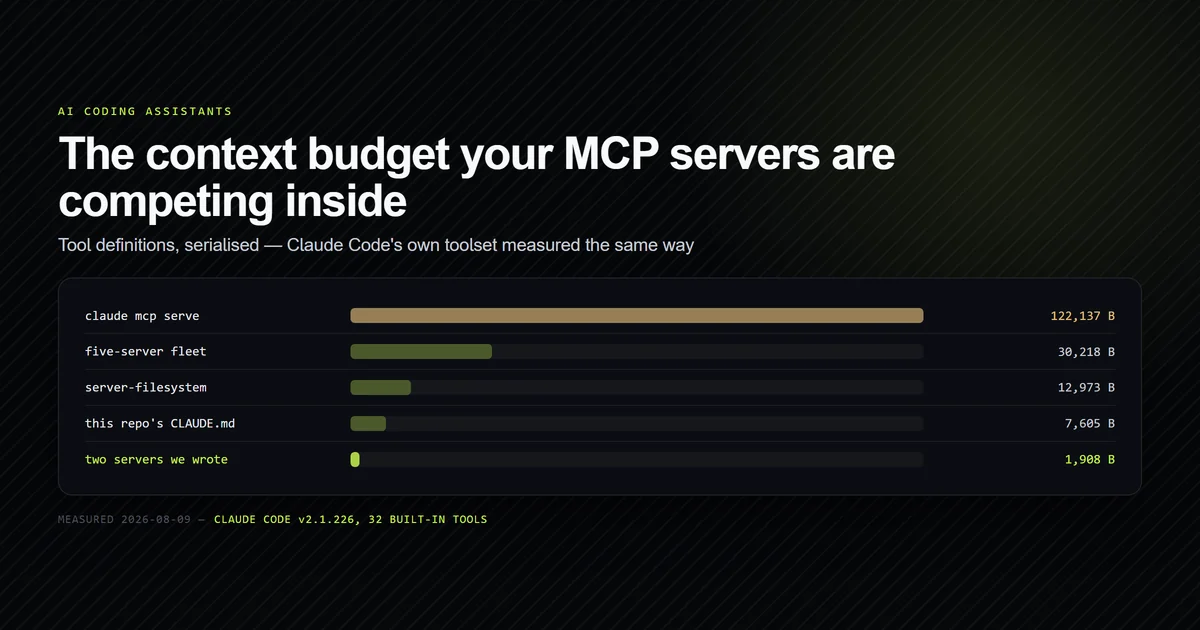
MCP server setup in Claude Code is three commands and one file, and the part that actually decides whether it was worth doing is invisible: every server's tool definitions sit in your context on every request, used or not. The number nobody publishes is what they are competing against — Claude Code's own toolset, served over the same protocol, is 122,137 bytes across 32 tools. This is the complete guide: how to add servers at each scope, the approval gate that looks like a bug, the full command surface, what a fleet costs, and how to write one that earns its place. Measured on Claude Code v2.1.226 and Node v26.7.0 on 2026-08-09.
Key takeaways
- Three scopes hold servers and the narrowest wins —
local, thenproject(.mcp.json), thenuser. Only.mcp.jsonis a file you edit. - A committed
.mcp.jsonnever connects until approved. It reports⏸ Pending approval, which reads exactly like a broken server. - Tool definitions are a standing cost. Five servers measured 30,218 bytes on every request — four times this repository's entire CLAUDE.md.
claude mcp serveexposes Claude Code's own 32 tools for 122,137 bytes, which is the real scale of the budget an added server competes inside.- A purpose-built server beats a general one on its own job by two orders of magnitude — 706 bytes and 98 ms against 12,973 bytes and 2,261 ms.
What Claude Code actually does with an MCP server
It starts a process, speaks newline-delimited JSON-RPC 2.0 to it over stdin and stdout, and asks it two questions: who are you, and what tools do you have. That is the whole handshake. The server's answer to the second one is merged into the model's tool list for the rest of the session.
Three methods carry a tools-only server: initialize, and the two the
tools specification
defines, tools/list and tools/call. The
transport specification
defines two ways to carry them — stdio for local processes and Streamable HTTP for remote ones —
and Claude Code supports both, plus the older SSE form.
Every tool a server exposes is namespaced by the client as mcp__<server>__<tool>. That naming is
not cosmetic: it is what you write in a permission rule, so mcp__filesystem__read_file is a
valid allowlist entry, and it is why two servers can expose a tool with the same name without
colliding.
What matters for everything below is when the tool definitions are sent. Not when you call a tool — on every request, as part of the model's context, for as long as the server is configured. A server you installed in March and used twice is still charging rent in August.
Setting up your first server
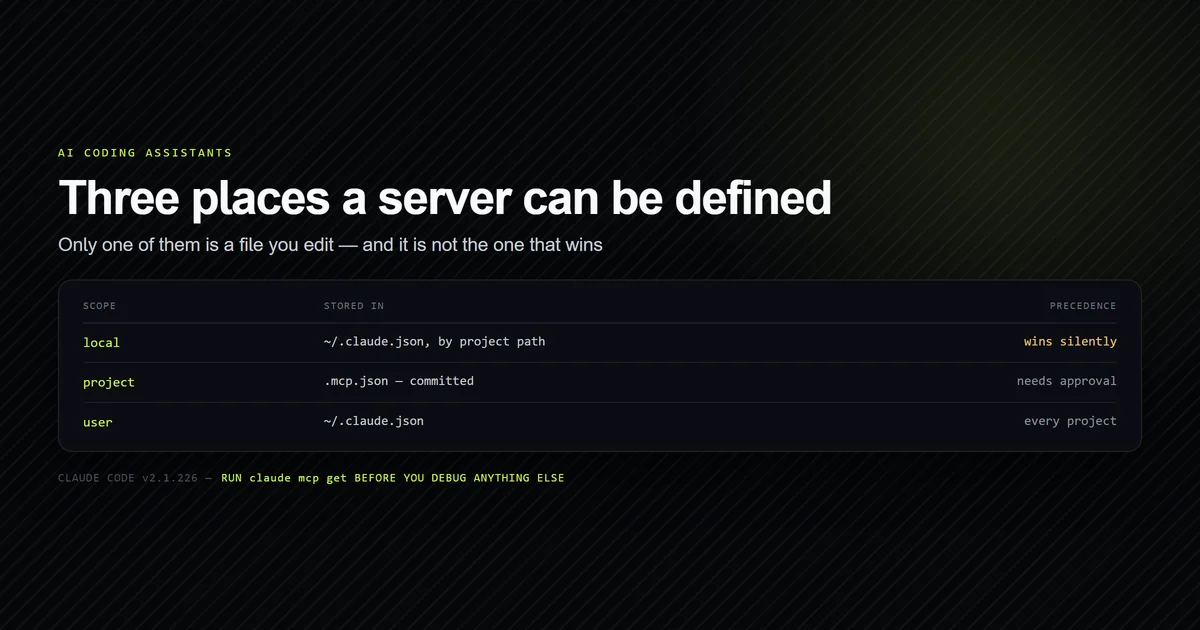
Servers accumulate across three scopes, documented in
Anthropic's MCP page for Claude Code, and the one people
look for does not exist. There is no global mcp.json in your home directory:
| Scope | Stored in | Applies to |
|---|---|---|
local | ~/.claude.json, keyed by project path | You, in one project |
project | .mcp.json in the repository root | Everyone who clones the repo |
user | ~/.claude.json | You, in every project |
local is also the scope claude mcp add uses when you do not name one, which is how a server
ends up in the wrong file on the first try —
what each scope writes, measured shows the file
each one touches and the confirmation line that names it.
Precedence runs narrowest-first: local beats project beats user. Nothing surfaces the
shadowing, so a team's committed server can be silently replaced by a personal one of the same
name.
For a server the whole team should get, write the file and commit it:
{
  "mcpServers": {
    "roadmap": {
      "command": "node",
      "args": ["scripts/mcp/roadmap-server.mjs"],
      "env": {}
    }
  }
}
Relative paths resolve against the project root, not your shell's working directory, which is
what makes that config portable across machines. For a personal server, use the CLI rather than
hand-editing ~/.claude.json — that file also holds your conversation history. Adding the filesystem server from
the official Model Context Protocol servers repository uses add-json:
claude mcp add-json filesystem -s local \
  '{"type":"stdio","command":"npx","args":["-y","@modelcontextprotocol/server-filesystem","."]}'
Secrets never go in the file. ${VAR:-} expands from the environment Claude Code was launched
with, and the default form matters more than it looks: an unset ${VAR} with no default is passed
through to your server as the literal characters rather than failing. Every field, every scope
rule, and that trap in full are in
mcp.json configuration explained.
Adding a server with claude mcp add
The CLI route is one command with a name, the command that launches the server, and — the part worth typing every time — a scope. Measured on Claude Code 2.1.269, Windows 11 and Node 26.7.0 on 2026-09-12:
claude mcp add --scope project probe -- node probe-server.mjs
# → Added stdio MCP server probe with command: node probe-server.mjs to project config
# → File modified: …\.mcp.json
The double dash separates Claude's flags from the server's own; everything after it is handed to
the subprocess, which is how a server that takes --port or --read-only gets them without Claude
intercepting the flag. Environment variables go in with -e KEY=value, and remote servers take
--transport http plus --header instead of a command. Copy an example that omits the double
dash and flags meant for the server get parsed by Claude, so the error names a Claude flag you
never typed.
The confirmation line is the thing to read, because it names the scope and the file it touched.
We ran claude mcp add probe -- node probe-server.mjs with no scope in an empty directory. It
reported to local config, no new file appeared, and the entry landed in ~/.claude.json under
projects[<absolute cwd>]. Move or rename the folder and the server is gone, because the key is the
path. If you ran claude mcp add and nothing appeared in git status, re-run it with
--scope project rather than hand-writing a .mcp.json — otherwise you have the same server in two
scopes with different definitions, and precedence decides which one runs.
What add writes is more explicit than the hand-written form — a 162-byte entry for one server:
{
  "mcpServers": {
    "probe": {
      "type": "stdio",
      "command": "node",
      "args": [
        "probe-server.mjs"
      ],
      "env": {}
    }
  }
}
This site's own .mcp.json declares two servers with command, args and env and no type
at all, and both report ✔ Connected in claude mcp list. The field is the stdio default made
visible, not a requirement; it earns its place with http or sse, where it is what distinguishes
them. Keep commands relative in project scope and absolute in user scope, where the working
directory changes with every project.
Running add again with a different name merges into the existing file. Running it with a name
already in the file is refused:
claude mcp add --scope project probe -- node probe-server.mjs --dup
# → MCP server probe already exists in .mcp.json
The existing entry was unchanged — we diffed it. There is no in-place edit through the CLI: to change a server's command, remove it and add it again, or edit the JSON. That is safer than a silent overwrite, and worth knowing before you script a setup step that assumes it is idempotent.
The approval gate that reads as a failure
A project .mcp.json arrives with the repository and can run any command on your machine, so
Claude Code refuses to start anything in it until you have accepted it once:
claude mcp get roadmap
# → roadmap:
# →   Scope: Project config (shared via .mcp.json)
# →   Status: ⏸ Pending approval (run `claude` to approve)
# →   Type: stdio
Configured, listed, and not running. From the outside this is indistinguishable from a broken server, and it is the single most common "my MCP server does not work" report.
Run claude in the project and accept the prompt. If you rejected it by mistake — easy to do,
since the prompt appears during startup — the recovery is a subcommand most people never find:
claude mcp reset-project-choices
That clears every approval and rejection for the project, so you are asked again next launch.
Pending approval does not block print mode
The gate above governs interactive sessions. On 2026-09-12 we ran a -p session against a project
server that claude mcp get and claude mcp list both reported as ⏸ Pending approval, and it
called the tool successfully. To be certain the model had not guessed the answer, we changed the
server to return the string rk7q-2f91 and ran it again — the session returned rk7q-2f91 in three
turns and 4,132 ms.
That matches the CLI's own note that the workspace trust dialog is skipped in non-interactive mode.
It is convenient in CI, and it is a real security property: a .mcp.json arriving in a pull request
runs without a prompt the moment something invokes Claude non-interactively. We nearly reported the
opposite — two commands said pending, so a first draft said print mode was blocked, and only the
unguessable return value disproved it.
The end-to-end measurement, with the config pinned so nothing else on the machine contributes:
claude -p --strict-mcp-config --mcp-config .mcp.json --allowedTools mcp__probe__ping --output-format json "Call the probe ping tool once and reply with only its output."
# → "result": "pong"
# → "num_turns": 3
# → "duration_ms": 3811
# → "total_cost_usd": 0.1580675
5,997 ms of wall clock from a written config to a returned tool result, 3,811 ms of it inside the
session, three turns, $0.158. The gap between the two timings is process startup and MCP
handshake, paid once per session rather than per call. --strict-mcp-config is also the flag to
reach for while debugging: it ignores every other MCP configuration on the machine, so a server that
works under it and fails without it has a scope or precedence problem rather than a fault of its
own.
The complete command surface
Ten subcommands on v2.1.226, and the useful half is not the half people use:
| Command | What it does |
|---|---|
add | Add a server from a command line or URL |
add-json | Add a server from a JSON string — the precise form |
add-from-claude-desktop | Import from Claude Desktop (Mac and WSL only) |
get | One server: scope, status, transport, command |
list | Every server across every scope, health-checked |
remove | Delete a server — -s scope is required |
login / logout | OAuth credentials for HTTP, SSE and claude.ai connectors |
reset-project-choices | Clear all .mcp.json approvals and rejections |
serve | Run Claude Code itself as an MCP server |
claude mcp get is the one to build a habit around. It is the only place the Scope: line
appears, and scope explains more misbehaviour than configuration errors do. The wider CLI beyond
MCP is catalogued in
the complete Claude Code command reference.
What a server costs before you call it
Here is the measurement that reframes the rest of this guide. claude mcp serve exposes Claude
Code's own tools over the same protocol, so it can be measured with the same harness as any other
server. Driven through initialize and tools/list:
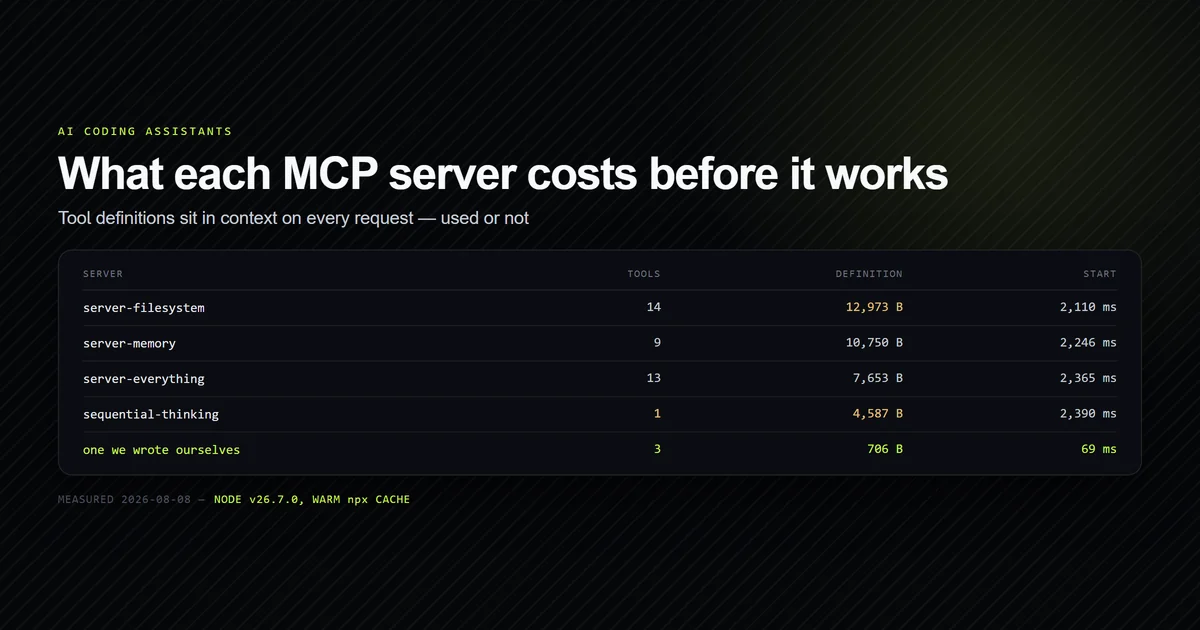
| Server | Tools | Definition bytes | Start |
|---|---|---|---|
claude mcp serve | 32 | 122,137 | 686 ms |
npx server-filesystem | 14 | 12,973 | 2,261 ms |
npx server-memory | 9 | 10,750 | 2,862 ms |
npx server-sequential-thinking | 1 | 4,587 | 2,672 ms |
node content-server.mjs | 3 | 1,202 | 264 ms |
node roadmap-server.mjs | 3 | 706 | 98 ms |
122,137 bytes. Six tools account for more than half of it — Workflow alone serialises to 21,461
bytes, Bash to 11,829, PowerShell to 9,364. For scale, our internal context-weight check puts
this repository's entire always-loaded instruction floor at 7,605 bytes.
Two conclusions follow, and they point in opposite directions. The built-in toolset is enormous, so a 706-byte server is genuinely marginal against it — the fear that one small server will wreck your context is misplaced. But the built-in tools are also already there, which means every general-purpose server you add is spending context to duplicate capability you have, at a cost that is real precisely because the baseline is already so high. The same reasoning that governs trimming a bloated CLAUDE.md applies with a larger multiplier here.
Choosing what to install
The useful question is not what a server can do. It is what fraction of its tools you will call often enough to justify carrying all of them.
That test disqualifies most of the recommendation lists. server-sequential-thinking spends
4,587 bytes describing a single tool. server-memory costs 10,750 bytes and is worth it only if
you genuinely want notes that persist across sessions. server-filesystem costs 12,973 bytes for
fourteen tools that mostly restate what the built-in Read, Write, Glob and Grep tools
already do — it earns its place when you need scoped access outside the project root, and not
otherwise.
Two things are worth checking before you install anything:
- Does the package exist?
@modelcontextprotocol/server-gitandserver-fetchappear in most recommendation lists and are not on npm, which thenpxinvocation hides until it fails. - Is a built-in tool already doing this? Filesystem access, web fetch and search are all built in. A server that wraps them costs context to add nothing.
The full ranking, with what each server actually exposes, is in the best MCP servers for developers.
Running more than one
Startup is not the constraint people expect it to be. A five-server fleet reached a full tool list in 2,867 ms concurrently against 7,354 ms serially — the client starts them in parallel, so you pay the slowest server rather than the sum:
npm run check:mcp-weight
# → Standing context cost: 30218 bytes of tool definitions on every request.
# → Startup: 2867 ms concurrently, 7354 ms serially (2.6x).
So add servers freely on startup grounds and carefully on context grounds. Three other behaviours only appear once you have more than one, all confirmed rather than assumed: a broken server fails alone while the rest stay connected, two servers may expose the same tool name with no warning from the CLI, and the same server name in two scopes means the narrower one silently wins. Multiple MCP servers in one client covers each with its measurement.
What approving a server actually grants
The approval prompt is the security boundary, and it is worth understanding what you are agreeing to, because the answer is broader than "this server can read files" — and broader than the host you approved it in. Listing servers on our CLI returned five, and three of them were account-level connectors declared in no file on the machine, which is one reason Claude Code and Claude Desktop are better understood as two hosts over one account than as two products.
A stdio entry in .mcp.json is a command line that Claude Code executes on your machine with
your user's permissions and your environment. "command": "npx" means the server is downloaded
from the registry at launch and run — the package resolved on the first run of the day is not
necessarily the package resolved last week. Approving a project server is closer to running
npm install && npm start on a stranger's repository than to granting an app a scope.
Three consequences follow, and only the first is obvious:
- A pull request can add a server.
.mcp.jsonis a tracked file like any other. The approval prompt fires once per project, so a server added in a branch you merged is a server you may approve without connecting it to the diff that introduced it. Review.mcp.jsonchanges the way you review a CI workflow file. envvalues are expanded from the environment Claude Code was launched with, not from a sandbox."${GITHUB_TOKEN:-}"in a committed config resolves against whatever your shell had exported. That is the mechanism that makes a shared config safe — the secret never enters the repository — and also the mechanism that hands a server a real credential (see our MCP servers GitHub integration guide for personal access token scope auditing and the 4,820-token context footprint).- Tool permissions are separate from server approval. Approving the server lets it start;
which of its tools may run without asking is governed by permission rules on
mcp__<server>__<tool>, somcp__filesystem__read_filecan be allowlisted whilemcp__filesystem__write_filestill prompts. Approving a server does not pre-approve its tools.
For the version of this question that involves a team, an approvals process and vendor data handling rather than one developer's machine, AI coding tools for teams covers the controls and the gaps each vendor documents.
Remote servers and the OAuth lifecycle
Everything so far assumed a local process. A remote server replaces command and args with a
url, and carries credentials in headers or through OAuth:
{
  "mcpServers": {
    "sentry": {
      "type": "http",
      "url": "https://mcp.sentry.dev/mcp",
      "headers": { "Authorization": "Bearer ${SENTRY_TOKEN:-}" }
    }
  }
}
Two practical differences are worth planning around.
Remote failures name themselves. Where a stdio server reports Connection closed for every
possible cause, a remote one reports the actual problem — a host that does not resolve comes back
as ENOTFOUND: getaddrinfo ENOTFOUND example.invalid, naming the host. When a server exists in
both forms and you are debugging rather than optimising, the remote one is easier to diagnose.
A server needing OAuth is not configured with a token at all. It is authenticated with
claude mcp login <name>, and the credentials are cleared with claude mcp logout <name>. Until
that runs the server reports a state of its own:
claude mcp list
# → claude.ai Gmail: https://gmailmcp.googleapis.com/mcp/v1 - ! Needs authentication
! Needs authentication is the third state that is not a failure, alongside ⏸ Pending approval
and a shadowed duplicate. Three of the four states claude mcp list can report are things other
than a broken server, which is most of why the "my MCP server is not working" report is usually
about something else.
Writing your own server
This is the part most setup guides skip, and it is where the ratio turns. A tools-only stdio server needs no SDK and no dependencies — three methods over newline-delimited JSON:
if (method === "initialize") {
  send({ jsonrpc: "2.0", id, result: {
    protocolVersion: params?.protocolVersion ?? "2025-06-18",
    capabilities: { tools: {} },
    serverInfo: { name: "devventa-roadmap", version: "1.0.0" },
  }});
}

if (method === "tools/list") send({ jsonrpc: "2.0", id, result: { tools: TOOLS } });

if (method === "tools/call") send({ jsonrpc: "2.0", id, result: {
  content: [{ type: "text", text: callTool(params?.name) }],
}});
One hard rule governs the whole file: stdout carries framed JSON-RPC and nothing else. A
stray console.log is not a log line, it is a corrupt frame. Diagnostics go to stderr, which the
client collects and shows in /mcp.
Expose answers, not capabilities. The two servers in this repository answer questions the built-in
tools cannot: which planned article is next without reading a 194 KB planning document, and whether
a given internal link resolves to a published route — a question that matters here because
dynamicParams = false turns a link to an unwritten article into a live 404. Six tools, 1,908
bytes between them.
If your project is a Next.js app, the server can import the app's own data layer directly rather than reimplementing it, with one non-obvious flag — that is the Next.js MCP server setup in full.
When a server will not connect
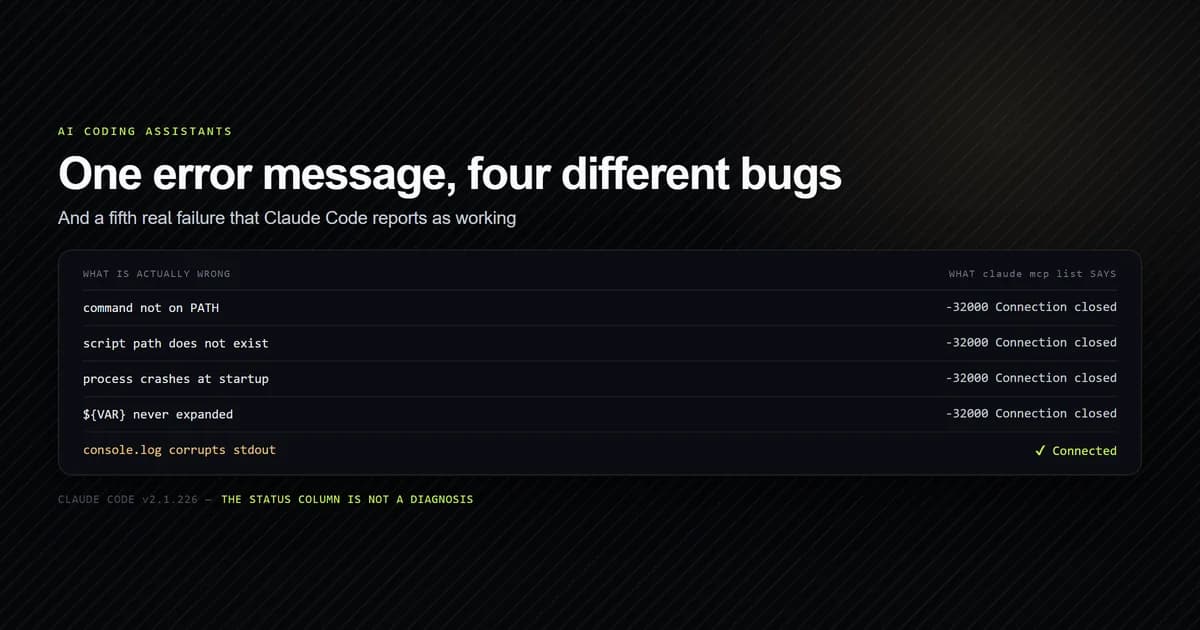
Every stdio failure produces the same message, regardless of cause:
claude mcp list
# → broken: node scripts/mcp/_does-not-exist.mjs - ✘ Failed to connect — -32000: Connection closed
Missing file, wrong flag, crash on startup, corrupt first line on stdout — one string for all four, and it never names the file. Worse, the health check also passes a server whose stdout is corrupted, because the client skips the unparseable line and finds the real frame behind it.
The order that resolves it fastest: check claude mcp get NAME for Scope: and Status: first
(pending approval and shadowing are not failures), confirm the command resolves on PATH, confirm
every path in args exists, then check that the first thing the process writes to stdout is a
JSON-RPC frame. We automate exactly those four with an internal check script, because the CLI
reports none of them. The full failure taxonomy is in
MCP server not working.
Best practices
- Always pass
--scopeexplicitly toclaude mcp add. Thelocaldefault is right roughly never in a shared repository. - Review
.mcp.jsonin pull requests. It is executable configuration, and in non-interactive mode it runs unprompted. - Commit repository servers, keep personal ones local.
.mcp.jsonwith relative paths gives every clone the same tools; local scope keeps your experiments out of their sessions. - Write
${VAR:-}rather than${VAR}. An empty string produces an honest 401. The literal placeholder produces a mystery. - Run
claude mcp getbefore debugging anything. Scope and status answer most questions before you open a file. - Name tools for the question they answer.
check_linkcollides with nothing;searchcollides with everything. - Re-measure after each addition. The context bill is additive and appears in no UI.
- Prefer
node path/to/server.mjsovernpxfor anything already in your repository. It is about two seconds of session startup and a network round trip to run code that is already on disk.
Common mistakes
- Reading
⏸ Pending approvalas a broken server. It is an unapproved one. Runclaudein the project — and do not read it as blocked in a script, where print mode calls the tool anyway. - Assuming
claude mcp addwrote to the repository. Checkgit statusimmediately after. A local-scope server works perfectly for you and does not exist for anyone else. - Editing
~/.claude.jsonby hand. It holds conversation history alongside configuration, and a syntax error there costs far more than one server. - Installing by capability rather than by use. Fourteen tools you might need cost the same as fourteen you do.
- Assuming a listed server is running. Status is a column, not the presence of a row.
- Reusing a server name across scopes. The narrower one wins silently.
- Writing
argsas a single joined string. It is an array; a joined string arrives as one argument and the server usually starts, then behaves incomprehensibly. - Committing a token in
env. It is in the repository's history from the first commit.
Conclusion
Start with one server, put it in .mcp.json with a relative path, approve it, and confirm with
claude mcp get rather than assuming. Add more freely — they start concurrently — but treat tool
definitions as the budget, because 30,218 bytes for five servers is real and invisible. Write your
own for anything specific to your repository: three JSON-RPC methods, no SDK, and it will beat
every general-purpose server on that job by two orders of magnitude. If you are setting up Claude
Code itself rather than its MCP layer,
the complete Claude Code guide is the place to start.
Frequently asked questions
How do I set up an MCP server in Claude Code?
Where does Claude Code store MCP configuration?
How much context does an MCP server use?
Why does claude mcp list show my server as pending approval?
Why did claude mcp add not create a .mcp.json file?
Do I need the MCP SDK to write a server?

Muhammad Kashif
Founder and editor of Devventa, covering AI coding assistants, Next.js and the modern AI development stack.