A CLAUDE.md setup is one markdown file at your project root, committed to git, holding
the facts Claude Code cannot infer from your code: build commands, conventions, and the
traps specific to your repo. Run /init to generate a starting file, then cut it down —
Anthropic's documented target is under 200 lines, because longer files consume more
context and reduce adherence.
This guide covers where the file goes, how it loads, the structure we run on this site's repository, and what to do when it outgrows the ceiling. Every example is from the CLAUDE.md in production here — 135 lines, ten sections — including the two instructions in it that went stale and had to be pulled.
Key takeaways
- CLAUDE.md is delivered as a user message after the system prompt, not as part of it. It is context, not enforced configuration, which is why adherence is probabilistic rather than absolute.
- Anthropic's documented size target is under 200 lines per file. There is no hard cap, but longer files reduce adherence.
@pathimports organize a large instruction set but do not reduce context cost — imported files still load in full at launch..claude/rules/with apaths:frontmatter field is the only mechanism that keeps instructions out of context until they are relevant.- An instruction that must run every time belongs in a hook, not in CLAUDE.md.
What CLAUDE.md actually does
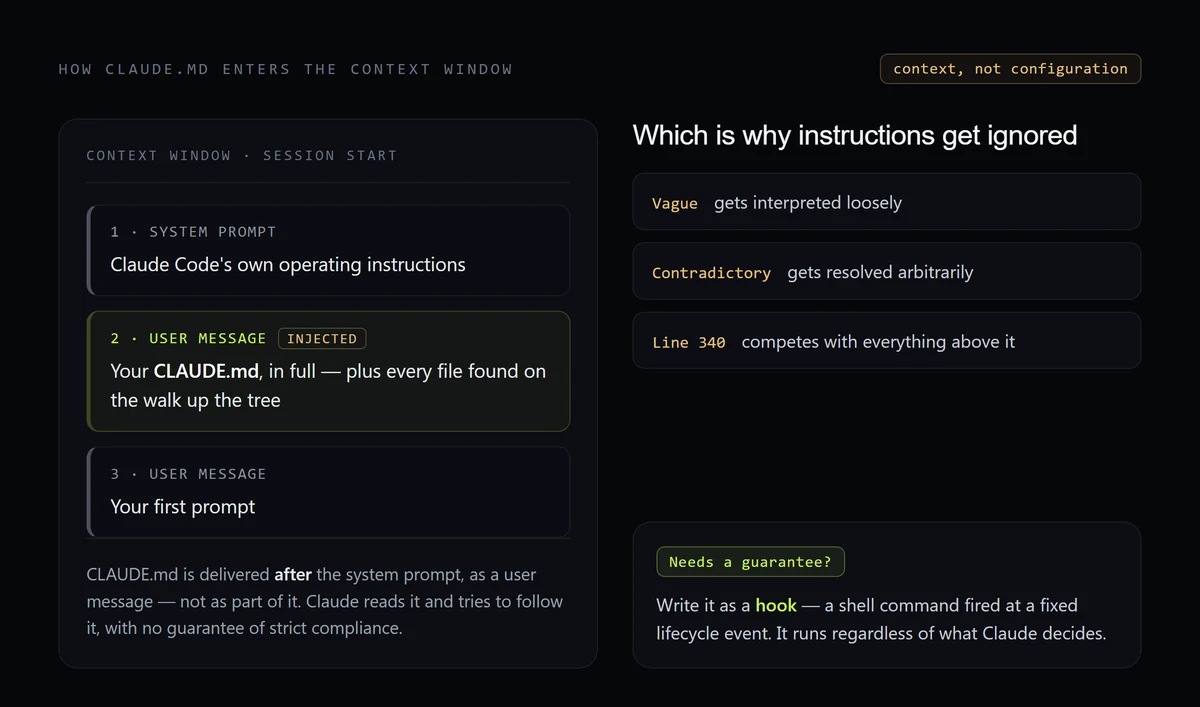
Claude Code reads CLAUDE.md at the start of every session and loads its contents into the context window. The detail that explains almost every complaint about the file comes from Anthropic's memory documentation: that content is delivered as a user message after the system prompt, not as part of the system prompt itself.
That single fact reframes the whole file. Claude reads your instructions and tries to follow them, but there is no guarantee of strict compliance — the docs say so directly. Vague instructions get interpreted loosely. Contradictory instructions get resolved arbitrarily. A rule buried on line 340 of a bloated file competes with everything above it.
So the question to ask about every line is not "is this rule correct?" but "is this rule specific enough to act on, and is it worth the context it costs?"
Where the file goes
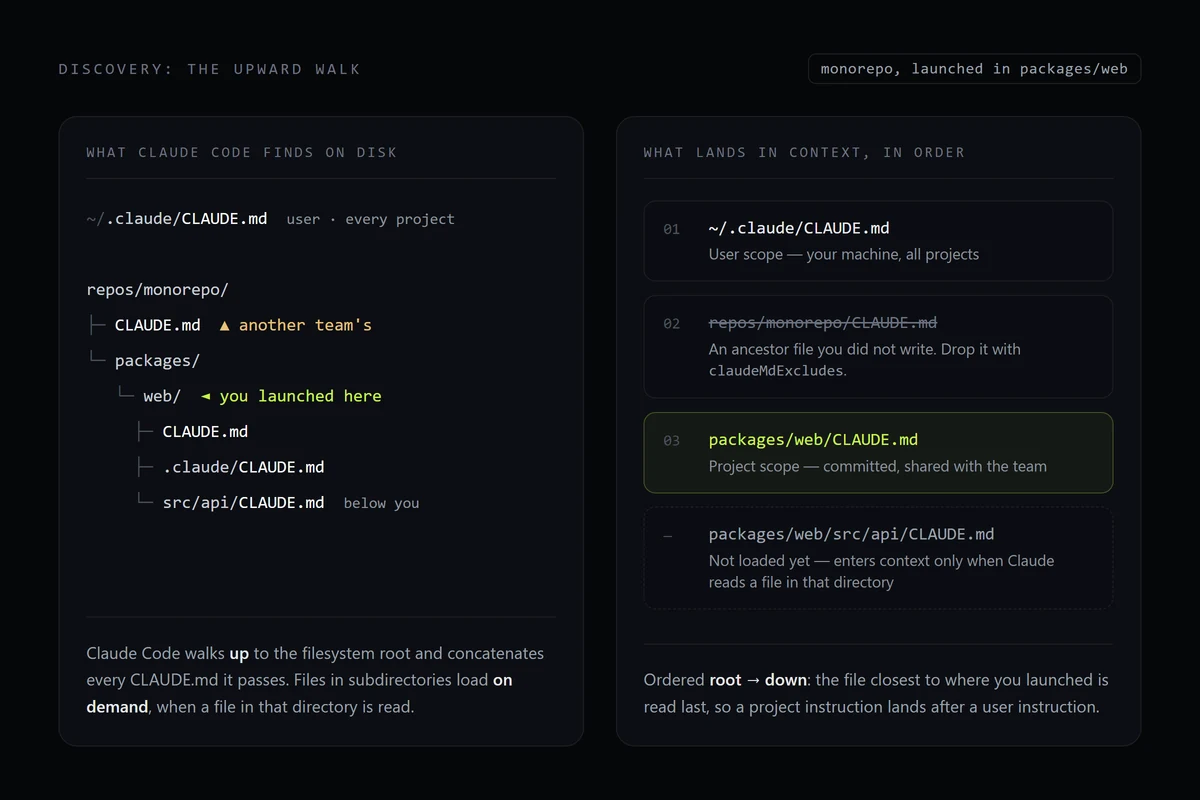
CLAUDE.md files load from several locations, ordered from broadest scope to most specific, so a project instruction lands in context after a user instruction.
| Scope | Location | Commit it? |
|---|---|---|
| Managed policy | OS-specific system path | Deployed by IT, not by you |
| User | ~/.claude/CLAUDE.md | No — personal, all projects |
| Project | ./CLAUDE.md or ./.claude/CLAUDE.md | Yes — shared with the team |
| Local | ./CLAUDE.local.md | No — add it to .gitignore |
Both project locations are read, so pick one and be consistent. Claude Code walks up the directory tree from your working directory and concatenates everything it finds, ordered from the filesystem root down — instructions closer to where you launched are read last. Files in subdirectories below you load on demand, when Claude reads a file in that directory.
That upward walk is what surprises people in monorepos: another team's CLAUDE.md three
levels up is in your context. The claudeMdExcludes setting skips specific files by path
or glob, and belongs in .claude/settings.local.json so the exclusion stays on your
machine.
A CLAUDE.md setup that survives real work
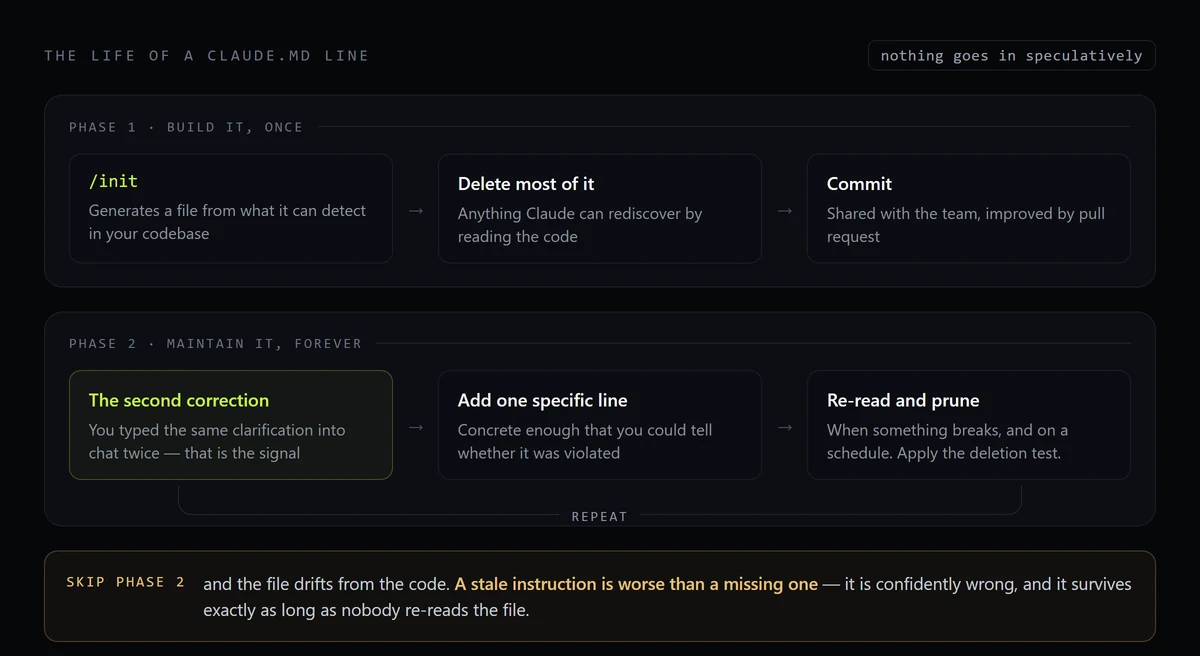
Start with /init, which reads your codebase and generates a file with the build
commands, test setup, and conventions it can detect. Then delete most of it. The generated
file describes things Claude can rediscover by reading the code; what you keep should be
what it cannot — and that split is measurable. Run against this repository with the hand-written file removed, /init recovered 11 of its 28 rules and none of the nine that exist because something broke once.
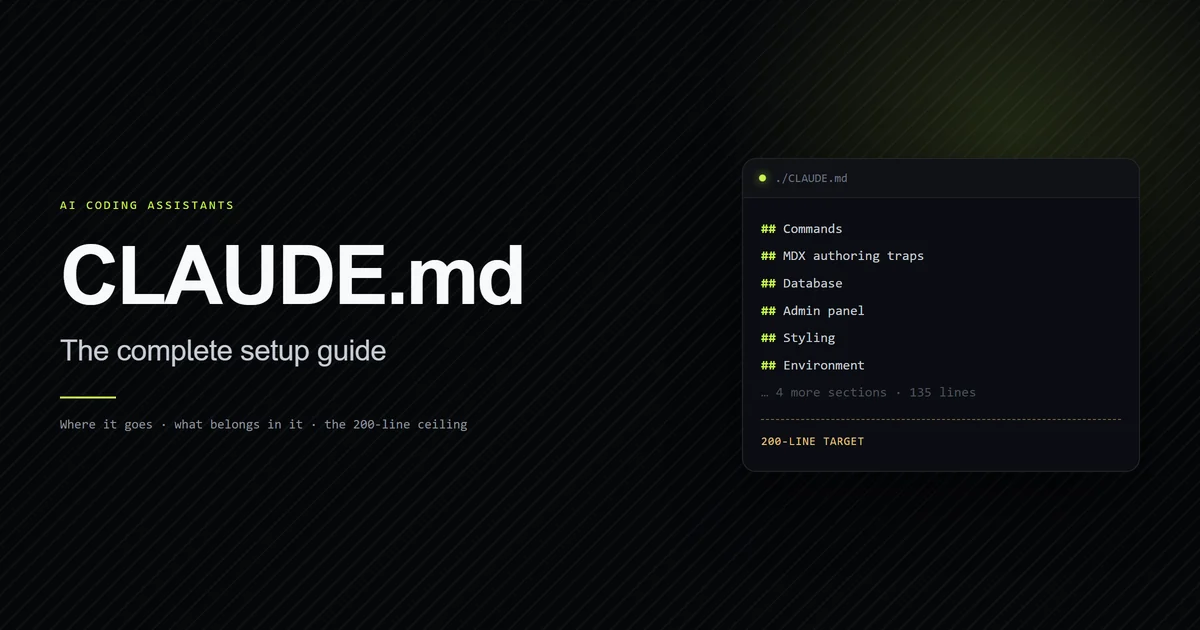
Here is the section list of the CLAUDE.md running this site, in order:
## Commands                                    ← build, typecheck, lint, dev
## Never build while the dev server is running ← the most expensive trap first
## MDX authoring traps                         ← six silent-failure rules
## Database                                    ← the one module allowed to talk to D1
## Admin panel                                 ← where the security boundary actually is
## Public site is not to be modified casually  ← what's frozen and why
## Styling                                     ← design tokens, no UI libraries
## Content workflow                            ← the editorial pipeline
## Environment                                 ← Windows, two shells, secrets
## Verifying, not assuming                     ← the code outranks the docs
The ordering is deliberate: the two sections most likely to cost an hour sit at the top, where they compete with the least. Every heading is a category of mistake we actually made, not a category of information that exists. The general form of that sequence — identity, commands, hard constraints, domain rules, environment, meta — is laid out in CLAUDE.md best structure.
What earns a place, and what does not:
| Include | Exclude |
|---|---|
| Commands that can't be guessed | Anything readable from the code |
| Style rules that differ from defaults | Standard language conventions |
| Non-obvious behaviour and gotchas | File-by-file descriptions |
| Architectural decisions and their why | Long tutorials or API docs |
| Environment quirks and required vars | Facts that change frequently |
Writing instructions Claude follows
Write instructions concrete enough to verify. The difference is not stylistic — a verifiable instruction gives Claude a check it can run against its own output, and a vague one gives it nothing.
| Vague | Verifiable |
|---|---|
| "Format code properly" | "Use 2-space indentation" |
| "Test your changes" | "Run npm test before committing" |
| "Keep files organized" | "API handlers live in src/api/handlers/" |
Three more rules earn their keep:
- Structure it. Markdown headers and bullets group related instructions. Claude scans structure the way a reader does — organized sections beat dense paragraphs.
- Remove contradictions. If two rules conflict, Claude may pick one arbitrarily.
Review nested CLAUDE.md files and
.claude/rules/periodically for guidance that has drifted apart. - Apply the deletion test. For every line ask: would removing this cause Claude to make a mistake? If not, cut it. Bloat is not neutral — it is what makes your real rules get lost.
The 200-line ceiling
Target under 200 lines per file. CLAUDE.md files load in full at any length, so nothing breaks when you cross it — the certain cost is tokens, because every line loads every session. For measured benchmarks on attention dilution and why there is no hard boundary, see our breakdown of the CLAUDE.md character limit and 150k myth. That cost is measurable rather than theoretical: measuring the context floor a project pays before you type puts this site's 135-line file at 91% of everything loaded at startup. Anthropic also states that longer files reduce adherence; a 2026 factorial study looked for that effect directly and did not detect it, which is covered alongside the mistakes that actually slow Claude Code down.
The instinct at that point is to split the file into @path imports. That organizes the
content, but it does not help — imported files are expanded and loaded into context at
launch alongside the file that references them, up to a maximum depth of four hops. The
context cost is identical. That expansion is also the only route a vendor-neutral
AGENTS.md has into a session — we measured what reaches context with and without
it — so one import line is worth spending
even when the rest are not.
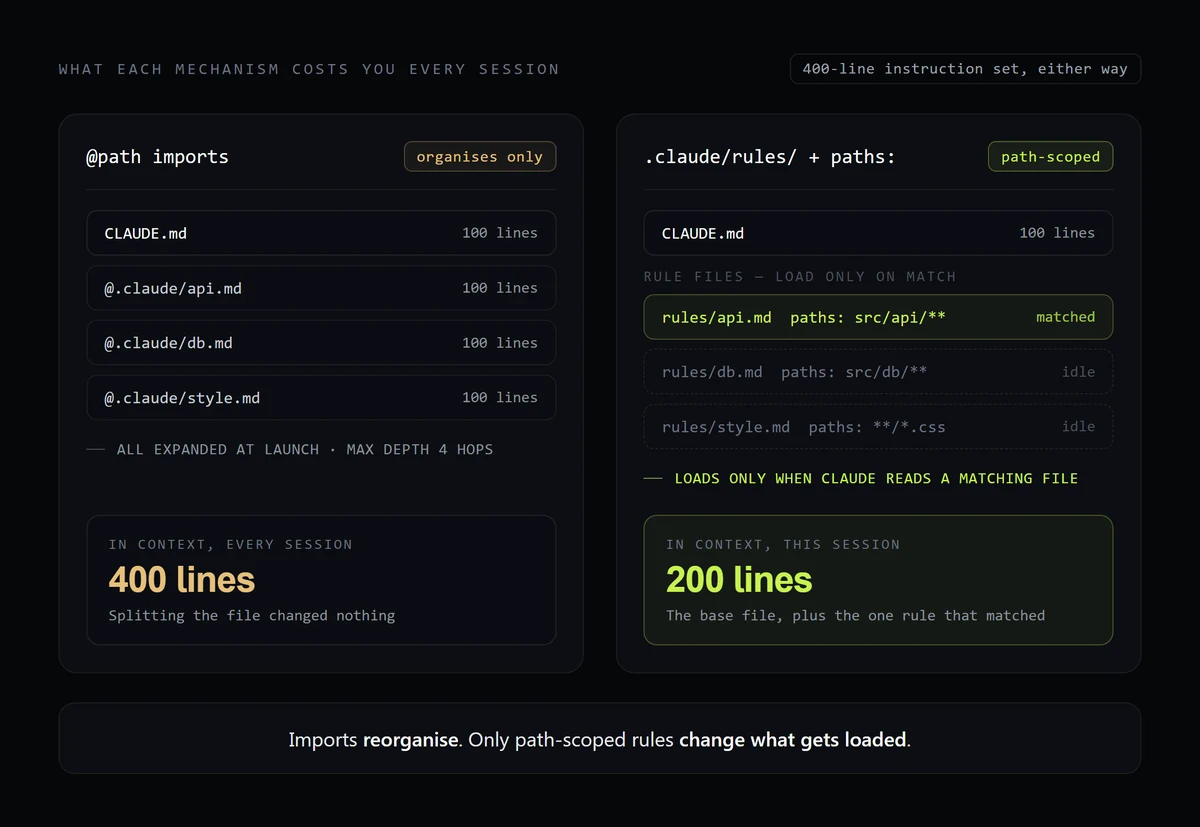
What actually reduces the cost is .claude/rules/. A rule file with a paths field in
its frontmatter loads only when Claude reads a matching file:
---
paths:
  - "src/api/**/*.ts"
---

# API rules

- Every endpoint validates its input before touching the database.
- Errors use the standard response shape in `src/api/errors.ts`.
Rules without a paths field load unconditionally, at the same priority as
.claude/CLAUDE.md. Two more levers: /doctor proposes trims for a checked-in CLAUDE.md,
cutting content Claude can derive from the codebase while keeping pitfalls and rationale
(v2.1.206 or later), and claudeMdExcludes drops ancestor files you don't want.
We haven't needed .claude/rules/ on this repo yet — at 135 lines the whole file is
cheaper than the machinery to split it. That calculus changes around the ceiling.
A CLAUDE.md example you can copy
Most CLAUDE.md examples are templates with placeholder headings. This is a real entry from ours, reproduced exactly, and it is shaped the way it is for a reason:
## Never build while the dev server is running

`next dev` and `next build` share `.next`. Running a build against a live dev
server rewrites its chunk manifest and **every route starts returning 500 —
public pages included**. It looks exactly like an application bug and wastes an
hour of debugging the wrong thing.

Before `npm run build`: confirm no dev server is running, or ask. If a build
already corrupted one, the fix is stop the server, `rm -rf .next`, restart.
Four things are doing work there. It names the symptom an agent will actually observe (500s on every route), not the cause. It states the mechanism in one sentence, so the rule is understood rather than memorized. It gives an action before the risky command. And it supplies the recovery, because the failure is discovered after the fact more often than before it.
That entry exists because we lost an hour to it. Every section in the file has a story like that behind it, which is the honest test of whether a line belongs: nothing goes in speculatively.
Common mistakes
- Documenting what the code already says. Directory layouts, dependency lists, and
architecture overviews are the first things
/initwrites and the first things to cut. Claude can read those. Spend the context on what it can't infer. - Writing rules you can't check. "Follow best practices" cannot fail a review, so it cannot change behaviour. If you can't describe what violating the rule looks like, rewrite it.
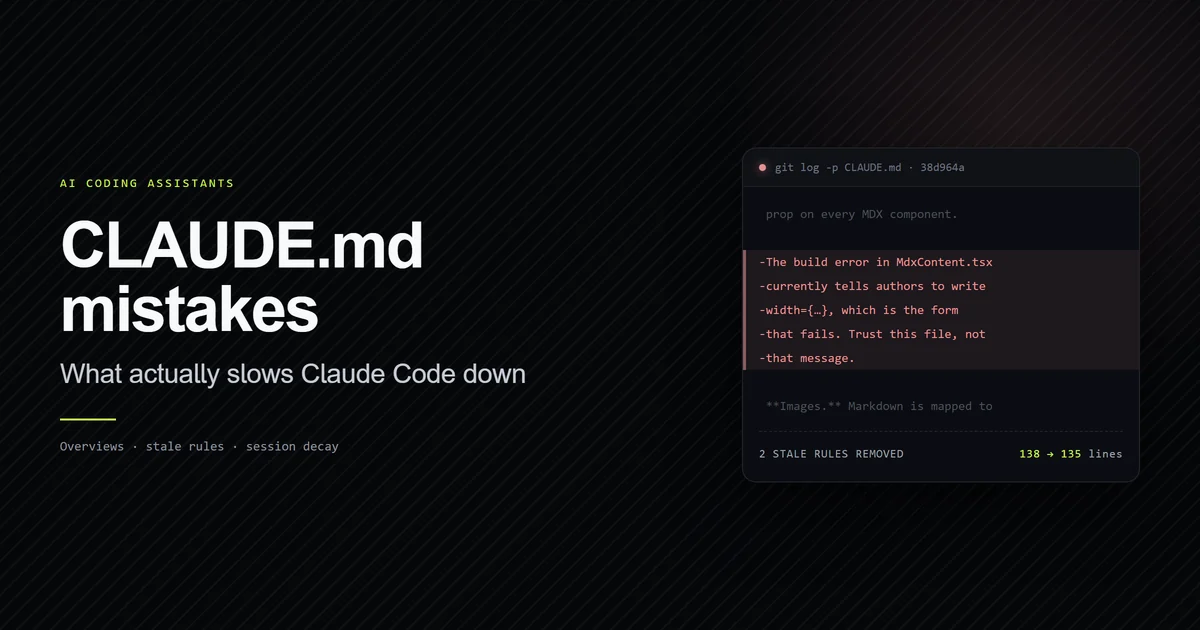
- Trusting the file after the code changes. This is the one we got wrong. Our CLAUDE.md
carried a warning that a build error in
components/article/MdxContent.tsxtold authors to use the wrong attribute syntax, and to trust the file over the message. The component was fixed weeks earlier; the warning stayed, teaching contributors to distrust a message that had become correct. A second entry pointed at a documentation example that had since been fixed. Both were removed on 2026-07-24. A stale instruction is worse than a missing one — it is confidently wrong, and it survives exactly as long as nobody re-reads the file. - Reaching for imports to fix size. Covered above: imports reorganize, they don't
reduce. Reach for
.claude/rules/instead. - Encoding must-happen rules as prose. Anything that has to run at a fixed point — before every commit, after every edit — is a hook. CLAUDE.md is advisory by design.
Best practices
- Commit it. A project CLAUDE.md belongs in version control so the team shares one set of conventions and improves them by pull request.
- Add on the second correction. When you type the same clarification into chat twice, that's the signal the fact belongs in the file.
- Prune on a schedule. Treat it like code: review it when things go wrong, and delete aggressively. The file compounds in value only if it stays accurate.
- Verify it loaded. Run
/contextand check the Memory files list. If your file isn't there, nothing else in this guide matters./memoryopens the files for editing. - Escalate deliberately. Advisory guidance goes in CLAUDE.md; guaranteed execution
goes in a hook; system-prompt-level instruction goes in
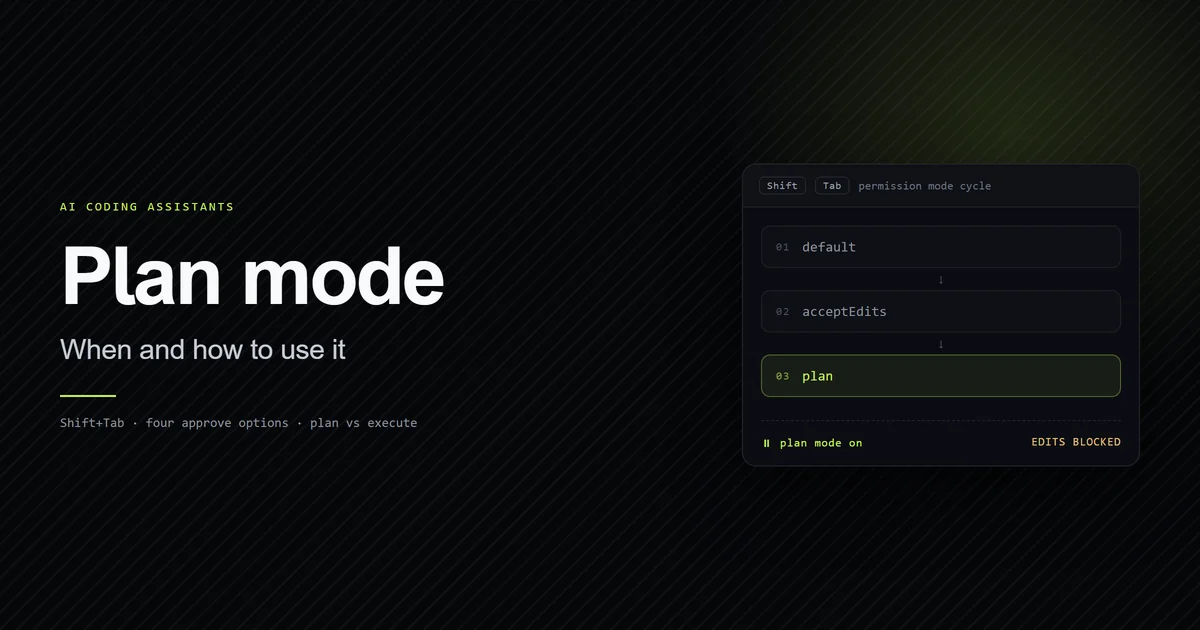
--append-system-prompt. And when you want Claude to commit to an approach before it touches anything, that is plan mode, not a file.
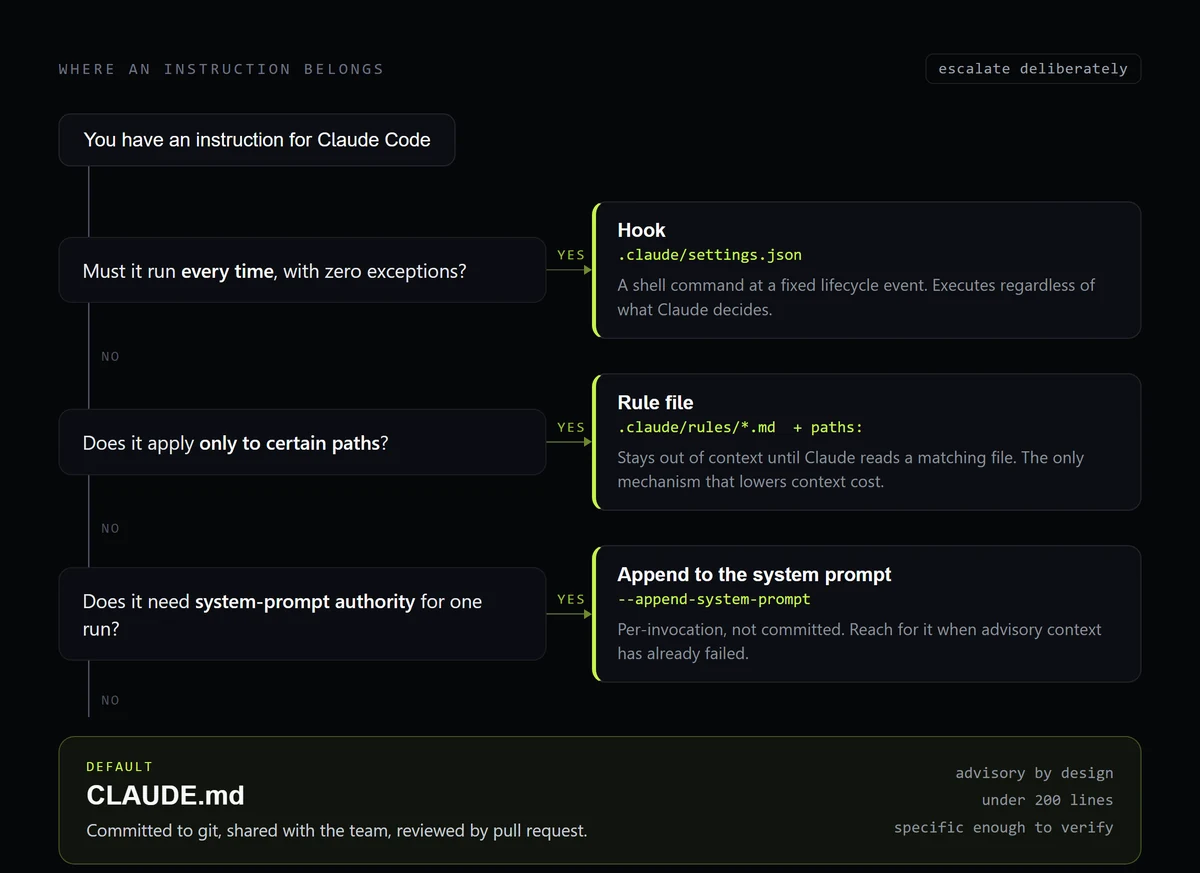
Laid out side by side, the five mechanisms differ on two things that matter — when they enter the context window, and whether they can be ignored:
| Mechanism | Where it lives | When it loads | Enforcement |
|---|---|---|---|
| CLAUDE.md | ./CLAUDE.md, committed | Every session, in full | Advisory |
| Rule file | .claude/rules/*.md with paths: | Only when Claude reads a matching file | Advisory |
| Auto memory | MEMORY.md index, per repository | Every session | Advisory |
| Hook | .claude/settings.json | Fires at a lifecycle event, not at launch | Guaranteed |
--append-system-prompt | CLI flag, not committed | That invocation only | Strongest framing available |
Four of the five are advisory, which is the point worth internalising: only a hook actually runs.
Conclusion
Write the file for the mistakes you have actually made, keep it under 200 lines, and make
every line specific enough that you could tell whether it was violated. If it grows past
the ceiling, move path-specific guidance into .claude/rules/ rather than splitting it
into imports that cost the same context. When a rule you wrote carefully still gets
skipped, the diagnosis order is a separate problem —
why Claude ignores CLAUDE.md measures how
much difference writing a rule down actually makes. And this file is only half the system
now: the other memory files are written by
the model rather than by you, into a per-project directory most people have never opened.
Then re-read it a month later. Ours was 135 lines and two of them were actively wrong — which is the strongest argument for keeping it short enough that re-reading is cheap. Both stale rules, and the measured cost of getting a CLAUDE.md wrong, are in the follow-up on what slows Claude Code down. If you're still deciding whether a terminal-first agent like Claude Code fits your workflow better than an editor like Cursor, that comparison is worth reading before you invest in a config file either way. And if your project is a Next.js app specifically, this workflow applies everything here plus the framework-specific traps a generic CLAUDE.md guide can't cover. For multi-agent repositories that need to support Cursor and Codex alongside Claude Code, see our complete AGENTS.md guide. More guides on working with agents are in AI Coding Assistants. For the full picture of how CLAUDE.md fits alongside plan mode, hooks, and MCP, see the complete Claude Code guide.
Frequently asked questions
Where does CLAUDE.md go?
How long should a CLAUDE.md file be?
Why is Claude Code ignoring my CLAUDE.md?
Do @path imports reduce context usage?
What's the difference between CLAUDE.md and auto memory?
Muhammad Kashif
Founder and editor of Devventa, covering AI coding assistants, Next.js and the modern AI development stack.