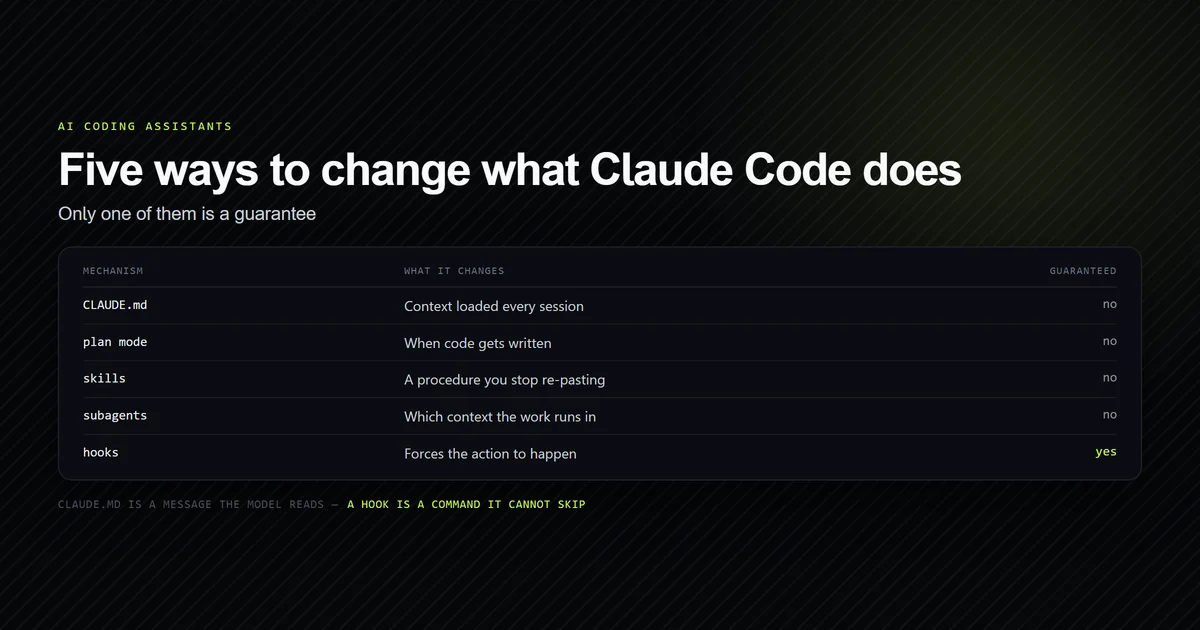
What model does Claude Code use? There is no single answer to look up, and that is the finding rather than a complaint. The model is the output of a precedence chain whose last step is account state cached on disk, and the name you type at the top of that chain does not always mean what it reads like. We billed one turn for each of ten --model values on 2026-09-19, on CLI 2.1.278. opusplan billed entirely as Sonnet. fable does not resolve to the id the CLI's own help text uses as its example. And running with no flag at all selects a different catalogue entry from the opus alias.
Key takeaways
--model opusplanreportedclaude-sonnet-5on a turn that did no planning, with a prompt size and cost identical to passing Sonnet directly.- The default is
claude-opus-5[1m]; theopusalias isclaude-opus-5. Same canonical model, same window, different catalogue entry. fableresolves toclaude-fable-5-1while the CLI's help text offersclaude-fable-5as its full-name example — and both are real, separate models.- A name the CLI does not recognise exits 1 and bills $0.00. No fallback, no substitution.
- There is no shipped default to read. Part of the model list is fetched from the account and cached in
~/.claude.json, which is why two developers on the same CLI version see different menus. - The prompt was 2 tokens of the 32,005 that reached the model — 0.006%. Which model you pick moves the bill less than most comparisons assume.
The short answer
Claude Code uses whichever model your account resolves to, unless a settings file or an environment variable pins one — and the name you pin is not a billing guarantee. If you want a stable answer, put model in .claude/settings.json (per Claude Code's settings reference) and commit it, prefer a full id over an alias, and verify what actually billed with --output-format json rather than trusting the string. If you want a cheaper bill, the effort setting is the larger lever.
For everything around the model — the permission system, subagents, the instruction file — the complete Claude Code guide is the pillar this sits under.
What model does Claude Code use: the complete name table
One billed turn per name. Same two-word prompt, same --effort low, run from an empty directory so nothing in a repository could influence the result.
claude -p "Reply with exactly: ok" --model opusplan --output-format json --effort low
# → modelUsage: { "claude-sonnet-5": { ... } }
| You type | modelUsage reports | Canonical |
|---|---|---|
opus | claude-opus-5 | claude-opus-5 |
sonnet | claude-sonnet-5 | claude-sonnet-5 |
haiku | claude-haiku-4-5-20251001 | claude-haiku-4-5 |
fable | claude-fable-5-1 | claude-fable-5-1 |
opusplan | claude-sonnet-5 | claude-sonnet-5 |
claude-opus-5[1m] | claude-opus-5[1m] | claude-opus-5 |
| (no flag) | claude-opus-5[1m] | claude-opus-5 |
The four bare full ids — claude-opus-5, claude-sonnet-5, claude-haiku-4-5 and claude-fable-5 — are each echoed back unchanged, which is the one part of this table that behaves exactly as documented. Everything interesting is in the rows above.
Only Haiku reports a window under a million tokens: 200,000, with a 32,000-token output ceiling against 64,000 everywhere else. That ceiling is Claude Code's own, not the API's — Anthropic's models overview publishes a higher figure for the same models, so a task planned around one long generation should be planned against the CLI's cap rather than the published one.
opusplan bills as Sonnet
This is the row worth the table. opusplan is not a typo and not an error; it is a real alias that the CLI accepts. On a turn that asked a model to reply with one word, it produced this:
  --model opusplan          claude-sonnet-5   prompt 43,285   $0.008701
  --model claude-sonnet-5   claude-sonnet-5   prompt 43,285   $0.008701
Identical to the token and to the cent. On this turn, opusplan and claude-sonnet-5 are indistinguishable from the outside.
The name describes a split — Opus for planning, Sonnet for execution — and a two-word prompt has no planning phase to trigger it, so what we measured is the floor of that alias rather than a defect. The practical consequence stands anyway: a session pinned to opusplan can bill zero Opus tokens, and a cost model that assumes "opusplan means Opus" will be wrong by the gap that separates the two tiers. If you are budgeting from a model name, budget from modelUsage instead.
The default is not the alias
Run with no --model at all and modelUsage names claude-opus-5[1m]. Run with --model opus and it names claude-opus-5. Both report canonicalModel: claude-opus-5 and both report a 1,000,000-token window, so no capability differs that we can see — but the string does, and the string is what your tooling matches on.
claude -p "Reply with exactly: ok" --output-format json --effort low
# → modelUsage: { "claude-opus-5[1m]": { "canonicalModel": "claude-opus-5", ... } }
We ran the unset case twice, once from an empty directory and once from this repository, and got the same answer both times.
claude-opus-5[1m] is not a typo and not a version. The bracketed form is a context-window variant: the usage payload reports it as the model id while giving canonicalModel separately, with contextWindow: 1000000. The same shape shows up in the cached account options. It is also accepted as input — --model "claude-opus-5[1m]" exits 0 and echoes itself back — so the bracketed form is a selector you can type, not only a string that appears in output.
This matters in exactly one place, and it is a place people hit: string matching. Cost dashboards, log parsers, allowlists and analytics that compare a model id against a published list will miss the bracketed variant, because the bracketed variant is not on the published list. So there are three ways to ask for Opus and they return three different strings for one canonical model. Match on canonicalModel where you have it, and on a prefix where you do not.
Two spellings of Fable, and only one is documented
The CLI's own --model help text reads: provide an alias for the latest model (e.g. 'fable', 'opus', or 'sonnet') or a model's full name (e.g. 'claude-fable-5'). Both halves of that sentence are true and they do not point at the same model.
| Name | Resolves to | Where it is documented |
|---|---|---|
fable | claude-fable-5-1 | help text, as an alias example |
claude-fable-5 | claude-fable-5 | help text, as the full-name example |
Both arms exited 0 and both billed. The alias tracks the newer 5.1; the documented full-name example pins the older 5. Neither is wrong — an alias that advanced while an example did not is ordinary drift — but copying the example out of --help into a committed settings file gets you a model one version behind the one the alias would have given you, silently and permanently, which is exactly what pinning is for and exactly not what most people mean by it.
Haiku has the same shape in reverse: the haiku alias returns the dated snapshot claude-haiku-4-5-20251001, while the bare claude-haiku-4-5 returns itself. Same canonical model, two ids.
A wrong name is refused, not substituted
The failure mode people worry about is a silent fallback — you typo a model id, the CLI quietly uses something else, and you find out on the invoice. It does not do that.
claude -p "Reply with exactly: ok" --model claude-opus-9 --output-format json
# → There's an issue with the selected model (claude-opus-9). It may not exist
#   or you may not have access to it. Run --model to pick a different model.
# exit 1
gpt-5 is refused the same way. Both arms report zero models in modelUsage and total_cost_usd: 0 — the run ends before a turn starts, so the check script re-runs both of them live on every invocation rather than quoting a recorded result. They are the only arms in this measurement that cost nothing.
That is a good design and worth relying on: a bad model name in a committed settings.json fails the session rather than changing your bill.
The resolution chain that picks the default
Everything above is what happens when you name a model. The reason there is no single documented answer when you do not is that the default is the output of a precedence chain, and the last step is not a file.
--model flag
  → .claude/settings.local.json      ← repo, not committed
  → .claude/settings.json            ← repo, committed
  → ~/.claude/settings.json          ← machine
  → ANTHROPIC_MODEL                  ← environment
  → whatever the account resolves to ← not visible from the repository
Every step but the last is something you can read, diff and hand to a teammate. The last one is not. Our internal check script reports where a given repository lands; this is its output on ours:
  CLI                  2.1.232 (Claude Code)

Where a model could be pinned, highest precedence first

  SOURCE            FILE                                  PRESENT   MODEL       EFFORT
  project (local)   .claude/settings.local.json           yes       —           —
  project (shared)  .claude/settings.json                 no        —           —
  user              ~/.claude/settings.json               yes       —           —

Account state cached on this machine  (~/.claude.json)

  Org default          none cached
  Model access         empty — no per-model grants cached
  Additional options   1 fetched from the account, not shipped in the CLI
    claude-fable-5[1m]      Fable

FAIL: nothing in this repository pins a model.
That Additional options line is the finding. ~/.claude.json carries additionalModelOptionsCache, orgModelDefaultCache and modelAccessCache — the set of models the CLI will offer you is partly server state cached on disk. It is not a list compiled into the binary, which is why "what model does Claude Code use" cannot be answered by reading the release notes, and why two developers on identical CLI versions can genuinely see different pickers.
That cache is also live. The capture above, from August, held claude-fable-5[1m] labelled Fable. Read again on 2026-09-19 it held claude-fable-5-1[1m], same label — it advanced without us upgrading anything to make it advance. OpenAI keeps the same kind of list in ~/.codex/models_cache.json, and reading that one turned up six models, none of them the one its own keyword names. We report the move; we do not claim to know when or why the account changed.
What changed between CLI versions
Two measurements sit behind this article, 35 days apart, and one result did not survive the gap. It is set out here rather than quietly dropped, because the way it failed is more useful than the original claim was.
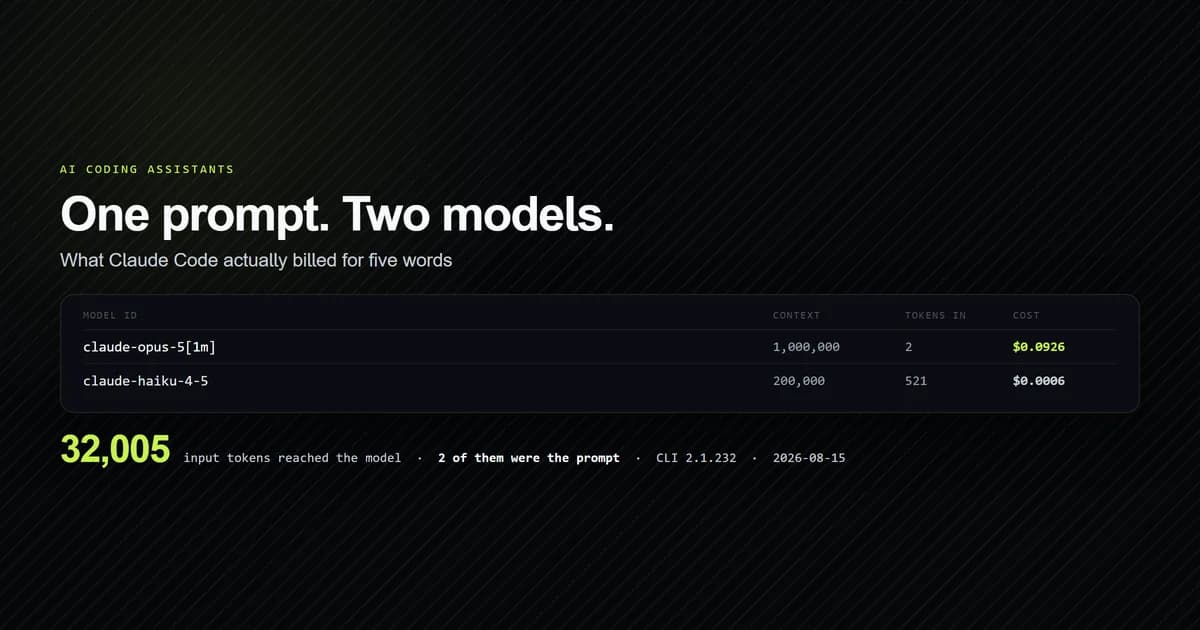
August, CLI 2.1.232. One headless invocation with JSON output reported two models on a single five-word prompt:
  MODEL ID                      CANONICAL           CONTEXT     MAX OUT   IN       OUT   COST
  claude-haiku-4-5-20251001     claude-haiku-4-5    200,000     32,000    521      12    $0.000581
  claude-opus-5[1m]             claude-opus-5       1,000,000   64,000    2        4     $0.092567
September, CLI 2.1.278. We re-ran that exact command twice, then kept looking: 22 billed arms across five model families, two working directories, with and without tool use. Every single one reported exactly one model.
| Measurement | CLI | Arms | Arms reporting two models |
|---|---|---|---|
| 2026-08-15 | 2.1.232 | 1 | 1 |
| 2026-09-19 | 2.1.278 | 22 | 0 |
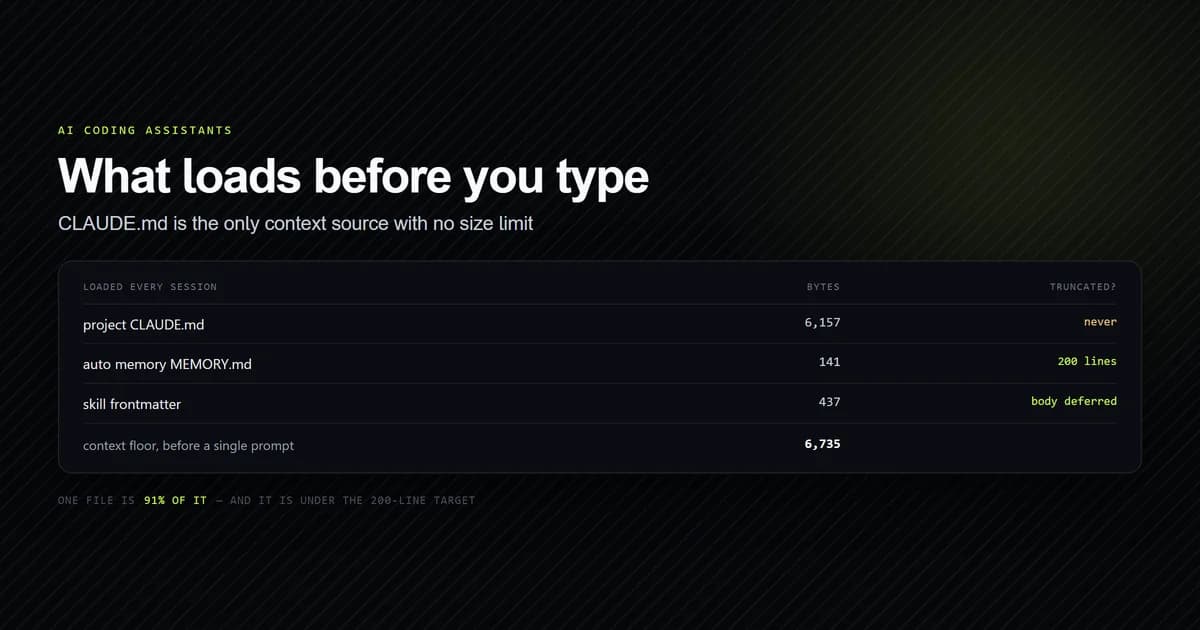
One number in that August capture is worth keeping regardless of how many models ran, because it reproduced in September and it is the most consequential figure here. The session model read 2 input tokens. Not two thousand. The prompt was almost the entire uncached input, because the other 32,003 tokens arrived as cache reads and cache writes. That is the harness, and it is the reason the model choice moves the bill less than people expect. September's arms show the same shape at a different size — Sonnet's prompt came to 43,285 tokens against Opus's 32,644 on the same two-word input, which is a property of what Claude Code sends rather than of the model.
How much of either context ceiling a real repository consumes is a separate measurement — one lockfile came to 139,640 tokens, which is most of the smaller window on its own.
Sonnet vs Opus, and the setting that matters more
The Sonnet-versus-Opus question is real, and it is smaller than the question next to it. We measured it properly — two probes, one per tier — and the premium turns out to be exactly 2.5x on identical work, invariant across every token shape. On a real coding task rather than a two-word prompt, the bill lands at 2.19x, because the harness does not send both models the same request. Claude Code exposes both levers (documented in the Claude Code CLI overview):
claude --model sonnet --effort medium
# --model  accepts an alias ('opus', 'sonnet') or a full id ('claude-opus-5')
# --effort accepts low, medium, high, xhigh, max
Aliases track the latest model in a family, which is convenient and is also a moving target — an alias pinned in a committed settings file will silently start meaning something else when the family advances, as the Fable rows above show. Anthropic released Claude Opus 5.5 with the full API ID claude-opus-5-5 on 2026-09-22, which is exactly the kind of family advance an alias may absorb. A full id does not move. Neither is wrong; they are different promises, and the choice deserves a sentence in your project's setup notes rather than a shrug.
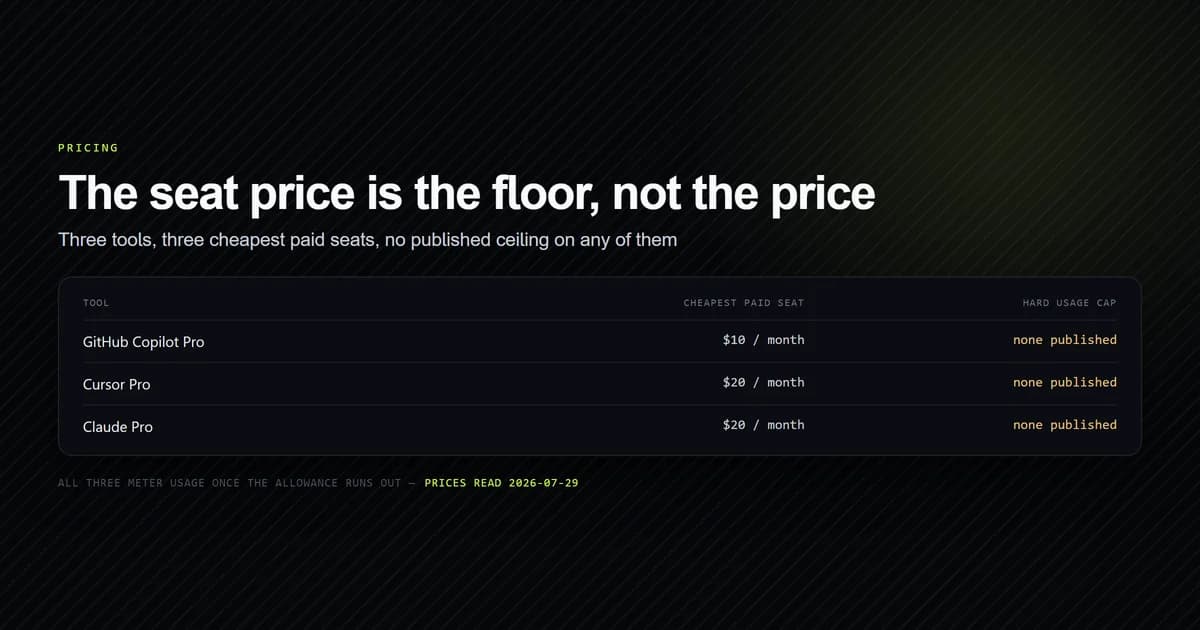
On effort: the environment on this machine reported CLAUDE_EFFORT=high for a running session, and the flag documents five levels. Effort changes how much thinking a turn does, which on agentic work moves the bill and the wall-clock more than swapping model families does. If a session feels expensive, measure before you downgrade — why Claude Code gets slow covers the other half of that, and what AI coding assistants actually cost covers the pricing side.
Pin the model in the repository
If the answer to "which model built this" should live in git rather than in a menu, it is one file:
{
  "model": "claude-opus-5"
}
Commit it. Two consequences, both worth accepting deliberately:
- A pinned full id stops tracking the family. You will get the model you asked for after the next release, which is the point, and you now own the upgrade.
- A pinned model overrides the account default for everyone on the repository, including people whose account would have offered something else. That is usually what a team wants and occasionally is not.
The check exits non-zero until one of those files names a model, so it works as a build step or a pre-commit hook rather than as something you remember to run.
What we are not claiming
That any of these models is better than another. Every arm answers a fixed two-word prompt and is scored only on whether the CLI accepted the name and what it billed. No output-quality, latency or capability comparison is made here, and a guard in the committed fixture asserts it. What the choice costs on a real coding task is a separate measurement with its own six arms.
That opusplan never uses Opus. We measured its floor on a turn with no planning phase. A session that plans may well bill Opus, and we did not construct one.
That the two-model behaviour was withdrawn. Twenty-two arms found none. That is evidence about this machine on this build, and an absence is the weakest kind of evidence there is.
That your account resolves the way ours does. The unset row is the output of a precedence chain whose last step is account state, so yours can legitimately differ. Nothing in a repository decides it unless you make it.
Two further limits, stated plainly. The probes are one account on a small number of days, and the cached account state was read from ~/.claude.json, which also holds identifiers — the committed scripts touch model-shaped keys by name for that reason, and print none of the rest.
Common mistakes
- Reading
opusplanas a guarantee of Opus. It reported Sonnet on every token of the turn we billed. - Copying the full-name example out of
--help.claude-fable-5is a version behind what thefablealias gives you. - String-matching model ids against a published list.
claude-opus-5[1m]andclaude-haiku-4-5-20251001are both real and neither is on one. - Pinning an alias and calling it pinned.
opustracks the family; the family moves. - Assuming the picker is the whole list. Part of it is fetched and cached per account. An option a colleague has and you do not is not necessarily a version difference.
- Assuming a typo is harmless. It is — it exits 1. The mistake is assuming the opposite and never testing it.
- Optimising the model before the harness. On the measured turn, the prompt was 0.006% of what reached the model, and emptying the tool list is enough to make the same model answer a repository question wrong.
Conclusion
Pin a full model id in .claude/settings.json, commit it, and verify what it billed with --output-format json rather than trusting the name. That is the whole recommendation, and the reason it is worth the two minutes is that three of the ten names we tested do not resolve to what they read like: opusplan bills as Sonnet, fable is a version ahead of the example in the help text, and the no-flag default is a different catalogue entry from the opus alias.
We re-run both findings with internal check scripts: one reports where a project lands in the precedence chain, and the other reproduces the table against an account — it re-reads the cached options and re-runs the two free arms live. Between them they answer the question this page is named after better than any documentation currently does.
Frequently asked questions
What model does Claude Code use by default?
What does opusplan do in Claude Code?
Does Claude Code fall back to another model if I pass a bad name?
Is the Claude Code model alias the same as the full id?
Is claude-opus-5[1m] a valid value for --model?
What does the 1m in claude-opus-5[1m] mean?
Does Claude Code use more than one model per turn?
How do I pin Claude Code to a specific model?
Should I use Sonnet or Opus in Claude Code?

Muhammad Kashif
Founder and editor of Devventa, covering AI coding assistants, Next.js and the modern AI development stack.