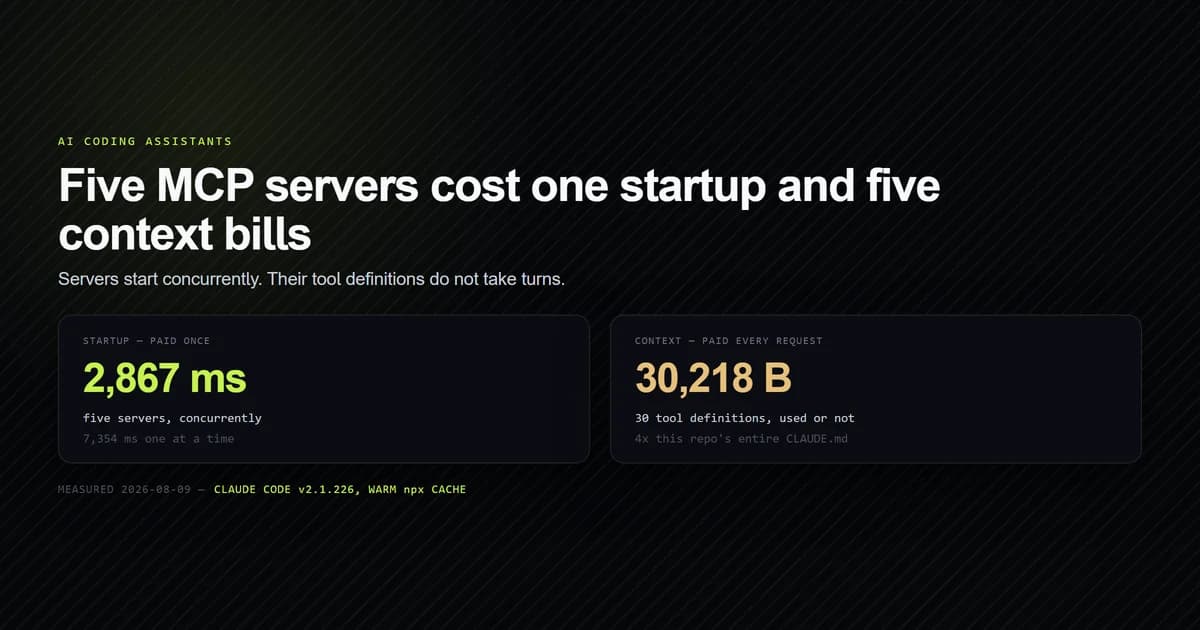
Running multiple MCP servers costs one startup, not five. We measured a fleet of five reaching a tool list in 2,867 ms concurrently against 7,354 ms one at a time, so the number of servers is almost irrelevant to how fast a session opens. What multiple mcp servers configuration actually costs is context: those same five contributed 30,218 bytes of tool definitions to every request, spent before the model reads a word of your message. This covers where the servers go, what the set costs, and the two failure modes that only appear once you have more than one. Measured on Claude Code v2.1.226 on 2026-08-09.
Key takeaways
- Startup is concurrent. Five servers took 2,867 ms together and 7,354 ms serially — you pay the slowest server, not the sum.
- Context is the real budget. 30 tools across five servers = 30,218 bytes on every message, roughly four times this repository's entire CLAUDE.md.
- Three general-purpose servers accounted for 28,310 of those bytes. Two purpose-built ones cost 1,908 between them.
- Duplicate tool names are allowed and unreported. Both servers connect; the client namespaces them and nothing warns you.
- A broken server fails alone. It reports
✘ Failed to connectwhile every other server in the same list stays connected.
Where multiple servers are configured
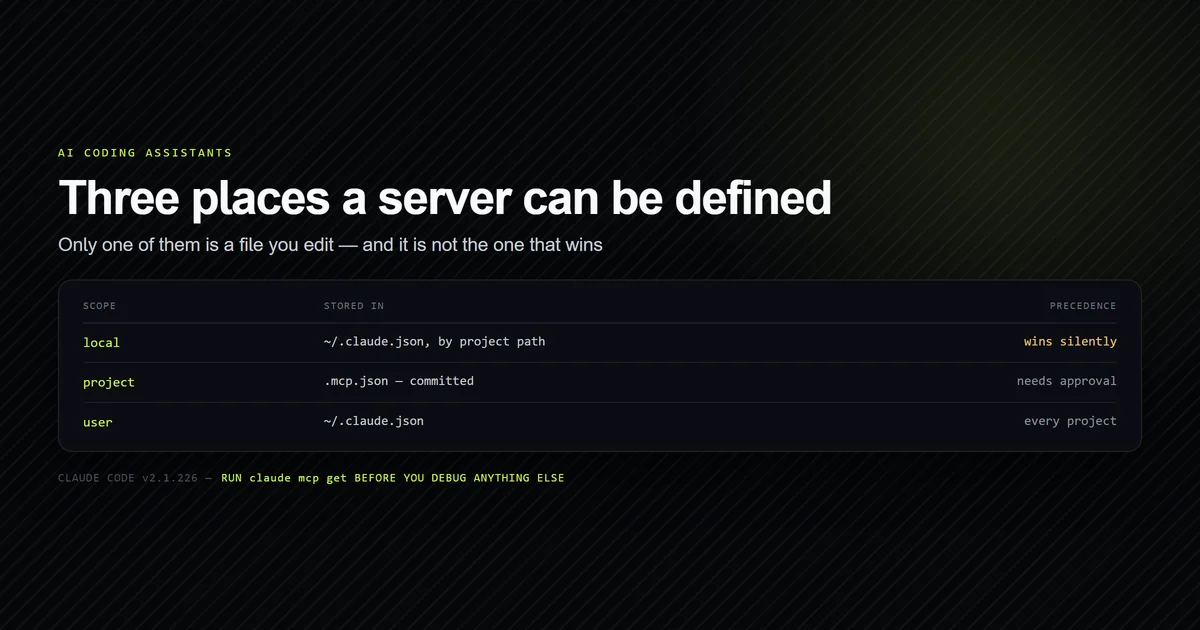
There is no list file. Servers accumulate across three scopes, which Anthropic's MCP documentation for Claude Code defines, and only one of them is a file you open — a point covered in full in mcp.json configuration explained, and worth repeating here because it is what makes "how many servers do I have" a harder question than it should be.
Several servers in one project go in one mcpServers object:
{
  "mcpServers": {
    "roadmap": {
      "command": "node",
      "args": ["scripts/mcp/roadmap-server.mjs"],
      "env": {}
    },
    "content": {
      "command": "node",
      "args": ["--conditions=react-server", "scripts/mcp/content-server.mjs"],
      "env": {}
    }
  }
}
Personal servers you do not want in the repository go in local scope instead, through the CLI:
claude mcp add-json filesystem -s local \
  '{"type":"stdio","command":"npx","args":["-y","@modelcontextprotocol/server-filesystem","."]}'
The set you are actually running is the union of all three scopes, deduplicated by name with the
narrower scope winning. That is why claude mcp list is the only honest inventory, and why the
question this article answers — what does the whole set cost — cannot be answered by reading
.mcp.json. For the wider setup this fits into, see
the complete guide to MCP server setup with Claude Code.
Startup is concurrent, so you pay the slowest one
The intuition that each server adds its startup to the session is wrong, and the difference is large enough to change what you are willing to install.
We configured five servers — three official npx ones and the two node servers committed to
this repository — and timed the whole set from spawn to a completed tools/list, warm:
| Measurement | Result |
|---|---|
| Five servers, concurrently | 2,867 ms |
| Five servers, one at a time | 7,354 ms |
| Slowest single server | 2,862 ms |
Concurrent wall clock lands within 5 ms of the slowest individual server, which is what concurrency looks like when it is working.
Claude Code itself behaves the same way, measured indirectly. claude mcp list health-checks by
starting every server, and it took 3.00 s against the two fast node servers alone and 5.45 s
once three npx servers were added — each of which takes about 2.7 s on its own. Serial
execution would have added roughly eight seconds. It added 2.45.
That caveat is not theoretical. The first version of the script behind this article reported the opposite result — that concurrent startup was 2.5x slower, 19,779 ms against 8,049 ms — because it measured the concurrent pass first, while the packages were still downloading, and the serial pass afterwards against a warm cache. Whichever pass runs first pays the cold cost. The script now runs a discarded warm-up pass before either measurement, and that is the only reason the numbers above mean anything.
The cost you pay on every request
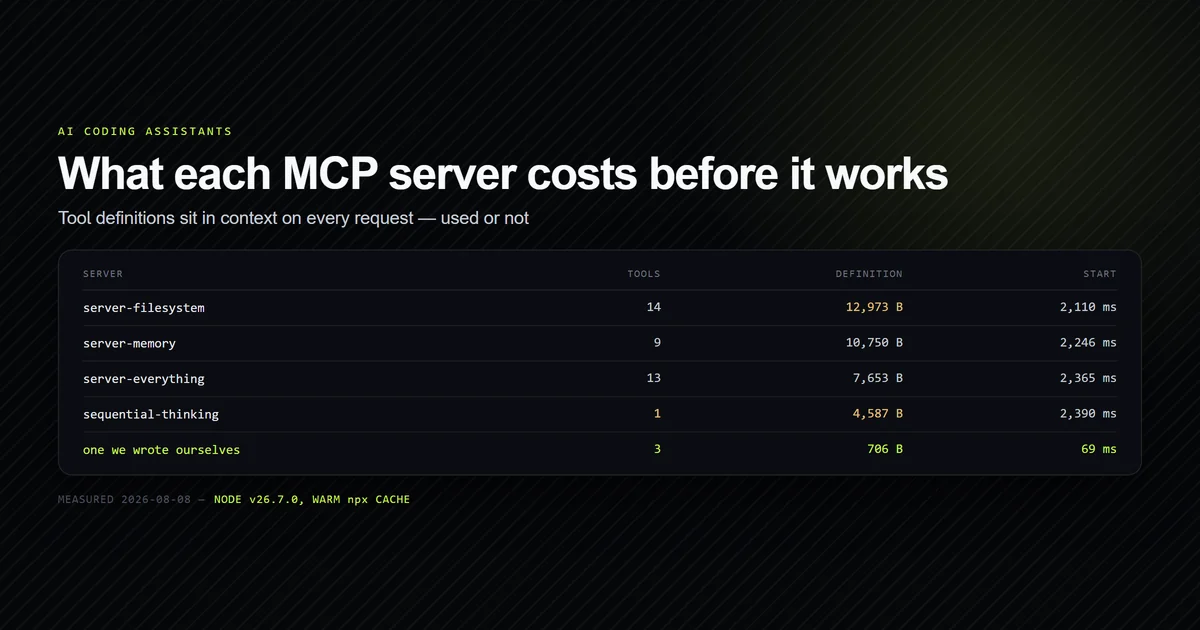
Startup happens once. Tool definitions — names, descriptions and the full JSON Schema each server
returns from tools/list
— are re-sent with every message, used or not, and this is where a fleet gets expensive:
| Server | Tools | Definition bytes | Start |
|---|---|---|---|
filesystem | 14 | 12,973 | 2,662 ms |
memory | 9 | 10,750 | 2,862 ms |
sequential-thinking | 1 | 4,587 | 2,672 ms |
content | 3 | 1,202 | 308 ms |
roadmap | 3 | 706 | 113 ms |
Thirty tools, 30,218 bytes. At the four-characters-per-token estimate this site uses elsewhere, that is roughly 7,500 tokens standing in context on every request.
The comparison that makes it concrete: our internal context-weight check puts this repository's always-loaded context floor at 7,605 bytes, essentially all of it CLAUDE.md. So five MCP servers cost about four times the entire instruction file the project spent months tuning — and unlike CLAUDE.md, nothing in the CLI shows you the number. If you have ever trimmed a CLAUDE.md to make sessions faster, this is the larger version of the same bill.
The distribution matters more than the total. Three general-purpose servers account for 28,310 of those bytes; the two written for this repository cost 1,908 together and answer questions no general server can. Whether a given server earns its slot is the subject of which MCP servers are actually worth installing; the point here is only that the bill is additive and invisible.
npm run check:mcp-weight
# → Standing context cost: 30218 bytes of tool definitions on every request.
# → Startup: 2867 ms concurrently, 7354 ms serially (2.6x).
Two servers exposing the same tool name
This is the failure people expect to be loud, and it is silent. We wrote a probe server exposing
read_file and search_files — both of which the official filesystem server also exposes — and
configured them together:
claude mcp list
# → filesystem: npx -y @modelcontextprotocol/server-filesystem . - ✔ Connected
# → probe-collision: node scripts/mcp/_probe-collision.mjs - ✔ Connected
Both connect. Neither is rejected, downgraded, or mentioned. There is no protocol collision,
because Claude Code namespaces every MCP tool as mcp__<server>__<tool> — which is the same
naming you use in a permission rule, and the reason mcp__filesystem__read_file is a valid
allowlist entry.
What collides is the model's choice. It now sees two tools whose bare names are identical and whose descriptions differ only in wording, with no signal about which one you meant. Our measurement script reports the duplication because the CLI does not:
npm run check:mcp-weight
# → 2 tool name(s) exposed by more than one server:
# →   read_file — filesystem, probe-collision
# →   search_files — filesystem, probe-collision
The fix is naming, not configuration. A tool called check_link cannot be confused with anything
in the filesystem server; a tool called search can be confused with everything. Name tools for
the specific question they answer, which is also what makes a
purpose-built server for your own project worth writing.
One broken server does not break the others
Worth confirming rather than assuming, because the opposite would make a large fleet fragile. We added a server pointing at a script that does not exist:
claude mcp list
# → roadmap: node scripts/mcp/roadmap-server.mjs - ⏸ Pending approval
# → content: node --conditions=react-server scripts/mcp/content-server.mjs - ⏸ Pending approval
# → filesystem: npx -y @modelcontextprotocol/server-filesystem . - ✔ Connected
# → probe-collision: node scripts/mcp/_probe-collision.mjs - ✔ Connected
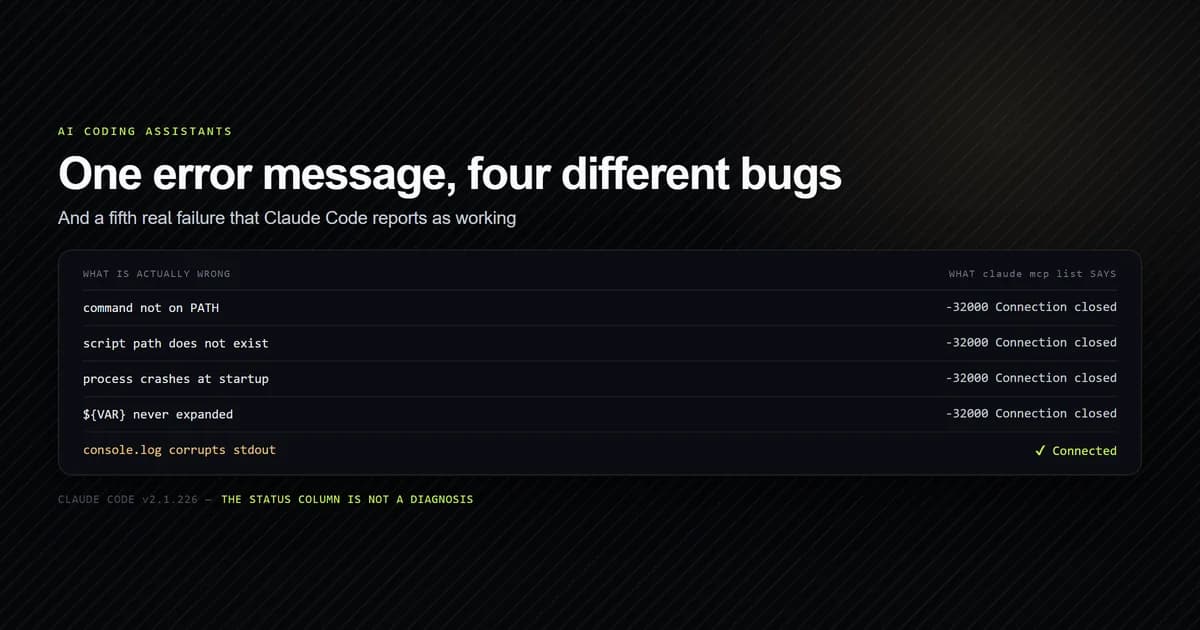
# → broken: node scripts/mcp/_does-not-exist.mjs - ✘ Failed to connect — -32000: Connection closed
Each server is its own process, so a failure is contained to that row. You lose its tools and nothing else.
The catch is that the error text is the same -32000: Connection closed regardless of cause — a
missing file, a bad flag, a crash on startup, a corrupt first line on stdout. With one server that
is merely unhelpful. With six it is genuinely hard, because the message does not name the file it
could not find. Troubleshooting an MCP server that will not connect
covers how to separate those causes.
Managing the set
Three commands cover almost everything, and the middle one is the one people skip:
claude mcp list— every server across every scope with its live status. The only complete inventory, since three scopes feed it.claude mcp get NAME— theScope:line for one server. Run this first when a server behaves unexpectedly; shadowing explains more misbehaviour than configuration errors do.claude mcp remove NAME -s SCOPE— the scope flag is required and it is not guessed. A server removed from the wrong scope reports success and stays in the list.
Two habits keep a growing set manageable. Put servers that belong to the repository in
.mcp.json with relative paths so every clone gets them, and keep personal ones in local scope so
they never appear in someone else's session. And re-measure after adding one — we wrote our measurement
script because the cost of a fleet is not visible anywhere else, and a server installed for a
one-off task keeps charging rent for months.
Common mistakes
- Counting servers instead of tools. Two servers with twenty-three tools cost more than five with eight. The unit of context is the tool definition.
- Assuming startup scales with server count. It does not. Concurrency means one slow
npxserver sets the floor for the entire session — replacing that one server is the whole fix. - Installing a server for a single task and leaving it. Its definitions are charged on every request for as long as it stays configured.
- Giving tools generic names.
search,queryandread_filecollide with something. Name the question, not the verb. - Debugging a duplicated server name as a config error. Check
claude mcp get NAMEand read the scope before touching the file. - Measuring a cold
npxcache and believing the result. Any comparison whose first pass downloads packages is measuring the network. Warm up, discard, then measure.
Conclusion
Add servers freely on startup grounds and cautiously on context grounds — the concurrency means
five cost about as much to launch as one, while their tool definitions add up on every message
without appearing anywhere. Run claude mcp list for the true inventory, claude mcp get before
debugging anything, and measure the fleet after each addition rather than trusting a per-server
impression. If you are still deciding what belongs in the set at all,
the complete MCP server setup guide covers the
whole decision from first server to fleet.
Frequently asked questions
How many MCP servers can I run at once?
Do multiple MCP servers slow down Claude Code?
What happens if two MCP servers have the same tool name?
Does one failed MCP server break the others?
How do I manage multiple MCP servers?

Muhammad Kashif
Founder and editor of Devventa, covering AI coding assistants, Next.js and the modern AI development stack.