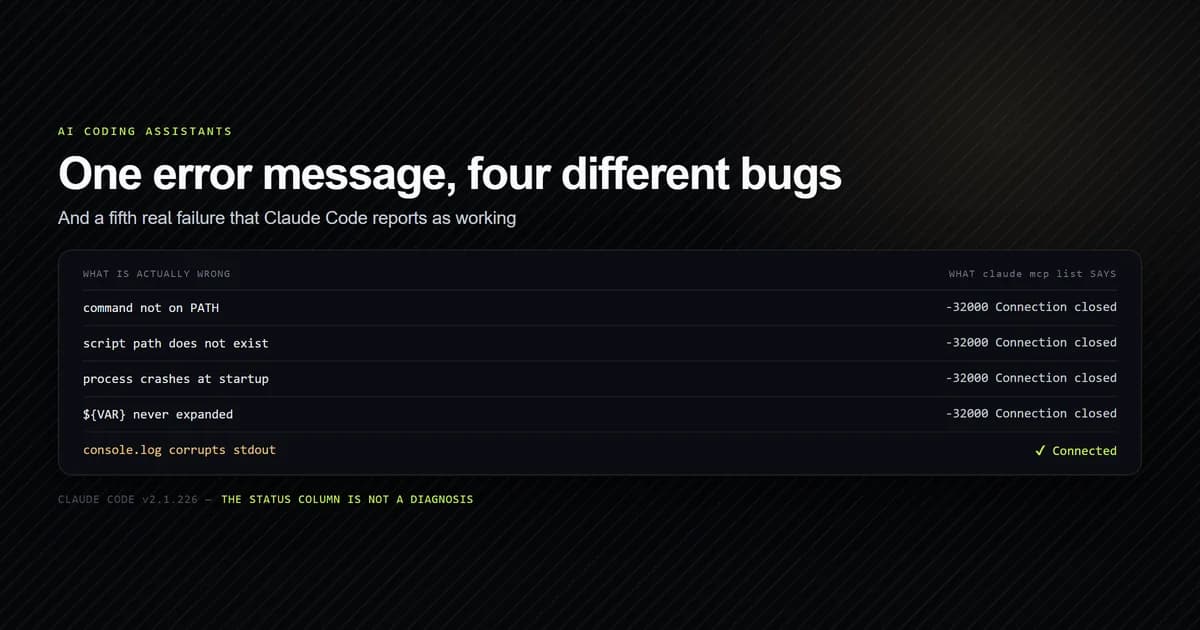
An MCP server not working reports -32000: MCP error -32000: Connection closed almost every
time, and it is the same message whether the binary is missing, a path is wrong, the process
crashed, or an environment variable never expanded. Worse, one genuine failure reports as
✔ Connected. This separates those cases using probe servers committed to this repository, and
ends with a check that reports what the CLI cannot. Measured on Claude Code v2.1.226 on
2026-08-08.
Key takeaways
Connection closedhas four distinct causes and identical text for all of them. The error is a category, not a diagnosis.⏸ Pending approvalis not a failure. A project.mcp.jsonserver is listed but never started until you approve it once.- A server that pollutes stdout reports
✔ Connected. The health check passes and the protocol is still corrupt. - Remote servers fail more usefully than local ones — a bad host reports
ENOTFOUNDby name, where stdio reports nothing specific. - An unset
${VAR}reaches your server as the literal placeholder, so the resulting failure never mentions the variable.
Start by asking whether it is running at all
Before reading a single log line, get the status of every configured server:
claude mcp list
# → claude.ai Gmail: https://gmailmcp.googleapis.com/mcp/v1 - ! Needs authentication
# → roadmap: node scripts/mcp/roadmap-server.mjs - ⏸ Pending approval (run `claude` to approve)
# → probe-missing: mcp-server-that-does-not-exist - ✘ Failed to connect — -32000: MCP error -32000: Connection closed
# → filesystem: npx -y @modelcontextprotocol/server-filesystem D:/repo - ✔ Connected
Four servers, four different states, and only one of them is actually broken. That distinction is the whole of triage here, because three of these states get reported as "my MCP server is not working" and only one of them needs debugging. If you are still assembling the setup rather than repairing it, the complete MCP server setup guide covers the states this article debugs.
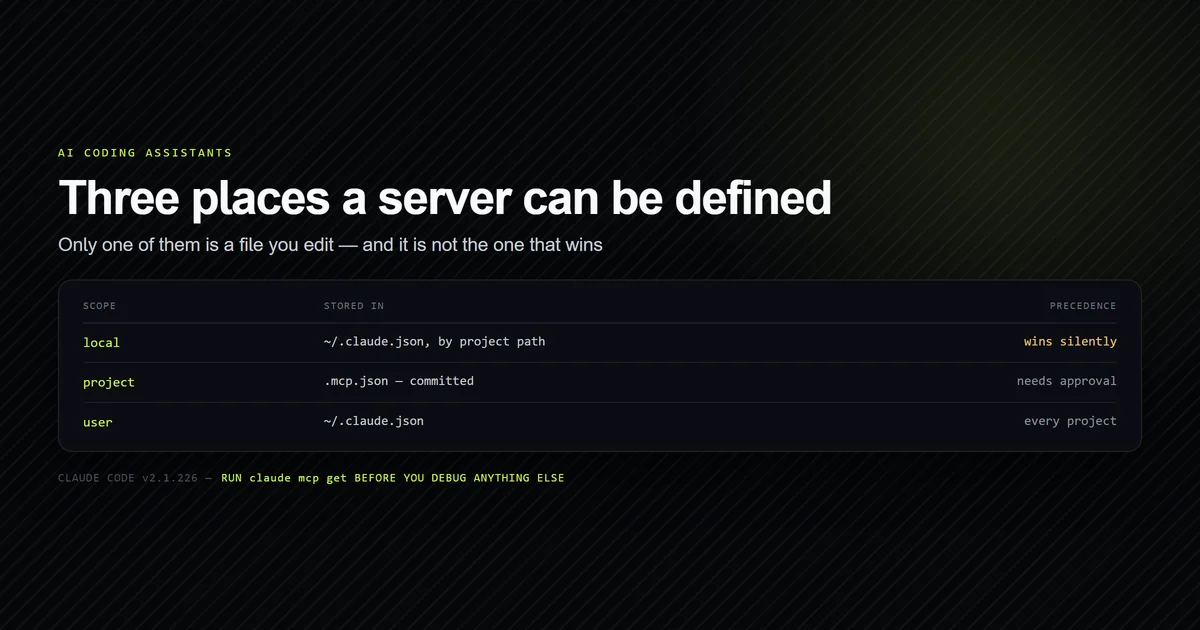
claude mcp get <name> adds the scope, which matters when a server you edited is not the one
running — a local definition shadows a project one of the same name, silently. The
mcp.json configuration rules cover that
precedence in full, and the failure gets harder to spot the more servers you have —
one broken server among several fails alone and
quietly.
Pending approval is not a failure
This is the most common report of an MCP server not working that needs no fix at all. A
.mcp.json file arrives with a repository and can run arbitrary commands, so Claude Code does
not trust one until you say so. Until then:
claude mcp get roadmap
# → roadmap:
# →   Scope: Project config (shared via .mcp.json)
# →   Status: ⏸ Pending approval (run `claude` to approve)
The server is configured correctly, listed among the others, and not running. Start claude
in that directory and accept the prompt; the decision is remembered per project, so a fresh
clone asks again. This is the single most common "not working" report that requires no fix at
all, and it is worth checking first precisely because nothing about it looks like a
permissions prompt from the outside.
Connection closed means four different things
Here is the problem, demonstrated with two servers that fail for completely unrelated reasons:
claude mcp list
# → probe-missing: mcp-server-that-does-not-exist - ✘ Failed to connect — -32000: MCP error -32000: Connection closed
# → probe-crash: node -e process.exit(1) - ✘ Failed to connect — -32000: MCP error -32000: Connection closed
The first has no such binary anywhere on PATH. The second is a perfectly valid command that
starts and immediately exits. The reported error is byte-identical, and claude mcp get adds
nothing beyond an Issue: line carrying the same text.
Four causes collapse into that message:
- The command is not on
PATH. The process never starts. - A path in
argsdoes not exist. The interpreter starts, fails to find the script, exits. - The process crashes during startup. A missing dependency, a syntax error, a bad flag.
- An unset
${VAR}was passed through literally. The server receives the eight characters${TOKEN}as a credential and exits on validation.
That last one deserves emphasis because it is invisible from every angle. We configured a
probe with "MCP_PROBE_TOKEN": "${MCP_SOURCE_VALUE}" and left the variable unset:
claude mcp get probe-env
# →   Status: ✘ Failed to connect
# →   Issue: -32000: MCP error -32000: Connection closed
# →     MCP_PROBE_TOKEN=${MCP_SOURCE_VALUE}
The variable name appears only because our probe printed it to stderr on the way out. A real
server that simply rejected the token would give you nothing. Writing ${MCP_SOURCE_VALUE:-}
instead produces an empty string and an honest authentication error.
The fastest way to separate these four is to stop using the client. Run the exact command from the config yourself, from the project root, and pipe one request into it:
printf '%s\n' '{"jsonrpc":"2.0","id":1,"method":"initialize","params":{"protocolVersion":"2025-06-18","capabilities":{},"clientInfo":{"name":"probe","version":"1"}}}' \
  | node scripts/mcp/roadmap-server.mjs
# → {"jsonrpc":"2.0","id":1,"result":{"protocolVersion":"2025-06-18","capabilities":{"tools":{}},"serverInfo":{"name":"devventa-roadmap","version":"1.0.0"}}}
A shell error names the missing binary. A stack trace names the crash. A response like the one above means the server is fine and the problem is the configuration around it.
The failure that reports as connected
This is the one worth remembering, because no amount of reading the status column finds it. It is the shape of every expensive bug on this project: seeded against ten real faults, two of ten printed nothing at all and a third passed typecheck, lint and build.
We took a working server and added a single line — console.log("Starting roadmap server…")
— changing nothing else. It is committed as scripts/mcp/_probe-stdout-noise.mjs. Claude Code
reports:
claude mcp list
# → probe-stdout: node scripts/mcp/_probe-stdout-noise.mjs - ✔ Connected
Connected. The handshake completed, the tools loaded, and the health check is satisfied, because the client skipped the unparseable line and found the real frame behind it. Piping the same request in by hand shows what the client actually received:
printf '%s\n' '{"jsonrpc":"2.0","id":1,"method":"initialize","params":{"protocolVersion":"2025-06-18"}}' \
  | node scripts/mcp/_probe-stdout-noise.mjs
# → Starting roadmap server…
# → {"jsonrpc":"2.0","id":1,"result":{"protocolVersion":"2025-06-18",...}}
stdout is the protocol channel, and the specification is unambiguous about it. The
stdio transport binding
states that the server "MUST NOT write anything to its stdout that is not a valid MCP
message," and that it "MAY write UTF-8 strings to stderr for any logging purposes
including informational, debug, and error messages."
So every banner, progress line, console.log left in from debugging, and anything a library
prints on import is a protocol violation. Tolerance at handshake time is not a guarantee later:
the moment a stray write lands mid-message, a tool call fails with a parse error that names
nothing useful.
A check for an MCP server not working
Because claude mcp list cannot distinguish these cases, we wrote an internal check
script. It reads both the project .mcp.json and the local-scope block for
this project, then for each stdio server resolves the command, verifies every path in args
exists, starts it, and inspects the first line of stdout:
npm run check:mcp
# → 7 MCP server(s) configured for this repository
# →
# →   ERROR  probe-stdout     local    stdio  unframed
# →          ↳ first stdout line is not JSON — the client sees a corrupt frame: "Starting roadmap server…"
# →   ERROR  probe-missing    local    stdio  unframed
# →          ↳ no JSON-RPC frame on stdout — failed to spawn
# →   ERROR  probe-crash      local    stdio  unframed
# →          ↳ no JSON-RPC frame on stdout — exited with code 1
# →   ok     probe-cwd        local    stdio  framed
# →   skip   probe-http       local    http   not checked
# →   ok     filesystem       local    stdio  framed
# →   ok     roadmap          project  stdio  framed
# →
# → 4 healthy, 3 with error(s), 0 warning(s).
The two things the CLI could not tell you are both there: probe-stdout is an error rather
than ✔ Connected, and failed to spawn is distinguished from exited with code 1. It exits
with the number of failing servers, so it gates CI.
The probe servers live in our repository; the registrations that produced the run above are
local scope, were created with these three commands, and were removed afterwards with
claude mcp remove <name> -s local:
claude mcp add probe-stdout -s local -- node scripts/mcp/_probe-stdout-noise.mjs
claude mcp add probe-missing -s local -- mcp-server-that-does-not-exist
claude mcp add probe-crash -s local -- node -e "process.exit(1)"
Two bugs in it are worth admitting, because both produced a wrong answer about a server
that genuinely works. The first version treated any argument containing a slash as a file
path, so @modelcontextprotocol/server-filesystem was reported as a missing file — a check
that cries wolf about a working server is worse than no check. It now matches path shapes:
explicitly relative, absolute, or ending in a script extension.
The second was Windows-specific and is a trap for anyone writing tooling around MCP rather
than using it. npm installs npx as a .cmd shim, and Node 26 refuses to spawn one directly:
Error: spawn EINVAL
  errno: -4071, code: 'EINVAL', syscall: 'spawn'
shell: true works and is
deprecated as DEP0190; naming npx.cmd explicitly
still throws. The fix is to invoke the comspec directly. Claude Code itself has no such problem —
the same npx server reports ✔ Connected — so this is a hazard for your tooling, not for your
config.
Remote servers fail more usefully
Everything above concerns stdio. An HTTP or SSE server reports a real cause:
claude mcp list
# → probe-http: https://example.invalid/mcp (HTTP) - ✘ Failed to connect — ENOTFOUND: getaddrinfo ENOTFOUND example.invalid
# → claude.ai Gmail: https://gmailmcp.googleapis.com/mcp/v1 - ! Needs authentication
ENOTFOUND names the host. ! Needs authentication is its own state, distinct from both
connected and failed, and the fix is claude mcp login <name> rather than anything in the
config — an OAuth server cannot be authenticated with a headers entry. Three connectors on
this machine sat in that state throughout this article and none of them was broken.
If you are weighing whether a remote server is worth keeping at all, its tool definitions cost you context on every request regardless of whether the connection is healthy — measured per server in what each MCP server costs before it works.
Common mistakes
- Debugging the config when the server never starts. Run the command by hand first. It takes ten seconds and splits the problem in half.
- Leaving a
console.login a stdio server. It reports as connected and corrupts the protocol channel. This is the failure that survives every status check. - Trusting
✔ Connectedto mean the tools work. It means the handshake completed. Ask the server for its tool list before believing it. - Reading
⏸ Pending approvalas an error. Nothing is wrong; nothing has started either. - Using
${TOKEN}without a default. An unset variable is passed through literally, and every error after that points somewhere else. - Assuming the server you edited is the one running. Check
Scope:inclaude mcp get— local shadows project, and nothing warns you.
Conclusion
Treat an MCP server not working as a triage problem before a debugging one. Run
claude mcp list first and read the status column carefully: needs-authentication,
pending-approval and failed are three different problems and only one is yours to fix. If a
server genuinely fails, run its command by hand with one initialize piped in — that single
step separates a missing binary from a crash from a placeholder that never expanded, which the
client's error text never will. And if a server connects but does nothing, look at stdout
before anything else. For what each field in the config is doing, see
mcp.json configuration explained.
Frequently asked questions
Why does my MCP server say Connection closed?
My MCP server shows as connected but no tools appear. Why?
How do I see MCP server logs in Claude Code?
Why is my MCP server pending approval?
How do I test an MCP server without Claude Code?

Muhammad Kashif
Founder and editor of Devventa, covering AI coding assistants, Next.js and the modern AI development stack.