An mcp.json configuration is a map of server names to launch instructions, and the whole
useful surface is six fields. What costs people an afternoon is not the schema — it is that
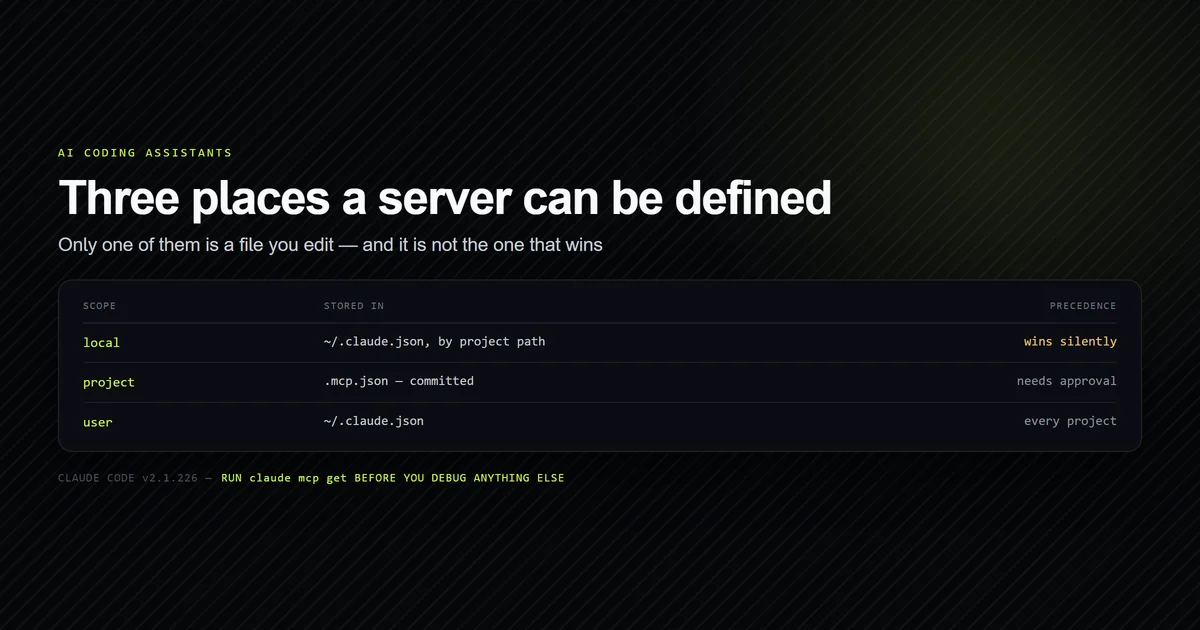
the same server can be defined in three places with silent precedence between them, and that
an unset environment variable is passed to your server as the literal string ${VAR} rather
than failing. This walks every field, the scope rules, and the two traps, using the working
config in this repository. Measured on Claude Code v2.1.226 on 2026-08-08.
Key takeaways
- Three scopes hold servers, and the narrowest wins. A
localdefinition silently shadows aprojectone with the same name, with no warning inclaude mcp list. - Only
.mcp.jsonis a file you edit. Local and user scope live inside~/.claude.json, keyed by absolute project path — edit them throughclaude mcp add, not by hand. - A project
.mcp.jsonnever connects until approved. It reports⏸ Pending approval, which reads exactly like a broken server. - An unset
${VAR}is not an error. The literal placeholder becomes the value — so a missing token reaches your server as the eight characters${TOKEN}. - Relative paths resolve against the project root, not your shell's working directory, which is what makes a committed config portable.
Where the config file lives and which one wins
Three scopes, and only one of them is a file you open in an editor. This is the configuration layer of MCP server setup in Claude Code (and if you are building an endpoint from scratch, our mcp server tutorial covers the stdio protocol), and Anthropic's MCP documentation for Claude Code documents the set:
| Scope | Stored in | Applies to |
|---|---|---|
local | ~/.claude.json, keyed by project path | You, in one project |
project | .mcp.json in the project root | Everyone who clones the repo |
user | ~/.claude.json | You, in every project |
Which of the three you land in is decided by a flag most examples omit, and its default is not the committed one: see where claude mcp add actually writes.
The one people look for — a global mcp.json in your home directory — does not exist. Local
and user scope are stored inside ~/.claude.json, a file that also holds your conversation
history and project metadata, which is why the CLI is the supported way to edit them.
Precedence runs narrowest-first: local beats project beats user. That ordering is
reasonable and the failure it produces is not, because nothing surfaces the shadowing. Two
definitions named github, one committed for the team and one you added locally six weeks
ago, and the team's is simply not the one running.
claude mcp get is where the scope becomes visible, and it is worth running before debugging
anything else:
claude mcp get roadmap
# → roadmap:
# →   Scope: Project config (shared via .mcp.json)
# →   Status: ⏸ Pending approval (run `claude` to approve)
# →   Type: stdio
That ⏸ Pending approval is the second surprise. A .mcp.json arrives with a repository and
can run any command on your machine, so Claude Code refuses to start anything in it until you
have accepted it once in that project. Until then the server is configured, listed, and not
running — a state that looks identical to a broken config from the outside.
Approval is also gated on workspace trust, which catches teams out. Since v2.1.196 a cloned
repository cannot approve its own servers: an enableAllProjectMcpServers setting committed
to .claude/settings.json is ignored until someone runs claude in the folder and accepts the
trust dialog, and the server stays at ⏸ Pending approval until they do. A correct, shared
mcp.json configuration still needs one interactive step per machine. For the wider command
surface around this, see the
complete Claude Code command reference.
A minimum working config
This is the entire .mcp.json committed to this repository. It runs a small server that
answers questions about our editorial roadmap, which is a 194 KB file nobody should pull into
a session to ask what to write next:
{
  "mcpServers": {
    "roadmap": {
      "command": "node",
      "args": ["scripts/mcp/roadmap-server.mjs"],
      "env": {}
    }
  }
}
mcpServers is the only top-level key an mcp.json configuration has. Everything else is a
server name mapped to an object, and the name is what you will see in /mcp, in tool names,
and in every error message — so roadmap beats my-server.
After adding a server, confirm it started before doing anything else:
claude mcp list
# → roadmap: node scripts/mcp/roadmap-server.mjs - ⏸ Pending approval (run `claude` to approve)
# → filesystem: npx -y @modelcontextprotocol/server-filesystem D:/repo - ✔ Connected
Every field in an mcp.json configuration
Six fields carry weight for a stdio server. Anything else in the object is ignored rather than rejected, which means a typo in a key name fails silently.
| Field | Required | What it does |
|---|---|---|
command | ✅ | The executable. Resolved on PATH unless it is a path |
args | — | Argument array. Never a single joined string |
env | — | Variables added to the server's environment |
type | — | stdio (default), http, or sse |
url | ⚠️ | Required for http and sse; invalid for stdio |
headers | — | Remote transports only — this is where a bearer token goes |
args being an array matters more than it looks. "args": "-y @modelcontextprotocol/server-filesystem ."
is not a shorthand for three arguments; it is one argument containing spaces, and the server
receives a single nonsense parameter.
Environment variables and the placeholder trap
Any string in an mcp.json configuration can reference an environment variable, expanded from the environment Claude Code itself was launched with:
{
  "mcpServers": {
    "github": {
      "command": "npx",
      "args": ["-y", "@modelcontextprotocol/server-github"],
      "env": { "GITHUB_TOKEN": "${GITHUB_TOKEN:-}" }
    }
  }
}
This is what makes a committed .mcp.json safe: the shape of the config is shared, the
secret is not. Never write a token into the file itself — it is in the repository forever
after the first commit.
The trap is what happens when the variable is not set. We tested it with a probe server that
refuses to start unless it receives the literal value expanded, configured with a plain
${MCP_SOURCE_VALUE} and no default:
claude mcp get probe-env
# →   Status: ✘ Failed to connect
# →   Issue: -32000: MCP error -32000: Connection closed
# →     MCP_PROBE_TOKEN=${MCP_SOURCE_VALUE}
The server did not receive an empty string and the client did not report a missing variable.
It received the twenty characters ${MCP_SOURCE_VALUE} as its token. Every downstream error
after that — a 401 from an API, a parse failure, a crash — is caused by a value that looks
like a template and is being treated as a credential.
The fix is one character. ${VAR:-default} supplies a fallback, and with it the same probe
connects. Anthropic's own documentation reaches the same conclusion from the other direction,
noting that referencing a variable Claude Code does not itself set "requires a default such as
${CLAUDE_PROJECT_DIR:-.}":
claude mcp add-json probe-env -s local \
  '{"type":"stdio","command":"node","args":["scripts/mcp/_probe-env.mjs"],"env":{"MCP_PROBE_TOKEN":"${MCP_SOURCE_VALUE:-expanded}"}}'
claude mcp get probe-env
# →   Status: ✔ Connected
Relative paths resolve against the project root
A committed config full of C:/Users/you/... paths breaks on every other machine, so the
question is whether relative paths work and what they are relative to.
They work, and they resolve against the project root rather than the directory your shell
happens to be in. We confirmed it rather than assuming it: a probe server that calls
process.exit(2) unless package.json is readable from its working directory connects
cleanly.
claude mcp list
# → probe-cwd: node scripts/mcp/_probe-cwd.mjs - ✔ Connected
So node scripts/mcp/roadmap-server.mjs is portable, and it is the form to prefer for any
server that lives inside the repository. In a Next.js project that server can go further and
import the app's own data layer rather than reimplementing it — one flag makes the difference,
and connecting an MCP server to a Next.js project covers it.
There is a cost to the npx form worth knowing before you reach for it. Running the same
handshake against both, warm, on this machine:
| Server | Startup to tools/list | Tool definitions |
|---|---|---|
npx @modelcontextprotocol/server-filesystem | 2,110 ms | 12,973 bytes |
node scripts/mcp/roadmap-server.mjs | 69 ms | 706 bytes |
Cold, before the package was cached, the same filesystem server took 22,752 ms. That is paid
once per install, but it is paid at session start, and a config with five npx servers in it
is the reason sessions feel slow to begin. Whether that trade is worth it is the subject of
which MCP servers are worth the context,
and what a whole fleet of them costs together is measured in
running multiple MCP servers in one client.
Remote servers take a different shape
An HTTP server replaces command and args with url, and carries auth in headers. The
protocol defines two standard transports —
stdio and Streamable HTTP —
and the shape of the mcp.json configuration follows which one you pick:
{
  "mcpServers": {
    "sentry": {
      "type": "http",
      "url": "https://mcp.sentry.dev/mcp",
      "headers": { "Authorization": "Bearer ${SENTRY_TOKEN:-}" }
    }
  }
}
Remote transports have one clear advantage when something goes wrong: their errors name the
cause. A stdio server that fails to start reports Connection closed no matter why, while a
bad URL reports the actual problem:
claude mcp list
# → probe-http: https://example.invalid/mcp (HTTP) - ✘ Failed to connect — ENOTFOUND: getaddrinfo ENOTFOUND example.invalid
Servers requiring OAuth rather than a static token are authenticated with claude mcp login,
not a headers entry. The three claude.ai connectors on this machine sit in exactly that
state, reporting ! Needs authentication until that runs — which is a configuration outcome,
not a broken server, and is covered in
MCP server not working.
Common mistakes
- Editing
~/.claude.jsonby hand. It holds conversation history alongside configuration, it is large, and a JSON syntax error there affects far more than one server. Useclaude mcp addandclaude mcp add-json. - Committing a token in
env. The whole point of${VAR:-}is that the config is shareable. A secret in a committed.mcp.jsonis a secret in the repository's history. - Writing
argsas one string. It is an array. A joined string arrives as a single argument and the server usually starts, then behaves incomprehensibly. - Assuming a listed server is running.
⏸ Pending approvalappears in the same list as connected servers and is easy to read past. Check the status column, not the presence of a row. - Reusing a server name across scopes. The narrower scope wins silently. If a team config
seems to be ignored, run
claude mcp get <name>and read theScope:line first. - Reaching for
npxfor a server that lives in your repo. It costs about two seconds of session startup and a package download to run code already on disk.
Conclusion
Put shared servers in a committed .mcp.json with relative paths and ${VAR:-} placeholders,
keep personal ones in local scope via claude mcp add, and run claude mcp get <name> as the
first debugging step — the Scope: and Status: lines answer most questions before you open
anything. If a server is configured and not working, the error text is usually the same seven
words regardless of cause, and
troubleshooting an MCP server that will not connect
covers how to tell those causes apart. For controlling individual tool execution boundaries on connected MCP servers, see Claude Code permissions. If you are carrying this file to another agent, note that
the schema is more portable than the filename: Antigravity CLI reads the same mcpServers object
from .agents/mcp_config.json but requires serverUrl where other clients accept url, which
the Antigravity CLI comparison measures against
this repo's own config.
Frequently asked questions
Where does mcp.json go?
Why is my server showing as pending approval?
Does mcp.json support environment variables?
Are relative paths in mcp.json allowed?
What is the difference between local, project, and user scope?

Muhammad Kashif
Founder and editor of Devventa, covering AI coding assistants, Next.js and the modern AI development stack.