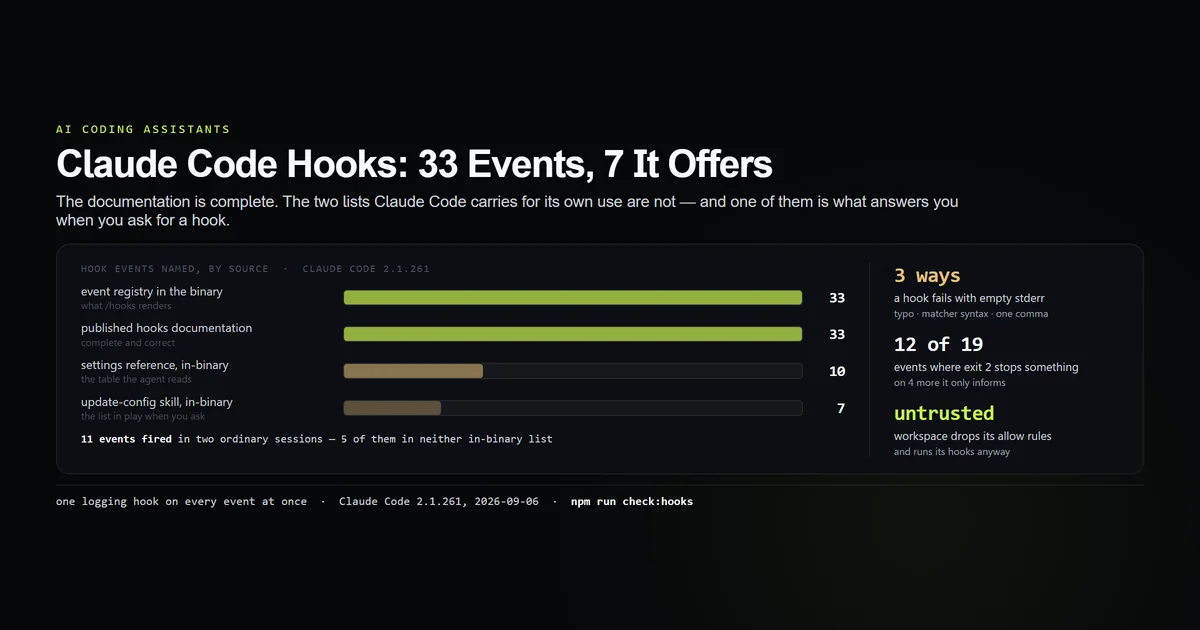
A hook is a shell command Claude Code runs at a named point in its own lifecycle, configured in the hooks key of a settings file. This claude code hooks tutorial is built the only way we could make it honest: this repository had no hooks at all, so we wrote one, registered it on every event Claude Code has, all at once, and ran real sessions against it. Measured on 2026-09-06 against Claude Code 2.1.261. There are 33 events. Eleven fired in two ordinary sessions. And the list Claude Code itself works from when you ask it to write you a hook holds seven.
Key takeaways
- Claude Code 2.1.261 registers 33 hook events and Anthropic's hooks page documents all 33. The two shortened lists are inside the tool: 10 in its embedded settings reference, 7 in the skill that runs when you ask for a hook.
- Exit code 2 does not mean one thing. On 12 events it prevents the action, on 4 it reaches the model and the run continues, and on 3 it only reaches you.
- Three ways a hook fails with an empty stderr: a misspelled event name, a matcher in permission-rule syntax, and one trailing comma — which disables the entire settings file.
- An untrusted workspace ignores its own
permissions.allowrules and runs its own hook commands anyway. PostToolUsedoes not fire when a tool fails —PostToolUseFailuredoes, and a hook that logs every tool call fromPostToolUsealone has a blind spot exactly where you need it.
The short answer
Put the hook in .claude/settings.json, match on the tool name, parse the JSON payload from stdin, and pipe-test the raw command before you trust it. That is the whole mechanism. The part worth your attention is not the syntax — it is that Claude Code will accept a hook that can never run and tell you nothing, which is why every step below ends in a check rather than a claim. If you are new to the surrounding configuration, the complete Claude Code guide covers where settings files live and which one wins; the settings.json precedence ladder is the article for scope questions. If you are here because a skill you wrote never fires, that is a different mechanism with a different fix — what a session actually shows the model about your skills is the measurement.
We re-ran everything here with an internal check script:
npm run check:hooks
# → Registry:            33 events  (the object the /hooks picker renders)
# → Public docs:         33 events
# → Settings reference:  10 events  (agent-facing, embedded in the binary)
# → update-config skill:  7 events  (the list in play when you ask for a hook)
# → Observed firing:     11 events  across 3 runs
Your first hook, in one file
Create .claude/settings.json in your project root. This one appends every Bash command Claude Code proposes to a log, and does nothing else:
{
  "hooks": {
    "PreToolUse": [
      {
        "matcher": "Bash",
        "hooks": [
          {
            "type": "command",
            "command": "node -e 'let s=\"\";process.stdin.on(\"data\",d=>s+=d).on(\"end\",()=>require(\"fs\").appendFileSync(process.env.HOME+\"/.claude/bash-log.txt\",JSON.parse(s).tool_input.command+\"\\n\"))'",
            "timeout": 20
          }
        ]
      }
    ]
  }
}
Every example in Claude Code's own hook documentation uses jq, and if you have it that is the shorter spelling — jq -r '.tool_input.command' >> ~/.claude/bash-log.txt is the same hook. jq is not installed on this machine, so every command printed in this article is the Node version, which is what we actually ran.
Three nested levels, and the middle one is the part people skip. hooks.PreToolUse is an array of matcher groups; each group has a matcher and its own hooks array of definitions. A definition is { type, command } plus an optional timeout in seconds and a statusMessage shown in the UI while it runs.
Before you believe it works, run the command by hand with the payload it will actually receive. This is the single highest-yield step in the whole process:
echo '{"tool_name":"Bash","tool_input":{"command":"ls"}}' \
  | node -e 'let s="";process.stdin.on("data",d=>s+=d).on("end",()=>console.log(JSON.parse(s).tool_input.command))'
# → ls
If that prints nothing, the hook would have failed silently in the session and you would have spent an afternoon on it.
The 33 events
Claude Code carries an event registry: an object keyed by event name, each entry holding a one-line summary, the payload field the matcher is tested against, and an exit-code contract. It is the list the /hooks picker renders. In 2.1.261 it is 13,117 bytes and holds 33 keys.
node scripts/check-hooks-surface.mjs --extract \
  | node -e 'let s="";process.stdin.on("data",d=>s+=d).on("end",()=>console.log(JSON.parse(s).events.length))'
# → 33
Anthropic's hooks documentation names all 33, so the published reference is not the problem. The two short lists are the ones inside the tool. The ## Hooks Configuration document embedded in the binary — agent-facing, since it goes on to instruct the agent to dedupe against the target file and ask before replacing an existing hook — has a ### Hook Events table with ten rows. And the built-in update-config skill, the one that loads when you ask Claude Code to set something up automatically, carries a single line:
**Hook events:** PreToolUse, PostToolUse, PreCompact, PostCompact, Stop, Notification, SessionStart
Seven. So "ask Claude to add a hook for me" is not equivalent to reading the docs and writing one — the agent is choosing from a fifth of the surface, and PostToolUseFailure and PostToolBatch, the two events that make a tool-logging hook correct, are in neither shortened list.
| Group | Events |
|---|---|
| Tool lifecycle | PreToolUse PostToolUse PostToolUseFailure PostToolBatch PermissionRequest PermissionDenied |
| Turn lifecycle | UserPromptSubmit UserPromptExpansion Stop StopFailure MessageDisplay Notification |
| Session lifecycle | SessionStart SessionEnd Setup PreCompact PostCompact ConfigChange InstructionsLoaded |
| Agents and tasks | SubagentStart SubagentStop TeammateIdle TaskCreated TaskCompleted |
| Model and environment | PreModelSwitch PostModelSwitch CwdChanged FileChanged DirectoryAdded WorktreeCreate WorktreeRemove |
| MCP | Elicitation ElicitationResult |
Two of them are worth knowing about immediately. PostToolBatch fires once after every call in a parallel batch resolves and hands you all of them in one array — including the ones that failed. InstructionsLoaded fires whenever a CLAUDE.md or a rule file is read, carrying the path, the memory type and the reason it loaded, and its own description says it is observability-only and cannot block.
Each event declares which payload field its matcher is tested against, and it is not always the tool name: SessionStart matches on source, PreCompact on trigger, SubagentStop on agent_type, ConfigChange on source, Notification on notification_type.
Which events actually fire
Registration is cheap, so we registered a logging hook on all 33 names in one settings.json and ran ordinary sessions. Every invocation appended its event name and the full stdin payload to a file.
The first run — write a file, read it back — produced 10 invocations across 8 events. A second run that launched one Explore subagent produced 18 invocations across 10 events. A third, a single shell command that fails, produced 3.
| Event | Fired | In the reference |
|---|---|---|
SessionStart UserPromptSubmit PreToolUse | yes | yes |
PostToolUse Stop PostToolUseFailure | yes | yes |
PostToolBatch MessageDisplay SessionEnd | yes | no |
SubagentStart SubagentStop | yes | no |
PermissionRequest Notification PreCompact PostCompact | no | yes |
Six events are in both columns. Five events that fire in a plain session are absent from the ten-row table the tool shows its own agent, and four rows of that table never fired — three of them because nothing in these runs triggered a permission prompt, a notification or a compaction, which is the expected reason rather than a defect.
What is in the payload
Four keys are on every payload of every event we observed:
{
  "session_id": "378a92a9-2b13-4bbb-a136-355405b61a09",
  "transcript_path": "/home/you/.claude/projects/<slug>/<session>.jsonl",
  "cwd": "/home/you/code/project",
  "hook_event_name": "PostToolUse"
}
Tool events add tool_name, tool_input, tool_use_id, permission_mode and prompt_id. PostToolUse adds tool_response and duration_ms. That is eleven keys; the example in the in-binary settings reference shows four of them. duration_ms, permission_mode and prompt_id appear in no documentation we could find and are three of the most useful things in the object — permission_mode in particular lets one hook behave differently under plan and under bypassPermissions.
Other events carry their own: Stop hands you last_assistant_message, stop_hook_active and background_tasks; SessionEnd a reason; MessageDisplay the delta of text about to be printed.
transcript_path is the most under-used key on the list. It points at the session's own JSONL file, so a Stop hook can read back everything that happened in the turn that just ended — where Claude Code stores its history covers what is in that file.
Exit codes are not one contract
Every guide repeats "exit 2 blocks". That is true of the event most people write first and false of most of the rest. Of the 33 events, 19 document a behaviour for exit code 2, and they fall into three groups:
| What exit 2 does | Count | Events |
|---|---|---|
| Prevents the action | 12 | PreToolUse PostToolBatch UserPromptSubmit PreCompact PreModelSwitch ConfigChange and 6 more |
| Reaches the model, run continues | 4 | PostToolUse PostToolUseFailure Stop SubagentStop |
| Reaches you only | 3 | SessionStart SubagentStart Setup |
The remaining 14 declare no exit-2 contract at all, and one — StopFailure, which replaces Stop when an API error ended the turn — states outright that its output and exit code are ignored.
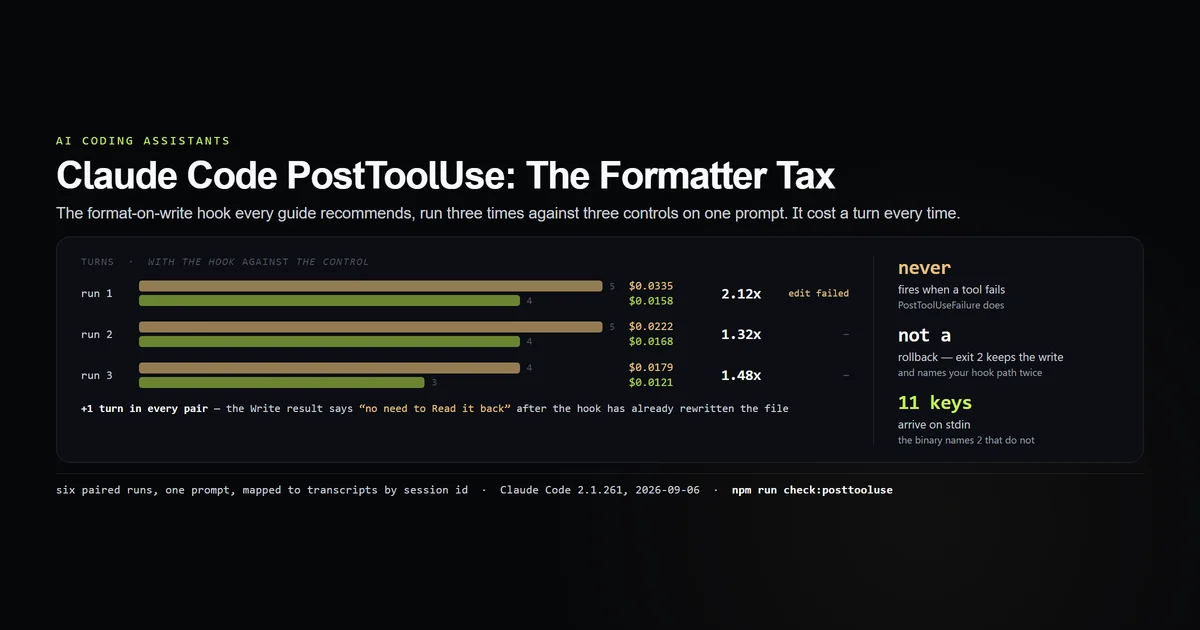
The practical consequence: an exit-2 in a PostToolUse hook is a complaint, not a veto. The write already happened. What a PostToolUse hook can and cannot undo measures that directly. If you want a veto, the PreToolUse hook is the only tool-level one there is.
Three ways a hook fails silently
Each of these was registered in a real settings.json alongside something that works, so the session proves the difference rather than the absence. There are three.
A misspelled event name. We wrote PreToolUSe — one capital out of place — next to a correct PreToolUse. The correct one fired. The typo did not. stderr was empty, the exit code was 0, and nothing anywhere named the unrecognised key.
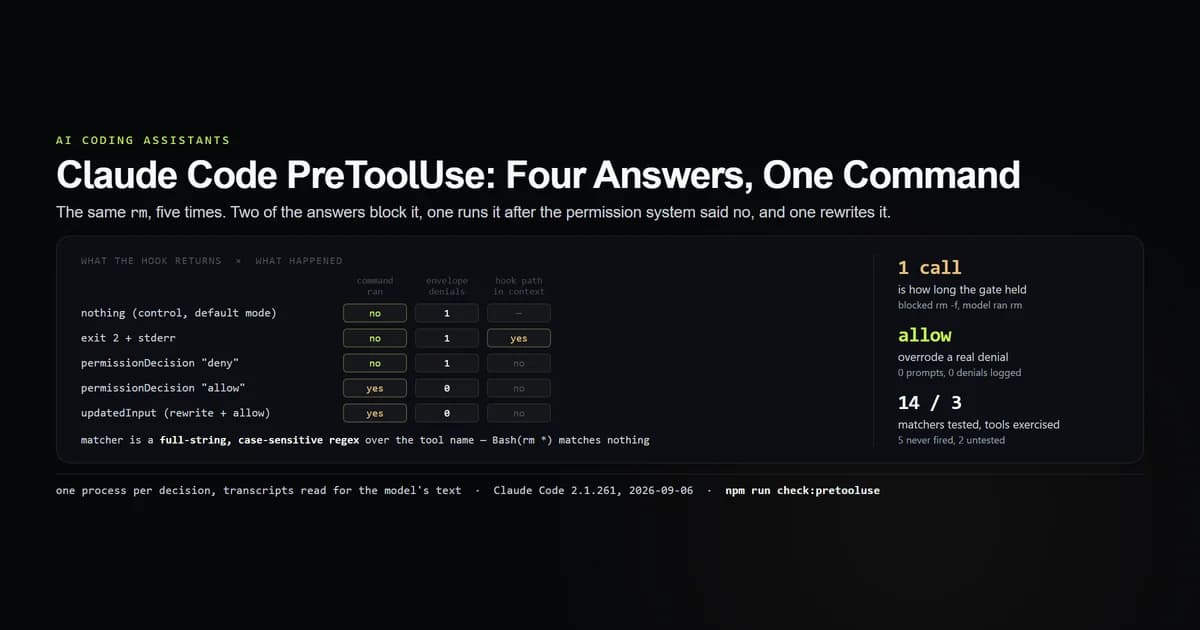
Permission-rule syntax in a matcher. permissions.allow takes entries like Bash(rm *), so writing the same string as a hook matcher is the obvious move. We registered "matcher": "Bash(rm *)" on PreToolUse and asked the session to run rm -f gone.txt. The hook never fired, nothing was printed, and the file is gone. Matchers are tested against tool_name alone; Bash(rm *) is a regex that matches no tool name that exists.
One trailing comma. This is the worst of the three, because it is not a hook failure at all — it is a settings failure that presents as one. We ran the same file twice, differing by a single character:
{
  "hooks": { "SessionStart": [ /* … */ ] },   // ← with a comma after this line,
  "permissions": { "allow": ["Read"] }        //   nothing in this file applies
}
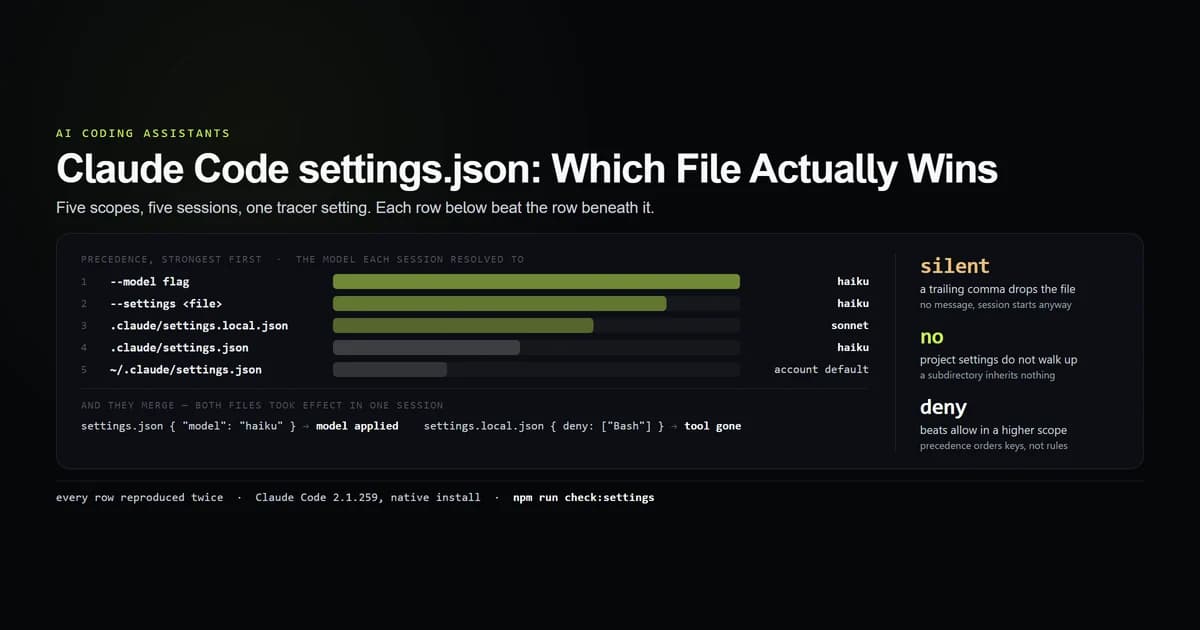
With the comma: the hook did not run, stderr was completely empty, and the exit code was 0. Without it: the hook ran — and the untrusted-workspace warning about permissions.allow appeared. That warning is the tell. Its absence is the only visible symptom of a settings file that has been discarded whole, and you will only notice it if you have seen the valid run.
Hooks run before the trust prompt does
This one is worth reading twice. We created a directory that had never been opened interactively, gave it a .claude/settings.json containing one permissions.allow entry and one SessionStart hook, and ran a session in it.
claude -p "Say OK" --model haiku --output-format json
# → stderr: Ignoring 1 permissions.allow entry from .claude/settings.json:
# →         this workspace has not been trusted.
The permission rule was ignored, loudly. The hook from the same file, in the same process, ran — and nothing was printed about it. The trust gate covers permission rules, not hook commands.
The consequence is concrete: cloning a repository and running Claude Code inside it executes whatever that repository put in its hooks key, before you have accepted anything. This is not a defect in the sense of a bug — Anthropic's hooks documentation is explicit that hooks execute arbitrary shell commands with your credentials, and the settings reference is where the file this one lives in is described — but the asymmetry with the trust prompt is not, and it is the reason git diff on .claude/settings.json deserves the same attention as a change to a CI file. Claude Code's permission rules are the surface that is gated.
Hooks fire inside subagents
The subagent run answered a question we had not thought to ask. A hook registered once in settings.json is invoked for tool calls made by Agent-tool subagents as well as by the main session, and the subagent shares the parent's session_id and transcript_path — so you cannot separate them by session.
What you can use is agent_type. Tool events raised inside a subagent carry agent_id and agent_type — "Explore", in our run — alongside tool_name. SubagentStart and SubagentStop bracket the whole thing, and SubagentStop additionally hands you agent_transcript_path.
# in a hook: exit 0 early when the call came from a subagent
node -e 'let s="";process.stdin.on("data",d=>s+=d).on("end",()=>{
  if (JSON.parse(s).agent_type) process.exit(0);
  /* … the real work … */ })'
If you run subagents for exploration, a formatter or a test-runner hook will fire for every one of their edits too, at their concurrency rather than yours.
What did not work
The framing of this article was wrong until an hour before it shipped. We had the 33-event registry, the 10-row table and the 7-name skill list, and wrote the piece around "the documentation is a third of the product." Then we fetched the published hooks page and counted: all 33 are there, correctly named. The public documentation is complete. The gap is entirely between that page and the two abbreviated copies the tool carries for its own use — which is a smaller claim and a more useful one, because it says something specific about asking the agent to configure itself. The version that would have shipped was more quotable and false.
The first list of hook events we pulled out of the binary was an array of nine names — Stop, SubagentStop, UserPromptSubmit, SessionStart, SessionEnd, PreToolUse, PostToolUse, PreCompact, Notification — which matches the public documentation closely enough to look like a confirmation. It is the validation set for launcher_hooks, a sandbox-runner feature, and has nothing to do with settings.json. Reading 900 bytes of context around it is what caught that. Two other arrays in the same binary look equally authoritative and are equally unrelated.
The extractor's first version reported a matcher field for PostToolBatch, which has none: an unbounded look-ahead window read the next event's matcherMetadata. Every event after it was shifted by one and the error is invisible unless you compare against something. The fix is in the committed script with a comment saying why.
The turn-by-turn ordering in our log is completion order, not event order. Hooks are spawned concurrently, we timestamped when each hook process finished writing, and the subagent run's log shows Stop in the middle of the subagent's tool calls as a result. We are not publishing an ordering claim from it. What the log does support is the set of events, which is what this article claims.
⚠️ One trap we are reporting rather than reproducing. The tool's own hook-construction procedure warns that the settings watcher "only watches directories that had a settings file when this session started," so creating .claude/settings.json mid-session leaves the hook correct and inert until /hooks is opened or the session restarts. Every run here started with the settings file already on disk, so we never hit it and cannot confirm it. It is quoted here because it explains a failure mode our three silent ones do not.
⚠️ This is one person, one machine, one platform. Every run is Claude Code 2.1.261 on Linux under WSL2, on Haiku, in -p mode. Interactive sessions raise events these runs cannot — PermissionRequest and Notification in particular — and the counts here are a floor, not a census.
Best practices
- Pipe-test the raw command before you put it in JSON. Synthesize the payload, run the command, check the exit code and the side effect. This catches a wrong package manager, a tool that is not installed, and unquoted paths in one step.
- Make the first version of every hook write a line to a file. You need proof it ran before you need it to do anything, and the two silent failures above are indistinguishable from a hook that ran and did nothing.
- Read the payload into a quoted variable, never through an unquoted
| xargs. Paths with spaces split, and the failure is intermittent. Claude Code's own hook-construction procedure names this specific mistake, which is a reasonable sign of how often it happens. - Pick the event by what exit 2 does there, not by when it fires.
PostToolUsecannot stop anything;PreToolUseandPostToolBatchcan. - Handle subagents explicitly. Check
agent_typeand decide, rather than discovering it when a formatter runs eight times in parallel. - Commit team hooks to
.claude/settings.jsonand keep personal ones in.claude/settings.local.json. The local file is gitignored; a hook that only works on your machine does not belong in the shared one. - Review
.claude/settings.jsonin every pull request. It runs before the trust prompt gates anything.
Common mistakes
Copying a permission rule into a matcher. Bash(git *) is valid in permissions.allow and matches nothing as a matcher. Symptom: the hook never runs and nothing is logged. Fix: matchers are regexes over the tool name — use Bash, and filter on tool_input.command inside the command itself.
Assuming the matcher is a substring test. It is a full-string, case-sensitive regex. Ba does not match Bash; bash does not match Bash. We tested both. Symptom: silence. Fix: ^Bash$ if you want to be explicit, or omit matcher entirely to match every tool.
Logging every tool call from PostToolUse. It does not fire on failure. Every failed command is missing from your log, which is the half you wanted. Fix: add PostToolUseFailure, or use PostToolBatch, which carries failed calls with their error text in tool_response.
Writing a formatter and assuming the model knows. The Write tool result tells the model its copy of the file is current; if your hook has since rewritten the file, that sentence is false. We measured what it costs — the PostToolUse article has the paired runs.
Writing the rule as a skill first. A skill is offered to the model, not run for it. Running one policy both ways over fifteen runs, the hook recorded 5 of 5 edits and the skill 0 of 5 — the same as having no policy at all — and the skill's description was fully in front of the model the whole time. Symptom: it works every time you test it by name and never happens in real work.
Debugging a hook by editing the JSON. The config is almost never the problem — with one exception, and it is the reason to check the file's syntax first and then stop touching it. node -e 'JSON.parse(require("fs").readFileSync(process.argv[1],"utf8"))' .claude/settings.json exits 0 if the file parses and 1 if one comma has switched off every setting you have. After that, the command is the suspect: run it by hand with a synthesized payload.
Conclusion
Write the hook, register it on one event, make it write a line to a file, and confirm the line appears before you make it do anything real. Reach for PreToolUse when you need to stop something, PostToolBatch when you need to see everything including failures, and SessionStart or Stop when you need the edges of a turn. Then read .claude/settings.json in every pull request that touches it, because it runs whether or not you have trusted the checkout. Next: PreToolUse, the only tool-level veto there is.
Frequently asked questions
Where do Claude Code hooks go?
How many hook events does Claude Code have?
Why is my Claude Code hook not running?
What does a hook receive on stdin?
Do hooks run in an untrusted directory?

Muhammad Kashif
Founder and editor of Devventa, covering AI coding assistants, Next.js and the modern AI development stack.