If Claude Code tells you auto mode is unavailable for your plan, your plan is almost certainly not the problem. Anthropic's permission modes documentation lists auto mode's plan requirement as "All plans." The message names the one requirement that is essentially never unmet. This guide covers what actually gates auto mode, how to tell this message apart from the transient one that reads almost identically, and why entering plan mode can trigger it on a subscription that qualifies. Checked against Claude Code v2.1.223 in August 2026.
Key takeaways
- Auto mode's documented plan requirement is "All plans." Pro, Max, Team, and Enterprise all qualify.
- Model is the usual cause. Sonnet 4.5, Opus 4.5, Haiku, and claude-3 models are unsupported on every provider.
- Anthropic states this message means a requirement is unmet and "is not a transient outage." Retrying does not help.
- A second, similarly worded message about not determining the safety of an action is transient, and retrying is the right response to it.
- Multiple open reports describe the message firing on Max subscriptions purely from entering plan mode, including one where it made a session unusable.
Why Claude Code says auto mode is unavailable for your plan
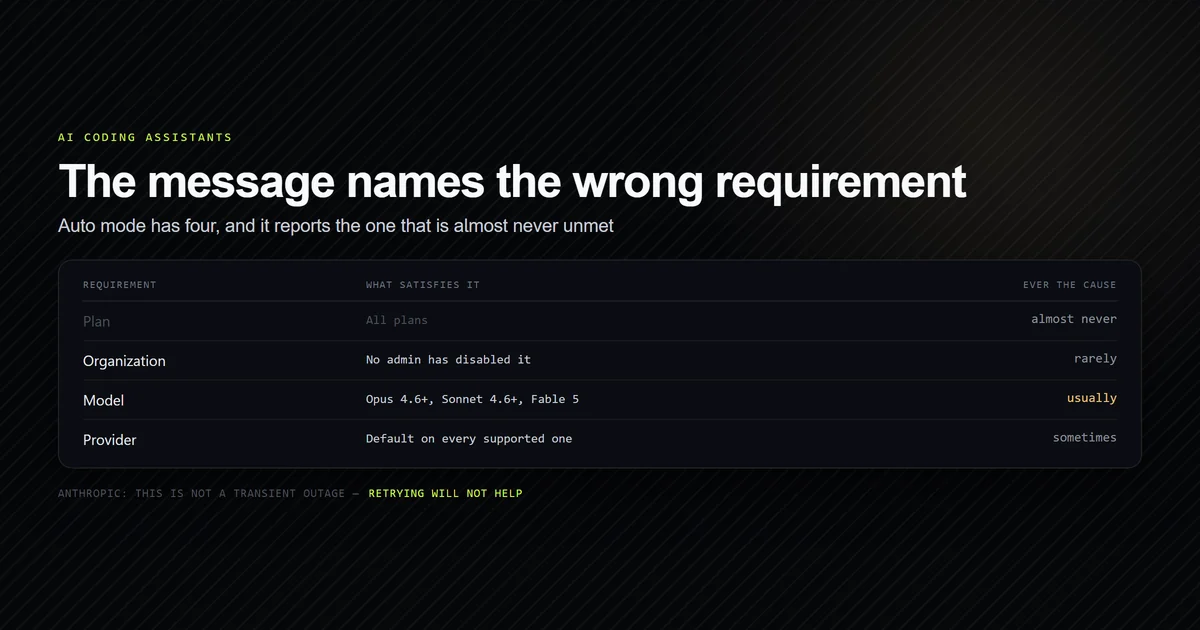
The message is accurate about the outcome and misleading about the cause. Auto mode has four documented requirements, and the wording surfaces the wrong one.
Here is the plan requirement, quoted from Anthropic's permission modes page in full:
Plan: All plans.
That is the entire entry. There is no tier gate, no Pro-versus-Max split, and no minimum subscription. If you are seeing this message on a paid plan, the plan is not why.
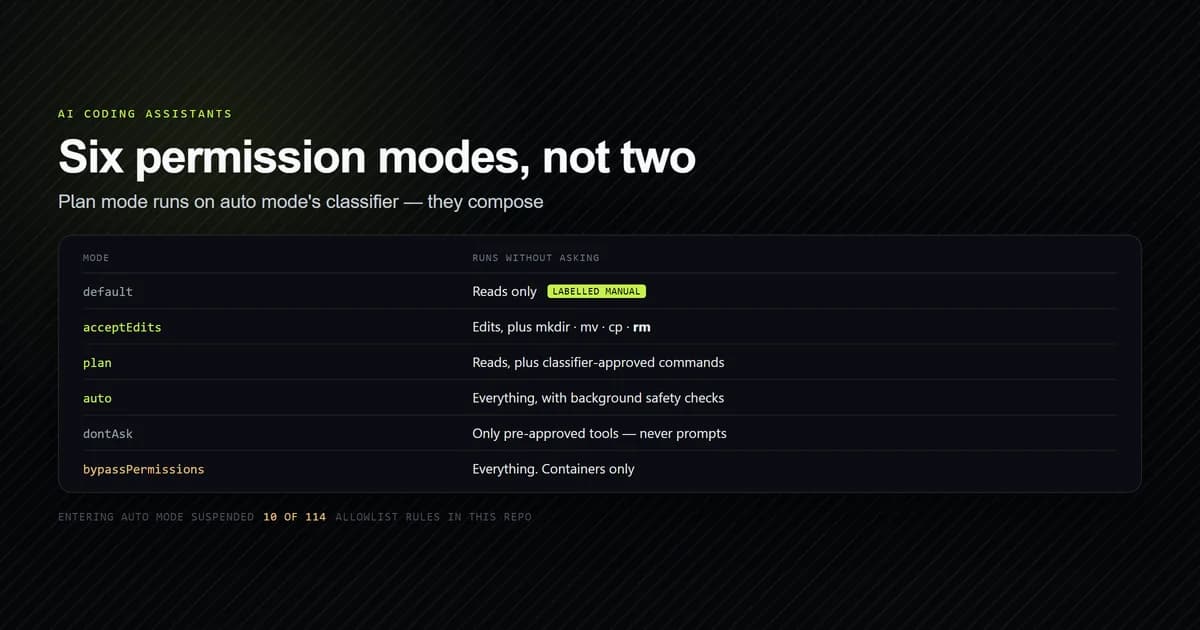
What the message is really telling you is that one of four requirements failed, and the string picked the least likely one to name. For how auto mode relates to the mode you are probably in when you see it, see auto mode versus plan mode, and the complete Claude Code guide for where both sit in the permission system.
The four requirements that actually gate it
| Requirement | What satisfies it |
|---|---|
| Plan | All plans. Never the cause on a paid subscription |
| Organization | Available by default on Team and Enterprise unless an admin disabled it |
| Model | Opus 4.6+, Sonnet 4.6+, or Fable 5 on the Anthropic API. Narrower elsewhere |
| Provider | Available by default on every supported provider |
Organization. On Team and Enterprise plans auto mode is available by default. An administrator
turns it off for everyone by setting permissions.disableAutoMode to "disable" in managed
settings, which removes auto from the Shift+Tab cycle and rejects --permission-mode auto at
startup. If you are on a company laptop and a colleague on the same plan has auto mode, this is
where to look.
Provider. Auto mode is available by default on the Anthropic API, Claude Platform on AWS,
Amazon Bedrock, Google Cloud's Agent Platform, Microsoft Foundry, and signed-in Claude apps gateway
sessions. There is a version trap here worth knowing: in v2.1.158 through v2.1.206, auto mode was
off on all of those except the Anthropic API and Claude Platform on AWS until you set
CLAUDE_CODE_ENABLE_AUTO_MODE=1. Version v2.1.207 removed that requirement, and the variable is
now accepted for compatibility with no effect.
Model is the usual cause
This is the requirement that actually fails, and it fails silently because switching models is a one-keystroke action that gives no warning about permission consequences.
| Provider | Models that support auto mode |
|---|---|
| Anthropic API, Claude Platform on AWS | Opus 4.6 or later, Sonnet 4.6 or later, Fable 5 |
| Bedrock, Google Cloud, Foundry, gateway | Sonnet 5, Opus 4.7 or later, Fable 5 |
Unsupported on every provider: Sonnet 4.5, Opus 4.5, any Haiku model, and the claude-3 family.
The practical failure looks like this. You pick a cheaper or faster model with /model for a
routine task, and auto mode quietly leaves the Shift+Tab cycle. Later you try to enter it, or
approve a plan with the auto mode option, and get told your plan does not support it. Nothing about
your plan changed. Your model did.
The provider column is the second thing to check, and it catches people migrating a working setup. A configuration that ran auto mode happily on the Anthropic API with Sonnet 4.6 will not have it on Bedrock, because Bedrock's list starts at Sonnet 5.
Two messages that read alike
Claude Code has two auto mode failure messages with very different meanings, and telling them apart saves the most time of anything in this article.
| Message | Meaning | What to do |
|---|---|---|
| Auto mode is unavailable for your plan | A requirement is unmet | Fix the requirement. Retrying will not help |
| Auto mode cannot determine the safety of an action | A classifier request failed | Usually transient. Retry |
On the first, Anthropic is explicit: "If Claude Code reports auto mode as unavailable, one of these requirements is unmet; this is not a transient outage."
The second names a model and reports it cannot determine the safety of a tool call. That one has
its own set of causes: the classifier model being temporarily unavailable, an unparseable
classifier response, a separate API safety check blocking the request because of earlier
conversation content, or a conversation that outgrew the classifier's context window. Most resolve
on a retry. The context-window variant is fixed with /compact, and on Amazon Bedrock the
unavailable-model variant can repeat until your AWS account is able to invoke the named model.
If you retry the first message expecting the second's behavior, you will retry indefinitely.
When plan mode triggers it
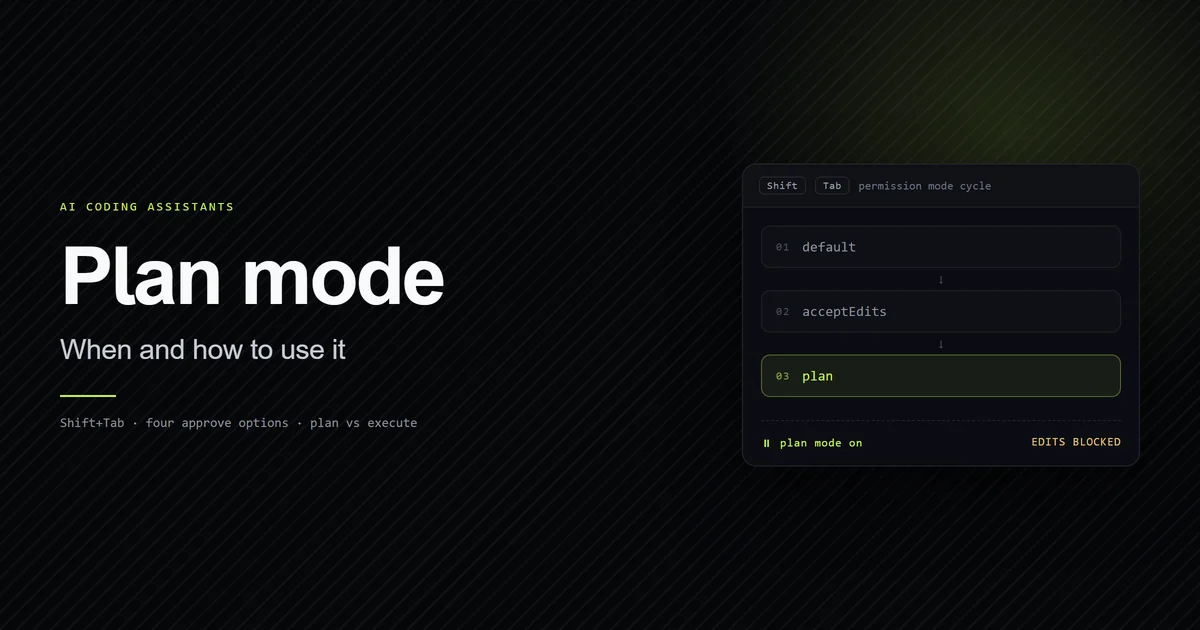
There is a reported failure cluster where the message appears on accounts that meet every requirement, triggered purely by entering plan mode.
The clearest report is issue #48066, on a
Max subscription running v2.1.90. With defaultMode set to plan in ~/.claude/settings.json,
the reporter describes the outcome as: "every message returns only 'Auto mode is unavailable for
your plan'. No actual response is produced. The session is completely unusable." Changing
defaultMode back in the same session did not clear it; only a new session did. It was closed as a
duplicate, and similar reports include
#44708,
#44365 and
#42649.
The reason this happens at all is architectural rather than arbitrary. Plan mode and auto mode are
coupled by design: when auto mode is available and useAutoModeDuringPlan is on, which is the
default, the classifier reviews shell commands during planning rather than prompting you. So
entering plan mode legitimately performs an auto mode availability check. What the reports describe
is that check surfacing a blocking, user-facing error in a mode that should degrade gracefully
instead.
The graceful degradation does exist elsewhere in the product, which is what makes the blocking behavior look like a defect rather than a policy. At a plan approval prompt, the first option normally reads Yes, and use auto mode. When auto mode is unavailable, that same option reads Yes, auto-accept edits instead. Claude will allow edits either way; only the review mechanism changes.
Diagnosing it in order
Work down this list. It is ordered by how often each one is the answer, not by how easy it is to check.
- Run
/model. Compare against the model table above. This is the cause most of the time. - Identify your provider. Anthropic API and Claude Platform on AWS accept a wider model range than Bedrock, Google Cloud, and Foundry.
- Check
claude --version. If you are below v2.1.207 on Bedrock, Google Cloud, or Foundry, you needCLAUDE_CODE_ENABLE_AUTO_MODE=1. If you are below v2.1.142,defaultModebehavior differs from everything documented here. - Look for managed settings. On Team or Enterprise, ask whether
permissions.disableAutoModeis set to"disable". You cannot override this locally, by design. - Check where
defaultModelives. Anautovalue in.claude/settings.jsonor.claude/settings.local.jsonis ignored deliberately, so a repository cannot grant itself auto mode. It belongs in~/.claude/settings.json.
{
  "permissions": {
    "defaultMode": "auto"
  }
}
- Start a fresh session. If everything above checks out and the message appeared on entering plan mode, you are likely in the reported failure cluster.
Common mistakes
- Upgrading your subscription to fix it. The plan requirement is "All plans." Upgrading Pro to Max changes nothing about auto mode availability, and this is the most expensive wrong move available.
- Retrying the message. Anthropic states it is not a transient outage. The message that is transient is the one about determining the safety of an action.
- Putting
defaultMode: "auto"in project settings. It is ignored silently since v2.1.142. The session starts indefaultmode with no error, which reads exactly like a broken setting. - Assuming plan mode is unavailable too. Plan mode does not require auto mode. When auto mode is unavailable, planning falls back to prompting for commands outside the read-only set, which is slower but fully functional, and the plan itself is stored no differently either way.
- Debugging in the session that broke. Several reports describe the error persisting after the triggering setting is reverted, with only a new session clearing it.
Conclusion
Check your model first, your provider second, and your organization's managed settings third. Do not upgrade your plan, because the plan requirement is "All plans" and the message names it misleadingly. If the message appeared the moment you entered plan mode on an account that qualifies, start a fresh session and treat it as the reported defect rather than a configuration problem. Plan mode itself keeps working without auto mode, so you are never blocked from planning while you sort this out. For the full mechanics of autonomous loops and permission tiers, see Claude Code auto mode explained, for what planning does, see plan mode, and for what the classifier costs when it is available, does plan mode use tokens.
Frequently asked questions
Which Claude plans support auto mode?
Why does auto mode work in one session but not another?
Is auto mode being unavailable a temporary outage?
What is useAutoModeDuringPlan?
Why is defaultMode auto being ignored in my project settings?

Muhammad Kashif
Founder and editor of Devventa, covering AI coding assistants, Next.js and the modern AI development stack.