Claude Code subagents run a task in a separate context window and return only the summary, which is what keeps a 40-file search out of the conversation you are actually working in — and out of the context floor every later turn pays for. This guide builds two real project subagents for this repository, shows a probe that confirms they loaded without spending a single token, and documents the three ways a definition fails where the session tells you nothing at all. For where subagents sit among Claude Code's other extension points, see the complete Claude Code guide. Measured against Claude Code v2.1.224 on 2026-08-07.
Key takeaways
- A subagent gets its own context window and its own system prompt — not the full Claude Code system prompt, and not your conversation history.
- Custom subagents load your CLAUDE.md. Explore and Plan do not. That exception is documented and has no per-agent override.
claude --agent <nonexistent> --init-onlylists every available agent and exits, so you can verify discovery for free.- Three definition failures are silent in-session: a
:in the name, a duplicate name, and a missingnamefield — the last logs nothing at all, even at debug level. - Tool access is filtered twice, and background is the default, so the same definition can resolve to different tools depending on where it runs.
What a subagent actually is
Four things are separate from your main conversation: the context window, the system prompt, the tool list, and the permission mode.
Anthropic's subagents documentation describes the startup state precisely. A non-fork subagent does not see your conversation history, the skills you have invoked, or the files Claude has already read. It receives its own system prompt plus environment details, a delegation message Claude writes summarising the task, your CLAUDE.md hierarchy, and a git status snapshot.
That last pair is the detail people get wrong. A custom subagent does load your project instructions. The built-in Explore and Plan agents are the only two that skip CLAUDE.md and git status, and the docs state there is no frontmatter field or per-agent setting to change which agents skip them.
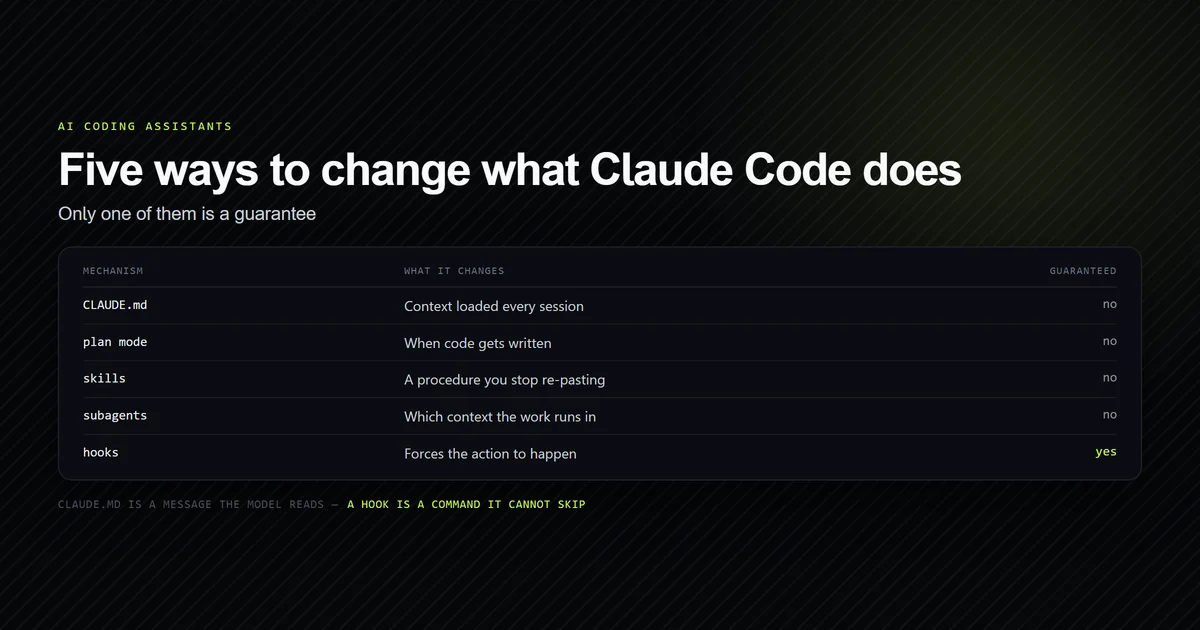
The consequence is worth sitting with: your project conventions reach a custom subagent as context, with the same advisory weight they carry in the main session. If a rule matters enough that a subagent must not break it, it belongs in a hook, for exactly the reasons covered in why Claude ignores CLAUDE.md.
The built-in subagents
Five are registered by default in an interactive session. We confirmed the list on this machine
rather than taking it from the docs — the probe is in the next section but one. Bundled commands
spawn their own on top of these: one /security-review run fanned out to nine sub-agents,
one per candidate finding, which is where the bill comes from.
| Agent | Model | Used for |
|---|---|---|
Explore | Inherits, capped at Opus | Read-only search and codebase discovery |
Plan | Inherits | Research during plan mode |
general-purpose | Inherits | Multi-step work needing both search and edits |
claude | Inherits | Catch-all when nothing more specific fits |
statusline-setup | Sonnet | Configuring your status line |
Explore and Plan deny Write and Edit. As of v2.1.198 Explore inherits the
main conversation's model rather than always running on Haiku, which made it better and more
expensive at the same time. If you want the old behaviour, define a project subagent named
Explore with model: haiku — a user or project definition overrides the built-in and keeps its
own model field.
The definitions in the 2.1.266 binary fill in the rest. Explore and Plan both set
omitClaudeMd: true, and their exclusion list also covers ExitPlanMode and the Artifact tools.
statusline-setup gets Read and Edit only and is pinned to Sonnet whatever your session runs.
Explore even carries two descriptions that disagree: the full text offers quick, medium and
very thorough as search-breadth values, the lean text only medium and very thorough.
Write a project subagent
A subagent is a markdown file: YAML frontmatter for configuration, body for the system prompt.
Only name and description are required. This repository now ships two under .claude/agents/ (see the Claude directory configuration), both checked into
version control so the whole project gets them.
---
name: content-auditor
description: Runs the repository's editorial checks against content/ and reports only the failures. Use before publishing an article, or after editing any file under content/.
tools: Bash, Read, Grep, Glob
model: haiku
color: yellow
---

You audit this repository's articles against its own editorial checks. You do not
write or edit files; report findings and stop.
Three choices in that frontmatter are load-bearing.
description is the routing signal, not documentation. Claude decides when to delegate by
reading it, so it names the trigger conditions rather than describing the agent's personality.
tools is an allowlist that replaces inheritance. Naming four tools means this agent cannot
edit files, write files, or reach any MCP server, regardless of what the main session can do.
model: haiku is a cost decision. Running three shell checks and classifying the output does
not need the session's model, and the field defaults to inherit if you omit it.
The second agent, roadmap-scout, is read-only — Read, Grep, Glob — and exists because this
project's editorial plan is 1,800 lines that nobody should pull into the main context to answer
"what is next."
Confirm it loaded without spending a token
The usual way to test a subagent is to ask Claude to use it, which costs a model turn and tells you nothing useful when it fails. There is a better way.
--init-only runs setup and session-start hooks then exits. Combined with --agent and a name
that does not exist, Claude Code enumerates everything it found and quits before any model turn:
claude --agent definitely-not-real --init-only
# → --agent 'definitely-not-real' not found. Available agents: claude, Explore,
# →   general-purpose, Plan, statusline-setup
That was this repository before the two files existed: five built-ins. After adding them:
claude --agent definitely-not-real --init-only
# → --agent 'definitely-not-real' not found. Available agents: claude, content-auditor,
# →   Explore, general-purpose, Plan, roadmap-scout, statusline-setup
Seven. Both project agents discovered, no session started, nothing billed. This is the check to run after writing a definition and the one to run when a subagent "does not work" — because most of the time it did not load, and a delegation attempt cannot distinguish that from a bad prompt.
One discovery caveat is documented and real: the file watcher covers only directories that existed
when the session started. Creating .claude/agents/ for the first time mid-session requires a
restart. Edits to files in an already-existing directory are picked up within seconds.
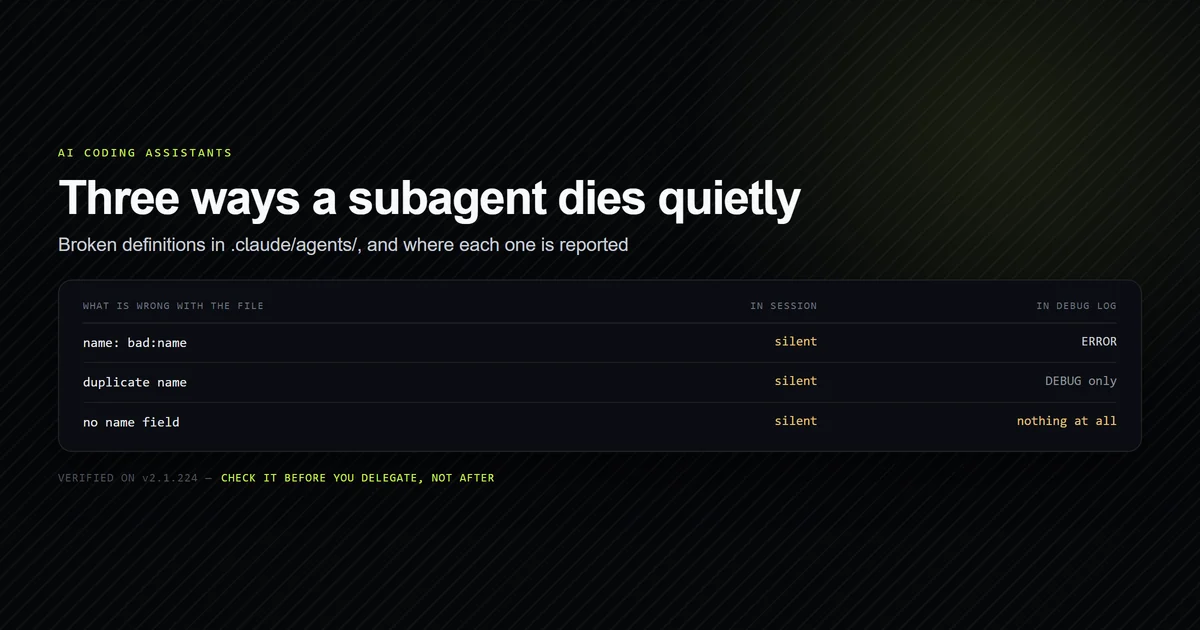
Three ways a definition fails silently
We wrote four deliberately broken definitions into .claude/agents/, re-ran the probe, and
captured the debug log with --debug-file. The session output did not change at all — the
available-agents list simply did not include them.
The log did:
[ERROR] Agent file .claude\agents\_probe-colon.md has invalid name 'bad:name':
        names must not contain ':' (reserved for plugin namespacing)
[DEBUG] [agents] Duplicate agent name 'content-auditor' (projectSettings):
        _probe-dupe.md, content-auditor.md — active: _probe-dupe.md
A colon in name blocks the file. Colons are reserved for plugin-scoped identifiers like
my-plugin:reviewer. This one at least logs an ERROR.
A duplicate name is the dangerous one. Two files declared content-auditor, and the log names
the winner: _probe-dupe.md, the throwaway probe. Adding a file can silently take over an
existing agent's name, the real definition stops being used, and the only record is a DEBUG line.
Anthropic documents the selection as filesystem read order rather than any precedence rule, which
is consistent with what we saw.
A definition with no name field produced no log line whatsoever — not at ERROR, not at
DEBUG. It simply never registered. Of the three, this is the one you will spend the longest
looking for.
The same log also shows the scope chain being walked in order, which confirms the documented precedence:
Failed to stat directory C:\Program Files\ClaudeCode\.claude\agents: ENOENT
Failed to stat directory C:\Users\<user>\.claude\agents: ENOENT
[STARTUP] Loading commands and agents...
Managed settings first, then user scope, then project. Both higher scopes were absent here, so the project definitions loaded unopposed.
Because none of this surfaces in a session, we wrote an internal check script that validates every definition against the documented schema and reports what the CLI hides. Against the probe files above it reported:
npm run check:agents
# → 6 definition(s) under .claude/agents/
# →
# →   content-auditor    model=haiku    tools=4
# →   roadmap-scout      model=haiku    tools=3
# →
# → ERROR  .claude/agents/_probe-noname.md
# →        missing required field `name` — never registers, and logs nothing
# → ERROR  .claude/agents/content-auditor.md
# →        duplicate name 'content-auditor', also in _probe-dupe.md
# →
# → 2 loadable, 4 error(s), 2 warning(s).
Its own first version had a bug worth admitting: it counted definitions with fatal errors as "loadable," which is precisely the false reassurance the check exists to remove.
What delegation saves and what it costs
On 2026-09-09, on Claude Code 2.1.266 and Windows 11, we dispatched content-auditor for real.
The job was one this repository already had — run its three editorial checks and report what
failed — and we ran it six times with claude -p --output-format json, all on Haiku with the same
three commands allowed: three times asking the parent to use the subagent, three times inline with
--disallowedTools "Agent,Skill" so the parent had to do the work itself. Turns and cost come from
the JSON envelope; parent context was measured by reading each session transcript off disk and
counting the characters of message content and tool results that landed in it.
| Arm | Turns | Parent context | Denials | Cost, 3 runs |
|---|---|---|---|---|
| Delegated | 1, 1, 1 | 7,373 · 5,943 · 6,404 | 0, 0, 0 | $0.1033 |
| Inline | 7, 8, 8 | 25,015 · 26,865 · 26,886 | 3, 4, 4 | $0.1309 |
All six runs returned the same answer, so nothing was traded away for the shorter conversation. Three results are worth keeping apart:
- Turns collapsed to one. The delegated parent called
Agentonce and wrote its summary. - Parent context fell 4.0x, from a mean 26,255 characters to 6,573.
- Cost did not move usefully. The delegated total is lower only because one inline run cost $0.0756; the other two cost $0.0274 and $0.0279, each below every delegated run.
The reason cost does not fall is that a subagent does not start clean. Grepping the sidechain
transcripts for a line unique to this project's CLAUDE.md found it in all three delegated runs,
delivered as an instructions attachment exactly as the parent receives it. Your project
instructions are paid for twice, and this repository's 9,586-byte CLAUDE.md is the floor under
every delegation. What the subagent does not inherit is the conversation — which is why the most
common bad delegation is a parent that knew something it did not think to pass on.
The model: field is honoured. With the parent started on --model sonnet, one session's
modelUsage came back with two keys, claude-sonnet-5 and claude-haiku-4-5-20251001, because
content-auditor declares model: haiku. That is the cheapest structural saving in the format.
Two caveats bound these numbers. Three runs a side is a direction, not a benchmark, and the job —
bounded, verbose, needing no judgement from the parent — is a near-perfect fit for delegation. And
part of the turn gap is a Windows artefact: every inline run burned three or four turns being
refused PowerShell before falling back to Bash, while the subagent, whose tools list does not
name PowerShell, went straight to Bash. Context is counted in transcript characters, not
tokens.
Where the delegated work goes
The delegated parent transcript holds exactly one tool call. The work sits beside it:
<session-id>.jsonl                                   ← the parent
<session-id>/subagents/agent-aa62b5fff93eb2c06.jsonl ← the subagent
<session-id>/subagents/agent-aa62b5fff93eb2c06.meta.json
Every entry in the subagent file carries isSidechain: true, an agentId, and an
attributionAgent field naming the definition. The three delegated runs put 17,642, 16,754 and
17,750 characters into those files — the check output and the intermediate reasoning, none of it
in the parent. The .meta.json sidecar records agentType, the toolUseId of the Agent call
that started it, spawnDepth, and requestShape; across our six spawns requestShape came back
background four times and foreground twice, from prompts that asked for neither.
--output-format json also returns a subagent_stats object that is absent from the help output
and marked @internal in the binary's schema:
{
  "spawned": 1,
  "requested": { "background": 0, "foreground": 0, "unset": 1 },
  "started_in_background": 1,
  "max_depth": 1,
  "spawned_by_subagents": 0,
  "completed": 1,
  "failed": 0,
  "killed": { "parent": 0, "user": 0, "system": 0 },
  "refused": { "depth_limit": 0, "concurrency_limit": 0, "budget": 0 },
  "by_type": { "content-auditor": 1 }
}
killed.system covers the --max-budget-usd halt and -p giving up on a background subagent
still running at its wait ceiling; refused counts only its three named caps. It does not see
agents started by a script — a workflow that ran three reported spawned: 0, as
dynamic workflows measures.
Tool access is filtered twice
Claude Code's tool access mode for subagents is not one list, it is two filters applied in sequence, and this is the behaviour most likely to surprise you.
The first filter removes a fixed set from every subagent regardless of the tools field:
AskUserQuestion, EndConversation, EnterPlanMode, ScheduleWakeup, TaskOutput,
WaitForMcpServers, and Workflow. Agent goes too, once the subagent is at the nesting depth
limit — a line written here from the binary and since confirmed by running a chain into the
ceiling, in nested subagents, where the
depth-three agent reported the tool missing and no refusal was ever recorded.
The second filter applies to subagents running in the background — which, since v2.1.198, is
the default. A background subagent keeps every MCP tool but only a reduced built-in set: Read,
Grep, Glob, Bash, PowerShell, Edit, Write, NotebookEdit, WebFetch, WebSearch,
TodoWrite, Skill, ToolSearch, EnterWorktree, ExitWorktree, Monitor, TaskStop,
SendMessage, and Artifact.
So the same definition can resolve to different tools depending on where it runs, and the removal reports no error unless it leaves the list resolving to nothing. If nothing survives, the subagent refuses to launch and the Agent tool returns an error naming the unresolved entries — which is a better outcome than the pre-v2.1.208 behaviour of launching with no tools and returning something confusing.
Two fields control the pool. tools is an allowlist; disallowedTools is a denylist applied
first, with tools resolved against what remains. Both accept MCP patterns, so
disallowedTools: mcp__github drops one server while keeping the rest. That is worth using
deliberately rather than leaving to inheritance: a subagent exists to keep noise out of your
main context, and an MCP server's tool definitions are context it spends before doing anything —
measured per server, the difference
between a lean pool and the default one is thousands of bytes on every request.
permissionMode is separate (see Claude Code's permissions documentation) and can be overridden — except upward. If the parent session is in
bypassPermissions or acceptEdits, that takes precedence. If the parent is in auto mode, the
subagent inherits auto mode and its own permissionMode is ignored entirely.
One more test belongs here because it fooled us first. We asked content-auditor — whose tools
line has no Write — to create a file, and it refused. That looked like proof the allowlist is
enforced, and it was not: the subagent made zero tool calls and quoted its own system prompt back,
"You do not write or edit files; report findings and stop." That measures the prompt, not the
allowlist. Prompts are followed; tool lists are the mechanism. Set both and rely on the second.
Concurrency and nesting limits
Three caps, read out of the 2.1.266 binary:
| Cap | Default | Set with |
|---|---|---|
| Concurrent subagents | 20 | CLAUDE_CODE_MAX_CONCURRENT_SUBAGENTS |
| Nesting depth | 3 | CLAUDE_CODE_MAX_SUBAGENT_SPAWN_DEPTH |
| Budget | — | --max-budget-usd, which stops running background subagents and counts them under killed.system |
Over the concurrency cap the spawn is refused with "Concurrent subagent limit reached. You can run
N subagents at once. Do not retry." The depth cap behaves differently from what its refusal
message suggests. The binary's own schema says "depth_limit stays near zero in practice: a
subagent at the nesting limit is normally not offered the tool at all", and running a deliberately
nesting agent on 2.1.270 confirmed it: the depth-three agent had no Agent tool in its list, and
refused.depth_limit stayed at zero in every arm — measured in
nested subagents. In practice the cap is
rarely approached anyway, because Explore and Plan, the agents most likely to be spawned in
bulk, have no Agent tool to spawn with.
A subagent is also the most expensive way to get work off the critical path; Claude Code background tasks measures the other two, a detached session and a detached shell command.
Subagents, background agents, and panes
Three things get conflated, and picking the wrong one is the most common structural mistake here.
| Mechanism | Runs where | Result goes |
|---|---|---|
| Subagent | Inside your session | Summary into this conversation |
| Background agent | Its own session | Stays there; monitor with claude agents |
| Agent team teammate | Own context, coordinated | Messages between agents |
A subagent is for a side task within work you are doing. A background agent is a separate
session you dispatch and come back to — claude agents opens the view, and attach, logs,
stop, and respawn control individual sessions from the shell.
Searches for "claude panes" usually mean the third case: several agents visible side by side.
That is agent teams rather than subagents, and the display is controlled by --teammate-mode,
which takes in-process, auto, tmux, or iterm2. The --tmux flag creates a tmux session
for a worktree and uses iTerm2 native panes when they are available. None of that applies to
subagents, which have no independent display — they appear as a row in the transcript and in
/tasks.
For a task that needs your conversation's full context rather than a fresh one, /subtask forks
instead of spawning fresh, and /btw answers a side question with no tool access at all. Skills
are the other neighbour: they run in the main conversation rather than an isolated context, and
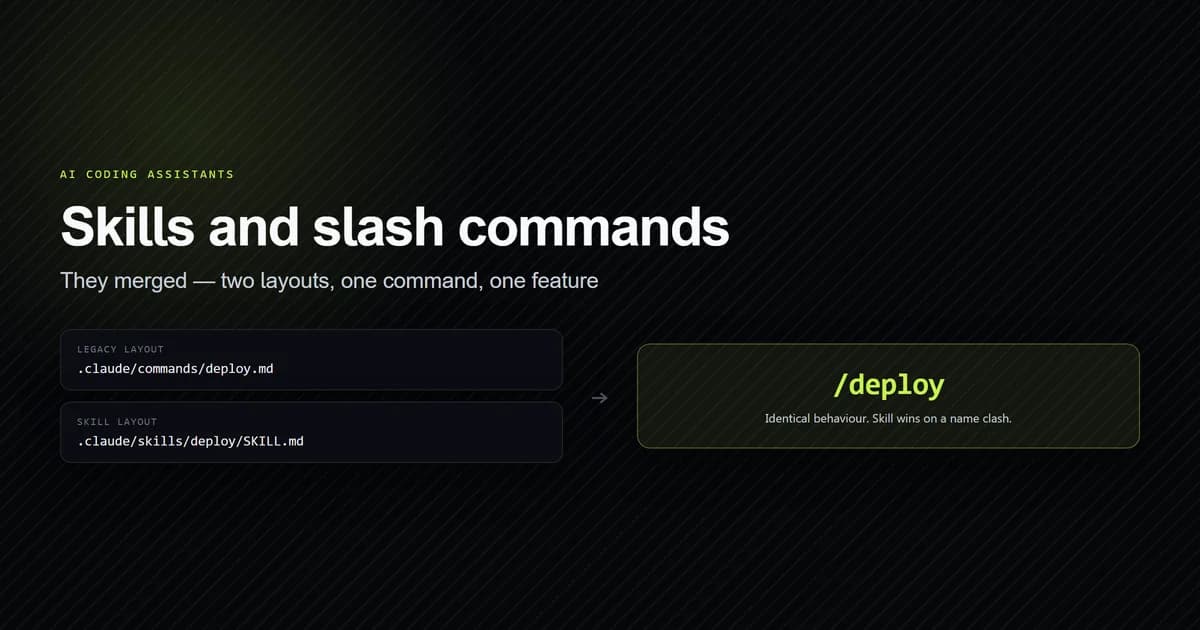
skills and slash commands covers when that is the
better shape.
Common mistakes
- Testing a new subagent by asking Claude to use it. A failed delegation cannot tell you the
file never loaded. Run the
--init-onlyprobe first; it is free. - Reusing a name. Two definitions with one name means the wrong file can win, and the only evidence is a DEBUG line. Keep names unique across the whole tree, including subfolders.
- Assuming Explore reads your CLAUDE.md. It does not, and neither does Plan. If a rule matters to a search task, restate it in the delegation prompt.
- Writing a
descriptionthat describes the agent. It is a routing signal. Name the conditions under which Claude should hand work over. - Listing tools a background subagent cannot keep. Background is the default since v2.1.198, and anything outside the reduced built-in set is removed without an error.
- Expecting a subagent to save money. It re-pays its system prompt and your
CLAUDE.mdon every spawn. It saves parent context and turns; budget for it as overhead, not a discount. - Reaching for subagents when you want parallel sessions. Many subagents returning detailed results consume the context you were trying to protect. Background agents or agent teams are the right shape for sustained parallel work.
- Expecting
/rewindto undo what a background subagent edited. Those edits usually land outside your session’s checkpoints, so git is the recovery path — see what Claude Code checkpoints can and cannot restore.
Conclusion
Write the definition, run claude --agent bogus --init-only to confirm it loaded, and only then
delegate anything to it — that sequence turns most subagent debugging into a five-second check.
Keep tools tight and description written as a trigger, put anything the subagent must not do
in a hook rather than its system prompt, and use background agents instead when the work is
genuinely parallel rather than a side task. If you maintain more than two or three definitions,
validate them in CI, because every failure mode we found was silent in the session. For the wider
command surface these sit behind, see the
complete Claude Code command reference.
Frequently asked questions
What is a Claude Code subagent?
Where do subagent files live?
Do subagents see my CLAUDE.md?
How do I check a subagent definition is valid before using it?
What is the difference between a subagent and a background agent?
Are subagents cheaper than doing the work inline?

Muhammad Kashif
Founder and editor of Devventa, covering AI coding assistants, Next.js and the modern AI development stack.