A Next.js MCP server is worth building for one reason: your app already contains the code that answers the questions you keep asking it. The trap is that importing that code into a plain Node process fails with an error about Client Components, in a process that has no React in it at all. This walks the whole nextjs mcp claude code setup — the server, the one CLI flag that makes the import work, and what it costs — using the server now committed to this repository. Measured on Claude Code v2.1.226 and Node v26.7.0 on 2026-08-09.
Key takeaways
- Your data layer is the server. A Next.js MCP server that re-parses your content has two
sources of truth; one that imports
lib/has one. server-onlybreaks the import, and its error names the wrong thing. It reports a Client Component problem in a process with no client, no React, and no bundler.node --conditions=react-serveris the entire fix, and it belongs in theargsarray of your.mcp.json.- TypeScript imports directly, no build step. Node strips the types at load, so there is no compiled copy to drift out of sync.
- Reusing the data layer costs about 170 ms of startup — 264 ms against 98 ms for a hand-written parser. That is the whole bill.
What a Next.js MCP server should expose
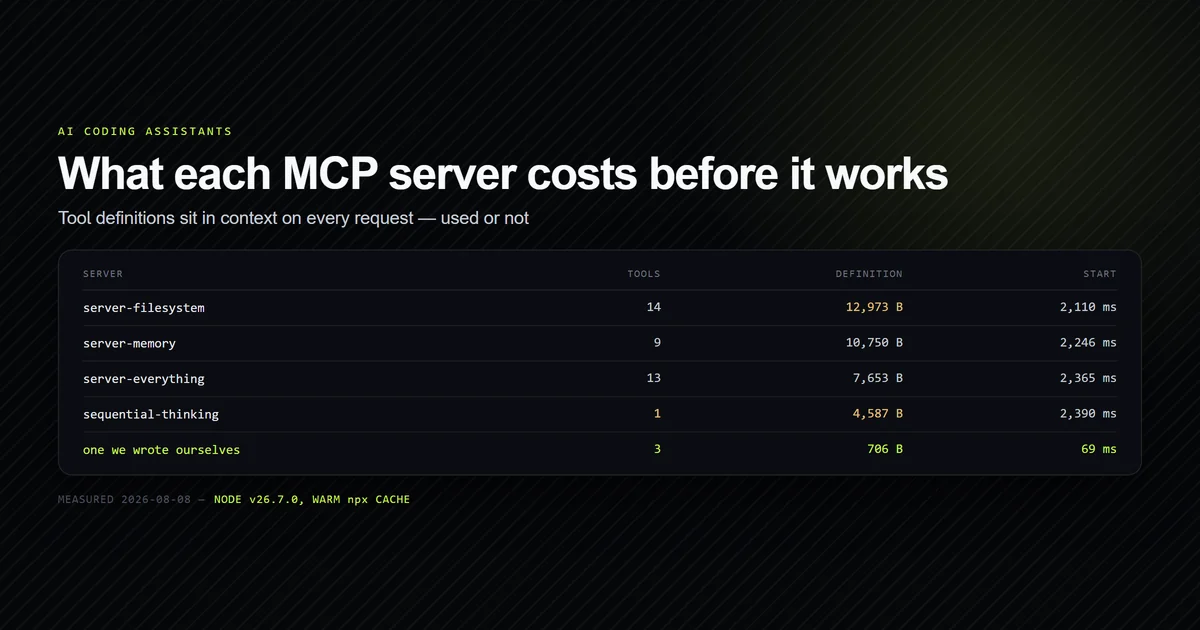
Not files. Claude Code can already read your repository, and the official filesystem server spends 12,973 bytes of context describing fourteen ways to do what the built-in tools already do. A useful mcp nextjs integration exposes the questions your app answers and the agent cannot.
This site is a good example because it has one such question. app/[category]/[slug] sets
dynamicParams = false, which means an internal link to an article that does not exist is not a
redirect and not a soft 404 — it is a hard 404 in a static export, and it ships. Whether
/next-js/technical-seo-nextjs resolves is a question lib/mdx.ts answers precisely and a
directory listing answers wrongly, because a directory listing cannot see draft: true.
So the server exposes three tools, and the interesting one is check_link:
const TOOLS = [
  {
    name: "check_link",
    description:
      "Does a root-relative internal link resolve to a published article? The site sets " +
      "dynamicParams = false, so a link to an unwritten article is a live 404.",
    inputSchema: {
      type: "object",
      properties: { href: { type: "string" } },
      required: ["href"],
      additionalProperties: false,
    },
  },
];
That is the general shape of the decision. Pick the checks your framework performs at build time and expose them at authoring time. For the broader question of which servers earn a slot at all, the complete guide to MCP server setup in Claude Code covers the budget this has to fit inside.
Importing the data layer you already have
The whole point is that check_link contains no parsing. It calls the same function
generateStaticParams calls:
import { getAllArticles, getArticleParams } from "../../lib/mdx.ts";

function checkLink(href) {
  const [, category, slug] = href.split("?")[0].split("#")[0].split("/");
  const params = getArticleParams();

  if (params.some((p) => p.category === category && p.slug === slug)) {
    return `${href} resolves — published.`;
  }

  // Naming the near-miss is the whole value: the category is the part
  // nobody remembers, and it is wrong more often than the slug is.
  const elsewhere = params.filter((p) => p.slug === slug);
  if (elsewhere.length) {
    return `${href} 404s. The slug exists under a different category: ` +
      elsewhere.map((p) => `/${p.category}/${p.slug}`).join(", ");
  }
  return `${href} 404s — no published article has the slug "${slug}".`;
}
Two things about that import are worth stating plainly, because both are recent enough that most published advice predates them.
It is a .ts file, imported from a .mjs file, with no build step and no loader. Node has
stripped types at load since 22.18 and does it by default on 26 — there is no dist/, no
tsx, and nothing to keep in sync. The trade is a warning on stderr about the module type of the
file, which is noise rather than a problem, though it is worth knowing that the same text on
stdout would corrupt the JSON-RPC frame and take the server down with it.
And it returns real answers. Against this repository's 33 published articles:
check_link  /ai-coding-assistants/technical-seo-nextjs
# → 404s. The slug exists under a different category: /next-js/technical-seo-nextjs

check_link  /ai-coding-assistants/mcp-servers-claude-code
# → resolves — published.
The first of those is the failure the tool exists for, and it is the one a human makes constantly.
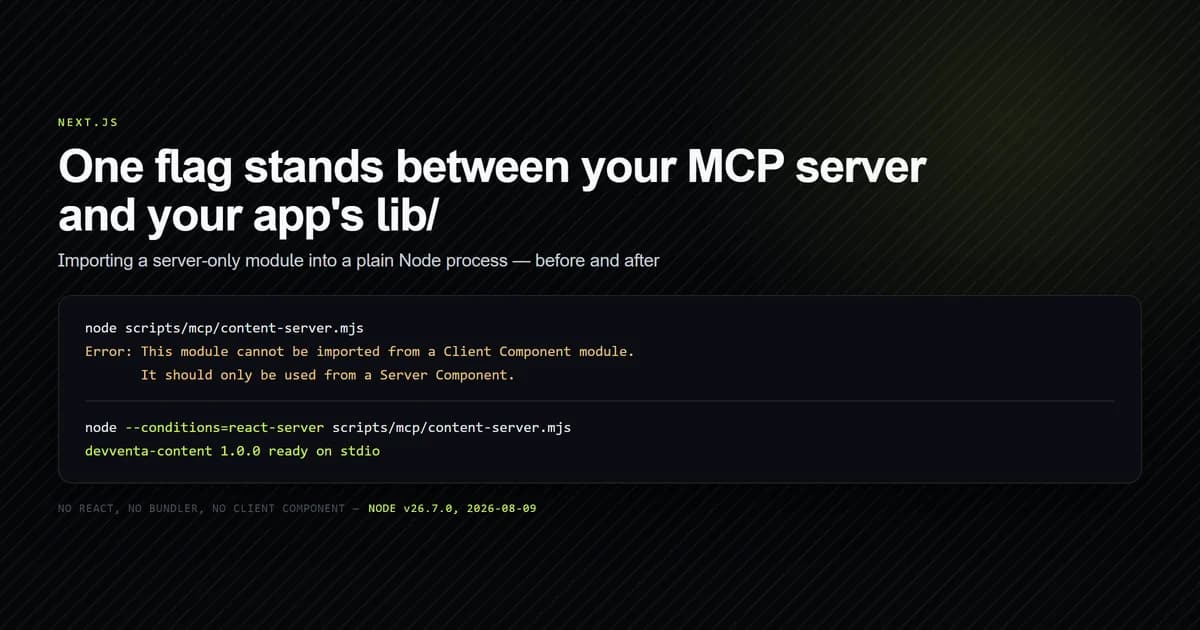
The server-only error that stops everyone
Run that server with plain node and it does not start:
node scripts/mcp/content-server.mjs
# → Error: This module cannot be imported from a Client Component module.
# →        It should only be used from a Server Component.
There is no client component. There is no React, no bundler, and no Next.js in the process. The
message is emitted by the server-only package, whose entire published contents are two files
and an exports map:
{
  "exports": {
    ".": {
      "react-server": "./empty.js",
      "default": "./index.js"
    }
  }
}
empty.js is empty. index.js is a bare throw. So the guard is not a runtime check at all —
it is a resolution trick. Next.js sets the react-server
export condition when it builds a Server Component, the
import resolves to the empty file, and nothing happens. Every other consumer resolves to the file
that throws, which is how a stray client import becomes a compile error.
Plain Node does not set that condition. It can be told to:
node --conditions=react-server scripts/mcp/content-server.mjs
# → devventa-content 1.0.0 ready on stdio
Node's --conditions flag is documented and stable; it just
appears nowhere near any MCP material, because it is a packaging feature and this is a packaging
problem wearing a React costume.
Wiring it into .mcp.json
Servers that live in the repository go in a committed .mcp.json, and the flag rides in args:
{
  "mcpServers": {
    "roadmap": {
      "command": "node",
      "args": ["scripts/mcp/roadmap-server.mjs"],
      "env": {}
    },
    "content": {
      "command": "node",
      "args": ["--conditions=react-server", "scripts/mcp/content-server.mjs"],
      "env": {}
    }
  }
}
args is an array, and the flag is its own element. "--conditions=react-server scripts/mcp/content-server.mjs"
as a single string is one argument containing a space, and Node treats the whole thing as a
filename it cannot find. The rest of the field reference is in
mcp.json configuration explained, including why the
relative path here is deliberate.
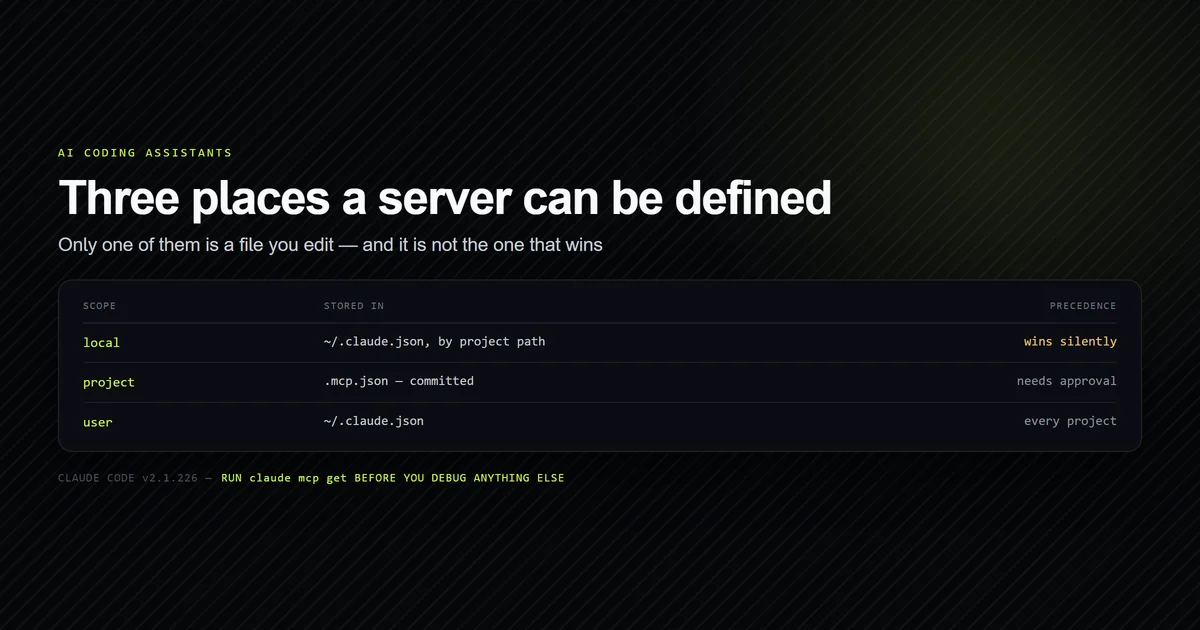
Then confirm it, because a project .mcp.json does not connect until it is approved:
claude mcp get content
# →   Scope: Project config (shared via .mcp.json)
# →   Status: ⏸ Pending approval (run `claude` to approve)
That state is not a failure. Approve it once in the project and the same command reports
✔ Connected. If it does not, the error you get will be the same seven words for every possible
cause, and MCP server not working covers how to
tell those causes apart.
What reusing the data layer costs
It costs startup time, and the amount is small enough to settle the argument. Both servers in the
config above answer questions about this repository; one imports lib/mdx.ts, the other parses
frontmatter with a regex it maintains itself. Timed from spawn to a completed tools/list, warm,
on Node v26.7.0:
| Server | Parser | Start | Definition bytes |
|---|---|---|---|
content | imports lib/mdx.ts | 264 ms | 1,202 |
roadmap | its own regex | 98 ms | 706 |
npx server-filesystem | n/a | 2,261 ms | 12,973 |
About 170 ms, paid once per session, to guarantee that the tool and the site cannot disagree. The
first run of the day is worse — 1,813 ms, before Node's compile cache is warm — but that is still
under the price of a single npx server, and unlike npx it never touches the network.
The roadmap server is the cautionary half of that table. Its hand-written frontmatter regex is
correct today only because nothing in this repository writes draft: "true" with quotes. The
imported version cannot have that bug, because draft: data.draft === true is the site's own
line. The same argument applies one layer up to the renderer: lib/mdx.ts reads the frontmatter,
but what next-mdx-remote then does with the body is
its own set of surprises, and a second parser would not know
about any of them either.
The failure that reports success
lib/mdx.ts resolves content against process.cwd(), and its directory read is deliberately
forgiving:
function readDirSafe(dir: string): string[] {
  try {
    return fs.readdirSync(dir);
  } catch {
    return []; // content/ need not exist yet
  }
}
That is correct for the app and dangerous for the server. Launch the server from the wrong
directory and nothing throws. It connects, reports ✔ Connected, lists its three tools, and
answers list_routes with zero routes — which reads as an empty site rather than a bad launch.
Every check_link call then returns 404s, confidently, for links that are fine.
This bit during development, and the fix is a guard that turns silence into an exit code:
function assertContentVisible() {
  if (existsSync(path.join(process.cwd(), "content"))) return;
  process.stderr.write(
    `${SERVER_INFO.name}: no content/ directory under ${process.cwd()}.\n` +
      "lib/mdx.ts resolves content against the working directory, so this " +
      "server must be launched from the project root.\n",
  );
  process.exit(2);
}
Claude Code launches stdio servers from the project root, so this never fires in normal use. It
fires when you test the server by hand from scripts/, which is exactly when a confident wrong
answer costs the most.
Common mistakes
- Refactoring
server-onlyout of your app to make the import work. The guard is doing real work in the Next.js build. The flag costs nothing and changes only the script. - Serving MCP from a route handler. It ties tool availability to
next devrunning, and the agent's tools disappear the moment you restart the dev server. A stdio process importing the same modules has neither problem. - Exposing file access. A Next.js MCP server that wraps
readFilespends context re-teaching a capability the client already has. Expose the derived answers instead. - Writing the flag and the path as one
argsstring. It is one argument with a space in it, and Node reports a missing file. - Testing from
scripts/. The working directory decides what the data layer can see, and a wrong one produces empty answers rather than errors. - Duplicating the parser "just for the script". Two parsers is two behaviours, and the second one is the one nobody runs the site against.
Conclusion
Build the server beside the app, import the app's own modules, and launch it with
node --conditions=react-server. The flag is the only non-obvious part of a next.js mcp server
and it is one line in an args array. Expose the questions your framework answers at build time
— resolvable routes, published slugs, anything generateStaticParams knows — and leave file
reading to the tools that already do it. If you are assembling the wider setup rather than this
one server, start from
the complete MCP server setup guide; if you are
building the site itself with an agent,
building a modern Next.js site with AI assistance is the
companion piece.
Frequently asked questions
How do I connect an MCP server to a Next.js project?
Can an MCP server import TypeScript from my Next.js app?
Why does my MCP server say a module cannot be imported from a Client Component?
Should the MCP server run inside my Next.js app or beside it?
What should a Next.js MCP server expose as tools?

Muhammad Kashif
Founder and editor of Devventa, covering AI coding assistants, Next.js and the modern AI development stack.