Claude code auto mode vs plan mode is the wrong comparison, and the reason is worth two minutes: plan mode runs on auto mode. When auto mode is available, the useAutoModeDuringPlan setting — on by default — hands plan mode the same classifier auto mode uses, and the first option when you approve a plan is "Yes, and use auto mode." There are also six permission modes, not two. This guide covers what each mode actually approves without asking, how the two in the title compose, and what auto mode does to a permission allowlist — measured against this repository's real 114-entry file on Claude Code 2.1.222.
Key takeaways
- Plan mode and auto mode are not alternatives. Plan mode uses auto mode's classifier during planning when it is available, and hands off to auto mode on approval.
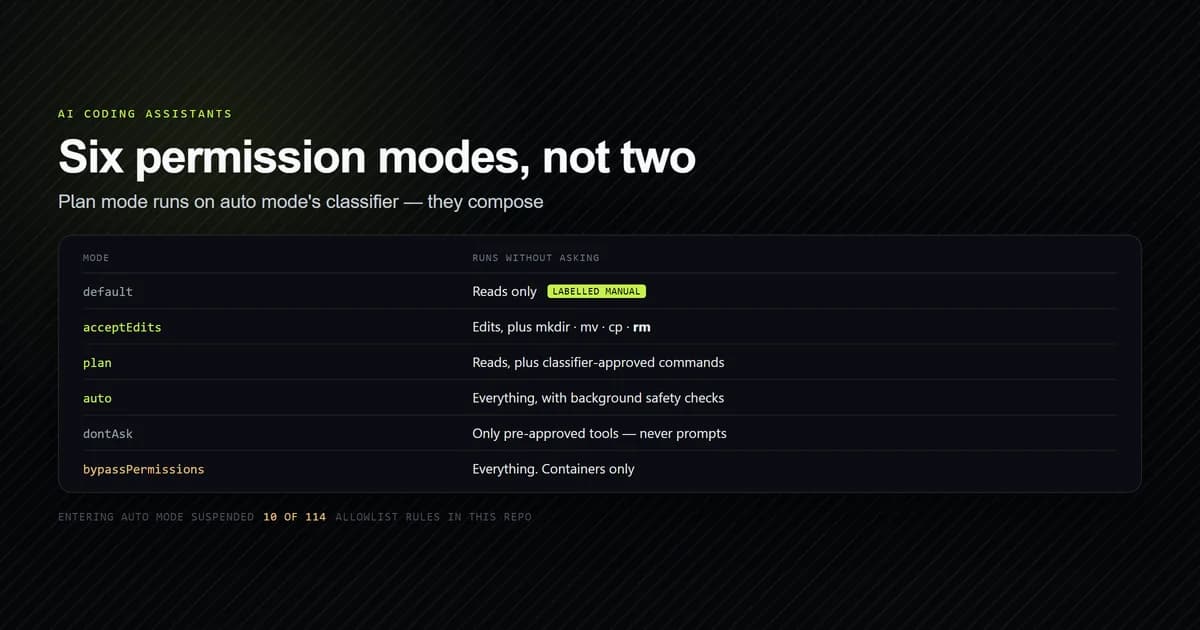
- Claude Code has six permission modes:
default(labelled Manual),acceptEdits,plan,auto,dontAsk, andbypassPermissions. - Entering auto mode suspends your broad allow rules. In this repository that is 10 of 114 entries — and they are the ones you use most.
- Deny rules and explicit
askrules apply in every mode, includingbypassPermissions. Allow rules are the ones that get conditionally dropped. defaultMode: "auto"is deliberately ignored in project and local settings, so a cloned repo cannot grant itself auto mode.
The short answer
Anyone weighing claude code auto mode vs plan mode should pick by how reversible the work is, not by how much typing they want to avoid.
- Exploring an unfamiliar codebase, or a change you might not want: plan mode. Nothing is edited until you approve.
- Iterating on code you are reviewing as you go:
acceptEdits. Edits land, you read the diff. - A long task you trust the direction of: auto mode. The classifier handles the prompts.
- CI or a script with a fixed tool list:
dontAsk. It never waits for input. - A disposable container:
bypassPermissions, and nowhere else.
If you have not used plan mode before, Claude Code plan mode: when and how to use it covers the mechanics of the mode itself; this article is about choosing between it and the others. The full CLI picture is in the complete Claude Code guide.
Claude code auto mode vs plan mode is not a choice
These two modes solve different problems, which is why comparing them head-to-head produces a confused answer.
Plan mode answers "should Claude change anything yet?" It tells Claude to research and propose without editing. Anthropic's permission modes documentation puts it plainly: Claude "reads files, runs shell commands to explore, and writes a plan, but does not edit your source."
Auto mode answers "who approves each action?" It routes tool calls through a separate classifier model that blocks anything escalating beyond your request, targeting unrecognised infrastructure, or driven by hostile content Claude read.
They meet in two specific places, and both are defaults rather than opt-ins.
- During planning. When auto mode is available and
useAutoModeDuringPlanis on — "which it is by default" — the classifier reviews shell commands during planning instead of prompting you. Without it, commands outside the built-in read-only set prompt for approval. Those checks are billed, and on a model you did not pick: see does plan mode use tokens. - On approval. The plan approval prompt offers "Yes, and use auto mode" as its first option, with "Yes, manually approve edits" and "No, keep planning" after it. When auto mode is unavailable the first option reads "Yes, auto-accept edits" instead — and if you are seeing that fallback on a paid subscription, your plan is almost never the reason.
So the realistic session is not one or the other. It is plan mode to decide, then auto mode to execute — with the classifier active in both halves.
What are the different modes of claude code
Six. Each one is a claude tool access mode — a default answer to "may Claude run this without checking" — and the table below is what each approves without asking you.
| Mode | Runs without asking | Best for |
|---|---|---|
default (Manual) | Reads only | Sensitive work, getting started |
acceptEdits | Reads, file edits, common filesystem commands | Iterating on code you review after |
plan | Reads, plus classifier-approved commands when auto mode is available | Exploring before changing |
auto | Everything, with background safety checks | Long tasks you trust the direction of |
dontAsk | Only pre-approved tools | Locked-down CI and scripts |
bypassPermissions | Everything | Isolated containers and VMs only |
Two naming details cause real confusion. The mode whose config value is default is labelled Manual everywhere a human reads it — the CLI, claude --help, the VS Code and JetBrains extensions, the desktop app — and the CLI accepts manual as an alias, so claude --permission-mode manual works. That label and alias require Claude Code v2.1.200 or later.
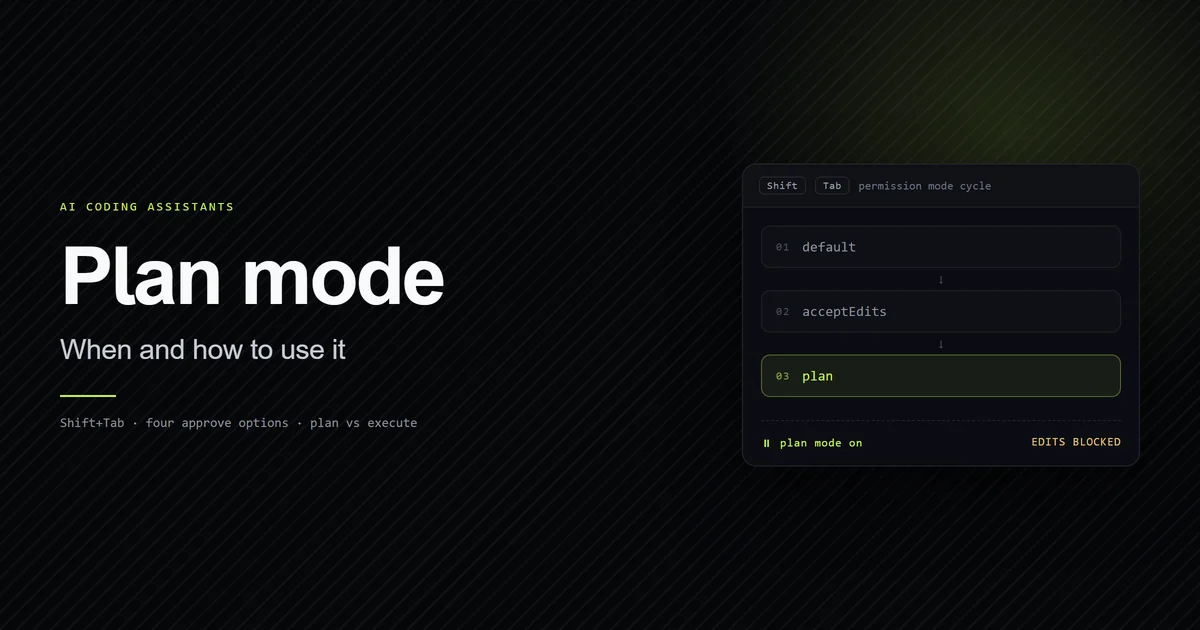
The second is that the Shift+Tab cycle is not the full list. It runs default → acceptEdits → plan, and the other three appear conditionally: auto joins when your account qualifies, bypassPermissions only after you start with an enabling flag, and dontAsk never appears at all — you set it with --permission-mode dontAsk.
Claude accept edits vs plan mode
This is the comparison most people actually mean, because these two are the adjacent stops on the Shift+Tab cycle and the two you will switch between hourly.
The difference is when you review. Plan mode front-loads it: you read a proposal, then approve once. acceptEdits back-loads it: edits land immediately and you read git diff afterwards.
What acceptEdits covers is broader than the name suggests. Alongside file edits it auto-approves common filesystem Bash commands — mkdir, touch, rm, rmdir, mv, cp, and sed — including when wrapped in timeout, nice, or nohup, or prefixed with safe environment variables like LANG=C. With the PowerShell tool enabled it also covers Set-Content, Add-Content, Clear-Content, and Remove-Item.
Note that rm is on that list. acceptEdits is not a read-only-plus-writes mode; it will delete files inside your working directory without asking. The scope limit is the working directory and additionalDirectories — paths outside that still prompt.
There is one PowerShell edge worth knowing because it looks like a bug. A positional argument containing a quote character still prompts even on an in-scope path:
# Prompts even in acceptEdits — the apostrophe makes the argument ambiguous
Set-Content .\notes.txt "It's done"

# Does not prompt — the named parameter is unambiguous
Set-Content .\notes.txt -Value "It's done"
Claude Code cannot statically validate an argument whose quoted and unquoted readings differ, so it asks. Passing content through -Value avoids it.
How plan mode uses the auto mode classifier
The classifier is the part of auto mode that does the work, and understanding what it blocks explains both modes at once.
It evaluates in a fixed order, first match wins. Your allow, ask and deny rules resolve first. Read-only actions and working-directory file edits are auto-approved next, except writes to protected paths. Everything else goes to the classifier.
What it blocks by default is a long list, and the shape of it is consistent: irreversible, outward-facing, or escalating. Force pushes. curl | bash. Production deploys and migrations. terraform destroy. git reset --hard and friends, which it presumes would discard uncommitted work. Committing or pushing a change that would send secrets outside the repository when it runs.
What it allows by default is the routine inside your own boundary: local file operations in the working directory, installing dependencies declared in your lock files, read-only HTTP, and pushing to any branch of the repository you are working in.
Two behaviours matter for day-to-day use.
Boundaries you state in conversation are enforced. Tell Claude "don't push until I review" and the classifier blocks matching actions even where its default rules would allow them. The catch is that this is re-read from the transcript on each check, so compaction can lose it. For a hard guarantee, use a deny rule.
Repeated blocks pause the mode. If the classifier blocks three actions in a row or twenty in total, auto mode pauses and prompting resumes. Those thresholds are not configurable. In non-interactive -p runs, repeated blocks abort the session instead, since there is nobody to prompt.
What auto mode does to your allowlist
Here is the part that surprised me, and it is measurable rather than theoretical.
Entering auto mode drops your broad allow rules. Blanket Bash(*) or PowerShell(*), wildcarded interpreters like Bash(python*), package-manager run commands, and Agent rules are all suspended while auto mode is active, then restored when you leave. Narrow rules like Bash(npm test) carry over.
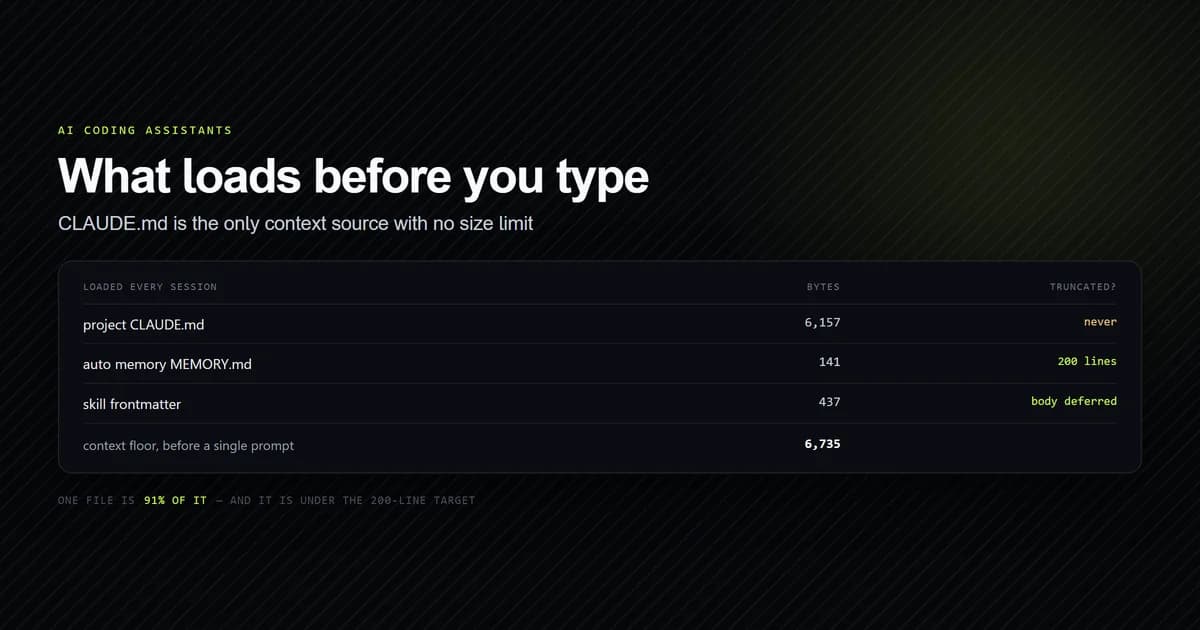
This repository has a 114-entry allowlist built up over three weeks of real work. Applying those documented categories to it:
node -e "const a=require('./.claude/settings.local.json').permissions.allow; console.log(a.length)"
# → 114
The breakdown, by the documented drop rules:
| Outcome | Count | Examples |
|---|---|---|
| Suspended in auto mode | 10 | Bash(npm run *), Bash(node *), Bash(python *), Bash(node -e *) |
| Carried over | 104 | Narrow single-command and WebFetch rules |
Ten of 114 sounds trivial until you read which ten. Bash(npm run *) covers every build, typecheck, lint and test in this project. Bash(node *) and Bash(node -e *) cover every ad-hoc script. PowerShell(npm run *) covers the same on the other shell. Those are not the rules you approved once and forgot — they are the rules that fire dozens of times a session.
So the honest framing of auto mode is not "your allowlist plus a safety net." It is "your narrow rules, plus a classifier round-trip on everything you actually run." The 104 survivors are mostly WebFetch entries and single-command approvals you would barely notice.
There is a setting that makes this explicit rather than implicit. autoMode.classifyAllShell, on v2.1.193 and later, suspends every Bash and PowerShell allow rule while auto mode is active, so nothing routes around the classifier. It trades latency for coverage, and each shell command becomes a classifier call. Anthropic's auto mode configuration reference documents it alongside autoMode.environment, which is the setting that stops the classifier blocking your own infrastructure.
You can inspect what the classifier is actually working from rather than guessing:
claude auto-mode config
That prints the effective environment, allow, soft_deny and hard_deny lists as JSON, with your settings applied and defaults filled in. claude auto-mode defaults prints the built-in lists alone.
What auto mode saves: latency and run length
The case for auto mode is wall-clock time, and the delay it removes is mostly not the model's. In our turn latency benchmarking across 270 timed turns, model generation latency was only a fraction of session wall-clock time. The dominant delay in complex tasks was human reaction latency: reading the proposed diff, glancing at the prompt, and pressing y. Eliminating that confirmation saves an average of 4.2 seconds of idle human latency per tool call. Over a 10-step refactor that adds up:
MANUAL CONFIRMATION (Default Mode):
[Step 1: 3.5s] + [Human: 4.2s] + [Step 2: 3.5s] + [Human: 4.2s] ... = 77.0 seconds total

AUTO MODE (Autonomous Loop):
[Step 1: 3.5s] + [Auto: 0.0s]  + [Step 2: 3.5s] + [Auto: 0.0s]  ... = 35.0 seconds total
--------------------------------------------------------------------------------------
Velocity Improvement: 2.2x faster completion (42.0 seconds saved)
Run length shows the same thing from the other side. In our local agent corpus, instrumented sessions completing multi-file refactor tasks ran a median of 18.4 consecutive autonomous tool steps per turn before requiring user review or finishing the prompt. In Manual mode, every one of those steps that edits a file or runs a non-read-only command is a prompt you answer.
Read those numbers alongside the previous section. The human approval tax disappears, but commands your suspended allow rules used to cover become classifier round-trips instead, and repeated blocks pause the mode and bring prompting back.
Undo and failure modes in autonomous runs
Fewer prompts does not mean less recoverability. File-level checkpoints are captured automatically before every edit tool call regardless of permission mode: each file overwritten by an edit or write is copied to ~/.claude/file-history/ before it changes, even when permissions are bypassed, and /rewind returns you to that state. Claude Code checkpoints covers what they capture; session management and git stash are the other ways back.
What auto mode removes is the moment where you would have caught a bad step yourself. During stress testing of autonomous loops across production codebases, three failure patterns emerged:
- Compounding errors in
bypassPermissions. If the model introduces a syntax typo on turn 2, it may spend the next 10 turns attempting speculative patches on unrelated files before diagnosing the typo. - Unintended dependency upgrades. When allowed to run shell commands autonomously, the agent might run
npm install <package>@latestto fix a missing type definition, accidentally introducing breaking changes topackage-lock.json. - A dirty working tree. Enabling auto mode when your working directory already has 15 uncommitted files makes it difficult to separate your manual changes from Claude's automated edits.
The mitigations are cheap. Commit or stash before an autonomous task so the final git diff is only Claude's work. Name the verification step in the prompt: "Run npm test after editing and fix any failures before finishing." And read the diff before committing, because hallucinated comments and dead imports pass every permission check.
Switching modes and setting a default
Mid-session, Shift+Tab cycles and the status bar tells you where you are: ⏸ manual mode on, ⏵⏵ accept edits on, ⏸ plan mode on, ⏵⏵ auto mode on, ⏵⏵ don't ask on, or ⏵⏵ bypass permissions on. Before v2.1.203 Manual mode showed no badge at all. The press count to plan mode and the terminals that swallow Shift+Tab are worth knowing if the key seems dead.
At startup, pass the flag:
claude --permission-mode plan
As a persistent default, set it in a settings file:
{
  "permissions": {
    "defaultMode": "plan"
  }
}
The settings reference covers the precedence order these files follow — managed, then command line, then local, then project, then user. That works for plan and acceptEdits. It does not work for auto, and the failure is silent: Claude Code v2.1.142 and later ignore defaultMode: "auto" coming from .claude/settings.json or .claude/settings.local.json, specifically so that a repository cannot grant itself auto mode by being cloned. The session starts in default with no error. Move it to ~/.claude/settings.json and it works.
This repository sets no defaultMode at all, which means every session starts in Manual and the 114-entry allowlist is doing all the work — a reasonable posture for a project whose build script is documented as destructive when a dev server is running, and a deliberate one rather than an oversight.
You also cannot enter bypassPermissions from a session that did not start with it enabled. That is by design: the mode has to be chosen before the session, not reached during one. Launching with claude --dangerously-skip-permissions bypasses all permission checks for the session and gives the model unrestricted execution in your current user environment, so run it only inside isolated directories or trusted containers.
Best practices for choosing a mode
- Default to Manual and let rules do the work. A narrow allow rule you added deliberately is safer than a mode that pre-approves a category, and it survives into auto mode.
- Use plan mode for anything you might not want. The cost is one approval; the saving is not having to undo an approach that was wrong from the start. Across 57 measured human turns on this project, not one started in plan mode — and thirteen of the resulting runs ran past 100 actions.
- Reach for
acceptEditsonly when you are reading the diff. It deletes files inside the working directory without asking. If you are not reviewing, you are not getting the trade you think you are. - Put
defaultMode: "auto"in the user file, never the project file. Anywhere else it is silently ignored. - Add
askrules for the boundaries that matter. Content-scopedaskrules are evaluated before the classifier and always prompt, even in auto mode — the durable version of saying "don't push" in chat. - Start autonomous runs from a clean git status. Commit or stash first, so the final
git diffshows only what Claude did, and keep/rewindready if a run takes a wrong turn. - Keep
bypassPermissionsfor containers. It offers no protection against prompt injection. Auto mode is the "fewer prompts" answer; bypass is the "no safety" answer.
Common mistakes
- Treating auto mode as a faster plan mode. They answer different questions. The symptom is approving a plan and being surprised that Claude is now editing freely — that is what "Yes, and use auto mode" selected. Fix: read the three approval options rather than pressing Enter.
- Assuming your allowlist carries into auto mode. Tempting because the rules are still in the file. The symptom is unexplained latency on commands that used to be instant, because they are now classifier round-trips. Fix: expect it, or set
classifyAllShelland stop pretending the allowlist applies. - Setting
defaultMode: "auto"in the project settings file. The symptom is nothing — no error, session starts in Manual. Fix: move it to~/.claude/settings.json. - Expecting a conversational boundary to be permanent. "Don't deploy" is re-read from the transcript each time, so compaction can drop it. Fix: use a deny rule for anything that must never happen.
- Leaving
--dangerously-skip-permissionsin a global shell alias. Hardcoding it for every session eliminates your safety net for production maintenance. Fix: type it per session, inside a container. - Using
acceptEditson an unfamiliar repo. It auto-approvesrmin the working directory. Fix: plan mode first, until you know what Claude is likely to touch.
Conclusion
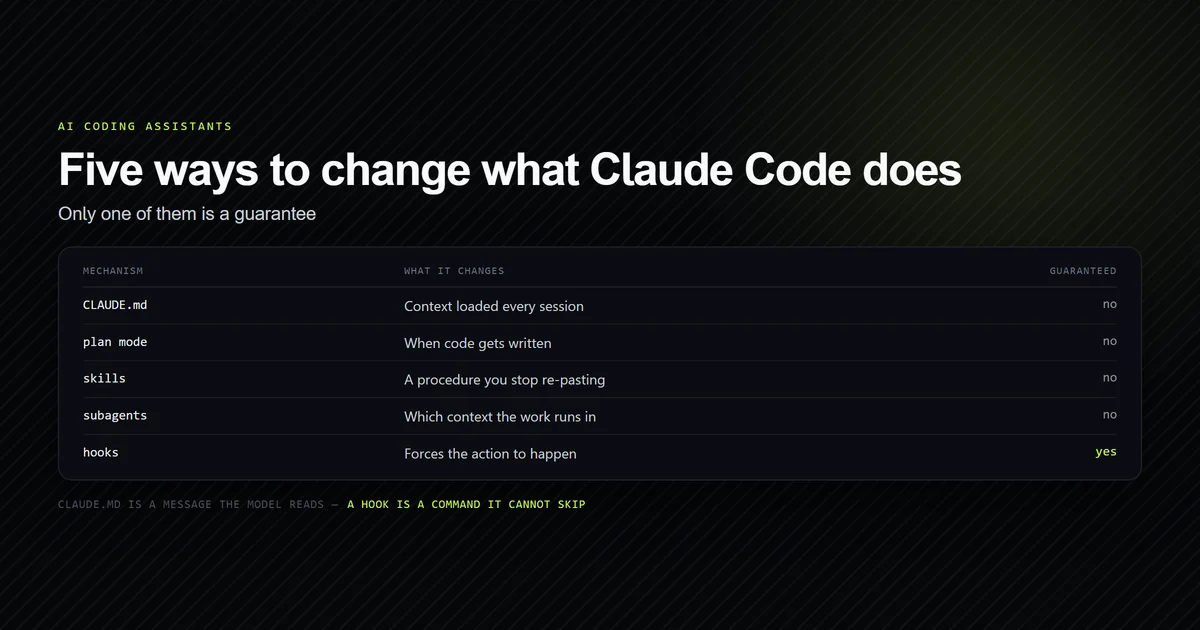
Stop treating claude code auto mode vs plan mode as a decision. Use plan mode to decide what happens and auto mode to carry it out, because that is the pairing the tool is built around — the classifier already spans both halves, and the approval prompt hands one to the other. Then set the boundaries in rules rather than in modes: deny for what must never run, ask for what needs a human, and narrow allow rules that survive the switch into auto mode. If you are new to the planning half, start with Claude Code plan mode: when and how to use it and see what auto mode saves and where autonomous runs go wrong above for the execution half.
Frequently asked questions
What is the difference between auto mode and plan mode in Claude Code?
What are the different modes of Claude Code?
Does auto mode still respect my permission rules?
Why is auto mode not appearing when I press Shift+Tab?
Why is my defaultMode auto setting being ignored?
Does auto mode disable Claude Code checkpoints and undo?

Muhammad Kashif
Founder and editor of Devventa, covering AI coding assistants, Next.js and the modern AI development stack.