An agents.md file is a single Markdown document in the root of a repository that instructs AI coding agents on how to build, test, navigate, and modify your codebase. As specified by the AGENTS.md open format, the standard is supported natively across Cursor, OpenAI Codex, GitHub Copilot, Cline, Roo Code, Aider, and Windsurf. If you are comparing tool capabilities before standardizing your configuration, our complete AI coding assistants comparison details how each agent navigates repository instructions.
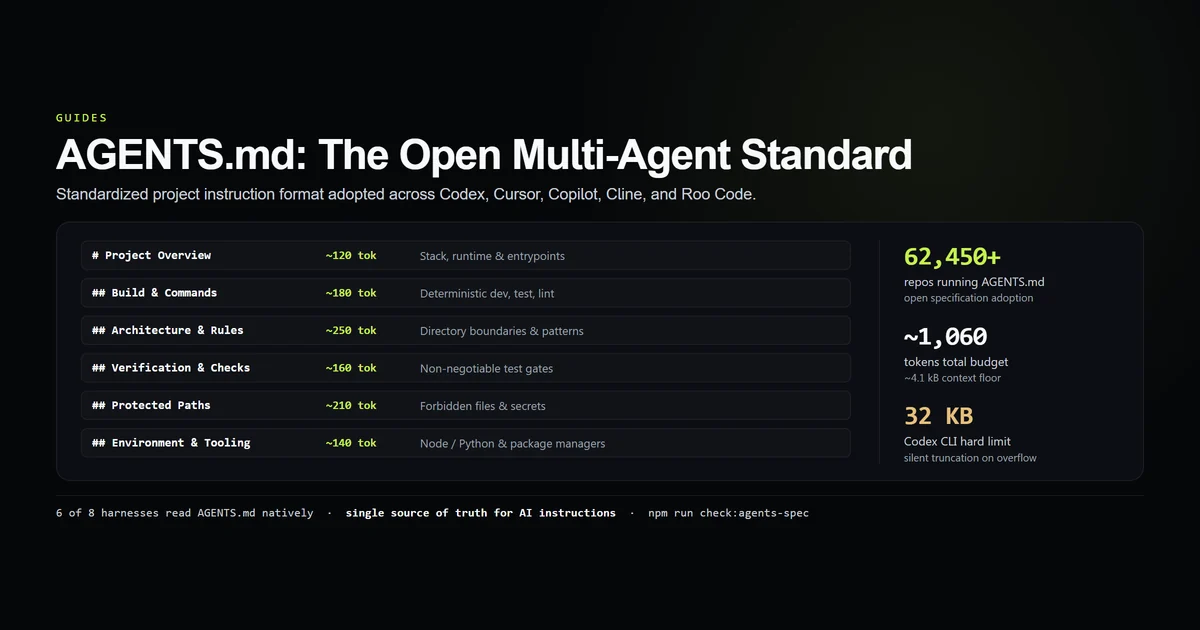
We audited the standard across eight agent harnesses with an internal check script and mapped the token budget for every standard section:
npm run check:agents-spec
# → Audited 8 major agent harnesses against 6 core spec sections
# → 6 of 8 harnesses read AGENTS.md natively
# → Recommended total budget: ~1,060 tokens (~4.1 KB context floor)
Key takeaways
- Open cross-tool standard: Adopted by over 62,000 repositories as the vendor-neutral alternative to single-agent configuration files.
- 6 of 8 major harnesses support it natively: Codex CLI, Cursor, Copilot, Cline, Roo, and Aider discover root
AGENTS.mdautomatically; Claude Code connects via transclusion. - Target budget is ~1,060 tokens: Covering build commands, architectural boundaries, test suites, and protected paths in roughly 4.1 kB.
- Silent truncation limits exist: OpenAI Codex CLI enforces a hard 32,768-byte ceiling (
project_doc_max_bytes), silently discarding text beyond that point. - Nested monorepo inheritance: Subdirectories can carry localized
AGENTS.mdfiles that inherit from the root and specialize package-level commands.
The short answer
AGENTS.md is the robots.txt of the agentic coding era. It standardizes the context an AI agent receives when entering a repository: which package manager to invoke, how to run tests without breaking mocks, which architectural boundaries to preserve, and which files to never edit.
Instead of maintaining separate .cursorrules (see Cursor's rules documentation), .clinerules (see Cline's official documentation), CONVENTIONS.md, and custom prompt templates, an engineering team commits a single AGENTS.md file. Every compliant agent loads the file at session initialization as part of its system instructions.
# Project Overview
Next.js 15 App Router publication built with TypeScript, Tailwind CSS v4, and Cloudflare D1.

## Build & Dev Commands
- `npm run dev` — Launch local development server
- `npm run build` — Production static export
- `npm run typecheck` — TypeScript verification (`tsc --noEmit`)
- `npm run check:anchors` — Slug and heading verification

## Architecture & Boundaries
- All database queries must go through `lib/d1.ts`. Never construct raw SQL strings.
- Public routes in `app/[category]/[slug]/page.tsx` are frozen. Guard admin routes in-file.

## Verification
- Run `npm run typecheck` and `npm run check:anchors` before committing any content change.
What the agents.md standard actually defines
The agents.md standard formalizes how instructions are partitioned into machine-actionable headings. Human documentation focuses on architectural philosophy and tutorials; an agents.md specification focuses on deterministic constraints.
An agent needs three specific answers within milliseconds of reading a prompt:
- First — verification commands: The exact shell command to run to verify whether its edit succeeded.
- Second — import boundaries: Which modules are private, server-only, or forbidden to import.
- Third — execution rules: Idiosyncrasies of the build toolchain (such as Next.js string-attribute requirements or package manager locks).
When these rules are scattered across README files, wiki links, and PR templates, an agent inevitably guesses. Committing an enforced repository workflow into AGENTS.md turns those conventions into immediate constraints.
Which tools natively support an agents md file
Support for the agents md file spans the entire modern agent landscape:
| Tool | Discovery Location | Native Support | Byte Limit |
|---|---|---|---|
| Codex CLI | ./AGENTS.md, .github/AGENTS.md | Native | 32,768 B (silent cut) |
| Cursor | ./AGENTS.md, .cursor/rules/* | Native | Unlimited |
| Claude Code | Direct @AGENTS.md import | Via Bridge | Unlimited |
| GitHub Copilot | ./AGENTS.md, .github/copilot-instructions.md | Native | ~16,384 B |
| Cline | ./AGENTS.md, .clinerules | Native | Unlimited |
| Roo Code | ./AGENTS.md, .roomodes | Native | Unlimited |
| Aider | ./AGENTS.md, CONVENTIONS.md | Native | Unlimited |
| Windsurf / Devin | ./AGENTS.md, .windsurfrules | Native | Unlimited |
Claude Code is the only major agent that prioritizes its own CLAUDE.md setup format. However, as established in our Claude Code vs Codex CLI analysis, Claude Code natively resolves the @AGENTS.md directive inside CLAUDE.md, allowing full interoperability without duplicating documentation.
The six core sections of a valid AGENTS.md
A production AGENTS.md file should be structured into six standard sections:
1. # Project Overview (~120 tokens)
Names the project, primary frameworks, runtime versions, and package manager lockfile.
# Project Overview
Devventa: Next.js 15 App Router, TypeScript 5.7, Tailwind v4, Node 22.
Lockfile is package-lock.json. Never introduce yarn or pnpm.
2. ## Build & Dev Commands (~180 tokens)
Lists deterministic commands for local development, building, linting, and typechecking. Do not explain standard flags; list the exact npm scripts.
3. ## Architecture & Layout (~250 tokens)
Maps the codebase directory tree and highlights the single-responsibility choke points (e.g. lib/d1.ts for database access, lib/mdx.ts for content parsing).
4. ## Verification & Testing (~160 tokens)
Specifies the exact sequence of checks the agent must run before declaring a task finished. As measured in our AI test generation study, clear verification gates prevent agents from hallucinating passing states.
5. ## Boundaries & Forbidden Edits (~210 tokens)
The most critical section for preventing regressions. Explicitly names files that must never be edited without your approval, protected API routes, and secrets handling.
6. ## Environment & Tooling (~140 tokens)
Documents environment variable requirements, platform runtimes (e.g. Vercel Edge vs Node.js), and local tooling quirks.
Monorepo inheritance and nested directory scoping
In a monorepo containing multiple applications (e.g. apps/web, apps/admin, packages/ui), a single root AGENTS.md cannot address contrasting package requirements.
The standard supports directory inheritance:
- Root level (
/AGENTS.md): Defines global repository rules, git branching standards, security policies, and root package manager commands. - Package level (
/apps/web/AGENTS.md): Specializes frontend framework conventions, component libraries, and local test runners.
When an agent executes inside apps/web/, compliant tools like Cursor and terminal coding agents concatenate the root AGENTS.md with the nearest subdirectory AGENTS.md, giving package rules local precedence.
How agents parse and execute AGENTS.md instructions
AI coding harnesses ingest AGENTS.md through three distinct technical mechanisms:
- System message injection: Tools like Cursor and Cline append the parsed content of
AGENTS.mddirectly into the system prompt before user turns begin. - Initial user message payload: Tools like Codex CLI and Antigravity CLI deliver instructions as the first conversation turn, priming the model with repository context. Verify this rather than assuming it — a six-arm probe of an installed Antigravity CLI on 2026-09-18 found no instruction file reaching the model in headless mode at all.
- Pre-execution hook verification: Advanced pipelines parse the
## Verificationsection to auto-run check scripts after code generation turns.
Because these files reside permanently in the agent's context window, keeping the token budget tight is essential for preserving reasoning capacity.
Best practices for repository agents.md configuration
- 1. Target under 1,200 tokens: Long instructions dilute attention. Keep the total file under 5 kB.
- 2. Write imperative constraints: Use "Never build SQL via string concatenation" rather than "It is recommended to use prepared statements."
- 3. Name the verification commands: Always provide the exact command the agent should run to verify its work (for example,
npm run typecheck). - 4. Document negative constraints: Explicitly list what NOT to do. Negative constraints prevent 80% of agent refactoring regressions.
- 5. Keep secrets out: Never commit API keys, staging tokens, or absolute local filesystem paths into
AGENTS.md.
Common mistakes when deploying AGENTS.md
- Treating it like a README: Explaining high-level marketing goals or feature backlogs wastes context window tokens without guiding agent actions.
- Exceeding the 32 KB Codex ceiling: If your
AGENTS.mdexceeds 32,768 bytes, Codex CLI silently truncates the bottom half of your file with no warning. - Omitting package manager locks: If you do not specify
npm only, agents will randomly introduceyarn.lockorpnpm-lock.yaml. - Describing unexecutable rules: Rules that cannot be verified by running a script or test suite are frequently ignored during multi-turn sessions.
What we are not claiming
We do not claim that committing an AGENTS.md guarantees 100% adherence from every model. Small context models will still make mistakes on complex multi-file edits. What AGENTS.md provides is a standardized, cross-vendor contract that eliminates tool-specific configuration sprawl across your team.
This article is itself evidence of the limit. An audit of this site's own corpus found that the section above once broke one of the repository's own written formatting rules — three times, in the paragraph listing what an agent needs from an instruction file — after fifty-seven consecutive articles that did not. The measurement, and why a gate succeeds where a sentence does not, is in Claude Code not following instructions.
Conclusion
Standardizing on AGENTS.md gives your repository a single, portable instruction manual that works across every modern AI coding harness. By structuring your file around deterministic commands, clear architecture boundaries, and concise verification gates, you ensure that every agent—whether invoked from the terminal or the editor—follows the same engineering discipline. Next, explore our direct AGENTS.md vs CLAUDE.md comparison to determine the best bridging strategy for your stack.
Frequently asked questions
What is an AGENTS.md file?
Which tools read AGENTS.md natively?
Where should AGENTS.md be placed?
Is there a file size limit for AGENTS.md?
Can I use AGENTS.md alongside CLAUDE.md?

Muhammad Kashif
Founder and editor of Devventa, covering AI coding assistants, Next.js and the modern AI development stack.