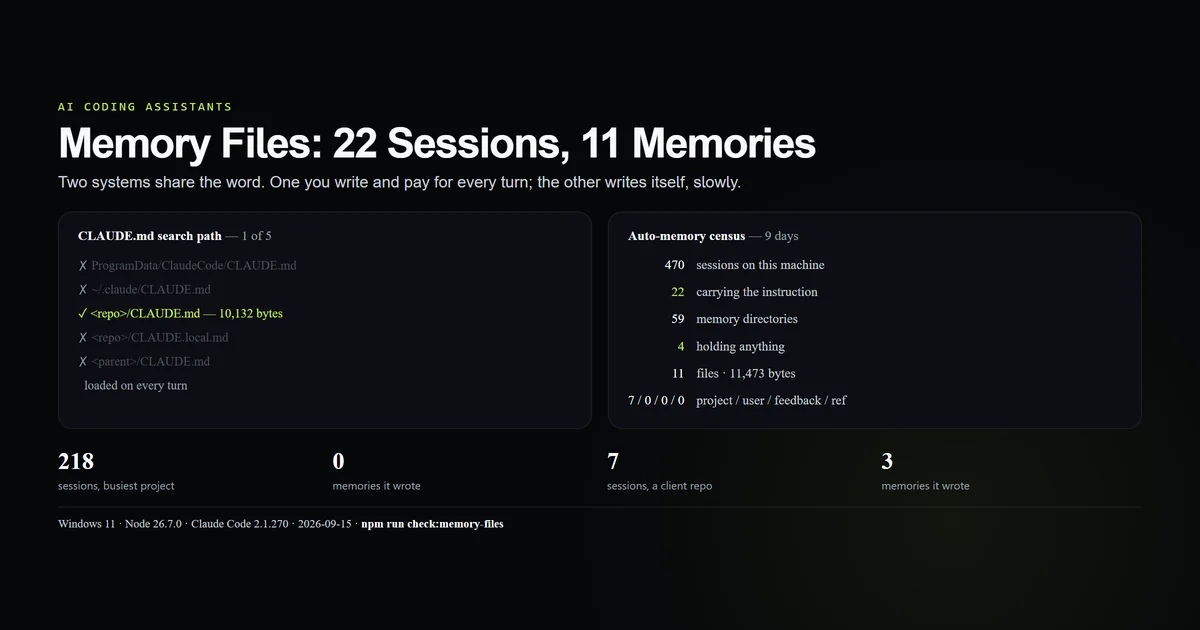
Claude code memory files are two different systems sharing one word, and they have opposite cost profiles. CLAUDE.md is written by you, read from up to five locations, and paid for on every turn. The auto-memory directory is written by the model, one markdown file per fact, and recalled selectively. We counted both across 470 sessions on one machine: one CLAUDE.md present out of five possible locations, and 11 memory files totalling 11,473 bytes produced in the nine days since the feature first appeared. Measured 2026-09-15 on Claude Code 2.1.270, Windows 11.
Key takeaways
- Two systems: CLAUDE.md you write, and an auto-memory directory the model writes.
- Of 470 sessions here, 22 carried the auto-memory instruction, first on 2026-09-07.
- 59 memory directories exist; 4 hold anything. Total output: 11 files, 11,473 bytes.
- Session count does not predict memories. The 218-session project has none; a 7-session project has three.
- The memory schema declares four types and only
projecthas ever been written here.
Two systems, one word
Ask where Claude Code keeps its memory and you get two correct answers.
CLAUDE.md is a file you author and commit. It is discovered at startup, loaded into the system prompt, and charged against your context window on every single turn. It is the right home for anything that must hold continuously.
Auto-memory is a directory of small markdown files the model writes when it judges something worth keeping. Each file holds one fact with frontmatter describing it, and an index file lists them. They are recalled when relevant rather than held open.
The distinction that matters for both cost and correctness: CLAUDE.md is always in the room, auto-memory is fetched. A rule you need enforced cannot live in a system that only surfaces when something looks relevant.
The CLAUDE.md search path
Claude Code looks for CLAUDE.md in several scopes, and they layer rather than override:
| Scope | Path | Present here |
|---|---|---|
| Enterprise | C:/ProgramData/ClaudeCode/CLAUDE.md | No |
| User | ~/.claude/CLAUDE.md | No |
| Project | <repo>/CLAUDE.md | Yes — 10,132 bytes |
| Project-local | <repo>/CLAUDE.local.md | No |
| Parent | D:/Projects/CLAUDE.md | No |
One of five. That is worth sitting with, because the hierarchy is usually described as though teams run all of it, and the common real configuration is a single committed project file doing all of the work — 10,132 bytes of it, on every turn, which is the cost context window management is mostly about.
The user-level file is the one most people are missing. A preference that is true of you rather than of a repository — how you want commits written, which package manager you use everywhere — belongs in ~/.claude/CLAUDE.md, not copied into each project's file. Ours does not exist either; that is a finding about this machine, not a recommendation.
What one machine actually has
Numbers first, mechanism after.
| Measure | Count |
|---|---|
| Sessions on this machine | 470 |
| Sessions carrying the auto-memory instruction | 22 |
| Project directories | 64 |
| Memory directories | 59 |
| Memory directories holding anything | 4 |
| Memory files written | 11 |
| Total bytes written | 11,473 |
The first reading of that table is that the feature barely fires. The second, correct reading is that it has barely had the chance: the instruction first appears in a session dated 2026-09-07, so 448 of the 470 sessions predate it entirely. Nine days, 22 eligible sessions, 11 files — roughly one memory every other session that had the feature at all.
The auto-memory directory
The layout is one directory per project, keyed by a flattened path:
memory/
  MEMORY.md                        ← the index, one line per memory
  lint-crlf-noise.md               ← one fact
  seo-keyword-map-workflow.md      ← one fact
<session-id>.jsonl                 ← transcripts, same directory level
MEMORY.md is the part that makes the system work. It is the index loaded into context each session — one line per memory, pointing at a file — so the model can see what it knows without holding all of it:
- [SEO keyword map workflow](seo-keyword-map-workflow.md) — .agents/memory/keyword-map.md owns
  keyword assignments and article status; check §4, update §2/§3.
- [Lint CRLF noise](lint-crlf-noise.md) — npm run lint is red repo-wide from CRLF vs prettier;
  filter `␍` messages.
That is the whole retrieval design: a cheap always-loaded index of one-line hooks, and full files fetched only when a hook looks relevant. Four indexes exist on this machine, one per non-empty directory.
What a written memory looks like
Here is a real one, written by a session on this machine and edited only to wrap lines:
---
name: lint-crlf-noise
description: npm run lint reports ~20k pre-existing "Delete ␍" prettier errors repo-wide;
  filter them to see real findings.
metadata:
  type: project
---

In this repo, `npm run lint` fails with ~20,000 `Delete ␍ prettier/prettier` errors across
every file, including untouched ones. Git is configured with `core.autocrlf=true`, so files
check out CRLF, while `.prettierrc` leaves `endOfLine` at its "lf" default.

**Why:** it is a pre-existing environment condition, not a regression from any change — so a
red `npm run lint` is not by itself evidence that an edit broke something.

**How to apply:** to judge a change, run eslint on the touched files with `--format json` and
drop messages containing `␍`; what remains is the real signal.
Three things are doing the work. The description is what lands in the index, so it has to be a hook rather than a title. The Why and How to apply lines make the fact actionable instead of trivia. And the body answers a question that would otherwise be re-derived — is this red build my fault — which is exactly the kind of thing worth a file.
Memories also cross-reference each other with [[name]] wiki-links; 4 of the 11 files use them. And 5 of the 11 carry an older frontmatter shape with originSessionId and modified keys that the newer files omit, so the schema has already drifted once in nine days.
The yield, and what predicts it
The obvious hypothesis is that heavily used projects accumulate memories. It is wrong here.
| Project | Sessions | Transcript | Memories |
|---|---|---|---|
| This site's repo | 218 | 26 MB | 0 |
| Its parent directory | 23 | 115 MB | 0 |
| A client site | 7 | 60 MB | 3 |
| Another client site | 6 | 10 MB | 3 |
The project with thirty times the sessions of the two productive ones has no memory directory at all, while both small projects have three memories each. Session count is not the variable — eligibility is. One of those 218 sessions ever carried the memory instruction; the small projects were worked on during the nine days the feature has existed.
There is a second effect worth naming, though this machine cannot separate it: this repository carries a 10 KB CLAUDE.md that already records its own traps in detail. A model asked to save only what is not already recorded in the repo has less to save in a project that documents itself well. That is a hypothesis, not a measurement, and it would take a controlled run to test.
Three of four types are unused
Each memory declares a type in its metadata, and the schema offers four: user, feedback, project and reference.
| Type | What it holds | Written here |
|---|---|---|
project | Ongoing work, goals, constraints | 7 |
user | Who the operator is, preferences | 0 |
feedback | Guidance on how to work | 0 |
reference | Pointers to dashboards, tickets, URLs | 0 |
Every memory on this machine is type: project. Three quarters of the taxonomy is unexercised.
The two most interesting absences are user and feedback, because they are the ones that would travel between projects — a preference is a preference everywhere. Their emptiness is consistent with what the directory layout implies: memory is scoped per project, so a fact about the operator gets written into whichever project happened to surface it, or not written at all. If you want a cross-project fact to hold, the user-level CLAUDE.md remains the only reliable home for it.
Which system to put a fact in
The decision rule, which is the thing most memory advice omits:
- Must be true every turn, with consequences if skipped →
CLAUDE.md. Build commands, architectural rules, "never do X". You are paying context for it precisely so it cannot be missed. - A fact discovered once, expensive to re-derive → memory. The CRLF example above is perfect: nobody needs it most days, and rediscovering it costs twenty minutes.
- True of you rather than the repo → user-level
CLAUDE.md. Memory is per-project and will not carry it across. - Already recorded in the repo → neither. Code structure, git history and existing docs are cheaper to read than to duplicate, and a duplicated fact goes stale independently.
- Only matters in this conversation → neither. Not everything worth saying is worth keeping.
The sharpest version of the test: would you accept this being silently skipped? If not, it is not a memory — it is a rule, and rules go in the file that loads every turn.
What did not work
The first reading of the headline was wrong, twice. Initially the busiest project was recorded as having an empty memory directory — a tidy story about a heavily used repo that never learned anything. It has no memory directory at all; the empty one belonged to its parent. Then the directories themselves were assumed to be created by the memory feature, until the oldest turned out to be dated 2026-08-09, 29 days before the first session carrying the instruction. Directory creation and the memory feature are not the same event, and the second version of the finding is the opposite of a story about disuse.
No probe session was launched. Every nested claude -p invocation on this machine is refused by its auto-mode classifier, so nothing here is a controlled experiment. It is a census of what one machine wrote on its own over nine days, which is why the CLAUDE.md-suppression idea above is labelled a hypothesis.
Transcript contents could not be parsed. Reading inside the .jsonl files is refused under a PII rule on this machine, so session counts come from filenames and the instruction census from grep -l, which reports that a file matched and nothing about where or how often. A per-session count of memory writes would need that access and does not exist here.
Best practices
- Put enforceable rules in CLAUDE.md, not memory. Memory is recalled when it looks relevant; a rule that only sometimes applies is not a rule.
- Create the user-level file.
~/.claude/CLAUDE.mdis the only place a cross-project preference reliably lives, and most machines — including this one — do not have it. - Write memory descriptions as hooks, not titles. The description is what appears in the always-loaded index and decides whether the file is ever fetched.
- Keep one fact per file. The schema is built for it and the index reads better.
- Check the memory directory when behaviour changes unexpectedly. It is model-written state you did not author, and it is a plain directory you can read and delete.
- Delete memories that turn out wrong. A stale memory is worse than none, exactly like a stale line in CLAUDE.md.
Common mistakes
Assuming an empty memory directory is a bug. 55 of the 59 directories here are empty. The instruction has existed for nine days.
Expecting memory to replace CLAUDE.md. Different loading model, different guarantees. One is always present; the other is fetched.
Putting preferences in a project memory. Memory is per-project. A fact about how you like to work will not follow you to the next repository.
Duplicating what the repo already records. It goes stale independently of the thing it describes, and now two sources disagree.
Reading session volume as memory volume. Our busiest project has 218 sessions, 26 MB of transcript and zero memories.
Conclusion
Treat these as two tools: write CLAUDE.md — project and user level — for everything that must hold every turn, and let the memory directory collect the expensive one-off facts you would otherwise re-derive. Then go and look at yours, because it is a plain directory of markdown you can read, edit and delete, and most people have never opened it. The number worth carrying is 11 files in nine days across 470 sessions: this system accumulates slowly, so the durable rules are still yours to write by hand.
Frequently asked questions
Where do Claude Code memory files live?
What is the difference between CLAUDE.md and Claude Code memory?
Why is my Claude Code memory directory empty?
How many memories does Claude Code actually write?
Should I write CLAUDE.md or let memory handle it?
Muhammad Kashif
Founder and editor of Devventa, covering AI coding assistants, Next.js and the modern AI development stack.