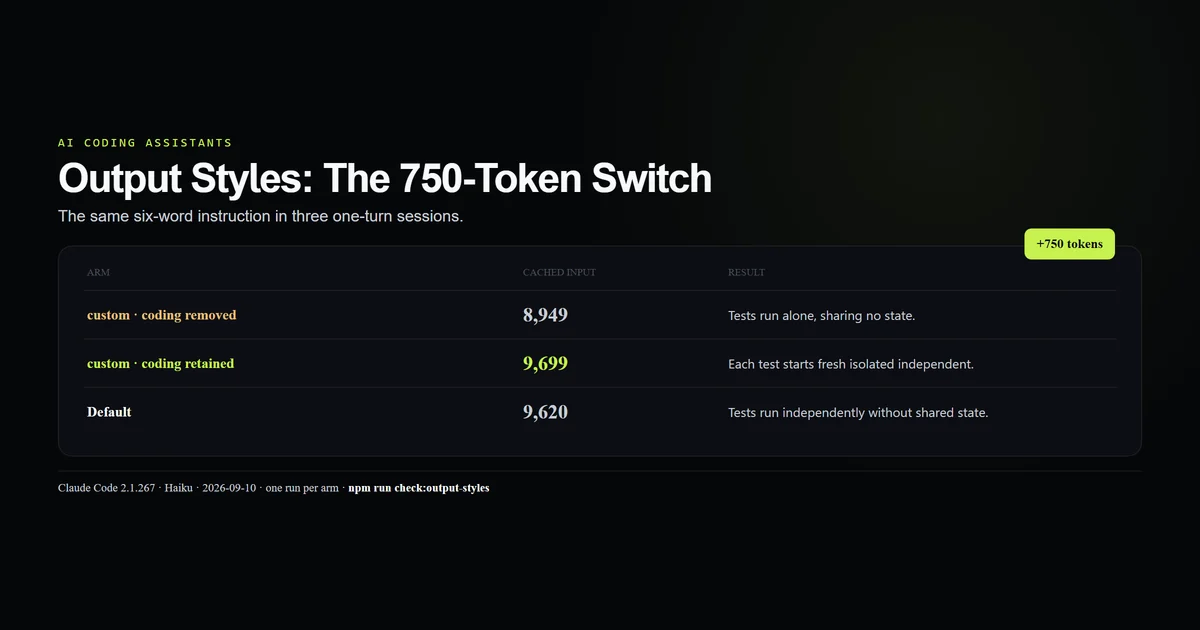
Claude Code output styles do more than adjust Claude tone: a custom style rewrites the system prompt, and by default it removes the built-in coding instructions. In our three-arm probe, the same six-word style used 8,949 cached input tokens without those instructions and 9,699 with them — a 750-token switch. This tutorial builds the exact files, shows where to select them, and separates response formatting from project rules. Measured 2026-09-10 on Claude Code 2.1.267.
Key takeaways
- A custom style changes the system prompt for every response, not a cosmetic renderer after generation.
keep-coding-instructionsdefaults to false; set it totruewhen the session still edits code.- The retained arm added 750 cached input tokens against the same style without coding instructions.
- All three arms obeyed the six-word format, so this experiment does not rank response quality.
- Style changes take effect in a new session, keeping the prompt stable for caching.
What Claude Code output styles change
Claude Code output styles set a repeated role, response format, or voice at the system-prompt layer. Anthropic's output styles documentation says project conventions belong in CLAUDE.md; the complete guide places both beside skills, agents, and one-off prompt flags.
The distinction is concrete. A style can say “always lead with a diagram.” CLAUDE.md can say “this repository uses npm and never pnpm.” Mixing those puts repository correctness behind a user preference that may not be selected.
The three-arm probe
We created two project styles with identical bodies. One omitted the keep flag; one set it to true. A Default control used no custom style.
---
name: Six words
description: Answer every request in exactly six words
---

Reply in exactly six words. Do not use bullets, headings, or code fences.
---
name: Six words coding
description: Answer in six words while retaining coding instructions
keep-coding-instructions: true
---

Reply in exactly six words. Do not use bullets, headings, or code fences.
Each tool-free Haiku session received the same prompt: “Reply with exactly six words explaining test isolation.”
| Arm | Cached input | Result |
|---|---|---|
| Custom, coding removed | 8,949 | Tests run alone, sharing no state. |
| Custom, coding retained | 9,699 | Each test starts fresh isolated independent. |
| Default | 9,620 | Tests run independently without shared state. |
All three responses are exactly six words. The experiment establishes selection and prompt size. One stochastic response per arm cannot tell us which style writes better code.
The 750-token switch
The same custom instructions cost 750 more cached input tokens when keep-coding-instructions: true. Compared with Default, removing coding instructions saved 671 tokens; retaining them came within 79 tokens of the Default prompt.
The transcripts explain the shape. Both custom arms contain output_style_instructions and output_style attachments. Only the retained arm's prompt snapshot contains the built-in software-engineering block. This is the behavior Anthropic documents, observed from outside rather than inferred from the answer.
Build a custom style
Use a style to customize Claude output when the instruction genuinely belongs on every turn. The minimum workflow is:
- Create one Markdown file under the user or project style directory.
- Give it a clear
nameanddescription. - Set
keep-coding-instructions: trueif the role still writes or reviews software. - Select it under
/config→ Output style. - Start a new session.
To set it directly, use the documented settings field:
{
  "outputStyle": "Six words coding"
}
The local settings file is appropriate for a personal preference. Commit a project style definition when the team needs the option; do not commit everyone's selection unless that is a deliberate project policy.
Where styles live
Scope follows the same basic hierarchy as other Claude Code configuration:
| Scope | Directory |
|---|---|
| User | ~/.claude/output-styles/ |
| Project | .claude/output-styles/ |
| Managed | policy .claude/output-styles/ |
Plugins can ship styles too. Their frontmatter additionally supports force-for-plugin: true, which can override the user's outputStyle. Our plugin inventory guide is the inspection step before accepting that behavior.
Output style versus CLAUDE.md
The decision rule is scope and layer:
- Output style: repeated role, tone, or format; modifies the system prompt.
CLAUDE.md: project conventions and codebase context; arrives as instructions for the project.- Skill: a reusable procedure selected for one kind of task.
--append-system-prompt: a one-run addition that preserves the default prompt.
If you need Claude to “be a data analyst,” a style fits. If you need it to “run npm run typecheck before publish,” use CLAUDE.md or an enforcement hook. The settings guide covers where the selector should live.
What did not work
The first probe hung for more than 90 seconds in the restricted environment and produced no output. We stopped only the process we started, then reran the same capped command with network access. It completed, so the stall is recorded as environment failure and not blamed on the style.
claude plugin validate cannot validate a bare output-styles directory. It returned “No manifest found” because the validator expects a plugin or marketplace root. The two project style files remain committed as the runnable artifact, and the repository check parses their measured fixture instead.
The prompt asked for six words and accidentally made all three arms look equally good. That is useful for confirming selection and useless for judging software behavior. No quality conclusion is drawn.
Best practices
- Set
keep-coding-instructions: truefor any style still expected to modify code. - Keep style instructions short; every byte joins the prompt on every turn.
- Put project facts in
CLAUDE.md, not in a personal writing persona. - Start a new session after selection rather than debugging a style that has not loaded yet.
- Test one hard constraint with a tool-free prompt before trusting a complex persona.
- Inspect the transcript attachment when exact selection matters.
Common mistakes
Treating styles as post-processing. The model sees the instruction before it answers. It changes generation and token use, not only presentation.
Omitting the keep flag while coding. The default is false. The symptom is a session that follows your format while dropping the normal software-engineering guardrails.
Using a style for repository policy. A teammate selects another style and the policy vanishes. Put durable project rules in a structured CLAUDE.md.
Comparing cost from one response. The retained arm cost roughly twice as much in this probe because thinking varied by thousands of tokens. That is model variance, not a publishable style price.
Conclusion
Claude Code output styles are the right tool when the same role or format should govern every response. For coding, the safe default is to set keep-coding-instructions: true and accept the measured 750-token addition; for a replacement role, leave it out deliberately. Customize Claude output at the system layer only when you mean to replace what already lives there.
Frequently asked questions
What are Claude Code output styles?
How do I create a custom Claude Code output style?
What does keep-coding-instructions do?
Can an output style change Claude's tone?
Why does an output style change only in a new session?
Muhammad Kashif
Founder and editor of Devventa, covering AI coding assistants, Next.js and the modern AI development stack.