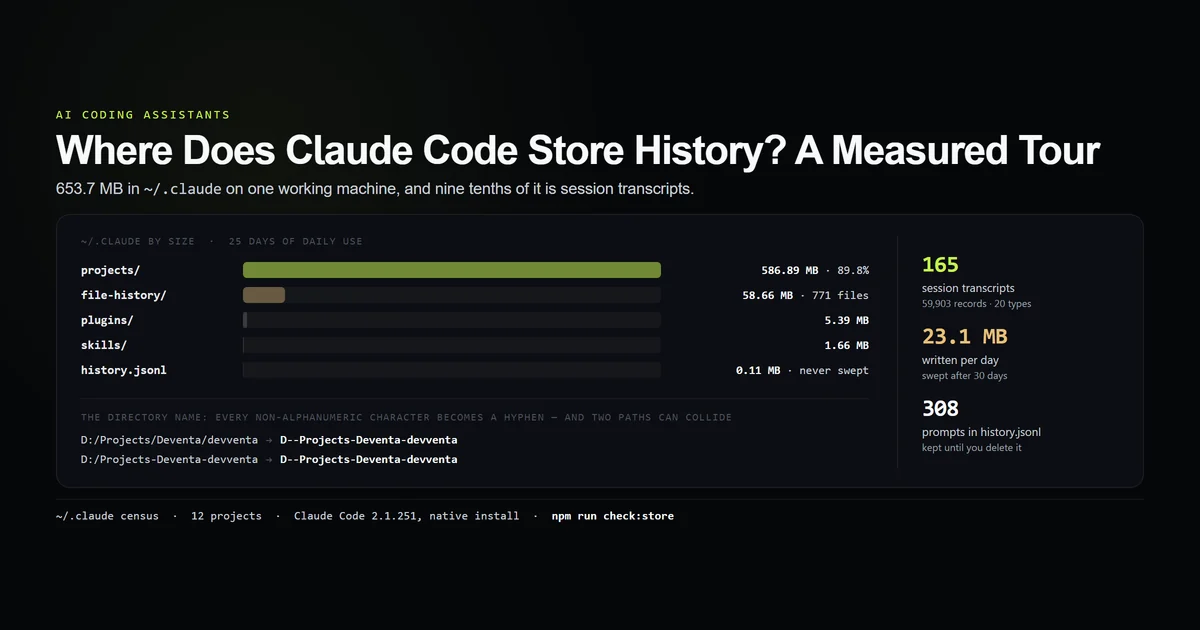
Claude Code stores history in ~/.claude, and almost all of it is in one subdirectory: ~/.claude/projects, holding one JSON Lines transcript per session. On the machine measured here that directory is 586.89 MB of the 653.7 MB total — 89.8% — growing at roughly 23 MB a day. This is the full layout with real sizes, what is actually inside a claude jsonl file, how the project directory names are built, and what survives an official purge. Measured 2026-08-31 on Claude Code 2.1.251, native install.
Key takeaways
- Session history lives in
~/.claude/projects/<mangled-path>/<session-id>.jsonl. 165 files, 59,903 records, 572.9 MB here. - The transcript is not a chat log. 20 distinct record types; conversation turns are 33,839 of 59,903 records.
- The directory name is the project path with every non-alphanumeric character replaced by a hyphen — a rule that is exact and not reversible.
history.jsonlis a separate record and is never swept. 308 prompts across 98 session ids, and it disagrees with the transcript store in both directions.- Transcripts are swept after
cleanupPeriodDays, default 30. Nothing here has aged out: the store begins the day the CLI was installed.
Where Claude Code stores history
All of it is written by the CLI itself rather than by anything you configure — this is the session model from the complete Claude Code guide, on disk. Anthropic publishes a reference for the whole .claude directory; what follows is the same tree with real numbers against it. One directory, twelve things in it, one of which is 90% of the bytes:
Path under ~/.claude/ | Holds | Size |
|---|---|---|
projects/ | One .jsonl transcript per session, one directory per project | 586.89 MB |
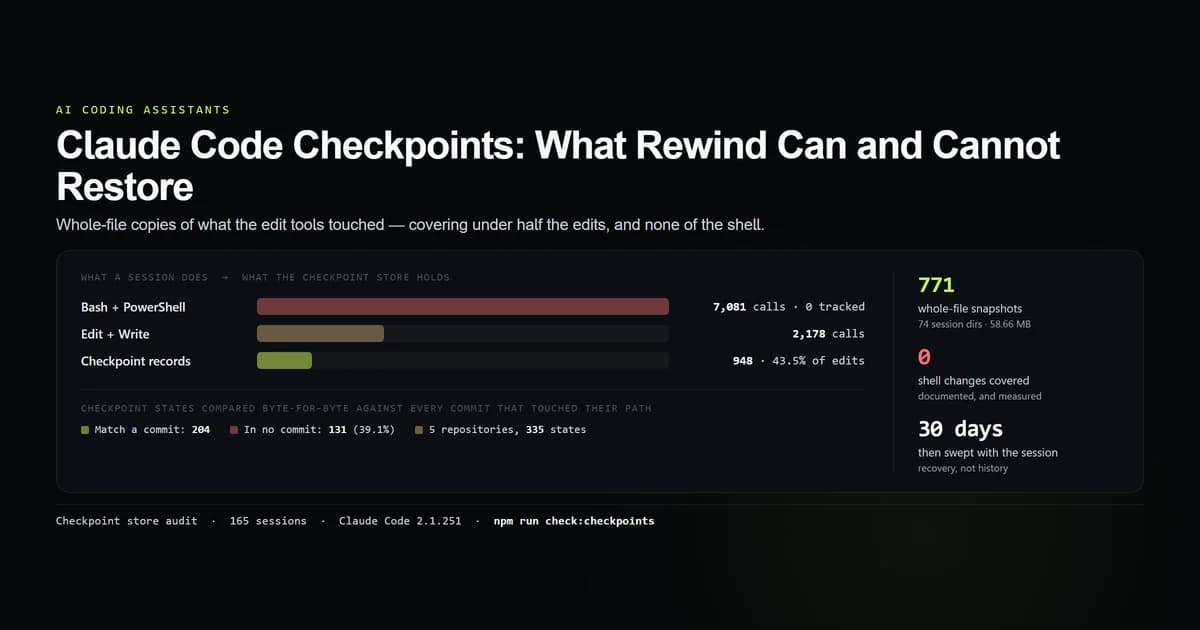
file-history/ | Checkpoint copies of files Claude edited | 58.66 MB |
plugins/ | Installed plugin marketplaces | 5.39 MB |
skills/ | Skill definitions | 1.66 MB |
backups/ | Rolling copies of ~/.claude.json | 0.38 MB |
history.jsonl | Every prompt typed, with its project and session id | 0.11 MB |
paste-cache/ | Pasted blocks too large to inline | 0.08 MB |
tasks/, debug/, sessions/, shell-snapshots/, cache/ | Per-session scratch and runtime state | under 1 MB combined |
One important file is not in that directory. ~/.claude.json sits beside it and holds per-project state — trust decisions, allowed tools, MCP servers, and the last session's cost and id for each of the 12 projects here. It is 77,849 bytes and it is the only place the real project paths are written down, which matters more than its size suggests.
npm run check:store
# → ~/.claude total: 653.7 MB
# →   586.89 MB   235 files  projects/       one .jsonl transcript per session
# →    58.66 MB   771 files  file-history/   checkpoint copies of edited files
# →     0.11 MB     1 files  history.jsonl   every prompt typed, newest last
# → transcripts : 165 files · 59,903 records · 20 record types
# → growth      : 23.1 MB/day (2026-08-06 -> 2026-08-31)
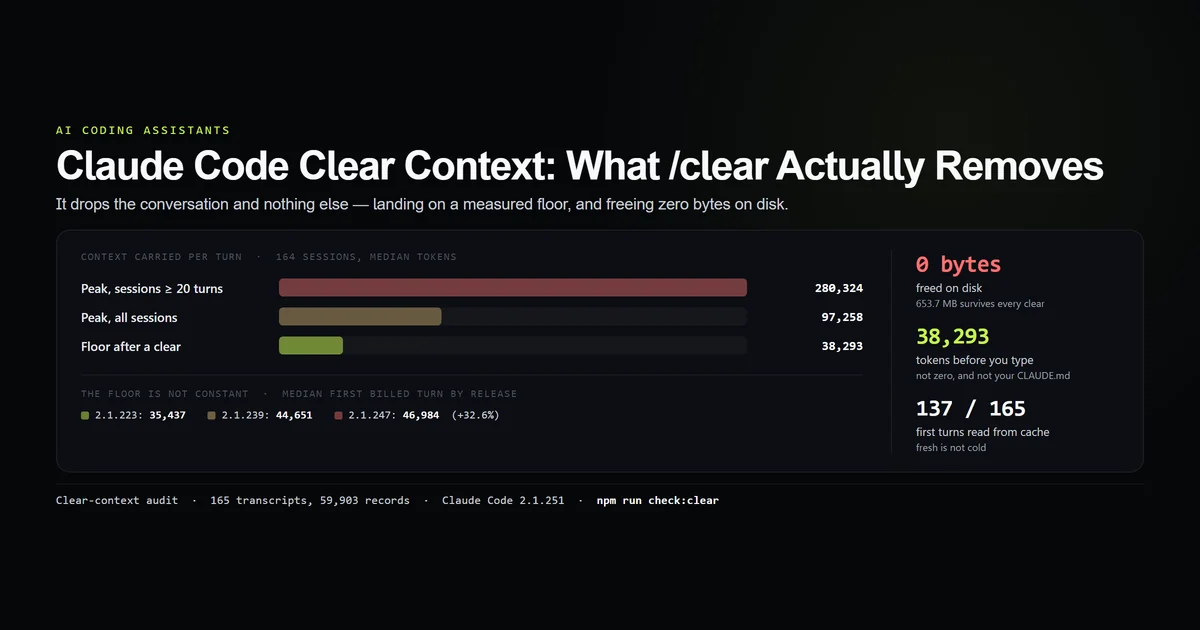
The practical consequence of that first row: if ~/.claude is large, it is transcripts. Nothing else in the directory is within an order of magnitude, and clearing context does not reduce it by a single byte.
What fills the transcript store
A .jsonl transcript is one JSON object per line, and calling it a conversation log undersells it considerably. Across 59,903 records in ~/.claude/projects there are 20 distinct record types:
| Record type | Count | What it is |
|---|---|---|
assistant / user | 33,839 | The conversation, including tool calls and results |
attachment | 7,724 | Files and context attached to a turn |
last-prompt / ai-title | 7,302 | Session naming and recall state |
mode / permission-mode | 7,150 | Which permission mode each turn ran in |
file-history-delta / -snapshot | 1,249 | The checkpoint index |
system:turn_duration | 281 | Wall-clock milliseconds per user turn |
cost-state | 13 | Per-session cost and per-model token rollup |
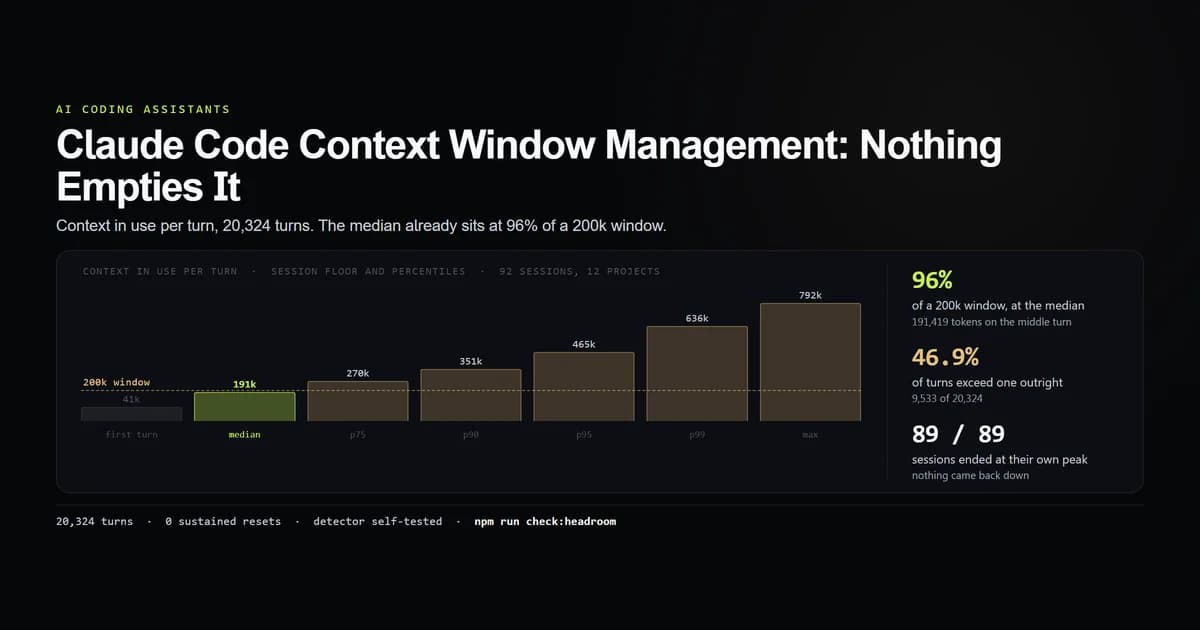
Conversation turns are 56.5% of the records. The rest is metadata the CLI writes for its own features — and it is why the transcripts are useful for more than reading back what you said. The permission-mode lines are how plan mode usage was counted; the turn_duration lines are how 270 turns were timed; the usage block on every assistant turn is how the context floor was measured.
The mean record is 10,031 bytes, which is the other half of the size story. A single tool result — a file read, a build log — is one line, and lines are what this format bills by.
How the project directory name is built
The directory names look like they have been through a mangler because they have. The rule is one line:
const mangle = (p) =>
  p.split("").map((c) => (/[A-Za-z0-9]/.test(c) ? c : "-")).join("");
Every character outside A-Z, a-z and 0-9 becomes a hyphen — drive letters, colons, slashes, spaces, underscores, parentheses, all of them. D:/Projects/Deventa/devventa becomes D--Projects-Deventa-devventa. Reimplemented from the observed names, that function reproduces all 12 directory names on this machine exactly, and the check fails if any directory on disk cannot be produced from a known path.
The interesting part is what the rule destroys. It is many-to-one:
| Project path | Directory |
|---|---|
D:/Projects/Deventa/devventa | D--Projects-Deventa-devventa |
D:/Projects-Deventa-devventa | D--Projects-Deventa-devventa |
Two different projects, one directory. You cannot read a project path back out of a ~/.claude/projects folder name, which is why ~/.claude.json keeps the real paths and why tooling that wants to map a directory to a repository has to go through it. Prefix matching does not save you either: this machine has both D--Projects-Deventa and D--Projects-Deventa-devventa, and one is a prefix of the other.
The prompt log is a second, separate record
~/.claude/history.jsonl is the up-arrow recall log, and it is a genuinely different record from the transcripts — same session ids, different contents, different lifetime. One line per prompt:
| Field | Holds |
|---|---|
display | The prompt text as typed |
pastedContents | Anything pasted into it |
timestamp | Epoch milliseconds |
project | The real project path, unmangled |
sessionId | The session the prompt belonged to |
On this machine: 308 prompts across 98 session ids. There are 165 transcripts. The two records disagree in both directions — 68 transcripts have no matching prompt in the log, and one logged session has no transcript at all.
That is not a defect, it is what the two records are for. Sessions started by a subagent, a background run, or a resumed conversation append transcript lines without a typed prompt; the log only ever records something you typed. It also means the prompt log is the smaller, more sensitive artifact: 0.11 MB that reads like a diary of what you asked, on every project, for as long as the install has existed.
What the store does not contain
Two limits worth knowing before you treat this directory as your history.
It starts with the install, not with the account. ~/.claude.json records firstStartTime of 2026-08-06 on this machine and an account whose first Claude Code token was issued 2026-04-02. The earliest transcript is from 2026-08-06 — ten minutes after the install. Four months of prior work is not here, because the store is machine-local and was created when the CLI was.
There are more session files than launches. 165 transcripts against a numStartups of 104. Resumed sessions, forks, background runs and subagent transcripts all produce files, so a one-file-per-launch mental model will mislead you when you go counting.
Both facts point the same way: ~/.claude is a local cache of local activity, not an account-level archive.
What is swept and what is kept forever
Claude Code deletes some of this on a timer and none of the rest. The retention period is cleanupPeriodDays, default 30, minimum 1.
- Swept after the retention period:
projects/<project>/<session>.jsonl, subagent transcripts, spilled tool results,tasks/andfile-history/entries. The bulk of the bytes, in other words. - Kept until you delete it:
history.jsonl— every prompt, forever — plus the usage stats cache and a few small caches.
The sweep last ran here on 2026-08-29 and removed nothing, because the oldest transcript is 24.8 days old and the threshold is 30. That is the honest state of this measurement: it is a full store, not a steady-state one. A machine past its first month would show projects/ levelling off while history.jsonl keeps growing, and this corpus cannot demonstrate that.
Deleting it properly
There is a first-party command for this, and it is worth using instead of rm because the state for one project is spread across four places. --dry-run prints the plan and deletes nothing:
claude project purge D:/Projects/Deventa/devventa --dry-run
# → Purge plan for D:\Projects\Deventa\devventa:
# →   dir:    ~/.claude/tasks/7347bef3-...            tasks for session
# →   dir:    ~/.claude/file-history/7347bef3-...     file edit history for session
# →   dir:    ~/.claude/file-history/ddfc13ac-...     file edit history for session
# →   dir:    ~/.claude/projects/D--Projects-Deventa-devventa
# →                                                   project transcripts (.jsonl) and memory/
# →   config: projects["D:/Projects/Deventa/devventa"] entry in ~/.claude.json
# →   filter: ~/.claude/history.jsonl                 5 prompt(s) typed in this project
# → Dry run: 6 item(s) would be deleted.
Four stores, one config entry, and a filtered rewrite of the prompt log. Note what the plan says next, verbatim from the same output: shell-snapshots/ are not project-scoped and are not touched, and backups/ may still contain the project entry in old .claude.json snapshots — at most five, rotating out on their own.
So even the official purge is not a complete erasure, and it tells you so. Drop --dry-run to execute, add --yes for scripts, or --all to purge every project at once, which deletes history.jsonl outright rather than filtering it.
If your goal is size rather than privacy, the lever is cleanupPeriodDays: at 23 MB a day, dropping 30 to 7 is the difference between a store that settles near 700 MB and one that settles near 160 MB.
Best practices
- 1. Set
cleanupPeriodDaysdeliberately. The default keeps a month of plaintext transcripts of every repository you have opened. Decide that number rather than inheriting it. - 2. Use
claude project purge, notrm -rf. Four locations plus a config entry; deleting the transcript directory alone leaves the checkpoints, the tasks and the prompt log behind. - 3. Read the real paths from
~/.claude.json. Directory names are lossy. Any script that maps a transcript folder back to a repository has to go through the config. - 4. Treat
history.jsonlas the sensitive one. It is never swept and it is the most readable file in the directory. - 5. Mine the transcripts before they expire. Every measurement on this site — cost per version, turn latency, the context floor — came out of these files. In 30 days they are gone.
Common mistakes
- Mistake 1: assuming the folder name is the project path. It is a lossy transform, and two paths can collide on one folder. Symptom: a script that confidently attributes sessions to the wrong repository.
- Mistake 2: thinking
/clearreduces this. It changes the directory by zero bytes. What it does and does not touch is measured here. - Mistake 3: counting transcripts as sessions you started. 165 files, 104 launches. Resumes, forks and subagents all write files — see how Claude Code session management governs resume flags,
--continue, and session forking. - Mistake 4: expecting a purge to remove every trace.
backups/keeps up to five old.claude.jsonsnapshots and the purge output warns you about them. - Mistake 5: forgetting the transcripts hold whatever tools read. If a session read a credentials file, that value is on disk in plaintext until the sweep takes it.
Conclusion
If you need one path, it is ~/.claude/projects — 90% of the bytes, one JSON Lines file per session, swept after 30 days by default. Keep the other three in mind, because they have different lifetimes: file-history for checkpoints, history.jsonl for prompts and never swept, and ~/.claude.json for the only unmangled copy of your project paths. Set cleanupPeriodDays to a number you chose, purge per-project with the first-party command, and read the transcripts before they expire — they answer questions no dashboard does, as the checkpoint audit and the context window measurements both did.
Frequently asked questions
Where does Claude Code store conversation history?
What is the .jsonl file in ~/.claude/projects?
How is the project folder name in ~/.claude/projects generated?
How do I delete Claude Code history for one project?
How long does Claude Code keep transcripts?

Muhammad Kashif
Founder and editor of Devventa, covering AI coding assistants, Next.js and the modern AI development stack.