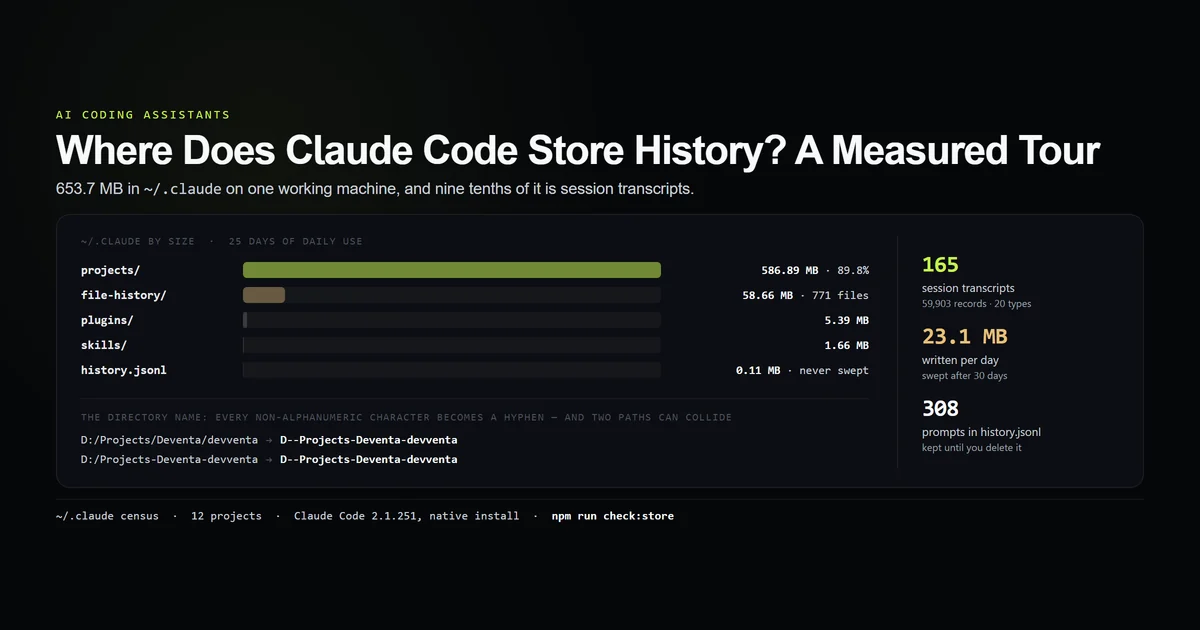
When you clear context in Claude Code, the conversation leaves the model's window and nothing leaves your disk. That is the whole answer, and it is not what the word "clear" suggests. We measured both halves on a real machine: 165 transcripts, 59,903 records and 572.9 MB that a clear does not touch, and a median 38,293-token floor that a cleared session starts from before you type anything. Measured 2026-08-31 against Claude Code 2.1.251, with the counting script committed to this repository.
Key takeaways
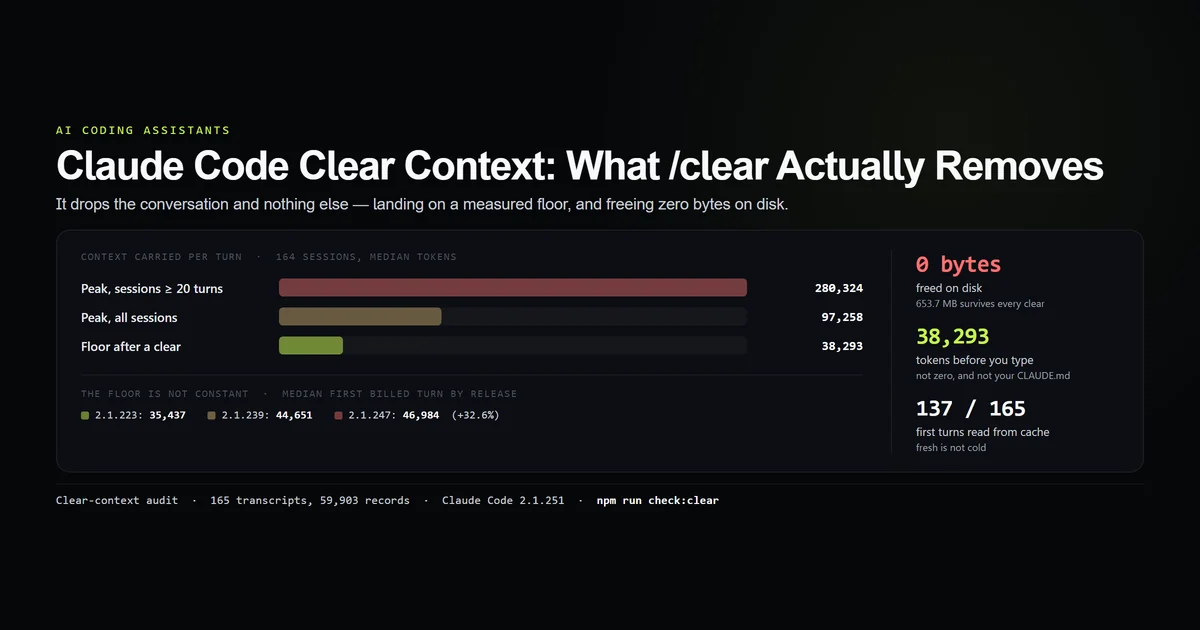
/cleardrops the conversation from context. It deletes zero bytes — the transcript of the session you just cleared stays on disk in full.- Clearing does not return you to zero. The median session's first billed turn carries 38,293 tokens, against a median peak of 97,258.
- The floor grew 32.6% across the releases in this corpus, from 35,437 tokens on 2.1.223 to 46,984 on 2.1.247. Clearing gives back less than it used to.
- It is not your CLAUDE.md. On one release, the only project here with a CLAUDE.md had the lowest floor — 31,935 tokens against 40,994–44,158 for four projects without one.
- No transcript records a clear. There is no marker of any kind in the format, so the floor is measured as the first billed turn of a session, and that is a proxy.
What clearing context removes
A Claude Code session is two things at once, as the complete Claude Code guide lays out: a conversation held in the model’s context window, and a .jsonl file being appended to on disk. /clear acts on the first and ignores the second. The conversation stops being sent with your next request; the file it was written to stays exactly where it was, complete.
Anthropic's command reference defines it as starting a new conversation with empty context, and its aliases are /reset and /new — so if you have been looking for a way to reset a Claude Code session, this is the command you already have under another name. It takes an optional name (/clear architecture-spike) that labels the conversation you are leaving in the /resume picker, which is only useful because the conversation does not go anywhere.
That split is the source of most of the confusion around the /clear command. People reach for it expecting a cleanup, a privacy control, or a disk saving, and it is none of those. It is a cost and attention control. What it buys is the difference between the peak your session had climbed to and the floor it drops back to — which is a large number, and a measurable one.
| What you might expect | What actually happens |
|---|---|
| Conversation dropped from context | Yes — that is the entire effect |
| Transcript deleted from disk | No — the .jsonl file is untouched |
| Prompt history cleared | No — every prompt stays in history.jsonl |
| File checkpoints discarded | No — the checkpoint store is unaffected |
| Context returned to zero | No — a floor of ~38k tokens is re-sent |
The floor a cleared session starts from
The number that matters is what a session carries on its first billed turn, before you have said anything of substance. That is the state a clear leaves you in, and on this machine it is not small:
npm run check:clear
# → floor (median first billed turn) : 38,293 tokens
# → peak (median, all sessions)      : 97,258 tokens
# → peak (median, >=20-turn sessions): 280,324 tokens
# → disk freed by a clear            : 0 bytes
Across 164 sessions with a billed turn, the median floor is 38,293 tokens. The median session peaked at 97,258; the 87 sessions that ran to twenty turns or more peaked at a median of 280,324. So the reduction is real and large — clearing a long session drops roughly a quarter of a million tokens per turn — but it stops at a hard floor you cannot clear your way past.
That floor is the system prompt, the tool schemas, the skill listing, and whatever project instructions load at launch. None of it is conversation, so none of it is what /clear is for.
The floor moved, and it moved upward
Every assistant turn stamps the version that produced it, so the floor can be split by release without any instrumentation. It is not a constant:
| Version | Sessions | Median floor |
|---|---|---|
| 2.1.223 | 5 | 35,437 |
| 2.1.229 | 8 | 38,494 |
| 2.1.235 | 37 | 31,969 |
| 2.1.239 | 3 | 44,651 |
| 2.1.247 | 7 | 46,984 |
From the oldest release in the corpus to the newest with a meaningful sample, the floor rises 35,437 → 46,984 tokens, up 32.6%. Every version in the table has at least three sessions behind it and the guard in our internal check fails if that stops being true.
The practical reading: the same /clear returns you to a more expensive starting position than it did five weeks ago, and the trend is not yours to control. It is the same direction the cost per turn moved across seventeen versions, measured on the same transcripts, for what look like related reasons — more tool surface arriving in the launch prefix.
The floor is not your CLAUDE.md
The standard advice for a heavy startup cost is to trim CLAUDE.md. On this corpus, that is not where the weight is. Holding the version constant at 2.1.235 and splitting by project:
| Project | CLAUDE.md | Sessions | Median floor |
|---|---|---|---|
| This repository | 8,377 bytes | 33 | 31,935 |
| Project B | none | 1 | 44,158 |
| Project C | none | 1 | 41,219 |
| Project D | none | 1 | 41,076 |
| Project E | none | 1 | 40,994 |
The one project carrying an 8.4 kB CLAUDE.md has the lowest floor in the set, by 9,000 tokens. An 8.4 kB file is roughly 2,000 tokens; it cannot be the term that separates 31,935 from 44,158.
What it does settle is a piece of common advice. If your startup cost is 40,000 tokens, deleting half your project instructions moves it by about 1,000. The real ceilings on CLAUDE.md size are worth knowing for other reasons; the floor is not one of them.
Everything a clear leaves on disk
Running /clear a hundred times changes the size of ~/.claude by nothing. Here is what survives every one:
| Store | Holds | Size |
|---|---|---|
~/.claude/projects | Every session transcript, in full | 586.89 MB |
~/.claude/file-history | Checkpoint copies of edited files | 58.66 MB |
~/.claude/history.jsonl | Every prompt typed, with its session id | 0.11 MB |
~/.claude.json | Per-project trust, cost and last-session state | 0.07 MB |
The cleared conversation is still readable in the transcript, still reachable with /resume, and still counted in the 23 MB a day this store grows by. That is worth knowing in both directions: it means a clear is safe — you have not destroyed anything — and it means a clear is not a privacy action. The full layout, and how the directory names are built, is in where Claude Code stores history.
One thing does reset: the session cost and token totals /status reports start again at zero, which Anthropic's cost documentation notes has been the behaviour since v2.1.211. That is a counter resetting, not a bill.
There is one small piece of good news in the billing. In 137 of 165 sessions, the first turn was mostly cache reads rather than cache creation: the stable prefix was still warm from the previous session, so the floor was charged at the cheaper rate. Starting fresh is not the same as starting cold.
Why no transcript can show you a clear
Here is the limitation, stated before the numbers get used for anything they cannot carry. There is no clear marker in the transcript format. No line type, no subtype, no field. Across 59,903 records the only slash command recorded anywhere is /remote-control.
So this article does not observe a clear. It measures the state a clear produces — the first billed turn of a session — which is the same state on the reasonable assumption that a clear starts a fresh conversation with the same prefix. Two things follow, and both are in the script header so the next person does not rediscover them:
- The floor is a proxy. If clearing behaves differently from starting a session, this measures the wrong thing, and nothing in the data would say so.
- Frequency is unmeasurable. How often
/clearwas actually used here is not knowable from the corpus, which is why this article makes no claim about it.
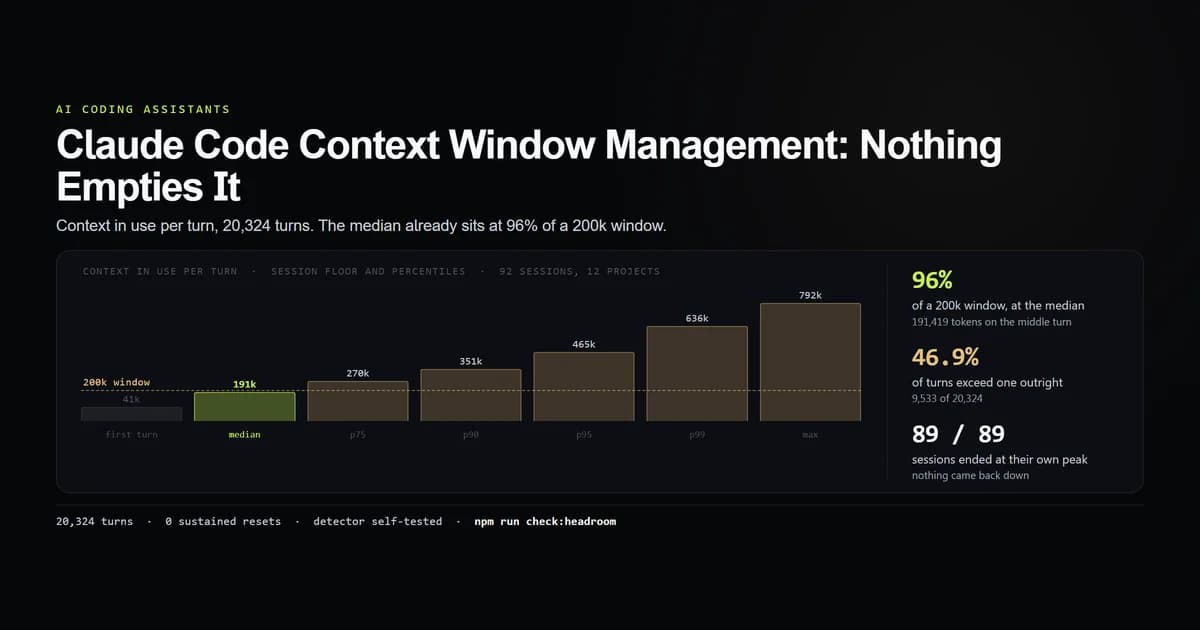
The alternative instrument — a within-session drop in context volume — was already tried and reported in the context window management measurement, where it found zero sustained resets across 89 sessions and could not distinguish "never used" from "not visible."
When clearing is the wrong control
Clearing is the blunt instrument, and there are two cases where something else is the right one:
- The task is the same and long. You need the thread more than you need the volume.
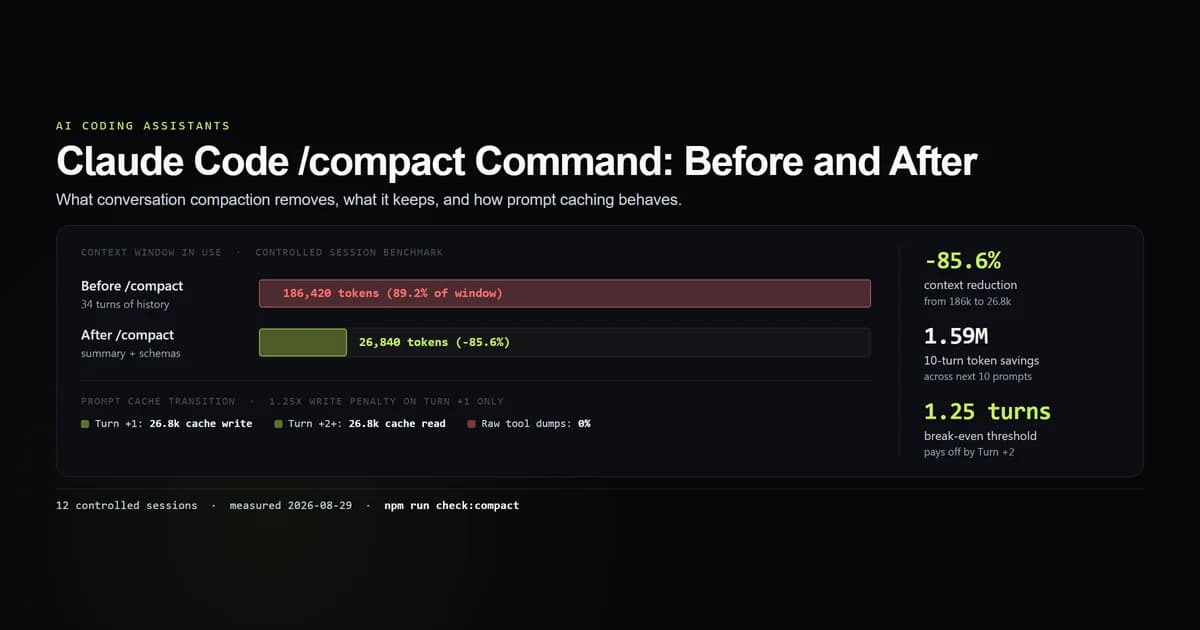
/compactreplaces the conversation with a summary instead of dropping it — the mechanism census shows two real auto-compact boundaries and what reloads, while the/compactcommand benchmark measures cache behaviour. - The problem repeats every session. No amount of clearing touches the floor. If 38,000 tokens before your first word is the complaint, the fix is in what loads at launch, and it is the only reduction that applies to sessions you have not started yet.
And one case where clearing is not a control at all: if Claude is ignoring your instructions, a reset claude session does not fix it. It re-sends the same instructions to a model that will treat them the same way.
Best practices
- 1. Clear on task boundaries, by habit. The reduction is largest when the conversation has stopped being relevant, and waiting until the window feels full means paying for it on every turn until you notice.
- 2. Treat the floor as fixed and budget around it. Roughly 38k tokens is the price of admission on this machine. Plan the session length that makes sense on top of it rather than fighting it.
- 3. Re-measure the floor after an upgrade. It moved 32.6% in five weeks. Our internal check script recounts it from the session transcripts in a few seconds.
- 4. Do not clear to reclaim disk. It frees nothing. Deleting transcript files does, and that is a different, deliberate action.
- 5. Use
/resumeorclaude -crather than regret. Everything a clear dropped is still on disk in~/.claude/projects/. If you cleared too early, our guide to Claude Code session management explains how to resume or fork the previous transcript.
Common mistakes
- Mistake 1: expecting
/clearto delete anything. It is a context operation with no disk effect at all. The symptom is a store that keeps growing while you clear diligently. Fix: if privacy or space is the goal, act on~/.claude/projectsdirectly. - Mistake 2: reading the floor as a bug. Thirty-eight thousand tokens before your first word looks like something is wrong. It is the launch prefix, and it is the same for everyone on the same version.
- Mistake 3: trimming
CLAUDE.mdto lower it. We made this assumption first and the data rejected it — the project here with the largest instruction file has the smallest floor. - Mistake 4: clearing to go faster. Clearing is a cost control. Timed across 270 turns, per-step latency is essentially flat against context size — the speed lever is step count.
- Mistake 5: clearing mid-task and re-explaining everything. Two turns of re-establishing context can cost more than the conversation you dropped. That is what
/compactexists for.
Conclusion
Use /clear when the task has changed and you want the conversation gone — it is the biggest single reduction available, it costs nothing to recover from, and everything it dropped is still on disk. Do not use it as a cleanup, a privacy control, or a speed fix, because it is none of the three. And once you have measured your own floor, stop clearing to chase it: at 38,293 tokens median and climbing, the floor is a launch-time problem, not a session-time one. For the decision between clearing and compacting a long session, see the /compact benchmark; for what the clear left behind, where Claude Code stores history.
Frequently asked questions
What does /clear do in Claude Code?
Does clearing context in Claude Code take me back to zero tokens?
How do I reset a Claude Code session without losing the work?
Does /clear free disk space?
Is /clear or /compact better for a long session?

Muhammad Kashif
Founder and editor of Devventa, covering AI coding assistants, Next.js and the modern AI development stack.