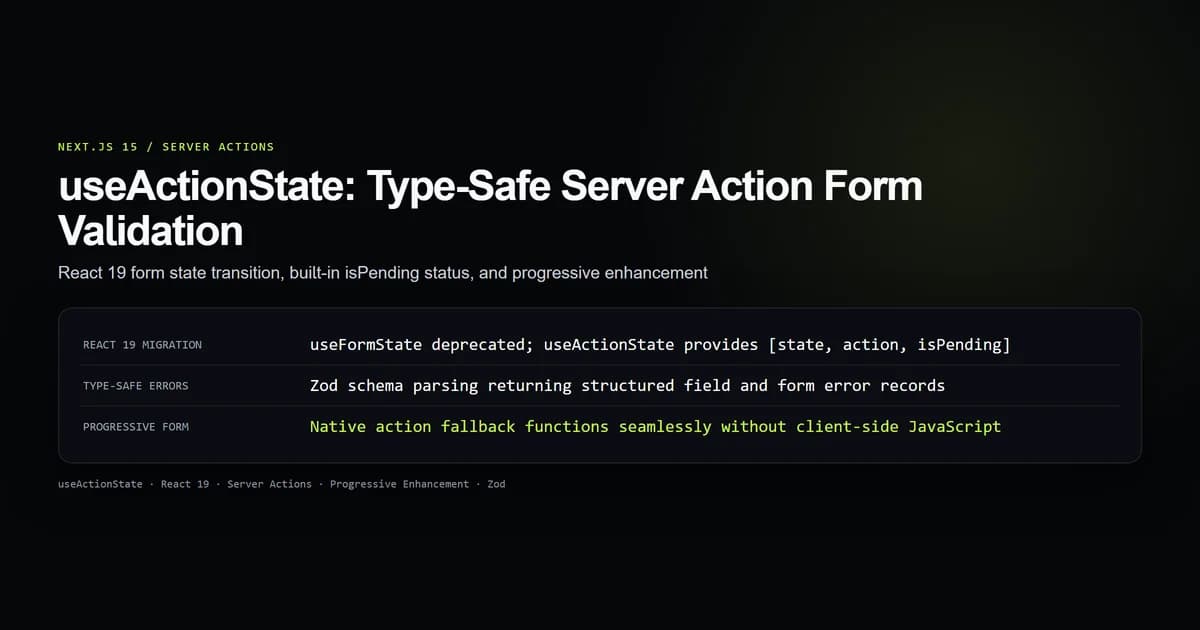
In React 19 and Next.js 15, useFormState is deprecated in favor of nextjs useactionstate, which consolidates Server Action execution, returned validation state, and transition tracking into a unified three-element tuple. Migrating form handling to useActionState eliminates the awkward requirement of nesting child components solely to access useFormStatus for submit button states.
When building forms with Server Actions in Next.js 15, returning structured validation states instead of throwing unhandled exceptions ensures that invalid inputs are preserved rather than unmounting the form via error.tsx. Here is how to configure type-safe form state models, integrate Zod validation, and retain progressive enhancement without client-side JavaScript.
Key takeaways
- React 19 replaces
ReactDOM.useFormStatewithReact.useActionState, expanding the return tuple to[state, formAction, isPending]. - The third tuple element (
isPending) removes the need for separateuseFormStatuschild components for pending spinners. - Validation failures should return structured error dictionaries; throwing exceptions crashes the tree into
error.tsx. - Form field values must be captured from
FormDataand echoed back in error states to prevent user input loss. useActionStatepreserves native HTML<form action={...}>semantics, executing cleanly even when client scripts are blocked.
React 19 deprecates useFormState for useActionState
In Next.js 14 applications running React 18, developers managing form mutations typically reached for useFormState from react-dom. That hook presented two structural friction points:
- Friction 1 (Location mismatch): It lived in
react-domrather than corereact, despite managing general action state. - Friction 2 (Missing pending signal):
useFormStatereturned only[state, formAction]. To disable the submit button or display a spinner during network transport, developers were forced to split their JSX and extract the button into a distinct child component usinguseFormStatus.
React 19 relocated the hook to core React under the name useActionState and modernized its signature. Per the official React useActionState documentation, the hook now directly exposes the transition state:
// React 18 / Next.js 14 (Deprecated)
import { useFormState } from "react-dom";
const [state, formAction] = useFormState(serverAction, initialState);

// React 19 / Next.js 15 (Standard)
import { useActionState } from "react";
const [state, formAction, isPending] = useActionState(serverAction, initialState);
The third value, isPending, is a boolean governed by React.useTransition under the hood. It turns true the moment the user triggers formAction and reverts to false once the Server Action completes and the DOM reconciles new server markup.
| Hook Feature | React 18 useFormState | React 19 useActionState |
|---|---|---|
| Package Import | react-dom | react |
| Return Tuple | [state, formAction] | [state, formAction, isPending] |
| Requires Child Button Component | Yes (for useFormStatus) | No (destructures isPending directly) |
| Non-Form Action Support | Limited | Yes (supports arbitrary async actions) |
Type-safe Server Action signature and return shape
The callback supplied to useActionState must adhere to an invariant contract. It receives the previous action state as its first argument and the submitted payload (typically FormData) as its second argument:
(prevState: ActionState, formData: FormData) => Promise<ActionState>
Designing an explicit discriminated union for ActionState provides strict compile-time safety across both the server mutation and the client component:
export type ActionState<TData = unknown> =
  | { status: "idle" }
  | {
      status: "error";
      message: string;
      fieldErrors?: Record<string, string[]>;
      submittedValues?: Record<string, string>;
    }
  | {
      status: "success";
      message: string;
      data?: TData;
    };
This state shape guarantees that client components can never render an error banner unless status === "error", and guarantees that successful submissions carry clean reset contracts.
Form validation with Zod and error mapping
Performing robust nextjs 15 server action validation requires schema parsing on the server. Never trust client-side validation alone; attackers bypass browser constraints by crafting raw HTTP requests.
Using Zod, we parse incoming FormData entries, extract field-specific constraints, and convert validation failures into our structured ActionState:
"use server";

import { z } from "zod";
import type { ActionState } from "@/types/form-state";

const ContactSchema = z.object({
  name: z.string().trim().min(2, "Name must be at least 2 characters"),
  email: z.string().trim().email("Please provide a valid email address"),
  message: z.string().trim().min(10, "Message must contain at least 10 characters"),
});

export async function submitContactAction(
  prevState: ActionState,
  formData: FormData
): Promise<ActionState> {
  const rawValues = {
    name: String(formData.get("name") || ""),
    email: String(formData.get("email") || ""),
    message: String(formData.get("message") || ""),
  };

  const parsed = ContactSchema.safeParse(rawValues);

  if (!parsed.success) {
    const formattedErrors = parsed.error.flatten().fieldErrors;
    return {
      status: "error",
      message: "Please correct the highlighted issues below.",
      fieldErrors: formattedErrors,
      submittedValues: rawValues, // Preserve inputs so user data is not erased
    };
  }

  try {
    // Execute database insert or notification service
    // await db.insert(messages).values(parsed.data);

    return {
      status: "success",
      message: "Thank you. Your message has been received.",
    };
  } catch {
    return {
      status: "error",
      message: "An internal server error occurred. Please try again later.",
      submittedValues: rawValues,
    };
  }
}
Notice that on validation error, the action echoes back submittedValues. Without this pattern, React resets form inputs upon re-rendering, frustrating users who must re-type lengthy descriptions.
Handling pending states without useFormStatus
With the isPending boolean exposed by useActionState, the client form component can be declared as a single, cohesive file:
"use client";

import { useActionState } from "react";
import { submitContactAction } from "@/app/contact/actions";
import type { ActionState } from "@/types/form-state";

const initialState: ActionState = { status: "idle" };

export function ContactForm() {
  const [state, formAction, isPending] = useActionState(
    submitContactAction,
    initialState
  );

  return (
    <form action={formAction} className="space-y-4 max-w-lg">
      {state.status === "error" && (
        <div role="alert" className="p-3 bg-red-950 border border-red-800 text-red-200 text-sm rounded">
          {state.message}
        </div>
      )}

      {state.status === "success" && (
        <div role="status" className="p-3 bg-green-950 border border-green-800 text-green-200 text-sm rounded">
          {state.message}
        </div>
      )}

      <div>
        <label htmlFor="name" className="block text-sm font-medium mb-1">
          Full Name
        </label>
        <input
          id="name"
          name="name"
          type="text"
          disabled={isPending}
          defaultValue={state.status === "error" ? state.submittedValues?.name : ""}
          className="w-full px-3 py-2 bg-neutral-900 border border-neutral-700 rounded"
        />
        {state.status === "error" && state.fieldErrors?.name && (
          <p className="text-xs text-red-400 mt-1">{state.fieldErrors.name[0]}</p>
        )}
      </div>

      <div>
        <label htmlFor="email" className="block text-sm font-medium mb-1">
          Email Address
        </label>
        <input
          id="email"
          name="email"
          type="email"
          disabled={isPending}
          defaultValue={state.status === "error" ? state.submittedValues?.email : ""}
          className="w-full px-3 py-2 bg-neutral-900 border border-neutral-700 rounded"
        />
        {state.status === "error" && state.fieldErrors?.email && (
          <p className="text-xs text-red-400 mt-1">{state.fieldErrors.email[0]}</p>
        )}
      </div>

      <div>
        <label htmlFor="message" className="block text-sm font-medium mb-1">
          Message
        </label>
        <textarea
          id="message"
          name="message"
          rows={4}
          disabled={isPending}
          defaultValue={state.status === "error" ? state.submittedValues?.message : ""}
          className="w-full px-3 py-2 bg-neutral-900 border border-neutral-700 rounded"
        />
        {state.status === "error" && state.fieldErrors?.message && (
          <p className="text-xs text-red-400 mt-1">{state.fieldErrors.message[0]}</p>
        )}
      </div>

      <button
        type="submit"
        disabled={isPending}
        className="px-5 py-2 bg-lime-400 text-neutral-950 font-medium rounded hover:bg-lime-300 disabled:opacity-50"
      >
        {isPending ? "Submitting..." : "Send Message"}
      </button>
    </form>
  );
}
Progressive enhancement without client-side JavaScript
A foundational strength of Next.js App Router and the Next.js Server Actions guide is built-in progressive enhancement.
When you pass the action handler to <form action={formAction}>, React wires up the submission handler such that:
- Stage 1 (Before client hydration): If a user clicks submit while the JavaScript bundle is still streaming or blocked by aggressive network conditions, the browser executes a native standard
POSTrequest. Next.js catches this on the server, runs the action, and re-renders the page with the updated state. - Stage 2 (After client hydration): React intercepts the form submission event via JavaScript, invokes the Server Action over an asynchronous fetch transport, and updates
stateandisPendingin place without reloading the browser window.
To ensure progressive enhancement succeeds:
- Always supply standard
nameattributes on every form input. Native browserFormDataserializes solely from named elements. - Never rely on
onClickhandlers on the submit button for data collection. - Avoid passing inline arrow functions directly in JSX like
action={() => startTransition(...)}if progressive enhancement is a requirement.
Best practices for useActionState forms
- Return states, never throw validation errors: Keep
throwstatements reserved for unrecoverable infrastructure faults. Form validation errors must return data structures. - Echo invalid input values: Always return
submittedValueson validation failure so users do not lose their input text during re-renders. - Use Zod safeParse over parse: Calling
.parse()throws exceptions on failure;.safeParse()returns typed result objects that map cleanly into error dictionaries. - Disable controls during isPending: Set
disabled={isPending}on buttons and inputs to prevent duplicate submissions and race conditions. - Provide ARIA role alerts: Ensure server error banners include
role="alert"orrole="status"so assistive technologies immediately announce validation feedback.
Common useActionState mistakes
-
Mistake 1: Importing from react-dom instead of react. Symptom: Linter or runtime errors referencing missing exports or deprecated
useFormStateimports. Fix: ImportuseActionStatedirectly from'react'. -
Mistake 2: Throwing Zod errors inside the Server Action. Symptom: The page crashes into
error.tsx, unmounting the form completely and erasing everything the user typed. Fix: Useschema.safeParse()and return the error messages inside your action state object. -
Mistake 3: Omitting prevState in the Server Action signature. Symptom: TypeScript error indicating the action function is incompatible with
useActionState. Fix: Ensure the action signature accepts(prevState: State, formData: FormData). -
Mistake 4: Missing name attributes on form inputs. Symptom:
formData.get('field')returnsnullon the server even when text is visible in the client browser. Fix: Add explicitname="fieldName"attributes to all<input>,<textarea>, and<select>tags.
Conclusion: Resilient form state architecture
Form management in React has historically been one of the most complex aspects of frontend engineering, often relying on heavy third-party state libraries and redundant validation layers.
With useActionState in React 19 and Next.js 15, the framework provides an authoritative, lightweight, and type-safe foundation for form mutations. By pairing Server Actions with structured return types, Zod validation, and progressive enhancement, you build forms that are resilient, fast, and accessible across all network conditions.
Frequently asked questions
Why did React 19 and Next.js 15 replace useFormState with useActionState?
How does useActionState support progressive enhancement?
Should Server Actions throw errors or return validation error objects?
How do you preserve user form input when validation fails?

Muhammad Kashif
Founder and editor of Devventa, covering AI coding assistants, Next.js and the modern AI development stack.