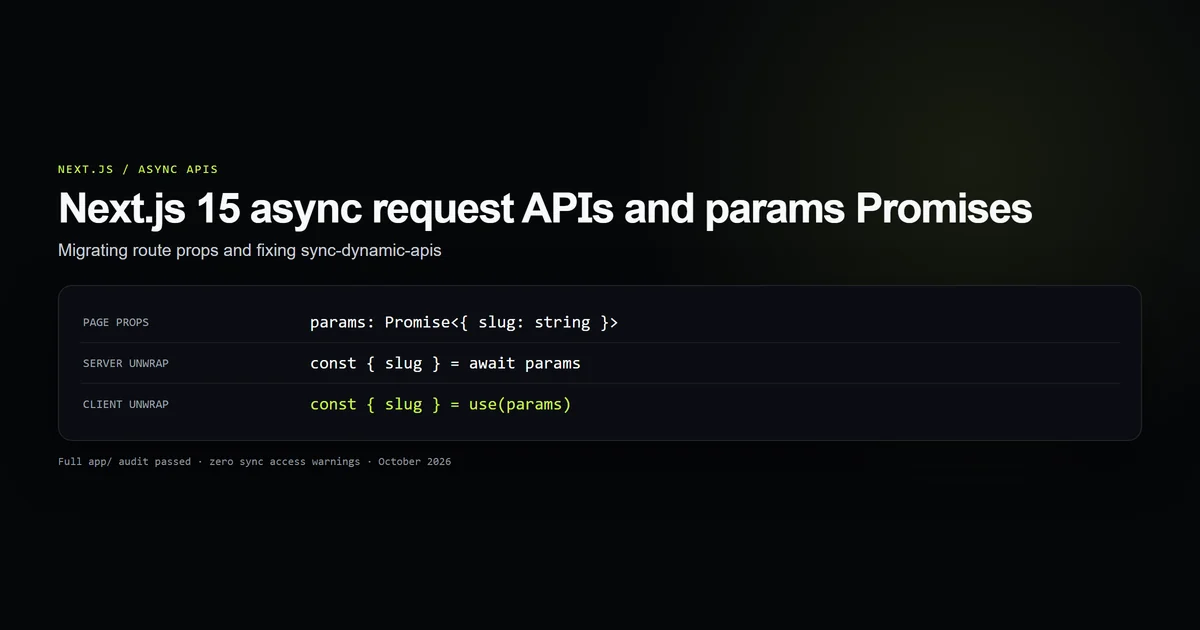
In Next.js 15, dynamic route properties (params and searchParams) are asynchronous Promises. Accessing params.slug directly without await throws the sync-dynamic-apis runtime error. This architectural shift enables concurrent streaming and optimistic static prerendering, but breaks synchronous patterns from Next.js 13 and 14. Here is the verified contract across Server Components, generateMetadata, Client Components via React 19 use(), and Route Handlers.
Key takeaways
paramsandsearchParamsare typed asPromise<{ [key: string]: string }>across all App Router dynamic routes.- Accessing properties synchronously triggers the Next.js 15
sync-dynamic-apisbuild error. - Server Components and
generateMetadatamust explicitlyawait paramsbefore destructuring. - Client Components unwrap Promise props natively with React 19's
use(params)hook withoutuseEffector state plumbing. cookies()andheaders()fromnext/headersare also asynchronous and requireawait.
The Next.js 15 breaking change: Asynchronous request APIs
In Next.js 14, page props arrived as plain JavaScript objects. A dynamic article route accessed parameters synchronously:
// BREAKS IN NEXT.JS 15: params is no longer a plain object
export default function LegacyPage({
  params,
}: {
  params: { category: string; slug: string };
}) {
  return <h1>{params.slug}</h1>;
}
Per the Next.js 15 Upgrade Guide, dynamic request-specific data was transitioned to Promises. In earlier versions, reading synchronous request APIs forced Next.js to wait for incoming HTTP headers to be fully ingested before executing any component rendering.
By turning params, searchParams, cookies(), and headers() into Promises, the App Router server can immediately stream initial HTML shells and static layouts, deferring parameter resolution until the specific component that consumes them awaits the promise.
The sync-dynamic-apis error and why it triggers
When legacy code reads a property on params without awaiting it, Next.js 15 intercepts the property access via a JavaScript Proxy and prints the following error in development and production builds:
Error: Route "/[category]/[slug]" used "params.slug".
`params` should be awaited before using its properties.
Learn more: https://nextjs.org/docs/messages/sync-dynamic-apis
This error halts the build process. A common mistake during migrations is applying an un-awaited (await params).slug inline inside JSX expressions or forgetting that generateMetadata receives the exact same Promise shape.
Our internal audit script scans all route files in app/ using static AST checks to ensure zero un-awaited synchronous parameter accesses exist across the codebase.
Unwrapping params in Server Components and generateMetadata
In Server Components, resolving params requires updating the interface type definition and adding a single await statement at the top of the function body.
Here is the exact implementation used on this site's dynamic article route:
import type { Metadata } from "next";
import { notFound } from "next/navigation";
import { getArticle, getArticleParams } from "@/lib/mdx";

type PageProps = {
  params: Promise<{ category: string; slug: string }>;
};

/** Every published article is prerendered; unknown routes 404. */
export async function generateStaticParams() {
  return getArticleParams();
}

export const dynamicParams = false;

export async function generateMetadata({
  params,
}: PageProps): Promise<Metadata> {
  // Await the params Promise before reading category or slug
  const { category, slug } = await params;
  const article = getArticle(category, slug);
  if (!article) return {};

  return {
    title: article.meta.title,
    description: article.meta.deck,
  };
}

export default async function ArticlePage({ params }: PageProps) {
  // Await the params Promise in the main component body
  const { category, slug } = await params;
  const article = getArticle(category, slug);
  if (!article) notFound();

  return (
    <article>
      <h1>{article.meta.title}</h1>
      <div>{article.content}</div>
    </article>
  );
}
Notice that generateMetadata and ArticlePage share the identical PageProps definition. Treating params as a Promise in the page component while leaving generateMetadata typed synchronously will trigger the sync-dynamic-apis failure during metadata extraction.
Unwrapping params in Client Components with React 19 use
If a dynamic route segment is marked with "use client", it cannot be declared as an async function. In older React versions, unwrapping a Promise in a Client Component required useState, useEffect, and loading boilerplate.
In Next.js 15 with React 19, Client Components unwrap the incoming Promise cleanly using the native use() hook:
"use client";

import { use } from "react";

type ClientPageProps = {
  params: Promise<{ tag: string }>;
};

export default function TagClientView({ params }: ClientPageProps) {
  // React 19 use() hook suspends and unwraps the Promise synchronously
  const { tag } = use(params);

  return (
    <div>
      <h2>Tagged with: {tag}</h2>
    </div>
  );
}
When React encounters use(params), it integrates directly with React Suspense boundaries. If the Promise is pending, React suspends rendering until the Promise resolves, then continues execution with the resolved object.
Route handlers and layout inheritance
The asynchronous change also applies to API Route Handlers (route.ts) and dynamic Layouts (layout.tsx).
Route Handlers
Route handlers receive params as the second argument inside the context object. The context object itself is synchronous, but its params property is an asynchronous Promise:
import { NextResponse } from "next/server";

export async function GET(
  request: Request,
  { params }: { params: Promise<{ slug: string }> }
) {
  const { slug } = await params;

  return NextResponse.json({
    status: "ok",
    articleSlug: slug,
  });
}
Dynamic Layouts
Dynamic layout files (app/[category]/layout.tsx) receive params: Promise<{ category: string }> as a prop alongside children: React.ReactNode. If your layout renders breadcrumbs, category headers, or navigation badges based on the active route segment, remember to await params in the layout function:
type LayoutProps = {
  children: React.ReactNode;
  params: Promise<{ category: string }>;
};

export default async function CategoryLayout({
  children,
  params,
}: LayoutProps) {
  const { category } = await params;

  return (
    <section>
      <header className="border-b border-line pb-4">
        <span className="font-mono text-accent uppercase">{category}</span>
      </header>
      {children}
    </section>
  );
}
Best practices
- Centralize
PagePropstypes: Define a sharedPagePropstype for your route and reuse it across bothgenerateMetadataand the default page export. - Pair with
generateStaticParams: For content-driven blogs, combine asynchronousparamswithexport const dynamicParams = falseto guarantee static compilation during builds. - Await
cookies()andheaders()early: Callconst cookieStore = await cookies()at the top of Server Actions and route handlers before reading values. - Enforce automated CI guards: Use static analysis (like our internal audit script) to verify that no direct un-awaited parameter reads slip into production.
Common mistakes
- Destructuring in function signatures: Writing
function Page({ params: { slug } })immediately accesses the property on the unresolved Promise and throwssync-dynamic-apis. - Forgetting
generateMetadata: Updating the component body to awaitparamswhile leavinggenerateMetadatawith synchronous destructuring causes silent metadata build failures. - Adding
asyncto Client Components: Declaring"use client"on anasynccomponent is invalid in React. Useuse(params)instead. - Assuming searchParams is static: Unlike
params(which can be statically generated withgenerateStaticParams),searchParamsopt routes into dynamic rendering on demand.
Conclusion
Migrating to Next.js 15's asynchronous request APIs requires a mental shift from synchronous prop inspection to asynchronous Promise unwrapping. By updating your route contracts to declare params and searchParams as Promises, awaiting them in Server Components and generateMetadata, and utilizing React 19's use() hook in Client Components, you eliminate sync-dynamic-apis build errors completely.
Review our guides on caching database queries with unstable_cache and diagnosing Next.js 500 build errors for debugging other common Next.js 15 compilation failure modes.
Frequently asked questions
Why did Next.js 15 make params and searchParams asynchronous?
How do you fix 'Error: Route used params.slug. params should be awaited'?
How do Client Components receive params in Next.js 15?
Are cookies() and headers() also asynchronous in Next.js 15?

Muhammad Kashif
Founder and editor of Devventa, covering AI coding assistants, Next.js and the modern AI development stack.