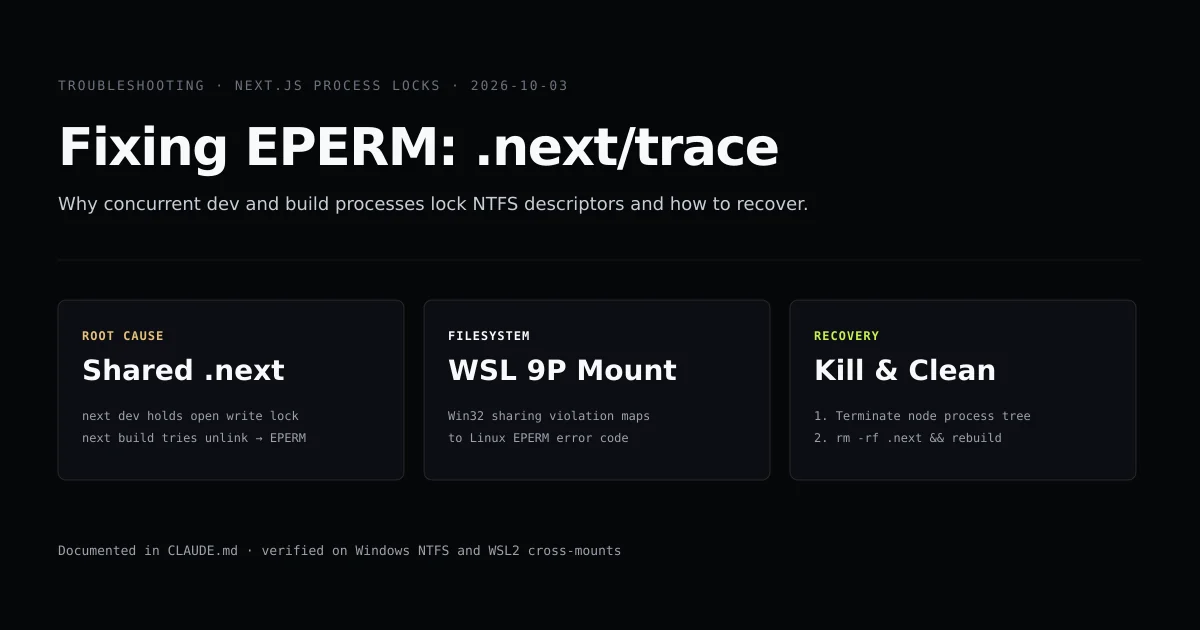
An eperm next trace error occurs because two Node.js processes are trying to control the .next directory simultaneously. Specifically, next dev holds an active file handle on .next/trace, and a subsequent next build (see the Next.js CLI documentation) attempts to unlink or overwrite it.
On Windows and WSL2 environments, NTFS file locking refuses to delete an open file descriptor. If you are configuring a production Next.js pipeline, our Next.js AI workflow and deployment guide documents the baseline structure this repository runs.
Key takeaways
- The root cause is a running
next devinstance holding an exclusive write lock on.next/trace. - Never execute
next buildwhilenext devis running; it corrupts the client chunk manifest and results in 500 errors on public routes. - On Windows and WSL2 cross-mounts, Win32 sharing violations translate directly into Linux
EPERMorEBUSYerror codes. - Recovery requires terminating the orphaned Node process, purging
.next, and rebuilding cleanly.
The short answer
When you encounter EPERM: operation not permitted, open '.next/trace', do not edit code or adjust file permissions. The error is an active process conflict.
To resolve it immediately:
- Kill all active Node processes (via Node.js process control) holding the
.nextdirectory. - Purge the corrupted
.nextfolder usingrm -rf .next. - Restart either the build or the dev server, but never both in parallel.
# Find and terminate holding process
fuser -k -9 .next/trace 2>/dev/null || killall -9 node
rm -rf .next
npm run build
# Terminate holding Node processes on Windows
Get-Process node -ErrorAction SilentlyContinue | Stop-Process -Force
Remove-Item -Recurse -Force .next
npm run build
Why nexttrace gets locked
Next.js generates runtime telemetry and build tracing events inside .next/trace. When you run next dev, the development server initializes internal performance tracers that continuously stream events to this file.
[Terminal 1] npm run dev    ──► [PID 1420] Holds open write handle on .next/trace
                                             ▲
                                             │ Locks NTFS descriptor
                                             ▼
[Terminal 2] npm run build  ──► [PID 8912] Attempts unlink / overwrite .next/
                                             │
                                             └──► EPERM: operation not permitted
During a production build, next build executes a clean compilation cycle. Part of this initialization attempts to reset output artifacts. When the build runner encounters an open file descriptor with write locks, the operating system blocks the unlink operation and throws the nextjs eperm error.
The cross-filesystem trap on Windows and WSL2
On standard Linux filesystems (ext4), an open file can be unlinked while a process holds a file descriptor; the kernel maintains the inode in memory until the process closes the handle.
Windows NTFS behaves differently:
- Mandatory File Locking: By default, Win32
CreateFilewith write flags denies deletion sharing to concurrent callers. - WSL2 Cross-Mounts: When running in WSL2 over a Windows mount (
/mnt/cor/mnt/d), filesystem calls pass through the 9P network protocol driver. - Error Code Translation: When 9P receives
ERROR_SHARING_VIOLATIONfrom the Windows host kernel, it maps the code toEPERM(Operation not permitted) orEBUSY(Resource busy).
This explains why developers running Next.js under WSL2 over host drives hit the next dev eperm trace issue much more frequently than those running inside pure Linux container volumes.
How chunk manifest corruption occurs
The file lock is not the only risk of running concurrent processes. When next build runs concurrently with next dev, both compilers write to the shared .next directory.
The build compiler overwrites client manifests (.next/build-manifest.json and .next/server/pages-manifest.json). The running development server suddenly attempts to serve dev requests using production chunk hashes that do not exist in the dev asset compiler.
GET /articles/some-slug 500
Error: Cannot find module '../static/chunks/app/layout-a49b81c.js'
Every route on the site starts throwing HTTP 500 errors. It looks identical to an application crash or corrupted npm dependency, but the sole cause is a concurrent build overwriting the active dev manifest.
The three-step recovery sequence
Follow this sequence in order whenever the trace lock fires:
Step 1: Identify and terminate the locking process
Do not guess which terminal tab owns the process. Check the actual file handle:
# On Linux / WSL:
lsof .next/trace
# If lsof returns PID 4210:
kill -9 4210
On Windows, use PowerShell to find processes holding open handles or stop all local node instances:
Get-Process node | Stop-Process -Force
Step 2: Remove the corrupted build directory
Once the file lock is released, completely remove the .next directory. Do not try to salvage chunks:
rm -rf .next
If rm -rf .next reports Directory not empty or returns EPERM again, a Node process is still alive. Repeat Step 1.
Step 3: Run the build in isolation
Execute the build command without any running dev servers, file watchers, or IDE live reload daemons:
npm run build
# → ○  (Static)   prerendered as static content
# → ✓ Generating static pages (146/146)
Common mistakes during recovery
- Running npm run dev immediately without deleting .next. Starting the dev server immediately reuses the corrupted manifest, perpetuating 500 errors.
- Changing Windows file permissions. Modifying NTFS ACLs or running
chmod 777does nothing becauseEPERMis caused by process sharing violations, not UNIX user permission bits. - Reinstalling node_modules. Developers often spend thirty minutes deleting and reinstalling
node_modules. The dependencies are completely fine; the issue is isolated to.next. - Ignoring IDE background extensions. VS Code plugins that run automated test runners or linting servers in the background can spawn hidden Node instances that access
.next.
What this does not fix
Terminating processes and wiping .next resolves process lock collisions. It will not resolve:
- True permission errors: If the repository is cloned into a system-protected path (such as
C:\Program Files), Node legitimately lacks write permissions. - Disk quota exhaustion: If the host drive is full, Next.js write calls fail with
ENOSPCrather thanEPERM. - Corrupted npm native bindings: If sharp or lightningcss fails to load, reinstall the platform-specific native binary rather than cycling dev servers.
Conclusion
The EPERM .next/trace error is a process lifecycle collision, not a code defect. In modern full-stack workflows where terminal coding agents and developers interact simultaneously, discipline around process boundaries is essential. Never execute next build while a dev watcher is running, always terminate orphan Node trees before compiling, and purge .next whenever a build collides. To explore how this site structures clean MDX rendering without compiler conflicts, read our complete next-mdx-remote architecture guide. If your build completes cleanly but crashes when receiving requests in production, see our troubleshooting guide on Next.js 500 error after build.
Frequently asked questions
Why does next build fail when next dev is still running?
Why is the EPERM trace error significantly more common on Windows and WSL?
Can I just delete the .next/trace file manually?
How can I prevent this error permanently in automated CI workflows?

Muhammad Kashif
Founder and editor of Devventa, covering AI coding assistants, Next.js and the modern AI development stack.