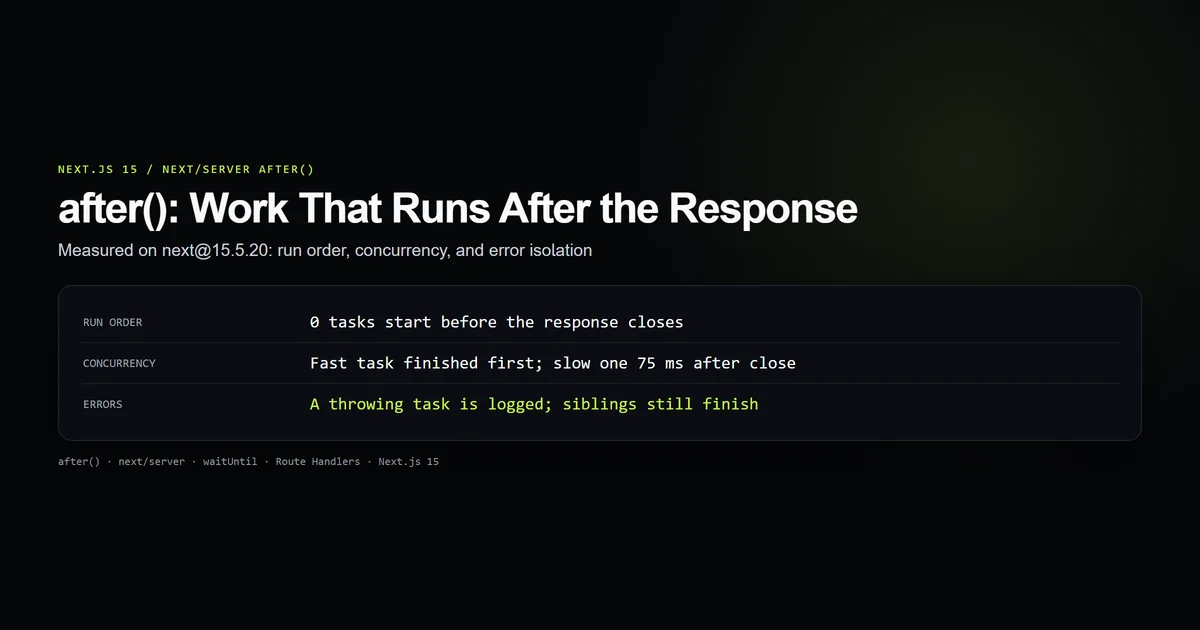
Next.js after() runs a callback once the response has finished streaming, so logging, emails, and cache warming stop adding to the time the user waits. It is imported from next/server, it never changes the response, and a task that throws cannot break the request or its sibling tasks.
We drove the installed AfterContext on next@15.5.20 with a simulated request and measured the run order, the error handling, and the failure modes. This article reports those results and the limits that matter before you move work out of the response path.
Key takeaways
after()callbacks start only after the response closes; none ran before it in our test.- Registered tasks run concurrently, not in registration order.
- A throwing task is logged and isolated; its siblings still finish.
- Calling
after()with no active request throws synchronously. - Work the response depends on must stay awaited.
What the after function does
after() takes a function or a promise and defers it until the response has been sent. The user gets the status, headers, and body first; the deferred work runs on the same server invocation afterward.
It exists because the usual alternative is wrong in both directions. Awaiting an analytics write makes the user wait for it. Firing it without await risks the platform freezing the invocation as soon as the response ends, killing the write mid-flight.
import { after } from "next/server";

import { saveSubscriber, sendWelcomeEmail, trackSignup } from "@/lib/subscribers"; // your own module

export async function POST(request: Request) {
  const { email } = (await request.json()) as { email: string };

  // The client needs this result, so it stays awaited.
  const id = await saveSubscriber(email);

  // Nothing in the response depends on these two.
  after(() => trackSignup(id));
  after(async () => {
    await sendWelcomeEmail(email);
  });

  return Response.json({ ok: true, id }, { status: 201 });
}
The rule in that file is the whole feature: persist what the response reports, defer everything else. Our own /api/newsletter and /api/contact handlers call neither, and a guard in check:after-callback asserts it.
Where you can call it
after() is callable anywhere Next.js has an active request: Route Handlers, Server Actions, Server Components, and middleware. It is not available in Client Components.
Outside a request it fails loudly rather than silently dropping the task. We called it from a plain Node script on 15.5.20:
`after` was called outside a request scope. Read more: https://nextjs.org/docs/messages/next-dynamic-api-wrong-context
That makes a unit test of a function containing after() fail unless you mock next/server. The throw is synchronous, so it surfaces in the test instead of vanishing into a floating promise.
In a static page, after() runs at build time during prerendering, not on each visit. Treat it as a request hook only on dynamic routes.
Run order we measured
Callbacks run after the response closes, and they run concurrently. The check registers a 60 ms task, a task that throws, and a fast task, in that order, then closes the simulated response.
await workAsyncStorage.run(store, async () => {
  after(async () => {
    await new Promise((resolve) => setTimeout(resolve, 60));
    stamp("slow task finished");
  });
  after(() => {
    throw new Error("boom");
  });
  after(() => stamp("fast task finished"));

  stamp("handler returned response");
  closeRequest();
  stamp("response closed");
  await Promise.all(waits);
});
The recorded order on next@15.5.20, Node 26.7.0:
handler returned response
response closed
fast task finished
slow task finished   (75 ms after close in this run, for a 60 ms sleep)
The fast task finished first even though it was registered last. The internal queue has no concurrency limit, so a slow first task does not hold the others. Do not write after() calls that rely on running one after another; chain them inside a single callback instead.
Errors inside after tasks
A failure inside after() is logged and contained. In the same run, the task that threw boom produced this line while both other tasks completed:
An error occurred in a function passed to `after()`: Error: boom
The context then calls onTaskError when the host provides one, and the response, already sent, is untouched. Two consequences follow.
- No retry. Next.js logs the failure and moves on. A lost welcome email stays lost unless your code records it.
- Silent in practice. Without log monitoring on the server, a permanently failing task looks like nothing at all to the user.
Wrap deferred work that matters in its own try/catch that writes the failure somewhere you read, and keep the response path free of it.
Request data and platform limits
Read request data before you defer, then pass plain values in. Reading cookies() or headers() inside a callback is handled differently depending on where after() was called; the Next.js documentation allows it in Route Handlers and Server Actions but not in Server Components. We did not measure that boundary, so resolve the values you need up front.
import { after } from "next/server";

import { writeAuditLog } from "@/lib/audit"; // your own module

export async function POST(request: Request) {
  const ip = request.headers.get("x-forwarded-for")?.split(",")[0]?.trim() ?? "unknown";

  after(() => writeAuditLog({ ip, path: new URL(request.url).pathname }));

  return new Response(null, { status: 204 });
}
On Vercel, after() extends the invocation through waitUntil. Per the platform documentation, that time counts against the function's maximum duration. A job that can run for minutes belongs on a queue, not behind after().
Best practices
- Await what the response reports. If the body, status, or a
Set-Cookiedepends on it,after()is the wrong place. - Resolve request data first. Pass strings and numbers into the callback, not the
Request. - Handle errors in the task. Next.js logs failures but never retries them.
- Keep tasks short. They share the invocation's duration limit.
- Register independent tasks separately. They run concurrently and one failure cannot stop the others.
Common mistakes
- Deferring the database write. It feels like a free speedup, but the client then receives an id for a row that may not exist yet. Symptom: a follow-up request returns 404. Fix: await it.
- Expecting sequential order. Three
after()calls start together. Symptom: an email that references a row another task has not written. Fix: one callback with explicit awaits. - Testing without a mock. A route handler that calls
after()throws the scope error under a bare test runner. Fix: mocknext/server'safterto execute immediately. - Assuming a retry. A thrown error is logged once. Fix: write failures to a table or alert channel from inside the task.
Conclusion
Use after() for work the user does not need to see finish: analytics, audit rows, notification emails, and cache warming. Keep the write the response reports on the awaited path, resolve request data before deferring, and catch errors inside the task because Next.js will only log them.
If the job can run longer than your function limit or must survive a crash, use a queue instead. For the response side of the same handlers, read Next.js 15 Route Handlers; for the form-submission side, see useActionState with Server Actions.
Frequently asked questions
What does after() do in Next.js?
Does after() make the response faster?
What happens if an after() callback throws?
Can I call after() in middleware or a client component?
Is after() guaranteed to finish on Vercel?

Muhammad Kashif
Founder and editor of Devventa, covering AI coding assistants, Next.js and the modern AI development stack.