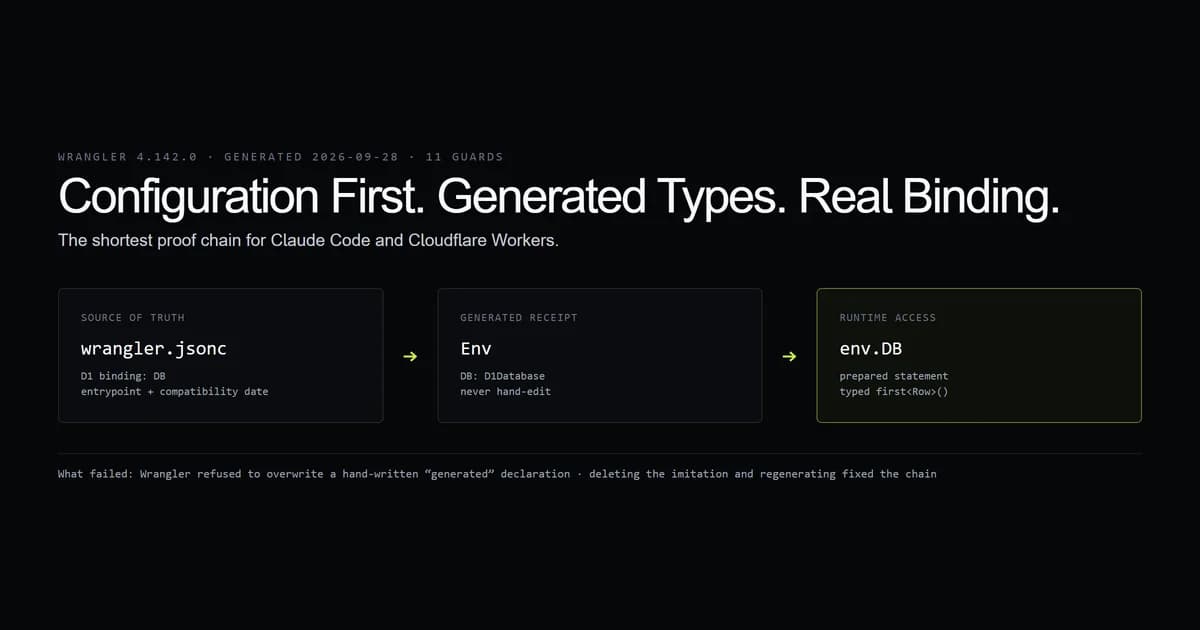
The reliable way to use Claude Code with Cloudflare Workers is to make wrangler.jsonc the source of truth. Generate environment types from that file, have Claude implement against the generated Env, and run a guard that fails when configuration, types, and code disagree.
We built a Worker fixture on Wrangler 4.142.0 with one D1 binding. The generated declaration contains DB: D1Database, the handler uses env.DB, and eleven guards verify the chain, including an isolated TypeScript build. The first attempt failed for a good reason: Wrangler refused to overwrite our hand-written imitation of its generated file. Configuration-first is not style advice here; it is the path the tool accepts.
Key takeaways
- Write
wrangler.jsoncbefore Worker code. The binding name, entrypoint, and compatibility date belong to the platform config. - Run
wrangler typesinstead of hand-writingEnv. Generated types turn a missing or renamed binding into a compiler error. - Use
env.DBfor D1 inside Workers.process.envand the HTTP query API solve different runtime problems. - Keep local D1 local by default. An agent should not point tests at remote data to escape a setup failure.
- Wrangler 4.142.0 rejected a hand-written generated-type placeholder. Deleting it and generating from config was the fix.
The short answer
Give Claude Code a narrow loop: edit wrangler.jsonc, run wrangler types, implement against the resulting environment, then test inside the Workers runtime. Do not ask the model to remember Cloudflare's binding schema from training data, and do not accept a plausible Env interface that was never derived from configuration.
Cloudflare now documents prompting Workers with coding agents and recommends its documentation MCP for current platform detail. The broader agent setup is in the complete Claude Code guide; this article covers the platform boundary where generated code most often looks correct while naming a binding that does not exist.
The reliable Workers loop
The order is the whole method:
- 1. Configure: Define the entrypoint, compatibility date, and bindings in
wrangler.jsonc. - 2. Generate: Create
worker-configuration.d.tswith the pinned Wrangler version. - 3. Implement: Write the handler against
envand the generated binding type. - 4. Test: Run a platform-aware local test.
- 5. Deploy: Proceed only after the local binding and migration state are explicit.
npx wrangler@4.142.0 types worker-configuration.d.ts
That command ran against the committed fixture on 2026-09-28. It generated an Env chain containing one D1 binding and printed a reminder to rerun it after every config edit.
Write wrangler.jsonc first
The fixture config is deliberately small:
{
  "$schema": "./node_modules/wrangler/config-schema.json",
  "name": "claude-workers-fixture",
  "main": "src/index.ts",
  "compatibility_date": "2026-09-28",
  "d1_databases": [{
    "binding": "DB",
    "database_name": "fixture-db",
    "database_id": "00000000-0000-0000-0000-000000000000"
  }]
}
The zero UUID is visibly a fixture value and cannot identify a real database. In a working project, Wrangler writes or reports the real ID. Never paste account IDs or tokens into an article, prompt, or committed instruction file.
Cloudflare's Wrangler configuration reference requires the binding to be a valid JavaScript identifier. That matters because the string becomes the property Claude must use in code.
Generate Env types from the config
Wrangler 4.142.0 generated this relevant portion:
interface __BaseEnv_Env {
  DB: D1Database;
}

interface Env extends __BaseEnv_Env {}
Do not ask Claude Code to maintain that file. Ask it to change the config and rerun the generator. The declaration is a receipt: it proves what Wrangler understood from the configuration at that moment.
Make Claude Code use the D1 binding
Inside a Worker, D1 arrives on env. The implementation should make that visible in the handler signature and use prepared statements:
export default {
  async fetch(_request: Request, env: Env): Promise<Response> {
    const row = await env.DB
      .prepare("SELECT 1 AS ok")
      .first<{ ok: number }>();
    return Response.json(row);
  },
};
Cloudflare's D1 binding API supports generic row types on first, run, and raw. Bind user values rather than concatenating them into SQL. The fixture has no user input, so SELECT 1 keeps the test about binding shape instead of query validation.
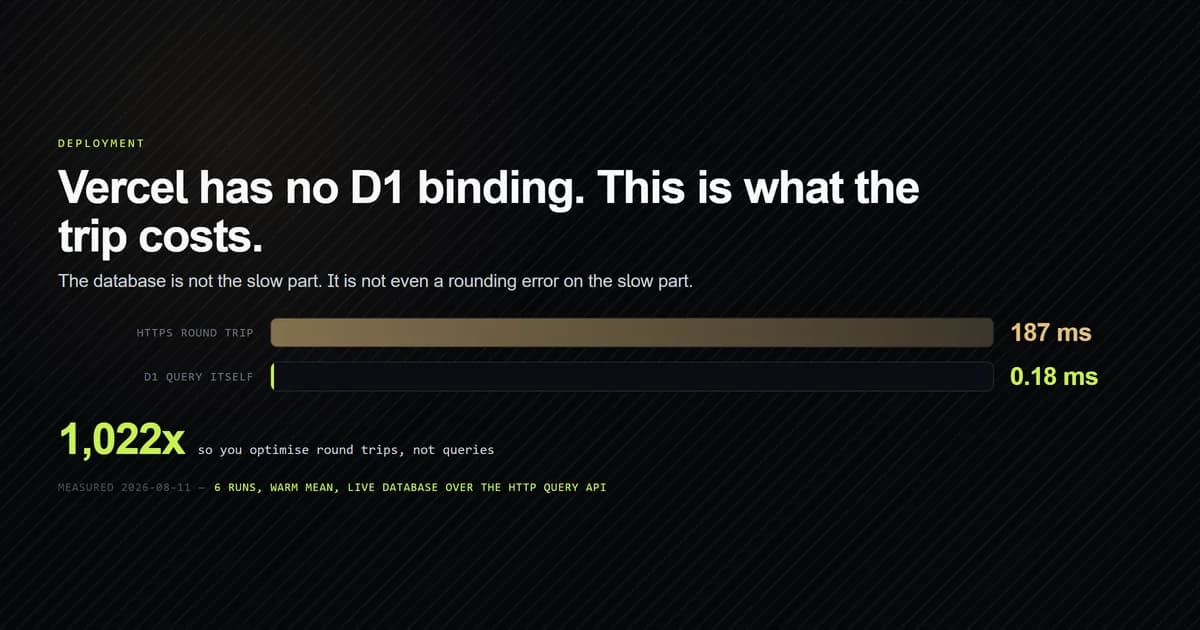
This is where Claude Code D1 guidance diverges by deployment target. A Worker uses env.DB. A Next.js app on Vercel has no Workers binding and must use the HTTP API; Cloudflare D1 on Vercel measures that path and its transport cost. Copying its process.env client into a Worker would be a regression.
What the guard checks
Our internal guard script checks the seam a language model can easily split:
Cloudflare Workers surface — Wrangler 4.142.0
entrypoint: src/index.ts
compatibility date: 2026-09-28
D1 binding: DB
generated type: present
runtime access: env.DB
11 guards passed.
It fails if the entrypoint moves, the compatibility date disappears, the D1 binding is not a JavaScript identifier, generated types omit the binding, source never uses it, or Worker code reaches for process.env. The guard does not prove the query succeeds against a real database. It proves the three repository artifacts agree.
That distinction matters for Workers AI coding workflows. A green static check can still sit beside a missing migration or wrong remote database. Use the Workers Vitest integration for runtime behavior; Cloudflare's testing guide recommends tests that run inside the Workers runtime so bindings are available directly.
Keep local and remote D1 separate
Wrangler uses local storage by default during local development. Cloudflare's D1 local development guide describes remote access as an explicit choice, not a fallback.
Put that rule in the prompt:
Add the query through env.DB. Update wrangler.jsonc first, regenerate Env types,
and test against local D1. Do not set remote: true, deploy, or modify production
migrations. Stop if the local schema is missing rather than changing targets.
The stop condition prevents the most dangerous agent shortcut: making a failing local test pass by widening its reach.
Common mistakes
- Hand-writing
Env. The interface can agree with the code while both disagree with Wrangler. Generate it from configuration. - Using
process.env.DB. Platform bindings are objects onenv, not environment-variable strings. - Editing generated declarations. The next generator run erases the patch. Edit
wrangler.jsoncand regenerate. - Testing Worker modules in plain Node. Node can miss runtime and binding differences. Use the Workers Vitest integration or Wrangler's local runtime.
- Switching local D1 to remote to make a test pass. The tempting fix expands blast radius. Fix local setup instead.
- Treating MCP output as verification. Current docs help Claude write the right API, but only the config, generator, compiler, and runtime prove the project uses it correctly.
Conclusion
The broader AI coding tools for Cloudflare Workers guide turns this Wrangler fixture into a tool-selection test, including what a local build cannot prove about production resources.
Use Claude Code to write the Worker, but make Wrangler define reality. Configuration comes first, generated environment types second, implementation third, and a runtime-aware test last. That sequence turns hallucinated binding names into immediate failures and keeps D1 local while the agent is still experimenting.
We guard the committed seam with an internal check script; regenerate the declaration after every binding edit. If the same database must be reached from Vercel, use the separate D1 HTTP API architecture rather than forcing Workers code into a runtime that does not provide env.DB.
Frequently asked questions
Can Claude Code build Cloudflare Workers?
How should Claude Code access D1 in a Worker?
What should I put in CLAUDE.md for Cloudflare Workers?
Should Claude Code edit worker-configuration.d.ts?
Does wrangler dev use the production D1 database?

Muhammad Kashif
Founder and editor of Devventa, covering AI coding assistants, Next.js and the modern AI development stack.