You can run Cloudflare D1 from a Next.js app on Vercel, and the reason it feels undocumented is that
every D1 example assumes env.DB. That binding is a Workers runtime feature, Vercel does not run
Workers, so the binding cannot exist — the replacement is D1's HTTP query API, which needs no SDK
and fits in one module. This is the client this site runs in production, the cost of the transport
measured rather than guessed, and the one constraint that shapes every query you will write.
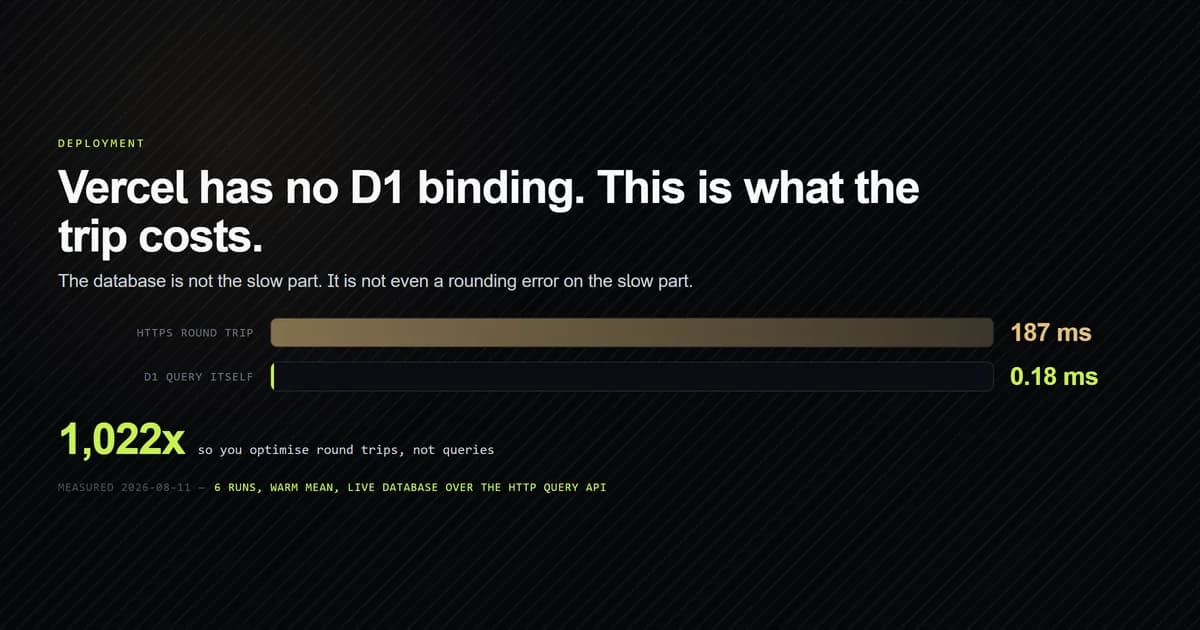
Measured on 2026-08-11 against a live D1 database.
Key takeaways
- There is nothing to bind on Vercel.
env.DBcomes from the Workers runtime; the HTTP query API is the supported alternative and needs onefetch. - The transport dominates completely. D1 executed a real query in 0.18 ms inside a 187 ms warm round trip — roughly 1,000x — so the only optimisation that matters is fewer calls.
- Batching and bound parameters are mutually exclusive. Multiple statements in one call work;
add a
paramsarray and it fails with7400. - Four error codes cover the real failures, and Cloudflare's numeric code is the whole diagnosis. An HTTP status alone is unactionable.
- Keep it to one module. Every call routed through a single function makes a future move to Workers a one-file change.
Why the binding is missing
D1 is bound to a Worker through wrangler.toml (see Cloudflare Workers bindings documentation), and the runtime injects it as env.DB. Vercel
runs Node.js and its own Edge runtime; neither is workerd, so no binding is injected and no
amount of configuration will produce one. The question "how do I get env.DB on Vercel" has no
answer, which is why searching for it is unproductive.
What does exist is Cloudflare's REST endpoint that accepts SQL, documented in the Cloudflare D1 query API reference:
POST https://api.cloudflare.com/client/v4
       /accounts/<account-id>/d1/database/<database-id>/query
Authorization: Bearer <token scoped to "D1: Edit">
{ "sql": "SELECT ...", "params": [] }
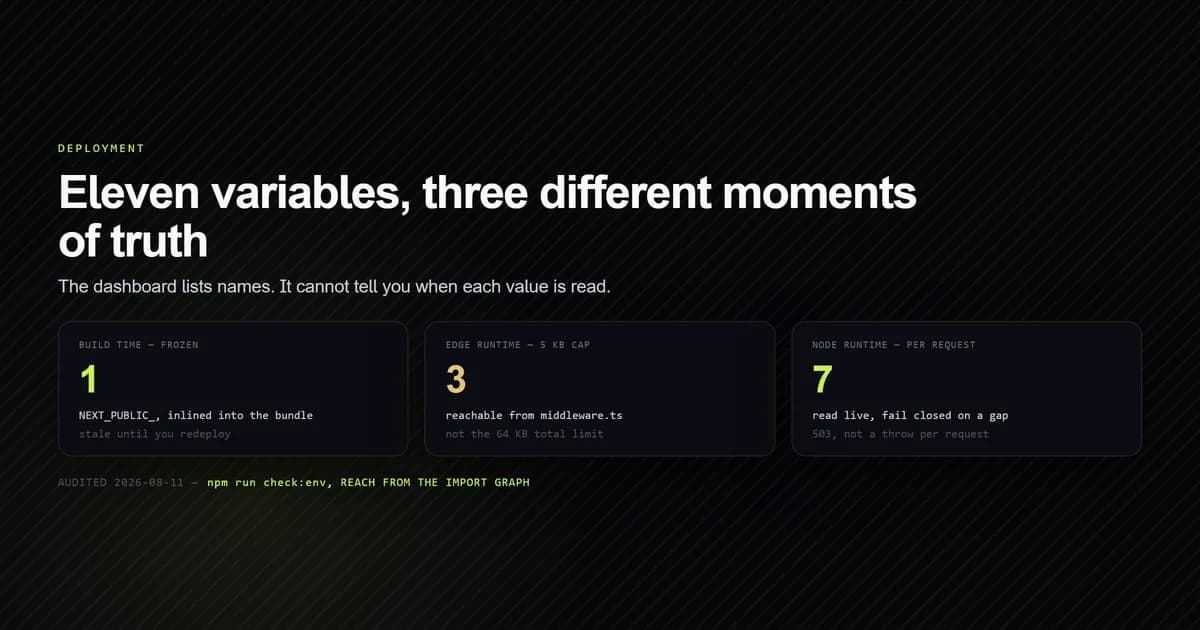
Three values configure it, all server-only: CLOUDFLARE_ACCOUNT_ID, CLOUDFLARE_D1_DATABASE_ID
and CLOUDFLARE_D1_API_TOKEN. None gets a NEXT_PUBLIC_ prefix, which would publish your database
token in the browser bundle — the build-time inlining that makes that possible is covered in
Vercel environment variables. This is one piece of the
stack described in building a modern Next.js site with AI
assistance, and it is the piece that most often gets rewritten
badly.
The whole client is one function
There is no D1 SDK to install for this path, and adding one would be a dependency for a fetch
call. The wrapper this site uses is lib/d1.ts, and the deliberate part is that it is the only
module that talks to D1:
export async function d1Query<T = Record<string, unknown>>(
  sql: string,
  params: (string | number | null)[] = [],
): Promise<D1Result<T>> {
  const config = readConfig();
  if (!config) {
    throw new D1Error("D1 is not configured (missing CLOUDFLARE_* environment variables)");
  }

  const url = `${API_BASE}/accounts/${config.accountId}/d1/database/${config.databaseId}/query`;

  const response = await fetch(url, {
    method: "POST",
    headers: {
      Authorization: `Bearer ${config.apiToken}`,
      "Content-Type": "application/json",
    },
    body: JSON.stringify({ sql, params }),
    signal: AbortSignal.timeout(QUERY_TIMEOUT_MS),
    cache: "no-store",
  });
  // …error handling below
}
Three of those lines are not decoration. AbortSignal.timeout(8_000) stops a stalled upstream from
holding a serverless function open until the platform kills it. cache: "no-store" matters because
Next.js extends fetch with caching and a cached database read is a bug that appears days later.
And the single choke point is the whole design: if this site ever moves to Workers, swapping this
function's body for env.DB.prepare().bind().run() (as defined in the Cloudflare D1 client API) is a one-file change, because nothing above it
knows the transport. The Claude Code with Cloudflare Workers workflow
shows how wrangler.jsonc and generated Env types keep that binding honest.
Values always go in params, never into the string. D1 binds them server-side, and it is easy to
prove:
npm run check:d1
# → Bound parameters   {"echo":"'; DROP TABLE x; --","math":42}
The injection attempt comes back as data.
What the round trip actually costs
D1 returns its own execution time in meta.duration alongside the results, which means you can
measure the query and the transport separately in the same call. Six runs against a live database:
npm run check:d1
# → cold    wall 1120 ms   d1 0.1699 ms
# → run 2   wall  197 ms   d1 0.1599 ms
# → run 3   wall  228 ms   d1 0.1559 ms
# → run 4   wall  167 ms   d1 0.1697 ms
# → run 5   wall  170 ms   d1 0.1472 ms
# → run 6   wall  174 ms   d1 0.2826 ms
# →
# →   warm mean wall     187 ms
# →   warm mean d1       0.1831 ms
# →   transport overhead 187 ms  (1022x the query)
The database is doing essentially no work. Everything you are paying for is TLS, HTTP and distance, and the first call of a process pays 1,120 ms for connection setup before any of it.
That ratio is the design input. Query optimisation is close to pointless here; call-count optimisation is everything. An index that takes a query from 0.4 ms to 0.15 ms is invisible. A second round trip is another 187 ms.
The batching trap
The obvious response is to batch, and the endpoint does accept multiple statements. It returns one result object per statement:
# 4 statements, sequentially, one HTTP call each
# → 755 ms

# the same 4 statements in a single call
# → 184 ms
Four times faster, and then it stops being useful:
HTTP 400
7400: The request is malformed: params with multiple statements is not supported
Bound parameters and multiple statements cannot be combined. Since every query that touches
user input must bind its values, and d1Query binds unconditionally, this site structurally cannot
batch. The only batchable statements are ones with no parameters at all, which in practice means
migrations and fixed aggregates.
This is the constraint that most affects how you write a data layer against D1 over HTTP, and it is not in the places you would look for it. Plan for it: the way to spend fewer round trips is to make each statement answer more, not to send more statements.
The error codes worth handling
Cloudflare returns a numeric code with every failure, and the code is the diagnosis. The HTTP status is not — three different mistakes below produce a 400. Each of these was produced by deliberately misconfiguring a real call:
| Mistake | HTTP | Code and message |
|---|---|---|
| Bad API token | 401 | 10000: Authentication error |
| Unknown database id | 404 | 7404: The database … could not be found |
| Malformed database id | 400 | 7400: Invalid property: databaseId => Invalid uuid |
| SQL error | 400 | 7500: no such table: …: SQLITE_ERROR |
So the wrapper parses the body even on a failed response, because discarding it leaves an
unactionable D1 responded 401 in the logs:
if (!response.ok) {
  let detail = "no error detail";
  try {
    const body = (await response.json()) as D1ApiResponse<never>;
    if (body.errors?.length) {
      detail = body.errors.map((e) => `${e.code}: ${e.message}`).join("; ");
    }
  } catch {
    // Non-JSON error body (gateway page) — the status alone will have to do.
  }
  throw new D1Error(`D1 responded ${response.status} — ${detail}`);
}
This measurement corrected the file's own comment. It claimed 7003 for a malformed path;
the real codes are 7400 for a bad identifier and 7404 for one that is well-formed but unknown.
The comment was written from Cloudflare's general API error list rather than from D1's responses,
and it has been fixed in the same commit as this article. Codes and messages carry no secrets — no
account or database identifier is echoed — so they are safe to log.
Designing queries around the latency
Once the transport is a thousand times the query, the shape of your data layer changes. The dashboard on this site needs four counters. The version nobody should write is four queries:
export async function getSubscriberStats(): Promise<SubscriberStats> {
  const { results } = await d1Query<Record<string, unknown>>(
    `SELECT
       COUNT(*) AS total,
       COALESCE(SUM(CASE WHEN status = 'pending'   THEN 1 ELSE 0 END), 0) AS pending,
       COALESCE(SUM(CASE WHEN status = 'confirmed' THEN 1 ELSE 0 END), 0) AS confirmed,
       COALESCE(SUM(CASE WHEN date(created_at) = date('now') THEN 1 ELSE 0 END), 0) AS today
     FROM newsletter_subscribers`,
  );
  // …
}
One statement, conditional aggregates, one round trip. The measured alternative is 755 ms for the same four numbers, and they would describe four moments a few hundred milliseconds apart rather than one consistent snapshot.
Three more habits follow from the same arithmetic:
- Let the database enforce constraints so you do not need a read first. The subscribe path is
INSERT … ON CONFLICT (email) DO NOTHINGand readsmeta.changesto learn what happened. A check-then-insert costs a second trip and races anyway. - Cap anything unbounded. The CSV export runs
LIMIT 50000because the whole result set is buffered to build the file, and an unbounded export is how you exhaust a serverless function's memory. - Return a clean 503 when credentials are missing.
isD1Configured()is checked before the call, so a misconfigured deployment answers "temporarily unavailable" instead of throwing per request.
Common mistakes
- Looking for the binding.
env.DBis a Workers runtime feature. On Vercel there is nothing to configure and no plugin that adds it. - Reusing one Cloudflare token everywhere. A D1-scoped token returns 403 against R2. Issue one per service.
- Forgetting
cache: "no-store". Next.js cachesfetch, and a cached database read looks correct until the data changes. - Omitting a timeout. Without one, a stalled upstream holds the function until the platform kills it, and you pay for the wait.
- Concatenating values into SQL because "batching needs it". The endpoint refuses params on multi-statement calls; that is a reason not to batch, never a reason to interpolate.
- Logging the status without the code.
401could be several things.10000: Authentication erroris one thing. - Spreading D1 calls across the codebase. Every call site is another place to forget the timeout, the cache flag or the parameter binding.
Conclusion
The Next.js newsletter API with D1 applies this transport to an atomic signup and verifies the actual SQL without calling production D1.
For a Worker that receives D1 as an env.DB binding, the AI coding tools for Cloudflare Workers guide shows the separate Wrangler configuration and generated-type checks.
Use the HTTP query API, keep it behind one function, bind every value, wrap expensive reads in Next.js 15 unstable_cache to prevent round trips, and design for latency rather than query execution time — at roughly 1,000x, the transport is the only cost with a lever on it. Handle the four error codes above by their number, not their status, and expect that batching will not rescue you once parameters are involved. If you are still setting the project up, deploying a Next.js site to Vercel covers the build side and Vercel environment variables covers where these three credentials live and which of them are frozen at build time.
Frequently asked questions
Can I use Cloudflare D1 from a Next.js app on Vercel?
How slow is the D1 HTTP API compared to a binding?
Can I batch multiple statements over the D1 HTTP API?
Is the D1 HTTP API safe from SQL injection?
What API token scope does D1 need?

Muhammad Kashif
Founder and editor of Devventa, covering AI coding assistants, Next.js and the modern AI development stack.