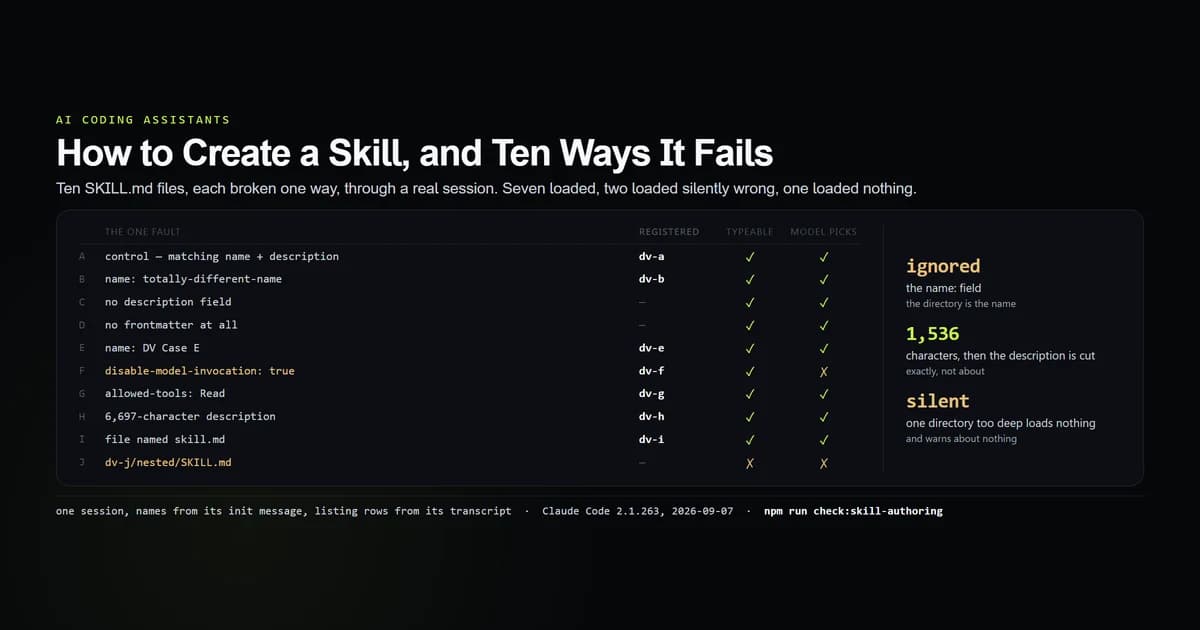
Learning how to create a Claude Code skill takes about ninety seconds; learning which of your mistakes it will absorb without telling you takes longer. We wrote ten SKILL.md files, each broken in exactly one way, put them in one .claude/skills/ directory and asked a real session what it could see. Seven loaded. Two loaded and were silently not what their author wrote. One loaded nothing and said nothing. Measured 2026-09-07 on Claude Code 2.1.263.
Key takeaways
- The
name:field is ignored. The directory name is the skill's name —name: totally-different-nameindv-b/SKILL.mdregisters asdv-b. - A
SKILL.mdwith no frontmatter at all still loads, and the model is shown the first line of your body as its description. - A
SKILL.mdone directory too deep loads nothing and warns about nothing. No name, no slash command, no listing row. allowed-toolsis real. The identical skill wrote a file without it and called nothing butSkillwithallowed-tools: Read.- The body arrives at the model with your skill directory's absolute path on the first line, and the frontmatter stripped.
The shortest skill that works
Two files' worth of structure and one required idea:
.claude/
  skills/
    article-preflight/
      SKILL.md          ← the path depth is exact
---
name: article-preflight
description: Run this repository's publish gate over content/. Use when the user asks to preflight, verify or QA an article, or asks whether a draft is ready to publish.
---

# Article preflight

Run these and report the first failure. Do not fix anything unless asked.

npm run check:anchors
npm run check:mdx-attrs
npm run check:rules
npm run typecheck
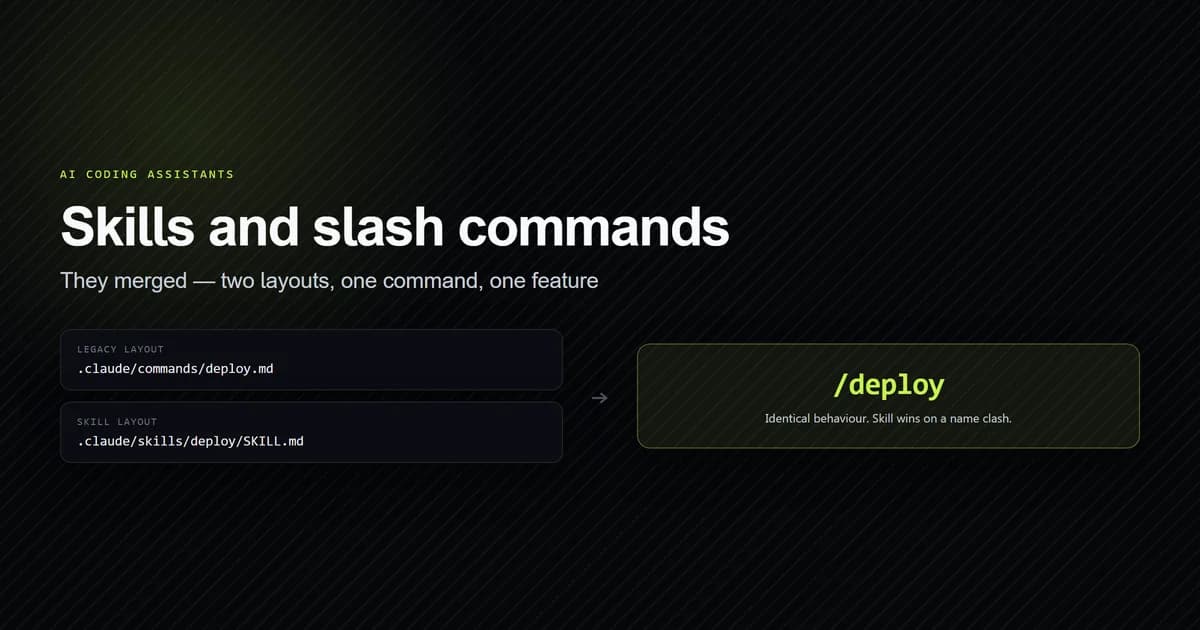
That is the whole format. ~/.claude/skills/<name>/SKILL.md does the same thing for every project on the machine, and skills are the same feature as custom slash commands (detailed in the Claude Code commands reference), so this one is also /article-preflight — a point the earlier skills and slash commands piece covers and the slash command census counts. Anthropic's agent skills documentation is the reference for the fields.
Ten files, one fault each
Ten directories, one session, three questions per skill: does it register a name, can a human type it, and can the model choose it? The name comes from the session's own init message; the listing row is read out of the transcript.
| Case | The one fault | Registered | Typeable | Model can pick |
|---|---|---|---|---|
| A | none (control) | dv-a | yes | yes |
| B | name: differs from the directory | dv-b | yes | yes |
| C | no description | — | yes | yes |
| D | no frontmatter at all | — | yes | yes |
| E | name: DV Case E | dv-e | yes | yes |
| F | disable-model-invocation: true | dv-f | yes | no |
| G | allowed-tools: Read | dv-g | yes | yes |
| H | 6,697-character description | dv-h | yes | yes (cut to 1,536) |
| I | file named skill.md | dv-i | yes | yes |
| J | dv-j/nested/SKILL.md | — | no | no |
We reproduce the whole table with an internal check script:
npm run check:skill-authoring
# → All 13 SKILL.md authoring guards passed.

npm run check:skill-authoring -- --cases
Case J is the one that costs an afternoon. A perfectly valid SKILL.md, one directory below where the loader looks, produces no name, no slash command, no listing row and no message. Nothing is broken; nothing is there.
The name field is not the name
Case B declares name: totally-different-name and registers as dv-b. Case E declares name: DV Case E — spaces, capitals — and registers as dv-e. The directory is authoritative and the field is decoration.
This bites in exactly one place. You copy a skill from somewhere, keep its SKILL.md, rename the folder to something that fits your project, and then wonder why /<the name in the file> reports an unknown command. Rename the directory to rename the skill.
Skip the description and it writes one
Cases C and D have no description — one has other frontmatter, one has no frontmatter at all — and both appear in the model's listing with a description anyway. It is the first line of the body.
We pushed on it with a 20,702-character body opening on a heading:
---
name: dv-nodesc
---
# Long body

- Reference note 0: this line exists only to give the skill body a measurable size.
…
- dv-nodesc: Long body
Nine characters, from a 20 KB file, with the markdown stripped. The fallback is not dangerous — it does not dump your body into the prompt — it is simply useless. Long body tells the model nothing about when to reach for the skill, which on a busy shelf is the same as not being installed.
What a description is for
It is not a summary of the skill. It is the match target, and it is competing for a shared budget. Two numbers govern how you write it:
- 1,536 characters is the per-description cap,
skillListingMaxDescChars. Case H declared 6,697 and the model was shown exactly 1,536 — the guard asserts the equality, not an approximation. - 8,000 characters is the whole listing's budget, and a long row is more expensive to fit, so it is more likely to be dropped whole. What that budget does to a new skill is the companion measurement to this one, and the short version is that most descriptions never arrive at all.
So write it as the sentence a user would type, not as documentation:
# reaches for the wrong reader
description: Editorial quality tooling for the content pipeline.

# reaches for the right one
description: Run this repository's publish gate over content/. Use when the user
  asks to preflight, verify or QA an article, or asks whether a draft is ready
  to publish.
allowed-tools is enforced
allowed-tools restricts what the model may call once the skill has loaded, and the only way to establish that is a pair. Same body — "create a file called tools-probe.txt … then print DV_TOOLS_DONE" — same prompt, one field:
| Frontmatter | Tools called | File written |
|---|---|---|
allowed-tools: Read | Skill | no |
| (field removed) | Skill, Write | yes |
The restricted run never reaches Write. This is the closest a skill gets to the guarantees a PreToolUse hook provides, and it is narrower: it constrains the turn the skill runs in, not the session.
⚠️ The restricted run also explained itself wrongly. It reported that the procedure "requires authentication to MCP servers (Gmail, Google Calendar, and Google Drive)". Nothing in the skill touches any of those. The absent Write call and the absent file are the measurement; the model's account of why is an error, and it is in the fixture as one.
What the model is handed
The Skill tool result contains no instructions at all:
Launching skill: changelog-entry
The body arrives immediately after, as a separate message:
Base directory for this skill: C:\…\lab\trig\.claude\skills\changelog-entry

# Changelog entry

Append one line to CHANGELOG.md in the format `- <date> <summary>` and then
print the sentinel SKILL_CHANGELOG_FIRED so the caller knows this procedure ran.

ARGUMENTS: Fixed the date parser
Three things worth knowing from that. Your frontmatter never reaches the model — it is configuration for the loader, not context, so do not write instructions into description expecting them to be followed. The first line is your skill directory's absolute path, which is what makes references/, scripts and templates alongside the SKILL.md addressable — and also puts your home directory into the transcript, the same leak the exit-2 hook paths have. And ARGUMENTS: is appended verbatim, so anything typed after /skill-name arrives as a trailing line rather than being substituted into the body.
The skill we actually shipped
This repository now has one, written against every rule above:
---
name: article-preflight
description: Run this repository's publish gate over content/. Use when the user asks to preflight, verify or QA an article, asks whether a draft is ready to publish, or has just finished editing a file under content/.
allowed-tools: Bash, Read, Grep, Glob
---

Report one line per check: the command, PASS or FAIL, and the count it prints.
`check:rules` exits non-zero while any violation exists, including the pre-audit
baseline, so compare its number against the last one recorded in `roadmap.md`
rather than treating non-zero as new breakage.
The allowed-tools line is deliberate: the skill reports, it does not edit, and the field is what makes that true rather than hoped for. The paragraph about check:rules is the part no generated skill would contain — it is the difference between a checklist and a procedure that knows what this repository's checks mean.
And it still does not fire on its own, because its description loses the listing auction. That is measured in the companion article, and it is why the last section of this one is about testing rather than writing.
How to test one
Do not test a skill by asking for the job and seeing what happens — that conflates "the file is wrong" with "the model did not choose it". Separate them:
- Does it load? Type
/<name>. If the CLI says the command is unknown, the file is in the wrong place or the directory is misnamed. That is case J. - Is the body right? Run it once by name and read what it did. This also puts the skill's usage count above zero, which is what gets its description into the listing.
- Can the model choose it? Read the
skill_listingattachment in the session transcript under~/.claude/projects/, or run/skills. If your skill is a bare name there, the model cannot see what it is for, and nothing about the body will change that. - Is
allowed-toolsdoing what you think? Pair it. Run the skill with the field and without it, and compare the tool calls.
What did not work
The allowed-tools result was almost published from a single run. One run, the field present, no file written — which looks like a finding and is not one, because a run can produce no file for a dozen reasons, and this one produced a confident wrong explanation of itself into the bargain. The control with the field deleted is the entire measurement. It is the same lesson the formatter-hook pairs produced and it had to be learned again here.
Case I is published with a warning rather than as a fact. skill.md loading is a property of an NTFS volume, not of Claude Code, and calling it "the loader is case-insensitive" would be a claim about code we did not read. The fixture marks it platform-dependent.
⚠️ One fault per case, and no combinations. A file with a wrong path and no description was not tested, and the ten cases do not compose into a grammar.
⚠️ Four frontmatter keys are named and not claimed. user-invocable, argument-hint, model and effort appear in the key vocabulary inside the binary. None was exercised here, so they are listed as vocabulary rather than behaviour.
Best practices
- Name the directory carefully; it is the URL. The
name:field will not save a badly named folder. - Always write a
description, and write it as a trigger. The fallback is your body's first line, which is never the sentence a user types. - Keep it under 1,536 characters — past that the listing cuts it, and a long row is likelier to be dropped whole.
- Add
allowed-toolsto anything that reports rather than acts. It is one line and it is enforced. - Add
disable-model-invocation: trueto anything destructive. The user can still type it; the model cannot choose it. - Put reference material in files beside the
SKILL.mdand point at them by relative path. The base directory arrives with the body, and the files cost nothing until they are read. - Run it once by hand after writing it. It is the difference between a skill that is installed and a skill that is findable.
Common mistakes
Nesting the SKILL.md. .claude/skills/deploy/scripts/SKILL.md is not a skill. Symptom: silence — no error, no command, nothing in /skills. Fix: .claude/skills/deploy/SKILL.md, exactly one directory deep.
Renaming a skill by editing name:. Symptom: /<new name> is unknown while the old one still works. Fix: rename the directory.
Writing instructions into the description. It never reaches the model as instructions — only as a listing row, cut to 1,536 characters. Fix: put them in the body, which is free until the skill runs.
Testing with the job instead of the name. A skill that does not fire may be perfect and invisible. Fix: /skill-name first, then read the listing.
Expecting a skill to run every time. It is chosen, not triggered. When the requirement is "always", a hook is the mechanism, and the whole configuration surface (governed by Claude Code settings) has more than one place to put a rule.
Conclusion
Knowing how to create a Claude Code skill is mostly knowing what the loader will forgive. It will forgive a missing description, a missing frontmatter block and a name field that contradicts the folder — and it will not tell you it forgave any of them. Write .claude/skills/<name>/SKILL.md at exactly that depth, put a trigger sentence in description, add allowed-tools when the skill only reports, and then run it once by hand: that last step is what turns an installed skill into one the model can find.
Frequently asked questions
Where do I put a Claude Code skill?
What fields does SKILL.md require?
Does the name field in SKILL.md rename the skill?
What does allowed-tools do in a SKILL.md?
How do I stop Claude from invoking a skill on its own?

Muhammad Kashif
Founder and editor of Devventa, covering AI coding assistants, Next.js and the modern AI development stack.