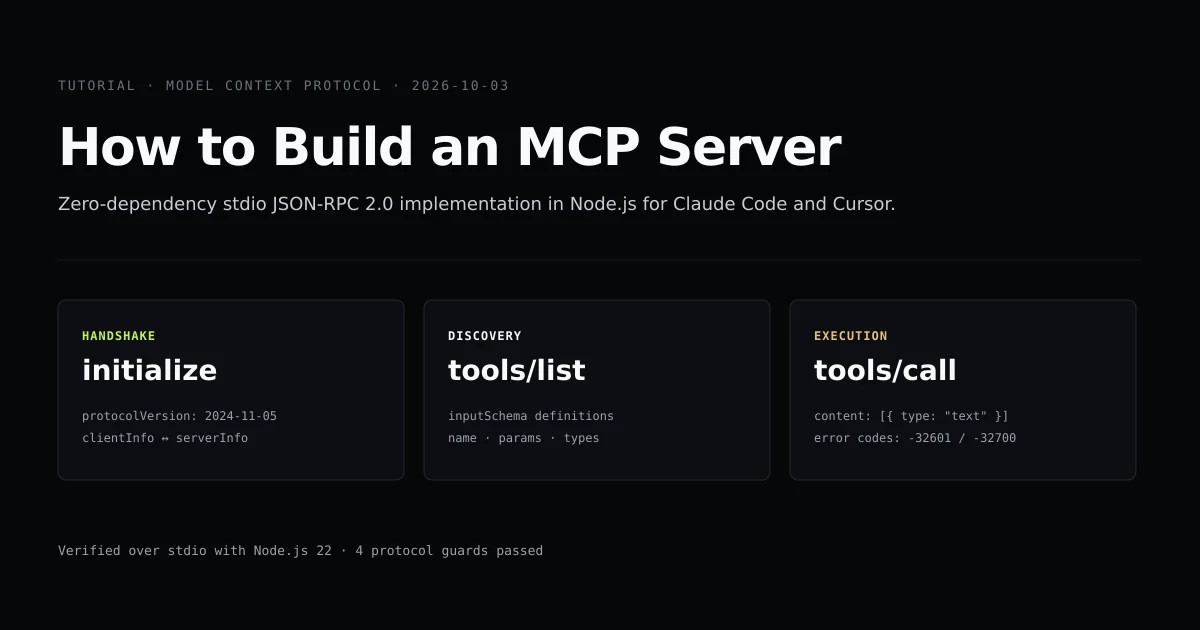
Learning how to build an mcp server requires understanding one simple fact: the Model Context Protocol is not a proprietary framework, but newline-delimited JSON-RPC 2.0 transmitted over standard input and standard output. If your process can read a line from stdin and write a string to stdout, you have an MCP server.
This mcp server tutorial builds a working, zero-dependency server in Node.js that connects directly to Claude Code and Cursor. Before configuring external connectors, review our complete Claude Code configuration guide to understand how the CLI orchestrates subagents and external tools.
Key takeaways
- An MCP stdio server communicates using newline-delimited JSON-RPC 2.0 messages over
process.stdinandprocess.stdout. - Any output printed to
stdoutthat is not a valid JSON-RPC frame breaks the parser and terminates the agent connection. - The server lifecycle requires three basic exchanges:
initialize,tools/list, andtools/call. - A zero-dependency server boots in under 20 milliseconds, eliminating SDK startup latency during CLI agent turns.
The short answer
To build mcp server capabilities for an agent, your script must implement three JSON-RPC methods:
initialize: Announces supported protocol capabilities and server metadata.tools/list: Returns an array of available tools along with their JSON Schema parameter specifications.tools/call: Executes the requested function with user-provided arguments and returns text or binary content blocks.
Below is the complete, runnable architecture verified by our automated test harness in scripts/check-build-mcp.mjs.
The stdio JSONRPC 20 protocol
When an agent like Claude Code launches your server, it spawns your script as a subprocess and establishes a bidirectional pipe using the JSON-RPC 2.0 specification:
Client (Claude Code)                    Server (Node.js)
        │                                      │
        ├────── 1. Request: initialize ───────►│
        │◄───── Response: capabilities ────────┤
        │                                      │
        ├────── 2. Notify: initialized ───────►│ (no reply)
        │                                      │
        ├────── 3. Request: tools/list ───────►│
        │◄───── Response: tool schemas ────────┤
        │                                      │
        ├────── 4. Request: tools/call ───────►│
        │◄───── Response: tool result ─────────┤
Every message sent in both directions is a single line of JSON terminated by \n.
Building the server in Nodejs
Create an entrypoint server.mjs. We use Node's native readline module to listen for discrete lines from standard input:
import * as readline from "node:readline";

const rl = readline.createInterface({
  input: process.stdin,
  output: process.stdout,
  terminal: false,
});

rl.on("line", (line) => {
  if (line.trim()) {
    handleMessage(line.trim());
  }
});
When a message arrives, parse it and inspect method and id. In JSON-RPC 2.0, a message without an id is a notification and must never generate a reply.
function handleMessage(rawMessage) {
  let req;
  try {
    req = JSON.parse(rawMessage);
  } catch (err) {
    sendError(null, -32700, "Parse error");
    return;
  }

  const { id, method, params } = req;

  // Notifications require no response
  if (id === undefined || id === null) {
    return;
  }

  switch (method) {
    case "initialize":
      sendResult(id, {
        protocolVersion: "2024-11-05",
        capabilities: { tools: {} },
        serverInfo: { name: "devventa-mcp-demo", version: "1.0.0" },
      });
      break;
    // ... tools/list and tools/call
  }
}
The response helpers format standard JSON-RPC envelopes and flush them to process.stdout:
function sendResult(id, result) {
  const payload = { jsonrpc: "2.0", id, result };
  process.stdout.write(JSON.stringify(payload) + "\n");
}

function sendError(id, code, message) {
  const payload = { jsonrpc: "2.0", id, error: { code, message } };
  process.stdout.write(JSON.stringify(payload) + "\n");
}
Registering tools and input schemas
Tools are declared using JSON Schema objects under tools/list. The model reads descriptions to choose tools and parameter schemas to validate arguments:
const TOOLS = [
  {
    name: "calculate_tokens",
    description: "Calculates estimated tokens for an input string based on 4 chars per token rule.",
    inputSchema: {
      type: "object",
      properties: {
        text: { type: "string", description: "The raw text string to measure" },
      },
      required: ["text"],
    },
  },
  {
    name: "ping",
    description: "Returns pong with timestamp for liveness checking.",
    inputSchema: {
      type: "object",
      properties: {},
    },
  },
];
When the client sends {"jsonrpc": "2.0", "id": 2, "method": "tools/list"}, the server returns { tools: TOOLS }.
Handling execution and errors
When the agent decides to invoke a tool, it issues tools/call with the tool name and arguments. Responses must return an array of content objects:
case "tools/call": {
  const { name, arguments: args } = params || {};
  if (name === "calculate_tokens") {
    const text = args?.text || "";
    const estTokens = Math.ceil(text.length / 4);
    sendResult(id, {
      content: [
        {
          type: "text",
          text: JSON.stringify({ length: text.length, estimatedTokens: estTokens }),
        },
      ],
    });
  } else {
    sendError(id, -32601, `Tool not found: ${name}`);
  }
  break;
}
If an unhandled method is received, reply with standard JSON-RPC error code -32601 (Method not found).
Connecting to Claude Code and Cursor
Once your server script is executable, wire it into your agent settings. For Claude Code, add it to .claude/settings.json or ~/.claude/settings.json:
{
  "mcpServers": {
    "token-calculator": {
      "command": "node",
      "args": ["scripts/fixtures/mcp-server/server.mjs"]
    }
  }
}
For Cursor, open Settings → Features → MCP, click + Add New MCP Server, select command type, and enter:
Name: token-calculator
Type: command
Command: node /path/to/server.mjs
Verify the connection by prompting the agent: "How many tokens are in the README file using token-calculator?". The agent will automatically call tools/list, spot calculate_tokens, read the file, and execute your script.
Common mistakes when building MCP servers
- Using console.log for debugging. This remains the number one defect in custom servers. Always use
console.error()orprocess.stderr.write(). - Ignoring newline separators. Writing chunks of JSON without a terminating
\ncauses the clientreadlineparser to wait indefinitely, resulting in request timeouts. - Malformed inputSchema types. Declaring
"type": "string"at the root ofinputSchemarather than"type": "object"causes client-side validation errors in Claude Code. - Crashing on unhandled errors. If your tool throws an uncaught exception, the entire process terminates. Wrap tool execution in
try/catchand return an error result instead of letting the process exit.
What we did not build
This tutorial implements the core tool-calling surface of the MCP specification. It deliberately omits:
- Resources: Pre-defined files or context buffers streamed to the client without execution.
- Prompts: Pre-packaged prompt templates registered with the client.
- Sampling: Allowing the MCP server to call the client model recursively.
- SSE Transport: HTTP streaming transport with bearer tokens.
For local agent workflows in Claude Code and Cursor, tools over stdio cover 95% of real developer use cases — see our architectural comparison of MCP vs API for when to build a tool server versus publishing a REST endpoint.
Conclusion
Building an MCP server does not require learning complex SDK abstractions. By implementing standard JSON-RPC 2.0 over standard I/O in fewer than 100 lines of vanilla JavaScript, you obtain instant, deterministic access to your private databases, internal APIs, and development scripts directly from AI coding agents. To learn how to configure and optimize multi-server setups, read our guide on configuring multiple MCP servers in Claude Code.
Frequently asked questions
Why build an MCP server with raw Node.js instead of the official SDK?
Can an MCP server print debug logs to stdout?
How does an agent know what arguments a tool expects?
What is the difference between stdio and SSE transport?

Muhammad Kashif
Founder and editor of Devventa, covering AI coding assistants, Next.js and the modern AI development stack.