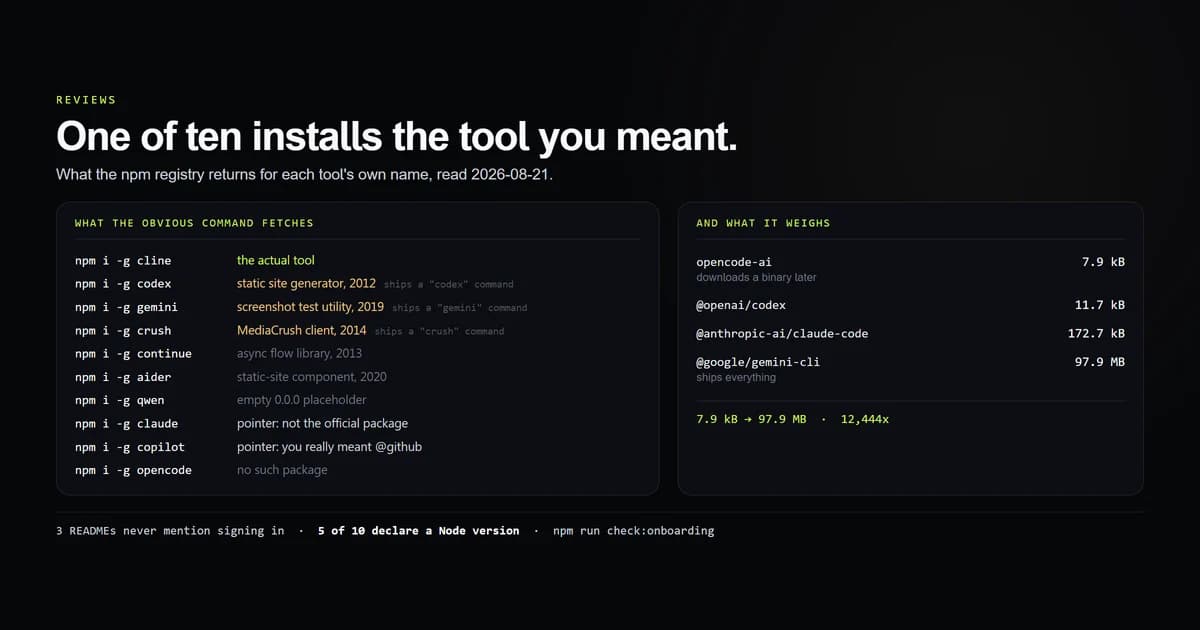
Most guides to ai coding tools for beginners start at the first prompt. The failures start earlier than that — at the install, where the tool's name, its package name and the command you type are frequently three different strings. On 2026-08-21 we asked the npm registry what each of ten tools' own names actually installs: one is the tool, two are pointer packages, one does not exist, and six are unrelated software — three of which ship a command with exactly the name you meant to run. If you have not yet picked a surface to work on, the assistants pillar is the decision before this one.
Key takeaways
npm install -gplus the tool's name gets you the tool once in ten tries. Six times it gets somebody else's package, three of which install a colliding command.- Install size spans 12,444x, from 7.9 kB to 97.9 MB — and the small numbers are installers that download the real binary on first run, not lean tools.
- Only five of ten declare a supported runtime version, so on the other five a too-old Node fails at run time with a syntax error rather than at install time with a message.
- Three READMEs never mention signing in or an API key, including Claude Code's, and every one of these tools requires an account before the first prompt.
- The measured easiest start is Codex CLI, on install size, declared runtime, a documented Windows route and a README that states the account requirement — none of which is a claim about output quality.
The short answer
Install by the package name, never by the tool name, and read the scope. Every tool worth using here publishes under a scoped or exact package — @openai/codex, @anthropic-ai/claude-code, @google/gemini-cli — and typing the friendly name instead is how beginners end up running a static site generator from 2012.
After that, the second decision is not which agent but which model key you will pay for, because the client is free and the tokens are not. What "free" is actually attached to covers that split, and the vendor free tiers covers what each plan caps.
npm install -g @openai/codex        # not: npm install -g codex
npm install -g @anthropic-ai/claude-code
npm install -g @google/gemini-cli
What the tool's own name installs
This is the measurement, from our internal onboarding check script. For each tool we queried the registry with the string a beginner types after reading its name in a roundup, then classified the result against the package that really ships it.
| You type | What arrives | Published |
|---|---|---|
npm i -g claude | pointer: "This is not the official Claude Code package" | 2025-06-13 |
npm i -g gemini | a UI screenshot testing utility, with a gemini command | 2019-11-25 |
npm i -g codex | a static site and documentation generator, with a codex command | 2012-05-07 |
npm i -g copilot | pointer: "You really meant to install @github/copilot" | 2025-09-25 |
npm i -g opencode | nothing — no such package | — |
npm i -g cline | the actual tool | 2026-08-21 |
npm i -g continue | a 2013 async flow-control library | 2013-12-01 |
npm i -g qwen | an empty 0.0.0 placeholder | 2025-01-30 |
npm i -g crush | a MediaCrush command-line client, with a crush command | 2014-08-24 |
npm i -g aider | a static-site article component | 2020-06-03 |
One correct, two pointers, one miss, six unrelated. The two pointer packages are the good outcome — somebody bought the obvious name specifically to redirect people, and Anthropic's and GitHub's both say so in the description field.
The bad outcome is the collision. gemini, codex and crush each install a working binary with the exact name the beginner intended to run. Type codex afterwards and something starts. It is a documentation generator from 2012, and nothing in the terminal will tell you that.
Scoped names exist to prevent exactly this. npm's own scope documentation describes a scope as a namespace that lets a package share a name with somebody else's, and every major vendor here uses one. The friendly name is marketing; the scope is the address.
The install is not the download
The second beginner surprise is size, and the numbers do not mean what they look like.
| Tool | Package | Unpacked | Deps | Runtime declared | Command |
|---|---|---|---|---|---|
| opencode | opencode-ai | 7.9 kB | 0 | — | opencode |
| Codex CLI | @openai/codex | 11.7 kB | 0 | Node >=16 | codex |
| Copilot CLI | @github/copilot | 13.0 kB | 1 | — | copilot |
| Cline | cline | 46.4 kB | 5 | — | cline |
| Crush | @charmland/crush | 48.6 kB | 3 | — | crush |
| Claude Code | @anthropic-ai/claude-code | 172.7 kB | 0 | Node >=22 | claude |
| Continue | @continuedev/cli | 64.8 MB | 4 | — | cn |
| Qwen Code | @qwen-code/qwen-code | 94.7 MB | 0 | Node >=22 | qwen |
| Gemini CLI | @google/gemini-cli | 97.9 MB | 0 | Node >=20 | gemini |
7.9 kB to 97.9 MB is a 12,444x span, and it is not a leanness ranking. The tiny packages are bootstrappers: they publish a script that fetches a platform binary on first run, so the disk cost arrives after npm install reports success. The large ones ship their dependency tree inside the tarball. Both approaches work; only one of them tells you the truth at install time.
Two rows deserve a beginner's attention on their own:
- Continue installs a command called
cn. Notcontinue, which is a 2013 library, and notcontinuedev. Nothing about the tool's name predicts it. - Only five of ten declare a runtime version. Where
engines.nodeis absent, an old Node does not produce an install error — it produces a syntax error the first time you run the tool, which reads like a broken package rather than a wrong environment. Node's own packages documentation covers the field; half this shelf omits it.
Aider is the outlier and worth naming separately: it installs from PyPI, requires Python >=3.10,<3.13, and declares 301 dependency specifiers against zero to five for every Node tool here. That is not a criticism of Aider — Python packaging works differently — but a beginner installing "latest Python" today can land outside its supported range and get a resolver error before they get an agent.
What the README does not say
The last door is the project's own documentation, read on the same day. We counted words, extracted every install command from fenced blocks, and found the first line that mentions signing in, logging in or an API key.
| Tool | README words | Windows route | First auth mention |
|---|---|---|---|
| Claude Code | 318 | yes | never |
| Codex CLI | 375 | yes | line 70 |
| Copilot CLI | 985 | yes | line 17 |
| opencode | 540 | yes | never |
| Continue | 214 | none documented | never |
| Gemini CLI | 1,457 | yes | line 150 |
| Cline | 1,178 | yes | line 218 |
| Qwen Code | 828 | yes | line 70 |
| Crush | 4,101 | yes | line 186 |
| Aider | 1,156 | yes | line 113 |
Three of ten never mention authentication, and all three require it. For a beginner that is the single most expensive omission on the page, because the failure it produces — install succeeds, tool starts, tool cannot do anything — is the one that reads as "this is broken" rather than "I have one step left".
Cline's first match is at line 218 and it is a Slack bot token in an integration example, not the thing a new user needs. Crush's is at line 186 of a 4,101-word README. Codex CLI's is at line 70 and says exactly what to do: run codex and select Sign in with ChatGPT.
Nine of ten document a Windows-native install route — npm, winget, scoop, choco or PowerShell — which is better than the reputation of this category suggests. The exception is Continue, whose 214-word README contains no install command in any fenced block at all.
The best ai coding tools for beginners, ranked by install
This ranks the first thirty minutes and nothing else. Every tool below can write code; the ordering is about how many ways day one can go wrong.
- Codex CLI — the fewest surprises. 11.7 kB, a declared Node floor, a documented Windows route, and a README that names the sign-in step at line 70. Its only trap is the collision: install
@openai/codex, nevercodex. - Claude Code — same profile, one gap. Small package, Node >=22 declared, several documented Windows routes, and a 318-word README that never mentions an account. Expect authentication on first run and it is a clean start.
- Cline — the one whose name works.
npm i -g clinegenuinely installs Cline, which nothing else here can claim, and the project has a browser-driving surface that matters for frontend work specifically. - Gemini CLI — the free-allowance route, at a size cost. 97.9 MB unpacked and the only repository in this survey that states a free model allowance in its own README. Worth it if you want zero spend; slow to install on a bad connection.
- Continue — last on install, not on merit. A binary called
cn, a name that installs a 2013 library, and a README with no install command in it. Everything about the tool is fine and everything about the first thirty minutes is not.
For the shape of the whole shelf rather than the door into it, the measured install rankings cover twenty tools across four registries. And for what happens after the install succeeds, the first-day refusals measured on both installed agents found that eight of twelve beginner mistakes end in a refusal, only four of which name anything to type.
Common mistakes on day one
- Installing by the friendly name. Tempting because that is the name in every article, including this one's tables. The symptom is a command that runs and behaves nothing like an AI agent. The fix is to copy the package name from the project's README, scope included.
- Assuming a fast install means a small tool. Tempting because
npm installfinished in two seconds. The symptom is a first run that stalls downloading a platform binary. Nothing is wrong; the download simply moved. - Reading an install failure as a broken package. Tempting because the error is a syntax error deep in a dependency. The symptom is a
SyntaxErroron an unsupported Node. Check your runtime first — half these packages do not declare the floor they need. - Expecting the free client to mean free usage. Tempting because installation cost nothing. One real 696,820-byte session on this repository billed $1.96 through the client that ran it, and none of that moves with the licence.
- Starting with a local model to avoid the bill. Tempting and occasionally right, but it is a hardware project. On a 15.9 GiB laptop four of seven quantised coding models fit and none of them ran.
What we are not claiming
Nothing here ranks output quality. This measures packages, binaries and READMEs. Which of these tools writes better code for a beginner needs all ten installed and a grader, and one is installed on the machine that produced these figures.
The registry results are a dated snapshot. Name collisions get bought, redirected and abandoned; two of the ten are already pointer packages that somebody registered on purpose. Our check script fails if a recorded guess starts resolving to a different package, which is the event this table most needs to survive.
Install size is not comparable across strategies. A 7.9 kB bootstrapper and a 97.9 MB tarball are measuring different moments. The script says so in its own output rather than ranking on the number, and Aider's row is a wheel download rather than an unpacked tree.
README silence is not the same as a missing requirement. Three projects never mention authentication in the file we read; all three document it elsewhere. The measurement is about what a beginner meets first, not about whether the vendor documented it at all.
Conclusion
If you are starting today, install @openai/codex or @anthropic-ai/claude-code by their full package names, expect to sign in before the first useful prompt, and check your Node version before you blame the tool. Then re-check your own shortlist against the registry in six months: one of the ten commands in the table above already installs the right thing only because Cline took over a package name registered in 2013, and that is the kind of fact that changes without an announcement. If a prompt-to-app tool got you here rather than a CLI, the number worth knowing is what happens to that code next — four of this site's generated files were deleted inside 48 hours, and none of them had been asked for.
Frequently asked questions
What is the easiest AI coding tool to start with?
Why did npm install the wrong package for my AI coding tool?
Do beginners need to pay for an AI coding tool?
Which AI coding tools work on Windows?
How much disk space does an AI coding CLI need?

Muhammad Kashif
Founder and editor of Devventa, covering AI coding assistants, Next.js and the modern AI development stack.