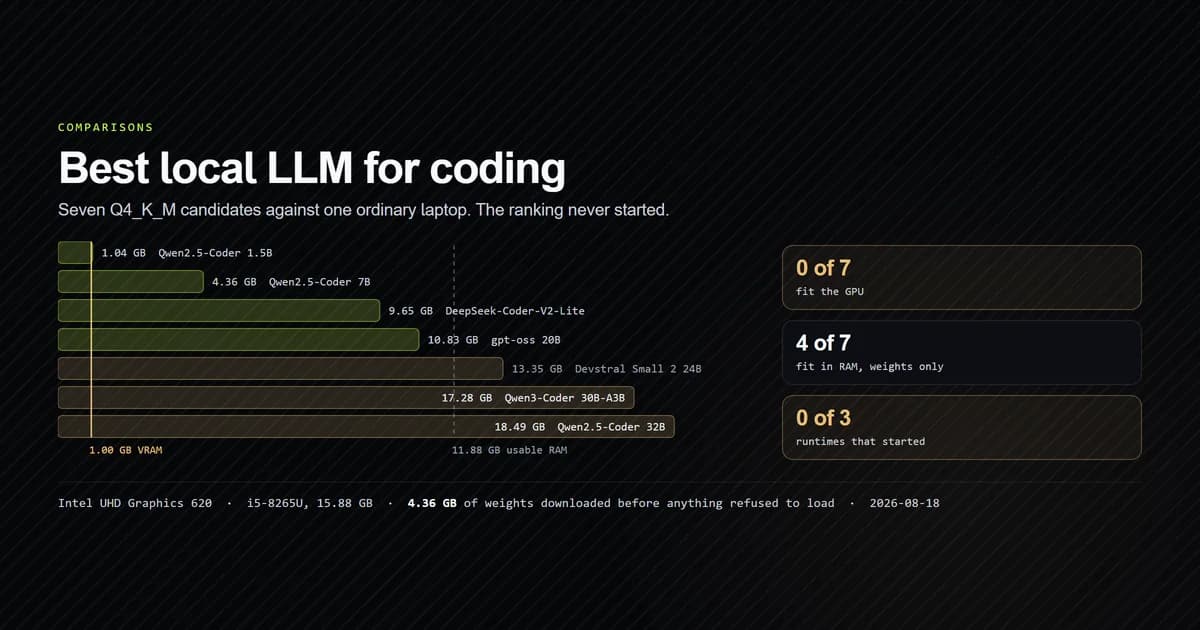
The best local LLM for coding is decided by your hardware before you get to the benchmarks, and on ordinary hardware the answer is usually "none of them." We measured seven Q4_K_M candidates — real byte counts from Hugging Face, not estimates — against one unremarkable Windows laptop on 2026-08-18. Zero of seven fit the GPU. Four fit in RAM. And three separate runtimes refused to start, so this article ends without a throughput number, on purpose.
Key takeaways
- Zero of seven candidates fit the GPU. The integrated adapter reports 1.00 GB of dedicated VRAM and the smallest model weighs 1.04 GB, so the GPU path was closed before the shortlist was read.
- Four of seven fit in RAM, from 1.04 GB up to 10.83 GB against 11.88 GB usable — and "fits" prices the weights only, not the KV cache.
- None of them ran. A runtime install failed, an official prebuilt binary was quarantined by Defender, and the binaries that survived exited with
STATUS_DLL_NOT_FOUND. - The two models most roundups name first have 32,768-token windows — against a real agentic read on this repository that measured 354,835 tokens.
- Four of the seven have not had a weight published in 583 days or more, and one in 789.
The short answer
Check the fit before you read a comparison. Take your dedicated VRAM, take your free RAM, and compare both against the actual file size of the quantisation you would download. If nothing fits the GPU, the honest recommendation for a coding workload is a hosted model, and the reason is speed rather than quality.
Local inference buys one thing that no hosted model can offer at any price: the code never leaves the machine. If that is the requirement, the setup cost below is the price and it is worth knowing in advance. If it is not the requirement, the complete comparison of AI coding assistants is where the hosted options are ranked, and the open-source assistants are the middle ground.
The machine this was measured on
Nothing here is a workstation. It is the kind of laptop a lot of developers actually own:
CPU     Intel Core i5-8265U @ 1.60GHz — 4 cores, 8 logical
RAM     15.88 GB total, 11.88 GB usable after a 4.00 GB refusal
GPU     Intel UHD Graphics 620 — 1.00 GB dedicated
The 4 GB refusal is a deliberate choice in the script, not a measurement: a model that fits with nothing to spare swaps, and a swapping model is unusable regardless of what the arithmetic said. Everything else on those lines comes from the operating system.
Seven candidates, measured against real memory
Every model below is one a 2026 local-coding shortlist actually names, at the quantisation those shortlists actually recommend. The weight sizes are the byte counts the Hugging Face model hub API returns for the exact file you would download, and the context lengths come from each base model's own config.json, gathered by our internal fit-check script:
| Model | Active params | Weights | Context |
|---|---|---|---|
| Qwen2.5-Coder 1.5B | 1.5B | 1.04 GB | 32,768 |
| Qwen2.5-Coder 7B | 7B | 4.36 GB | 32,768 |
| DeepSeek-Coder-V2-Lite 16B | 2.4B | 9.65 GB | 163,840 |
| gpt-oss 20B | 3.6B | 10.83 GB | 131,072 |
| Devstral Small 2 24B | 24B | 13.35 GB | 393,216 |
| Qwen3-Coder 30B-A3B | 3B | 17.28 GB | 262,144 |
| Qwen2.5-Coder 32B | 32B | 18.49 GB | 32,768 |
Four fit in RAM: the 1.5B, the 7B, DeepSeek-Coder-V2-Lite and gpt-oss 20B. The other three exceed 11.88 GB on weights alone.
Two of the four that fit are mixture-of-experts models whose active parameter count is far below the headline — DeepSeek-Coder-V2-Lite runs 2.4B of 16B per token, gpt-oss runs 3.6B of 20B. That is the mechanism by which a 20B model can be quicker than a 24B one, and it is the reason parameter count is a poor proxy for either speed or fit.
The script's own caveat is the important line under the table: weights are the file, and the KV cache is charged on top of it. gpt-oss 20B at 10.83 GB against 11.88 GB usable leaves roughly a gigabyte for the operating system, the runtime and every token of context. That verdict is an upper bound, not a promise.
Zero of seven fit the GPU
The GPU column is the whole article in one number. 1.00 GB of dedicated VRAM against a smallest candidate of 1.04 GB. Not close, and not close for any of the other six either.
This is not an exotic machine — a 2018 mobile i5 with integrated graphics is a working developer laptop, not a museum piece. A "best local LLM for coding" list that opens with a 30B recommendation is written for a discrete GPU, and it rarely says so. The list is not wrong about the models; it is answering a question about hardware it never states.
Three runtimes, and none of them ran
Here is where this stops being an arithmetic exercise. We downloaded 4.36 GB of weights — both split parts of Qwen2.5-Coder-7B-Instruct Q4_K_M, byte-exact against the sizes the API reported — and then could not load them. Three attempts, all recorded in the fixture with their exact errors:
node-llama-cpp@3.20.0via npm. No prebuilt binary resolved for this platform, so the postinstall fell back to building from source. Itsgit clone --depth=1 --branch=b10361 https://github.com/ggml-org/llama.cpp.gitstep failed, npm rolled the package back, andnode_modules/node-llama-cpp/was left containing one empty directory. Not retried: a from-source llama.cpp build needs a toolchain this machine also does not have.- The official llama.cpp prebuilt, release b10483. Prebuilt binaries from the llama.cpp GitHub repository had
llama-bench.exequarantined by Microsoft Defender before it could run — "the file contains a virus or potentially unwanted software" — logged asTrojan:Win32/Wacatac.C!ml, threat ID 2147749372, three detections. The!mlsuffix marks a machine-learning heuristic rather than a signature match, which is the well-documented false-positive class for unsigned native binaries. We did not restore it. Overriding someone's antivirus to produce a benchmark number is not a step an article gets to take. - The binaries Defender left alone.
llama-cli.exeandllama-tokenize.exeboth exit0xC0000135—STATUS_DLL_NOT_FOUND— on--version, before a model is touched. The cause is specific:msvcp140.dll,vcruntime140.dllandvcruntime140_1.dllare all absent, because the Visual C++ 2015–2022 redistributable is not installed and the release bundleslibomp140but not the MSVC runtime it links against.
Three attempts, zero completed runs, and not one of the three failures had anything to do with the model. This is the part the roundups leave out, and it is the part that actually consumes an afternoon.
The last one is a one-line fix — install the redistributable — and we left it undone deliberately, because a machine-wide runtime install is the machine owner's call. If you are setting this up on your own hardware, install it first and skip the hour we spent finding out.
The context problem nobody prices
Set aside fit and runtimes. The two models that top most local coding lists — Qwen2.5-Coder 7B and 32B — declare 32,768-token context windows.
For a chat about a function, that is plenty. For agentic work over a repository it is not, and the gap is measurable: one ordinary read on this repository — a lockfile and two project documents — came to 354,835 tokens. That is roughly ten times the entire window of the model the shortlist recommends first.
Those token counts were produced by Anthropic's tokeniser, not Qwen's, so the multiple is approximate. The order of magnitude is not, and it does not depend on which tokeniser you use: a 32k window cannot hold a 300 KB lockfile whichever way you count.
The models that do publish large windows — Devstral Small 2 at 393,216 and Qwen3-Coder 30B-A3B at 262,144 — are exactly the ones that do not fit. The window and the fit trade against each other, and on this machine they never both come out right.
Three of the seven are 2024 weights
The weights themselves have a date, and the check prints it:
| Model | Weights last published | Age on 2026-08-18 |
|---|---|---|
| DeepSeek-Coder-V2-Lite 16B | 2024-06-20 | 789 days |
| Qwen2.5-Coder 1.5B and 7B | 2024-11-12 | 644 days |
| Qwen2.5-Coder 32B | 2025-01-12 | 583 days |
| Qwen3-Coder 30B-A3B | 2026-01-30 | 200 days |
Three of the four models that fit this machine were published in 2024. The newest weights on the list are the ones that do not fit. Nothing about that is scandalous — small models are not re-released often — but it does mean the practical local option is generally a generation or two behind the hosted one, and a comparison that ignores the date is comparing a 2026 model to a 2024 one without saying so.
What to actually do
- Read your dedicated VRAM first. If it is under about 8 GB, the GPU path is closed for anything above a toy model and the rest of the shortlist is academic.
- Install the platform runtime before the model. On Windows that is the Visual C++ redistributable runtime. It is the difference between a working setup and an hour of
0xC0000135. - Expect an antivirus fight. Unsigned native inference binaries trip machine-learning heuristics. Decide in advance whether you are willing to make an exclusion, because you will be asked.
- Match the context window to the work, not the benchmark. A 32k window is a real ceiling for agentic coding, and the models with larger windows are the ones that will not fit.
- Run a fit check before you download 4.36 GB. Ours queries the real file sizes and compares them to the real memory, and it takes seconds.
- Do not assume the shelf has moved since you last looked. Re-asked 34 days later from a second registry, four of these seven weight sizes came back identical and no next-generation coding model existed to replace them.
- Price the alternative before you commit to the hardware. The route local inference replaces is a free client on a paid key, and one measured session costs $0.62 to $1.77 depending on the vendor — which is the number a GPU purchase has to beat.
Common mistakes choosing a local coding model
- Ranking on benchmark scores before checking fit. Tempting because the scores are the published part. The symptom is a 30B recommendation on a laptop with 1 GB of VRAM. The fix is the fit table first, quality second.
- Counting shared GPU memory as VRAM. Tempting because the system reports a large number. The symptom is inference that is no faster than CPU. The fix is reading the dedicated figure and letting it fail.
- Budgeting weights and forgetting the KV cache. Tempting because the file size is the number on the page. The symptom is a model that loads and then dies mid-context. The fix is treating a "fits" verdict as an upper bound.
- Assuming the model is the hard part. This one cost us the afternoon. The symptom is 4.36 GB downloaded and three runtimes that will not start. The fix is proving a runtime works — on a 1 GB model — before downloading a real one.
Re-measured 34 days on: the shelf did not move
We re-asked the question on 2026-09-21 from a different registry, on the same laptop, 34 days after the measurement above. The result is a null one, and null results about a fast-moving field are worth publishing.
- Nothing on the shelf is named for 2026. Seven probed next-generation names returned 404 against five controls that returned 200. The newest coding family is still
qwen3-coder. - Four of seven byte counts agreed with the first registry to the hundredth of a GiB. Two disagreements trace to quantisation; one is unexplained and stays that way here.
- The machine did not grow either. Two of seven candidates exceed this laptop's entire installed memory — 17.28 and 18.49 GiB against 15.88 GiB of RAM. Exactly one fits the dedicated VRAM, by 82 MiB, on an integrated adapter where that line means very little.
- Zero local inference runtimes are installed today, 34 days after an afternoon spent installing three. Nothing from that attempt survived on disk.
Two registries, 34 days apart, agreeing on most numbers and disagreeing on no model's existence is the strongest evidence this article has that the local shelf is stable rather than merely unmeasured. Fit still decides it, and fit did not change.
What we are not claiming
There is no throughput figure in this article, and no quality ranking either. Both would need a runtime that started, and none did. We are not going to publish a tokens-per-second number extrapolated from someone else's hardware, or a code-quality verdict on models we could not prompt.
What is measured here is fit, context, and the setup path — which happens to be the part that decides the outcome on this class of machine. The quality question is real and it is open, and on this machine it never became relevant.
Conclusion
Run the fit check before the shortlist. If your dedicated VRAM is under 8 GB, a local coding model will run on the CPU or not at all, and on this laptop it did not run at all — three runtimes, zero starts, for reasons that were all environmental rather than about the models. Choose local when the code genuinely cannot leave the machine and you are willing to spend the setup; choose hosted otherwise, and spend the afternoon on the code instead. Before you spend it either way, it is worth counting how much a local model actually removes: an audit of every outbound service in this repository found the model endpoint was one of seven, and the two models above with windows large enough for its instruction set were the two whose weights did not fit in RAM.
Frequently asked questions
What is the best local LLM for coding on 16GB of RAM?
Can I run a local coding model without a dedicated GPU?
How much VRAM do I need for a local coding LLM?
Is a local coding model private enough to replace a cloud one?
Why did Windows Defender flag llama.cpp?
Is there a new local coding model for 2026?
Do Hugging Face and Ollama report the same model sizes?

Muhammad Kashif
Founder and editor of Devventa, covering AI coding assistants, Next.js and the modern AI development stack.