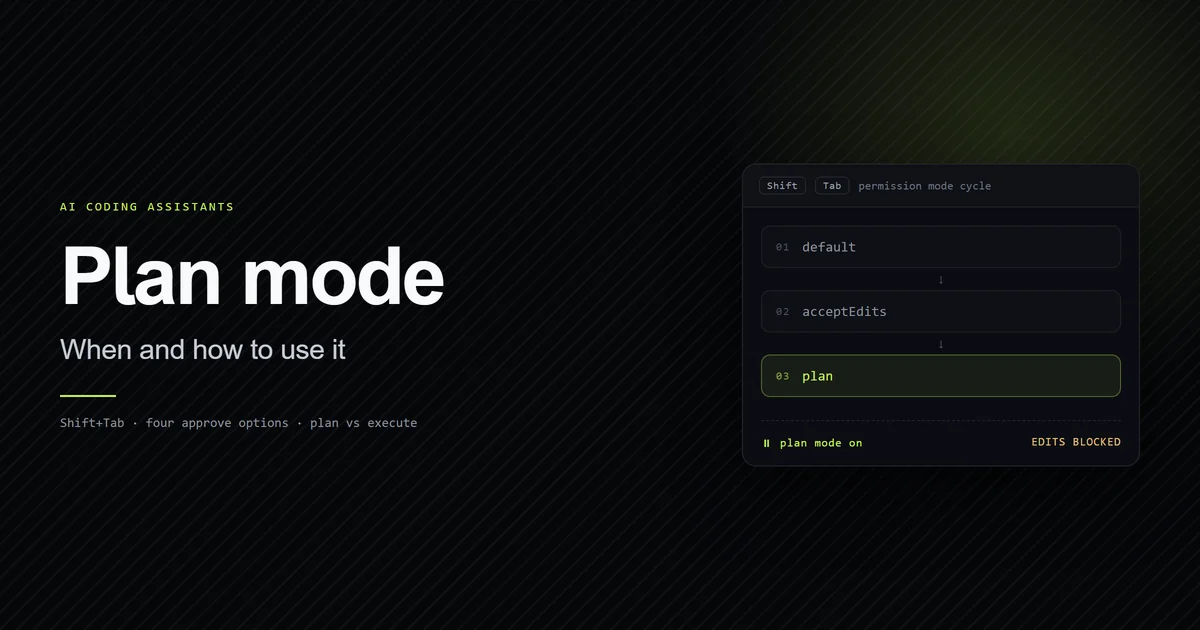
The Claude Code plan mode shortcut is Shift+Tab. It is not a key that means "plan mode", though — it advances the permission-mode cycle one step per press, and plan mode is one stop on that cycle. From the default Manual mode that is two presses; from accept-edits mode it is one. This guide covers the exact press count, why enabling auto mode or bypass permissions never changes it, and what to do when your terminal swallows the key. Measured against Claude Code 2.1.247 on 2026-08-30.
Key takeaways
Shift+Tabis the only keyboard shortcut into plan mode. It cycles:default→acceptEdits→plan.- From
defaultit is two presses; fromacceptEdits, one. That count is stable across every settings configuration we tested. bypassPermissionsandautoslot in afterplan, so enabling them lengthens the tail of the cycle but never moves plan.- If
Shift+Tabdoes nothing, a terminal multiplexer or IDE is intercepting it. Use--permission-mode planordefaultModeinstead. - Across 26 real session transcripts, only 4 of 1,180 mode-carrying turns were in plan mode, and
bypassPermissionsnever appeared — the tail modes are rarer than the docs make them sound.
The plan mode shortcut in one key
Press Shift+Tab in an interactive Claude Code session and the status bar changes to show a different permission mode. Each press moves one step along a fixed cycle:
 default  ──Shift+Tab──▶  acceptEdits  ──Shift+Tab──▶  plan  ──Shift+Tab──▶  (back to default)
 "manual mode on"          "accept edits on"            "plan mode on"
That is the whole mechanism. Plan mode is the third stop, and the shortcut is the same key you use to reach every other mode. For what plan mode then does — what it blocks, the approve options — see Claude Code plan mode. For every non-keyboard way in, on VS Code, JetBrains, desktop and web, see how to activate plan mode. For where it sits in the complete Claude Code guide, planning is the permission mode you drive with this key.
There is no dedicated plan mode key
People search for a "plan mode hotkey" expecting something like Ctrl+P. There isn't one, and that is a design choice, not a gap. The permission modes are a single ordered ring, and Shift+Tab is the ring's advance key. Binding plan mode to its own key would create two ways to be in a mode and one way to be confused about which press does what.
The practical consequence: you never press a key that means plan mode. You press Shift+Tab until the status bar says plan mode on, and one more press takes you out again.
How many presses reach plan mode
It depends only on where you start:
| Starting mode | Presses to plan | Sequence |
|---|---|---|
default (Manual) | 2 | default → acceptEdits → plan |
acceptEdits | 1 | acceptEdits → plan |
plan | 0 | already there |
bypassPermissions or auto | 1–2 | wraps forward to default, then in |
A fresh session starts in default unless you set defaultMode, so the answer most of the time is two presses.
Why the count never changes before plan
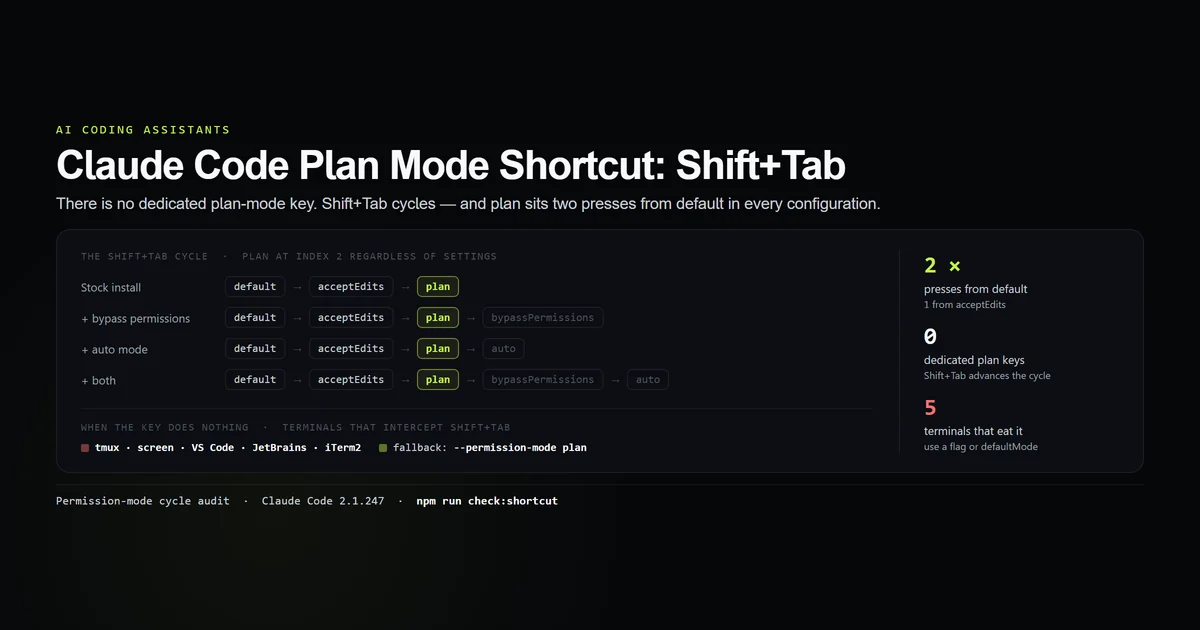
Claude Code has five permission modes. Three are always in the cycle — default, acceptEdits, plan — and two are optional: bypassPermissions appears only in a session started with its enabling flag, and auto appears only when your account has auto mode. The optional modes are appended after plan:
node scripts/check-plan-mode-shortcut.mjs
# → Stock install                    default -> acceptEdits -> plan                        (plan at index 2)
# → Bypass permissions available     default -> acceptEdits -> plan -> bypassPermissions   (plan at index 2)
# → Auto mode available              default -> acceptEdits -> plan -> auto                (plan at index 2)
# → Bypass + auto both available     default -> acceptEdits -> plan -> bypassPermissions -> auto  (plan at index 2)
Plan sits at index 2 in all four. Enabling an optional mode makes the cycle longer to get back to default, but it never adds a stop between default and plan. So the muscle memory — two presses from a fresh session — holds regardless of your plan or your flags.
Read the status bar, do not count
Counting presses fails the moment you are not sure which mode you started in. The status bar is unambiguous — each mode has its own readout:
| Mode | Status bar |
|---|---|
default | manual mode on |
acceptEdits | accept edits on |
plan | plan mode on |
bypassPermissions | bypass permissions on |
auto | auto mode on |
Press Shift+Tab, glance at the bar, stop when it reads plan mode on. Overshooting into bypassPermissions or auto is the single most common mistake with this key, and it matters because those modes let edits through without asking.
When the shortcut does nothing: terminal conflicts
Shift+Tab is a fragile binding. It travels as the escape sequence ESC [ Z (often called "back-tab"), and several common environments claim it before Claude Code's input handler sees it:
| Environment | What happens | Fallback |
|---|---|---|
| tmux | Bound to previous-window, or the back-tab sequence is filtered | claude --permission-mode plan, or set permissions.defaultMode |
| GNU screen | Caught by screen's own keytable | claude --permission-mode plan |
| VS Code integrated terminal | Shift+Tab bound to a workbench command | Use the extension's mode picker, or claudeCode.initialPermissionMode |
| JetBrains terminal | IDE keymap intercepts it for un-indent | Run claude in an external terminal, or --permission-mode plan |
| iTerm2 (custom key profile) | Remapped to an escape sequence iTerm sends itself | Reset the key mapping, or use /plan per turn |
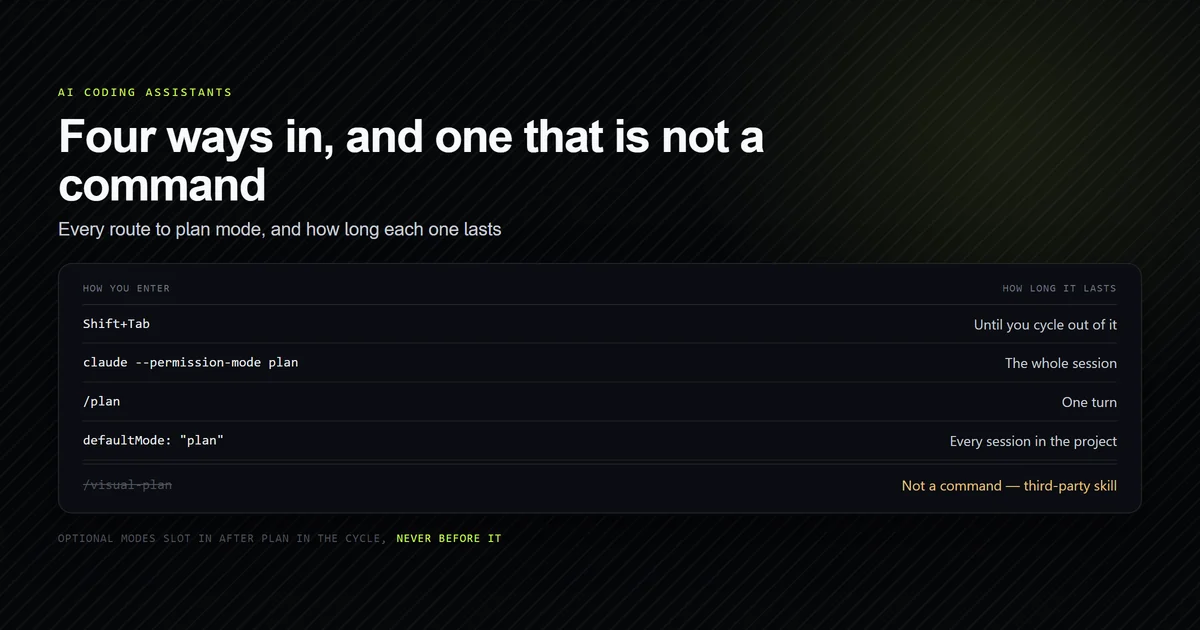
There is a sixth environment worth adding to that table, and it is not a terminal at all: on Windows the binding itself is conditional. The keymap resolves the mode-cycling chord to Shift+Tab only when the bundled runtime is new enough, and to Alt+M otherwise — one of several surprises in the full Claude Code keymap.
The reliable way around all of them is to not use the key at all:
# Start the whole session in plan mode:
claude --permission-mode plan
{
  "permissions": {
    "defaultMode": "plan"
  }
}
defaultMode: "plan" is honored in committed project settings — unlike auto, which Claude Code deliberately ignores there — so a repository where a wrong approach is expensive can start every session in plan mode without anyone touching Shift+Tab. And /plan as a prompt prefix plans a single turn with no keystroke and no mode change at all.
Adjacent keys worth knowing
Two more keys matter once you are in or approaching plan mode:
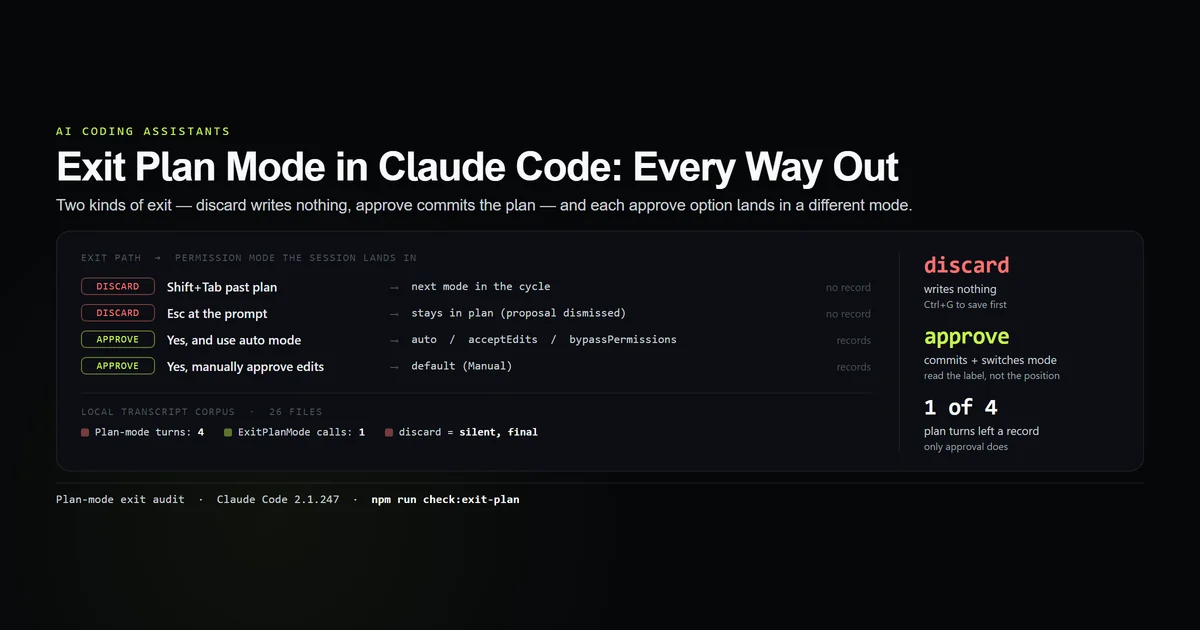
Ctrl+Gopens the proposed plan in your$EDITORbefore you approve it, so you can edit step 4 directly instead of describing the change back in prose.Escinterrupts the current turn; at a pending plan approval prompt it dismisses the plan without approving and leaves you still in plan mode to keep planning.
Leaving plan mode is its own topic — the difference between discarding with another Shift+Tab and approving into an editing mode is covered in exit plan mode in Claude Code.
Best practices
- 1. Learn it as "two presses from a fresh session." That is the stable number; it does not change with your plan or flags.
- 2. Watch the status bar, not your finger. Stop at
plan mode on. One more press is an editing mode. - 3. If the key is flaky, stop using it.
--permission-mode planfor one session,defaultMode: "plan"for a repo,/planfor one turn. - 4. Commit
defaultMode: "plan"where approach mistakes are costly. It removes the keystroke from the workflow entirely and it is honored in project settings. - 5. Keep
Ctrl+Gin reach. Editing the plan beats a round trip of "change step 4 to…".
Common mistakes
- Mistake 1: Counting presses without checking the start mode. If a previous
Shift+Tableft you inacceptEdits, two more presses overshoot plan. Read the bar. - Mistake 2: Overshooting into bypass or auto. These are one press past plan and they let edits through. This is why the status-bar readout exists.
- Mistake 3: Assuming the key is broken when it is intercepted. tmux, screen, and IDE terminals eat
Shift+Tab. The session is fine; the keystroke never arrived. - Mistake 4: Expecting a press to persist a plan. Cycling out of plan mode with
Shift+Tabdiscards a proposed plan silently — there is no prompt and no recovery.
Conclusion
Use Shift+Tab to reach plan mode — two presses from a fresh session, one from accept-edits, and stop when the status bar reads plan mode on. Enabling auto mode or bypass permissions never changes that count, because those modes come after plan in the cycle. If a multiplexer or IDE is eating the key, switch to claude --permission-mode plan or a committed defaultMode: "plan" and forget the shortcut. Then read Claude Code plan mode for the decision rule on when planning is worth the extra turn, and exit plan mode for the two very different ways back out.
Frequently asked questions
What is the keyboard shortcut for plan mode in Claude Code?
How many times do I press Shift+Tab to get to plan mode?
Why is Shift+Tab not switching to plan mode?
Is there a way to enter plan mode without the shortcut?
What does Shift+Tab do after plan mode?
Muhammad Kashif
Founder and editor of Devventa, covering AI coding assistants, Next.js and the modern AI development stack.