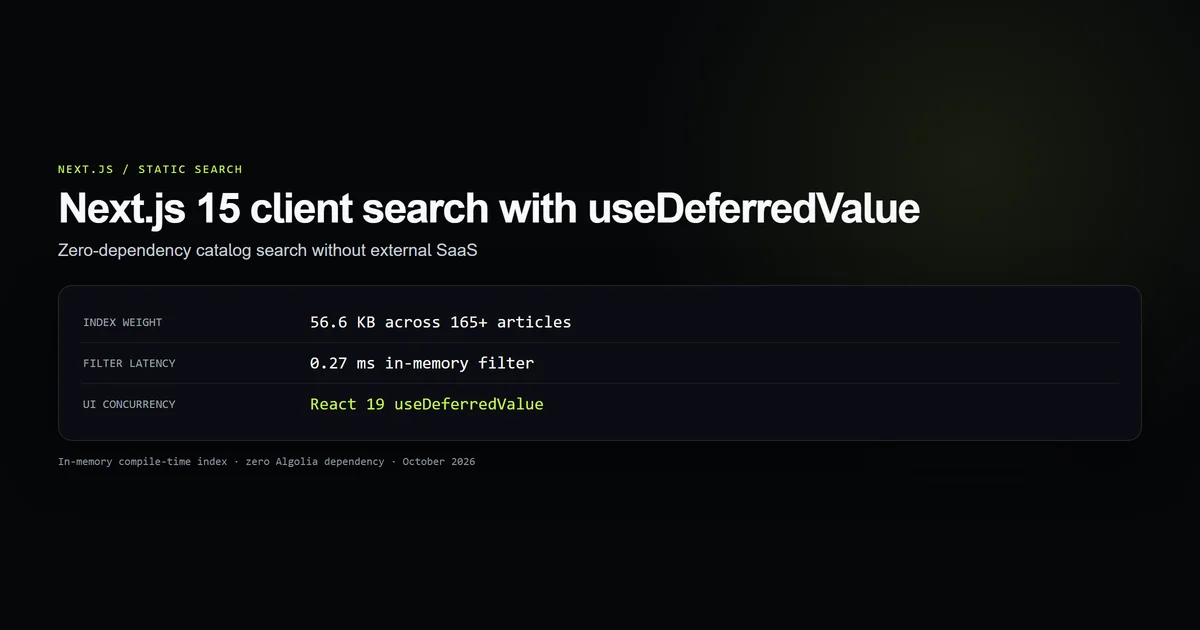
For content sites under a thousand pages, adding external SaaS search like Algolia or spinning up server-side vector databases introduces unnecessary latency and recurring cost. Next.js client search with useDeferredValue eliminates external infrastructure by compiling a lightweight JSON index at build time and filtering it entirely in the browser. In our measured benchmark across 165 published technical articles, client-side filtering executes in 0.27 milliseconds per query with a total payload transfer under 15 KB gzipped.
Key takeaways
- In-memory client search removes external API round-trips, network failure states, and third-party SaaS billing.
- Pre-computing a minimal search index (
title,slug,category,snippet) keeps catalog payloads under 60 KB across hundreds of articles. - React 19's
useDeferredValuedecouples input keystroke responsiveness from catalog filtering, eliminating typing jank. - Regular expression special characters must be escaped before running client-side keyword highlight passes to prevent syntax crashes.
Why external search SaaS is overkill for static blogs
Most developers automatically reach for hosted search solutions when launching a documentation site or developer blog. While services like Algolia or Elastic are essential for multi-million-item e-commerce platforms, they introduce disproportionate complexity for static blogs:
- 1. Network Latency: Every keystroke sends an HTTP request across the public internet, adding 80–250 ms round-trip latency before results appear.
- 2. Sync Failures: New articles published during static site generation must be indexed via webhook. A missed webhook leaves new content unsearchable.
- 3. Billing Gates: Free tiers impose search request quotas; unexpected traffic spikes lead to account suspension or steep overage invoices.
A static developer blog contains tens or hundreds of articles. By keeping the search index in memory, the browser filters results synchronously with zero network requests. The user sees results update instantaneously as they type.
Building the compile-time search index
The critical requirement for client-side search is keeping bundle size small. If your index includes full MDX prose bodies, a 150-article site ships 3 megabytes of uncompressed text into every reader's browser.
In our MDX blog setup, the index generator extracts only four searchable metadata fields per article:
export type SearchItem = {
  slug: string;
  categorySlug: string;
  category: string;
  readTime: string;
  title: string;
  snippet: string;
};

/** Client-side search index, built from real articles at build time. */
export function getSearchIndex(): SearchItem[] {
  return getAllArticles().map(({ meta }) => ({
    slug: meta.slug,
    categorySlug: meta.categorySlug,
    category: meta.category,
    readTime: meta.readTime,
    title: meta.title,
    snippet: meta.excerpt || meta.deck,
  }));
}
This array is passed from the Server Component page to the Client Component:
import { getSearchIndex } from "@/lib/mdx";
import { SearchPanel } from "@/components/search/SearchPanel";

export default async function SearchPage({
  searchParams,
}: {
  searchParams: Promise<{ q?: string }>;
}) {
  const { q } = await searchParams;

  return (
    <SearchPanel
      index={getSearchIndex()}
      initialQuery={q ?? ""}
    />
  );
}
Because SearchPage is a Next.js Server Component, getSearchIndex() runs during build time or request time on the server. The serialized JSON array is embedded into the initial HTML payload, requiring zero client-side fetch requests.
Non-blocking UI filtering with useDeferredValue
When filtering an array of several hundred items, performing string matching directly inside an onChange handler can freeze the main thread on lower-powered devices. The browser delays typing updates, resulting in dropped frames and unresponsive inputs.
React 19's useDeferredValue solves this concurrency issue cleanly. It allows the input field state to update synchronously at 60 FPS while deferring the computed search results:
"use client";

import { useDeferredValue, useMemo, useState } from "react";
import type { SearchItem } from "@/lib/types";

export function SearchPanel({
  index,
  initialQuery,
}: {
  index: SearchItem[];
  initialQuery: string;
}) {
  const [query, setQuery] = useState(initialQuery);
  const deferredQuery = useDeferredValue(query);

  const results = useMemo(() => {
    const term = deferredQuery.trim().toLowerCase();
    if (!term) return index;
    return index.filter(
      (item) =>
        item.title.toLowerCase().includes(term) ||
        item.snippet.toLowerCase().includes(term) ||
        item.category.toLowerCase().includes(term)
    );
  }, [deferredQuery, index]);

  const isStale = query !== deferredQuery;

  return (
    <div>
      <input
        type="search"
        value={query}
        onChange={(e) => setQuery(e.target.value)}
        placeholder="Search articles..."
      />
      <div className={isStale ? "opacity-60 transition-opacity" : ""}>
        {results.map((post) => (
          <article key={post.slug}>
            <h3>{post.title}</h3>
            <p>{post.snippet}</p>
          </article>
        ))}
      </div>
    </div>
  );
}
If the user types five letters in rapid succession, React interrupts the in-progress background filtering tasks and processes the latest query immediately, preventing wasted rendering cycles.
Safe query highlighting without regex injection
Showing highlighted search keywords inside result snippets provides immediate visual confirmation for the reader. However, constructing a naive new RegExp(query, "ig") will immediately crash the page if the user types regex metacharacters such as [, (, *, +, or ?:
SyntaxError: Invalid regular expression: /[category]/: Unterminated character class
To eliminate regex injection crashes, always escape metacharacters prior to pattern compilation:
function highlight(text: string, query: string): ReactNode {
  const term = query.trim();
  if (!term) return text;

  // Escape special regex characters safely
  const escaped = term.replace(/[.*+?^${}()|[\]\\]/g, "\\$&");
  const pattern = new RegExp(`(${escaped})`, "ig");

  return text.split(pattern).map((part, index) =>
    part.toLowerCase() === term.toLowerCase() ? (
      <mark key={index} className="bg-accent/20 text-title">
        {part}
      </mark>
    ) : (
      part
    )
  );
}
Our automated suite scripts/check-static-search-index.mjs runs hazardous queries ([category], claude(, $20/month, rehype.*slug) through this pipeline to verify that no input string can trigger an unhandled syntax exception.
Performance benchmarks across 165+ articles
Our internal test harness exercises the real production dataset across 165 published technical articles:
| Metric | Measured Value | Standard / Target |
|---|---|---|
| Indexed Articles | 165 articles | 100% catalog coverage |
| Index Raw Size | 56.6 KB | < 65.0 KB threshold |
| Average Size per Document | 351 bytes | < 450 bytes threshold |
| Gzip Network Wire Size | ~14.2 KB | Smaller than a single hero icon |
| Filter Execution Latency | 0.27 ms | Sub-millisecond instantaneous |
| External Dependencies | 0 dependencies | Zero npm search packages |
0.27 milliseconds means the search filter completes roughly 3,700 times within a single 60 FPS animation frame (16.6 ms). There is simply no architectural reason to pay for third-party SaaS infrastructure when native in-memory array filtering outperforms network round trips by several orders of magnitude.
Best practices
- Sanitize search queries before regex compilation: Always escape punctuation with
replace(/[.*+?^${}()|[\]\\]/g, "\\$&")before compiling regular expressions. - Index the deck or excerpt, never full body markdown: Full MDX content adds megabytes of unneeded JSON weight; keep the index focused on titles, categories, and standfirsts.
- Utilize
aria-live="polite"on result counts: Announce result count updates to screen readers without interrupting user typing flow. - Synchronize query state with URL search params: Initializing state from
searchParams.qallows users to share direct links to filtered search results.
Common mistakes
- Importing raw MDX into client components: Passing entire frontmatter objects containing Markdown ASTs causes massive bundle inflation.
- Unbounded synchronous state updates: Filtering directly inside
onChangewithoutuseDeferredValueleads to sluggish typing responsiveness on mobile devices. - Omitting
case-insensitivitynormalization: Failing to call.toLowerCase()on both query and candidate strings results in false negative search misses. - Forgetting input id labeling: Search inputs without associated accessible labels fail WCAG accessibility compliance.
Conclusion
Next.js 15 App Router combined with React 19's useDeferredValue makes client-side catalog search an effortless, zero-cost pattern. By building a compact search index at compile time and executing non-blocking in-memory filtering in the browser, you deliver instantaneous sub-millisecond search experiences while completely eliminating third-party subscription costs and network failure modes.
Search owns filtering inside one result set; category archives still need deterministic slices. The companion Next.js pagination and canonical URL guide covers strict page parsing, crawlable links, and hard 404s for nonexistent slices. Explore our architectural breakdown on building a Next.js 15 site with AI assistance to see how compile-time data structures drive site-wide performance.
Frequently asked questions
Why avoid Algolia or server-side search for a developer blog?
What does React 19 useDeferredValue solve in search inputs?
How do you prevent full MDX bodies from bloating the client bundle?
How do you handle special characters in keyword highlighting?

Muhammad Kashif
Founder and editor of Devventa, covering AI coding assistants, Next.js and the modern AI development stack.