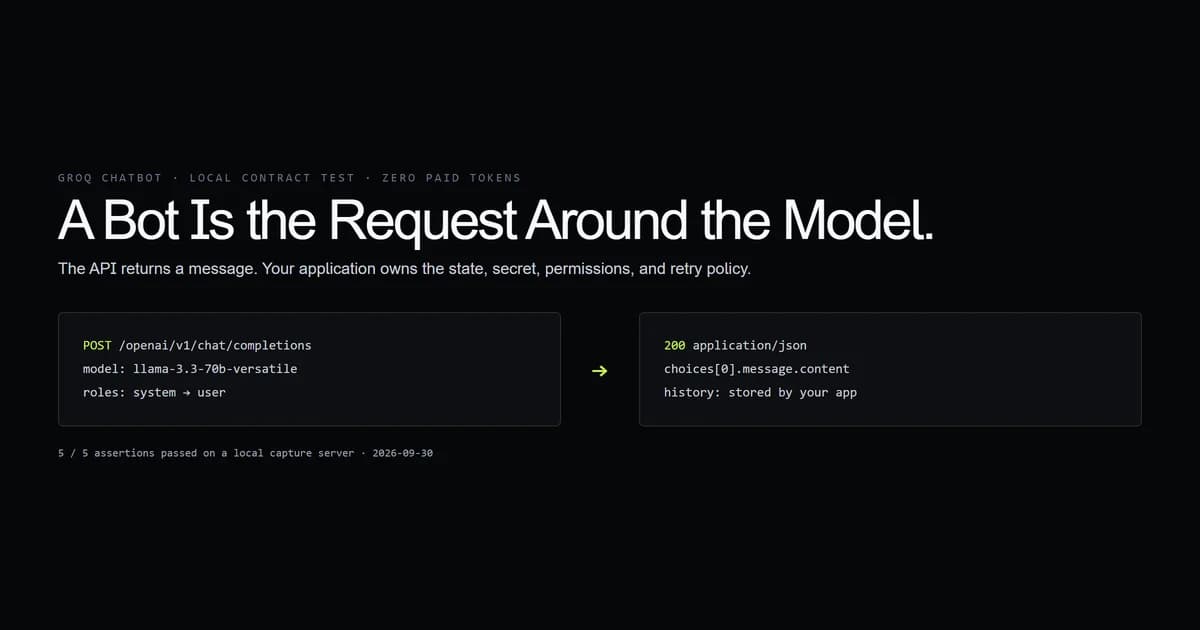
A Groq bot is an application you build on GroqCloud's model APIs; Groq's official documentation does not name a separate product “Groq Bot.” The minimum useful version sends an ordered message history to Chat Completions, stores that history in your application, and handles model or network failures explicitly. We executed the Node request in this article against a local capture server on 2026-09-30. The test saw the exact method, route, headers, model, message order, and parsed assistant reply without spending an API token.
Key takeaways
- “Groq Bot” describes an implementation, not an official standalone product.
- The model is stateless across requests. Your application owns conversation history.
- Use a current production model ID. Preview IDs may disappear with short notice.
- Keep the secret in the authorization header. Never send or log it in the JSON body.
- Tools change the architecture. A chatbot becomes agentic only when a tool loop exists somewhere.
What Groq Bot means
A Groq bot is a chatbot whose inference request runs through GroqCloud. Groq documents Chat Completions for conversational agents, but your code still owns identity, persistence, retrieval, moderation, and the user interface.
That distinction follows the same boundary as model versus agent: the model produces a response; the harness decides what context reaches it and what happens next. Groq's text generation documentation is the canonical starting point for the API behavior.
The smallest working Groq chatbot request
A dependency-free Groq chatbot API call needs an API key, model, and messages array. This is the same request shape our local server captured:
export async function askGroq(messages) {
  const response = await fetch("https://api.groq.com/openai/v1/chat/completions", {
    method: "POST",
    headers: {
      Authorization: `Bearer ${process.env.GROQ_API_KEY}`,
      "Content-Type": "application/json",
    },
    body: JSON.stringify({
      model: "llama-3.3-70b-versatile",
      messages,
      temperature: 0.2,
    }),
  });

  if (!response.ok) throw new Error(`Groq returned ${response.status}`);
  const data = await response.json();
  return data.choices[0].message.content;
}
The model ID is current on 2026-09-30 and appears on Groq's Llama 3.3 70B model page. Recheck it before copying this into a long-lived deployment.
Conversation state belongs in your application
The Groq chatbot API does not remove the need to store and select history. Keep an array of role/content pairs per conversation, append the assistant response, and send the relevant slice on the next turn.
const messages = [
  { role: "system", content: "Answer in one sentence." },
  { role: "user", content: "Where should conversation state live?" },
];

const answer = await askGroq(messages);
messages.push({ role: "assistant", content: answer });
In production, the array belongs behind an authenticated server endpoint, not in a globally shared process variable. Apply retention and deletion rules before adding transcripts to a database. Long histories also need trimming or summarization; the model page documents a 131,072-token context window, not infinite memory.
Choose a production model deliberately
Select from Groq's current production list, then pin the ID you tested. Groq separates production and preview models on its supported models page. Preview models are for evaluation and may be discontinued quickly.
The tempting mistake is choosing the highest token-speed figure and calling the decision finished. A bot also depends on instruction following, context size, output ceiling, tool support, price, and the latency distribution your users see. Benchmark the prompts your application actually sends.
From chatbot to agent
A plain completion answers; an agent can choose and execute tools. Groq documents server-side tools that can handle orchestration for supported models, including browser search and code execution.
Read the built-in tools documentation before adding a tools array. Support is model-specific, and a tool with external effects needs a permission boundary. If you execute tools locally, your application owns the loop, argument validation, timeouts, and audit log.
What we tested
We tested the request contract, not Groq's speed or answer quality. Our internal check script starts a local HTTP server, points the same request function at it, captures the request, and returns a synthetic Chat Completions response.
PASS  POSTs to the Chat Completions route
PASS  uses the documented production model
PASS  sends system and user messages in order
PASS  keeps the API key out of the JSON body
PASS  reads the assistant message

5 checks passed; no paid API call made.
The first draft tried to prove too much: a mock can verify integration shape but cannot establish real latency, rate limits, or output quality. Those remain deployment measurements. The local test is valuable precisely because its claim is narrow and rerunnable.
Common mistakes
- Treating “Groq Bot” as a downloadable product. Start from the API docs; choose or build the interface separately.
- Sending only the latest user message. The symptom is a bot that forgets the previous turn. Re-send the selected history.
- Putting the API key in browser code. Anyone can extract it. Call Groq from your server.
- Pinning a preview model in production. Check the production list and plan for deprecations.
- Retrying every failure blindly. Retry transient status codes with backoff; surface invalid requests instead of multiplying them.
Conclusion
Build a Groq bot when GroqCloud's hosted inference fits your latency and model requirements, but keep the architecture honest: your server owns secrets, history, permissions, and failures. Start with the small Chat Completions request above, run a local contract check like ours, then benchmark live traffic with your own prompts. Add tools only after the plain conversational path is observable and bounded.
Frequently asked questions
Is Groq Bot an official Groq product?
Which API does a Groq chatbot use?
Where should Groq bot conversation history live?
Can a Groq bot search the web or run code?

Muhammad Kashif
Founder and editor of Devventa, covering AI coding assistants, Next.js and the modern AI development stack.