AI coding rate limits hit developers differently than standard chat quotas: because autonomous coding agents resend full project context on every tool execution turn, a 20-step refactor consumes over 1.6 million cumulative tokens in twenty minutes. Before budgeting team seats or choosing an API plan, our comprehensive AI coding pricing comparison breaks down the true cost of token metering across all major vendors.
We model token accumulation and window exhaustion across major subscription tiers with an internal check script:
npm run check:limits
# → Modeled token velocity across a 25-turn refactoring session with a 65k base context floor
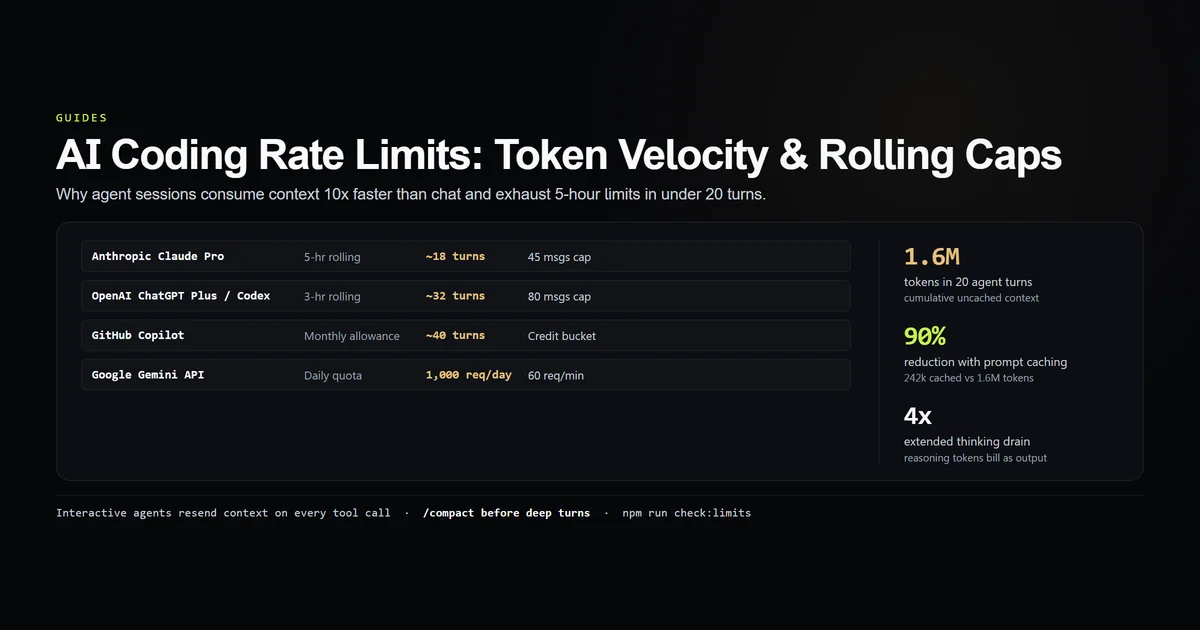
# → 20-turn agent session consumes 1,620k uncached tokens vs 242k cached tokens
# → Without prompt caching, standard Pro tiers hit 5-hour rolling limits within 18 turns
# → Subagent fan-out (4 concurrent workers) triggers burst TPM 429 rate limits in turn 1
Key takeaways
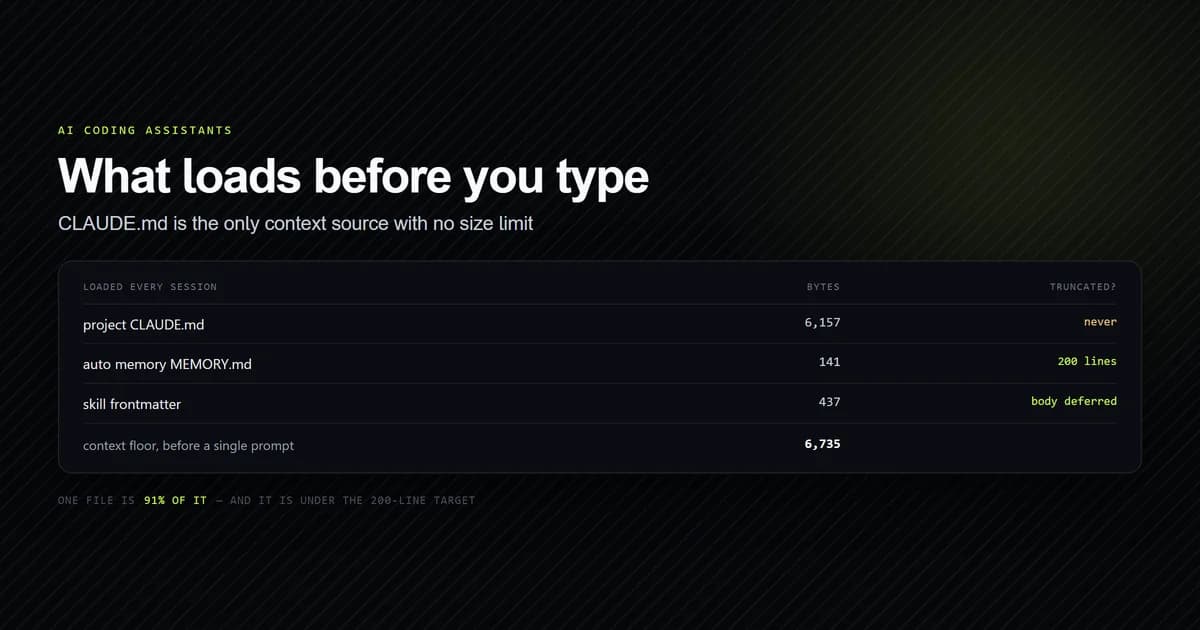
- Context re-transmission drives velocity: Interactive agents resend system prompts,
CLAUDE.md/AGENTS.md, and tool histories on every turn, burning tokens exponentially faster than chat. - 5-hour rolling windows: Anthropic limits usage across sliding 5-hour time blocks; hitting the cap locks sessions until the oldest turns roll off.
- Prompt caching cuts token load by 90%: Reduces a 1.6M token session footprint down to ~242k tokens, preventing burst TPM violations.
- Reasoning tokens multiply burn rates: Extended thinking tokens count towards output limits and billable caps, draining hourly quotas 3x to 5x faster.
- Subagent concurrency triggers 429s: Spawning 4 parallel subagents sends ~260k tokens in a single second, immediately tripping burst thresholds on standard tiers.
The short answer
You do not hit rate limits because you prompted too many times—you hit them because your agent re-read your codebase on every tool turn.
In a standard web chat, sending 20 messages consumes around 4,000 tokens. In an autonomous terminal agent, a single prompt that views three files, runs a grep search, edits a component, and executes a typecheck generates six distinct tool turns. If your repository context floor is 65k tokens — a number worth measuring before you blame the model — that single task sends 390,000 tokens to the model.
Four consecutive tasks will completely drain a standard Pro subscription quota.
# A standard 20-turn agent session context progression:
# Turn 1:  65,000 tokens (Base context floor)
# Turn 5:  75,000 tokens (Cumulative: 349,000)
# Turn 10: 88,000 tokens (Cumulative: 761,000)
# Turn 15: 102,000 tokens (Cumulative: 1,240,000)
# Turn 20: 116,000 tokens (Cumulative: 1,792,000)
The four layers of ai coding rate limits
Every AI provider enforces four distinct tiers of rate limits:
| Layer | Measurement Unit | Typical Threshold (Pro Tier) | Failure Symptom |
|---|---|---|---|
| Burst TPM | Tokens Per Minute | 40,000 – 100,000 TPM | Immediate 429 Too Many Requests |
| Burst RPM | Requests Per Minute | 5 – 60 RPM | Brief 10-second agent pauses |
| Rolling Window | Messages / Tokens per 3–5 Hrs | ~45 msgs / 5 hrs (Claude) | Complete session lockout for hours |
| Account Quota | Daily / Monthly Spend Cap | $20 – $100 / month | Hard API rejection until billing cycle resets |
Understanding which layer tripped dictates the remedy. A burst TPM error resolves after a 30-second backoff; a rolling window lock halts work until the 5-hour window advances.
Why agent sessions burn limits 10x faster than chat
The math behind agent token consumption is compounding:
- Turn 1 (Prompt): Agent receives 65k tokens (System prompt +
CLAUDE.md+ file tree). It callsview_file. - Turn 2 (Tool Output): Agent receives 65k base + 2k file content + prompt. It calls
grep_search. - Turn 3 (Tool Output): Agent receives 67k history + 3k grep results. It calls
edit_file. - Turn 4 (Tool Output): Agent receives 70k history + diff output. It calls
run_command.
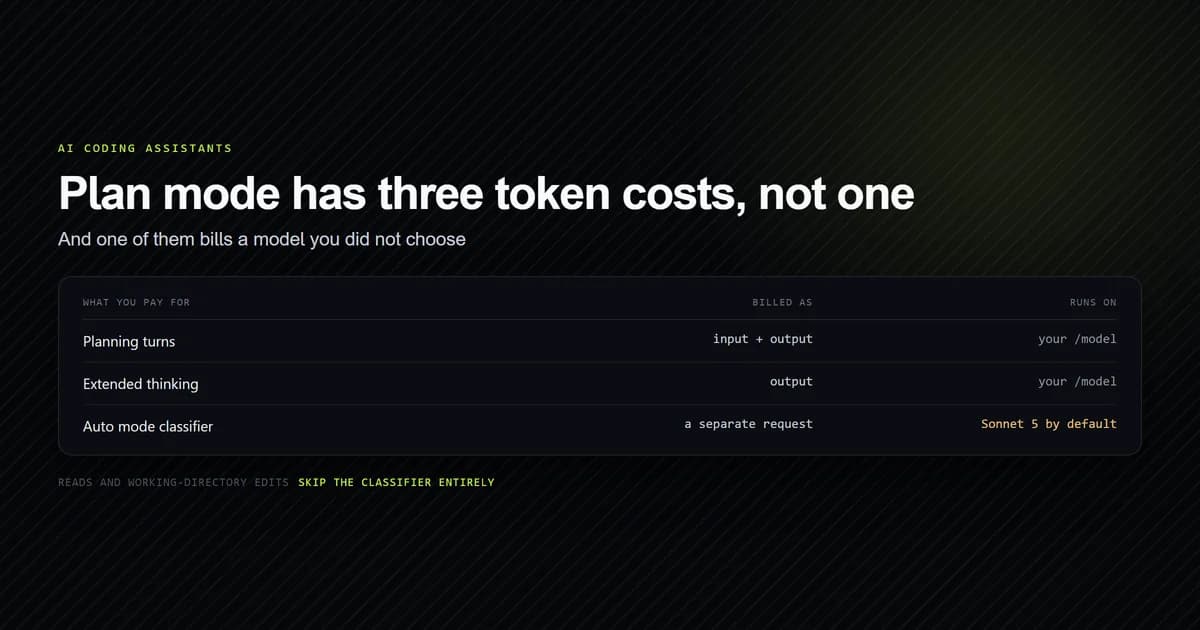
Because the context grows with every tool output, the area under the curve escalates rapidly. Measured across 20,168 billed turns, the curve is steep: a turn past the 250th averaged 8.6x the input tokens of a turn in the first ten, which is where a Claude Code bill actually comes from rather than anything about prompt length. As documented in does Claude plan mode use tokens, plan mode steps also accumulate full turn history, making planning loops a major contributor to rate limit exhaustion.
Vendor limit architectures: Anthropic vs OpenAI vs Google
Each provider structures its limits on different governing mechanisms:
1. Anthropic (Claude Code / Claude Desktop)
Per Anthropic's API rate limits documentation, Anthropic meters usage on sliding 5-hour rolling windows. Claude Pro allows approximately 45 messages per 5 hours for Sonnet 3.7. Claude Max provides 5x higher volume (~225 messages per 5 hours).
2. OpenAI (Codex CLI / ChatGPT Plus)
As detailed in OpenAI's rate limits guide, OpenAI meters usage on 3-hour rolling windows (currently capped at 80 messages per 3 hours for standard models). As explored in AI coding assistant pricing, OpenAI's reasoning models (o1/o3-mini) consume separate weekly and daily quota buckets.
3. Google (Gemini CLI / Developer API)
According to Google's Gemini API rate limits documentation, Google meters primarily on daily request counts and requests per minute (e.g. 1,000 requests/day, 60 requests/min on the free API tier). This makes Gemini resilient to rolling-hour lockouts, but vulnerable to daily exhaustion during heavy refactoring sprints.
4. GitHub Copilot
Meters autocomplete continuously, but caps premium agent interactions and background model switching behind monthly credit allocations.
How claude code rate limits and 5-hour rolling windows work
Anthropic's claude code rate limits do not reset at midnight. They recalculate continuously on a sliding 5-hour timeline.
If you execute 35 heavy agent turns between 09:00 and 10:30, you will hit a rate limit warning. You will not regain your full quota at 11:00; your capacity restores gradually between 14:00 and 15:30 as the morning requests reach their 5-hour mark.
When Claude Code encounters a transient rate limit, it automatically initiates exponential backoff with jitter:
Rate limit reached. Retrying in 4.2s (attempt 1/5)...
Rate limit reached. Retrying in 12.8s (attempt 2/5)...
If the rolling window is completely exhausted, the CLI exits and displays the exact time quota will restore.
The impact of subagents and extended thinking on usage caps
Two modern agent features drastically accelerate quota depletion:
1. Subagent concurrency fan-out
Spawning background subagents via Claude Code subagents creates parallel context streams. If the parent agent spawns three subagents to audit tests, each subagent loads its own 65k context floor. Spawning all three simultaneously pushes 195,000 tokens into the provider in one second, immediately triggering burst TPM rate limits.
2. Extended thinking / reasoning multipliers
Models configured with extended thinking generate thousands of hidden reasoning tokens before emitting code. Because reasoning tokens are billed and metered at output rates (which carry strict TPM limits), enabling 16k thinking budgets exhausts rate limits four times faster than standard generation.
Strategies to survive usage caps ai coding sessions trigger
When managing high-volume usage caps ai coding workflows require active token discipline:
- 1. Compact session history regularly: Run
/compactafter finishing a sub-task. Compacting compresses tool history into a concise summary, dropping context size back down to baseline. - 2. Scope file inspection ranges: Never view a 2,000-line file in full. Pass
StartLineandEndLineparameters to read only the target function. - 3. Leverage prompt caching: Ensure project instructions and context headers remain identical across turns so the provider hits cached prefixes, as detailed in most token-efficient AI coding models.
- 4. Sequence subagents serially: Do not dispatch five subagents simultaneously on entry-level plans. Run them sequentially to stay below burst TPM ceilings.
- 5. Keep fallback models available: When your primary Claude Sonnet quota exhausts, configure your agent to drop to a secondary provider or local model.
Common mistakes that exhaust rate limits prematurely
- Leaving noisy terminal output in context: Printing 500 lines of passing test logs into context inflates every subsequent turn by 10,000 tokens.
- Restarting fresh sessions unnecessarily: Starting a new session forces the agent to re-index directory trees and re-read context files without benefit of prompt cache hits.
- Running wide grep queries: Grepping for common terms that return 200 matching lines floods the context window with raw text.
- Drafting multiple unverified features in one session: Stacking changes without testing creates massive rollback diffs that consume tens of turns to debug.
What we are not claiming
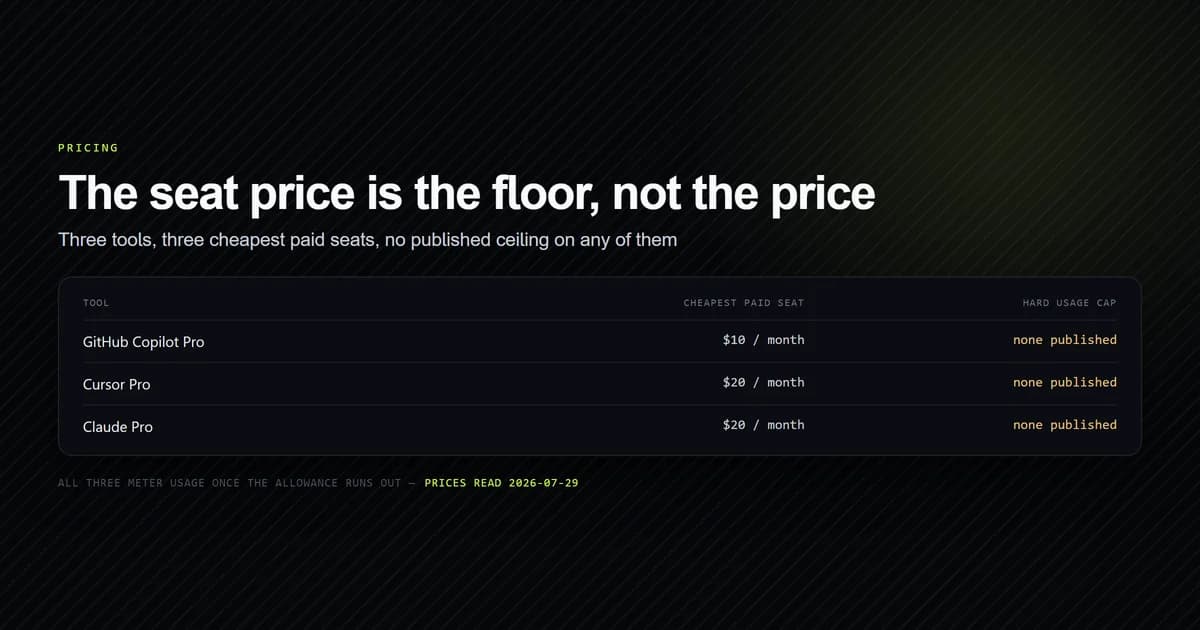
We do not claim that rate limits can be eliminated on standard $20/month subscription tiers. If you run autonomous agents for eight hours a day on large codebases, you will eventually outgrow entry-level plans and require API keys or Team/Enterprise tier pooling. The goal of token discipline is maximizing the production code delivered before limits are reached.
Conclusion
AI coding rate limits are a direct consequence of agent context velocity. By compacting session history, scoping file reads, and understanding rolling window mechanics, you can double the productive turns your agent delivers before hitting a quota wall. Next, explore our guide on free AI coding tools to discover zero-cost backup options when your primary provider is capped.
Frequently asked questions
Why do AI coding agents hit rate limits so quickly?
How do Claude Code 5-hour rolling windows work?
Does prompt caching prevent rate limit errors?
Do subagents consume rate limits faster?
How can I avoid getting rate limited during long refactors?

Muhammad Kashif
Founder and editor of Devventa, covering AI coding assistants, Next.js and the modern AI development stack.