Choosing ai tools for freelance developers is a billing-shape decision, not a feature decision. An employed developer gets a seat assigned to them and never sees the invoice; you pay it personally, in the months you bill nothing as well as the months you bill well. That single difference moves the answer away from "which tool is best" and toward "which meter survives a quiet March." Every price below was read from the vendor's own pricing page on August 1, 2026, and the decision rule at the end is the one we would apply to our own next contract.
Key takeaways
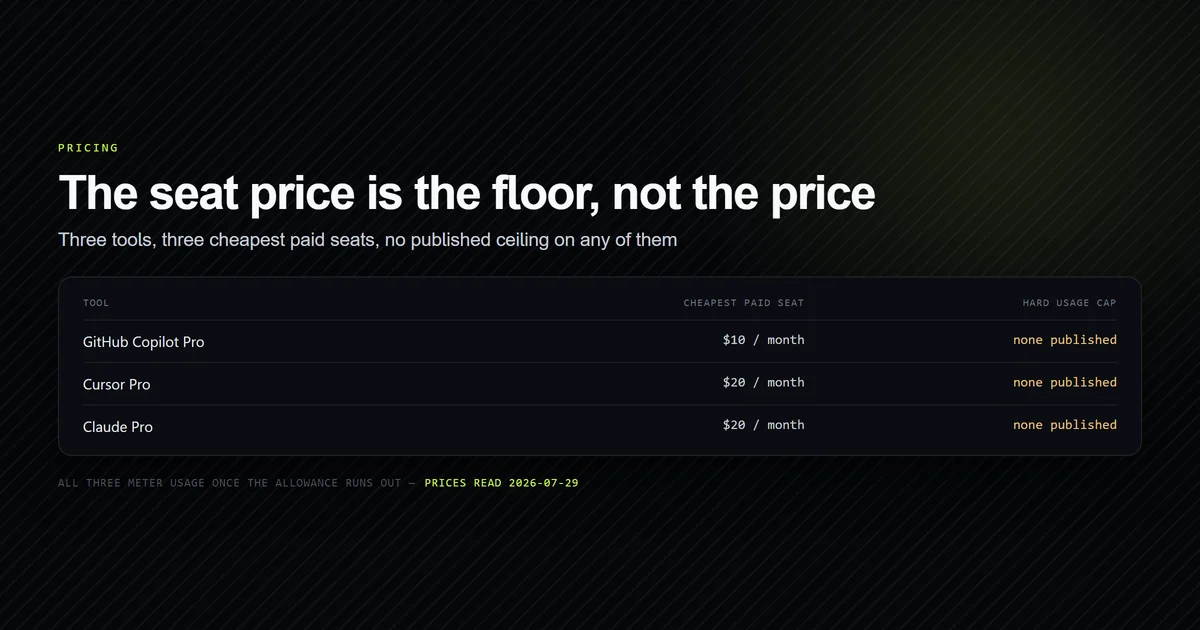
- Copilot Pro at $10/month is the cheapest credible paid setup for a solo developer as of August 2026; Claude Pro is $20/month billed monthly, or $17/month billed annually.
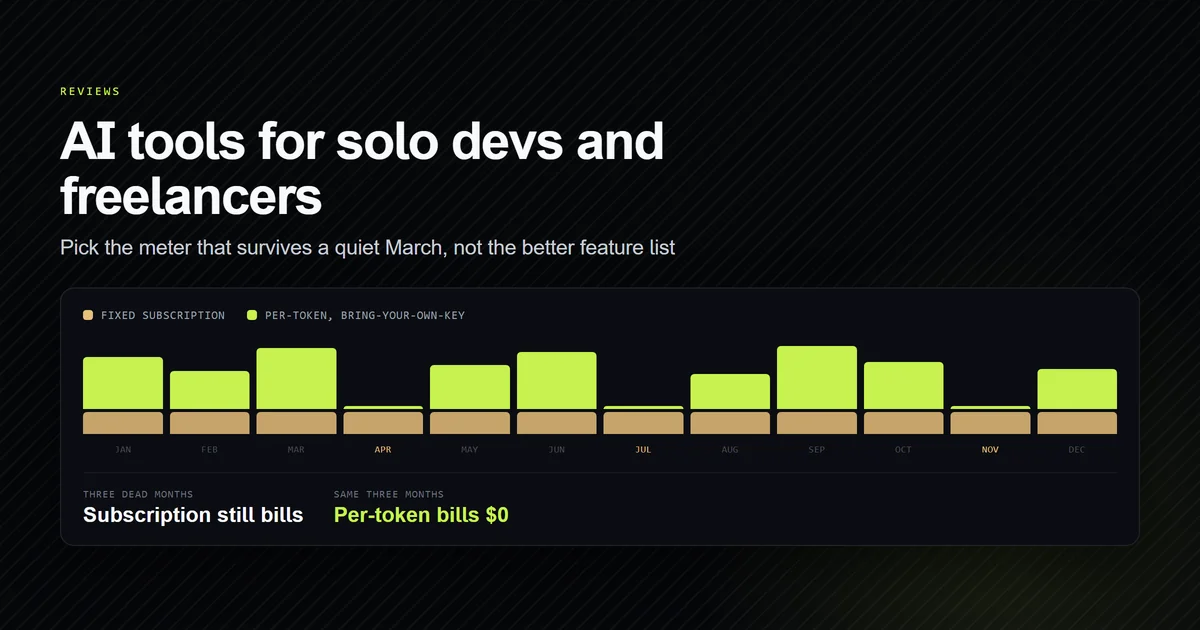
- Subscriptions win when you code most working days; bring-your-own-key wins when two or three months a year are dead, because an idle month costs $0.
- Paying for two agentic subscriptions at once is the most common solo overspend — one agent plus a free completion tier covers most work.
- Annual billing is the wrong default for freelancers: Claude's annual plan is $200 up front, which is a bet that the next twelve months all bill.
- Build the tool cost into your rate rather than itemising it on the invoice.
The short answer for a solo developer
If you code most working days, buy one subscription and stop shopping. Copilot Pro is $10/month and the cheapest credible agentic setup; Claude Pro is $20/month and the stronger terminal experience. If your work is spiky — two good months, one dead one — run an Apache-2.0 agent against your own API key instead, and pay nothing in the months you are not billing.
Everything after this section is the arithmetic behind that rule, which matters because the two options are not far apart at typical solo volumes and the tiebreaker is your calendar rather than the tool.
Why freelance economics are different
Three things change when nobody else is buying your tools. The seat comes out of your own margin, so a $20/month subscription is $240 a year against your net rather than a line on someone's departmental budget. Your workload is discontinuous in a way salaried work is not — a contract ends, a client goes quiet for six weeks, and a fixed monthly cost keeps clearing regardless. And your time is directly billable, which inverts how you should value a tool: an hour lost to a bad agent run is an hour you cannot invoice, so paying more for fewer derailments is often correct even when the cheaper tool "works."
That last point is the one solo developers get backwards most often. Optimising a $10 difference between plans while losing two billable hours a month to tool friction is a bad trade at any realistic rate.
What the plans actually cost in August 2026
These are individual-tier prices read from each vendor's own pricing page on August 1, 2026. Team and enterprise tiers are excluded because they do not apply to a one-person business.
| Tool | Entry paid plan | What you get |
|---|---|---|
| GitHub Copilot | $10/month (Pro) | Unlimited completions, 1,500 AI credits |
| Claude | $20/month (Pro) | Claude Code included, usage limits |
| Cursor | $20/month (Pro) | Included model usage, overage billed in arrears |
| Devin Desktop | $20/month (Pro) | Daily and weekly quotas |
| Cline · Aider · Continue | $0 | Apache-2.0, you pay the model provider |
Two figures deserve emphasis. Copilot's $10 tier is genuinely the floor for a paid agentic setup, and its credits are legible — 1,500 of them, where 1 credit is $0.01, so the included usage is $15 of model consumption on a $10 seat. Claude Pro at $20/month billed monthly drops to $17/month annually, but that is $200 charged up front, which for a freelancer is a twelve-month bet on your own pipeline. We would not take it in year one.
The full mechanics of credits, quotas, and overage across every vendor are broken down in what AI coding assistants actually cost — the short version is that the seat price is a floor and every vendor now meters something above it.
Match the billing shape to your work shape
There are only two billing shapes and one question that picks between them: how many months a year do you bill fewer than about ten development days?
- Zero to one dead months — buy a subscription. Fixed cost, predictable, no meter to watch, and the included usage covers continuous work.
- Two or more dead months — go bring-your-own-key on an open source agent. You pay per token, so a month with no client is a month with no bill.
- Genuinely unpredictable — start bring-your-own-key and watch your API spend for sixty days. If it clears $20/month consistently, switch to a subscription and stop thinking about it.
The third option is the one to default to if you are not sure, because it is the only one that produces evidence. A per-token bill tells you exactly what your usage is worth; a subscription hides it.
The best ai coding tool for solo dev work
For most freelancers the answer is one agentic tool, chosen by where you work. If your day is a terminal, Claude Code at $20/month is the strongest option and the one this site was built with. If your day is VS Code and your work lives on GitHub, Copilot Pro at $10 covers completions and an agent for half the price. The full terminal-versus-editor argument is in Claude Code vs Cursor, and the head-to-head that matters most on price is GitHub Copilot vs Claude Code.
What we would not do as a solo developer is run two paid agents. The overlap is close to total, the second subscription buys a marginal capability you will use a few times a month, and $30–40/month of duplicated tooling is a meaningful share of a one-person software budget. Pick one, learn it properly, and put the difference toward the API credits you will eventually want for burst work.
AI tools on a small budget
Below the $10 floor there are two honest strategies and one bad one.
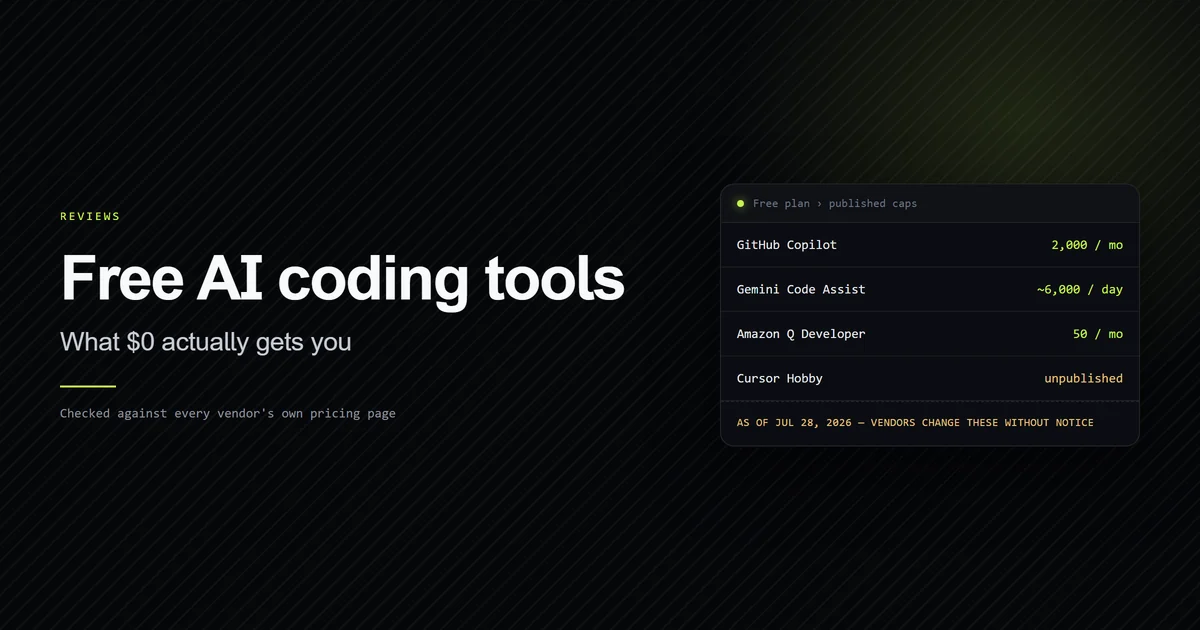
The first is free tiers, which are more usable than they were — every major vendor now runs one, and the caps are documented rather than mysterious. Start there and measure what you actually hit; the full breakdown of what each free tier really gives you is the place to begin if the budget is genuinely zero.
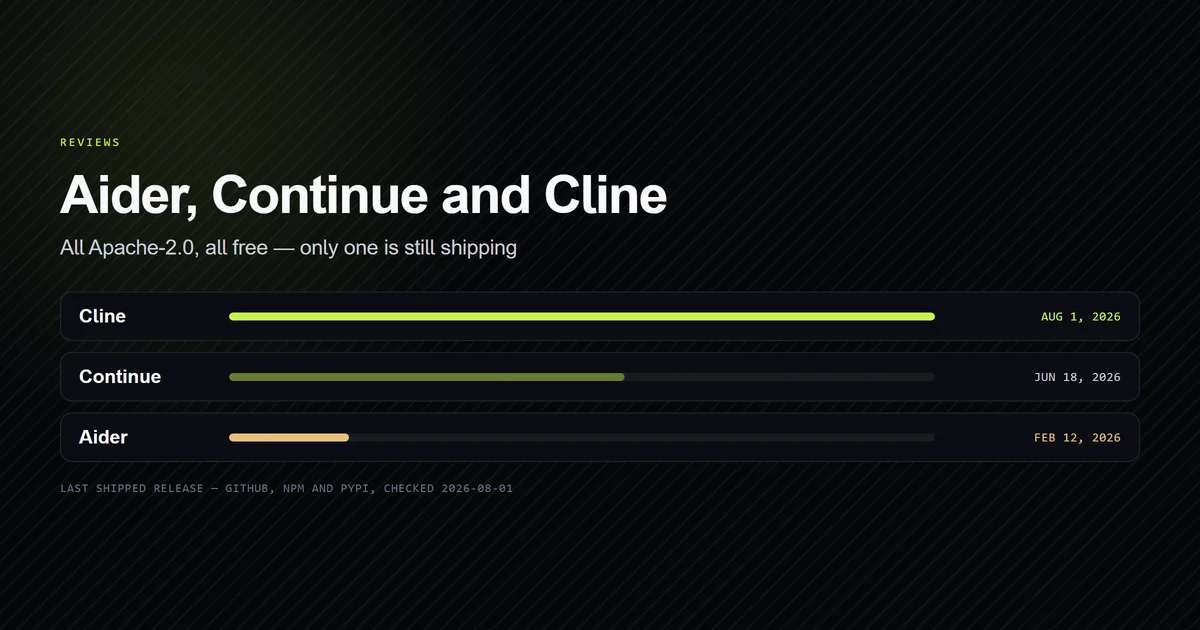
The second is an open source agent on your own API key. Cline, Aider, and Continue are all Apache-2.0 and cost nothing to install, and we compared their maintenance signals in the open source tool review — Cline is the one shipping releases as of August 2026. With a cheap model behind it, a light month can cost a couple of dollars.
The bad strategy is stacking free tiers across three tools to avoid paying for one. It costs you context switching, three sets of project rules to maintain, and no continuity in any of them — all to save an amount smaller than one billable hour.
What a solo build actually looks like
This site is the artifact. It is a one-person Next.js 15 project built with AI assistance throughout, and the repository's own history is a fair picture of what a solo developer with an agentic tool produces in a short window:
git rev-list --count HEAD
# → 18

git log --format='%ad' --date=short | sort -u | wc -l
# → 8

git shortlog -sn --all
# → 18  Muhammad Kashif
Eight working days across July 22 to August 1, 2026, one author, 18 commits — producing 146 tracked files, 8,749 lines of TypeScript, JSX and CSS, and fourteen published articles totalling 3,772 lines of MDX. At Claude Pro's $20/month that is roughly $7 of subscription attributable to the window, against work that would be quoted in the thousands.
And here is what it cost that no pricing page mentions. This repository's CLAUDE.md
carries a rule written in blood: never run a production build while the dev server is
running, because next dev and next build share .next, and building against a live
dev server rewrites its chunk manifest until every route returns 500 — public pages
included. It presents exactly like an application bug. That failure cost an hour of
debugging the wrong thing, and an hour is the real unit of freelance cost. No subscription
tier prevents it; only writing the trap down does.
Billing clients for AI-assisted work
Build the tool cost into your rate. A $20 subscription against a month of billed work is a rounding error, and itemising it on an invoice starts a conversation you do not want — namely whether AI-assisted work should be cheaper, which is a question about your rate, not your tooling.
Two exceptions are worth handling explicitly. If a client's contract or security policy requires disclosure of AI assistance, disclose it in writing before you start, not at delivery. And if a client's code cannot leave their network, that is the one case where a self-hosted open source agent belongs alongside your main subscription — treat the setup time as billable scoping work, because it is.
Common mistakes freelancers make
- Buying annual to save $3/month. Claude's annual plan is $200 up front. That is a twelve-month bet on your own pipeline, and freelancers lose that bet more often than employees do.
- Running two paid agents. Near-total overlap, double the cost, and two sets of project rules to keep in sync.
- Optimising the seat and ignoring the hour. At any real rate, billable time lost to tool friction dwarfs the price difference between every plan on this page.
- Creating an API key with no spend cap. Bring-your-own-key has no ceiling by design. Set the cap the same day.
- Paying through a dead month out of inertia. If a contract ends and the next has not landed, cancel. Monthly billing exists for exactly this.
- Assuming last quarter's price is current. Copilot's billing model changed on June 1, 2026 and Windsurf became Devin Desktop on June 2, 2026. Re-check before you budget.
Conclusion
Buy one subscription if you code most working days — Copilot Pro at $10/month if your work is GitHub-shaped, Claude Pro at $20/month if you live in a terminal — and bill it into your rate rather than onto the invoice. Go bring-your-own-key on an open source agent instead if two or more months a year bill nothing, and set a spend cap the day you create the key. Do not buy annual in your first year, and do not run two paid agents. If you are starting from zero, work through the free tiers first and let your own usage pick the plan, or the full comparison of every major tool if you want the decision framework rather than the freelance-specific version of it. Once you know roughly what you consume in a billing month, the seat-by-seat pricing breakdown puts a threshold on the subscription-versus-own-key question this article answers by calendar.
Frequently asked questions
What are the best AI tools for freelance developers?
What is the best AI coding tool for a solo dev on a budget?
Is a $20/month AI coding subscription worth it for freelancers?
Can I charge clients for AI coding tool costs?
Do I need more than one AI coding tool as a solo developer?
Muhammad Kashif
Founder and editor of Devventa, covering AI coding assistants, Next.js and the modern AI development stack.