Claude code sandboxes are not something Claude Code turns on for you. On 2.1.270 the word "sandbox" appears twice in 65 documented flags, and both times it is the same sentence — "Recommended only for sandboxes with no internet access" — describing a container you were expected to build before you got there. What the CLI ships instead is three separate containment layers that people routinely mistake for one, and only one of them removes capability. This guide separates them, quotes what each actually does, and is honest about which we could exercise. Read on Windows 11, Node 26.7.0, Claude Code 2.1.270, 2026-09-15.
Key takeaways
- No flag creates a sandbox.
claude --helpnames one twice, both times as a prerequisite you supply. - The three layers are configuration (
--safe-mode,--bare), capability (--restricted,--tools), and runtime judgement, which has no flag. --restrictedis the only flag that both removes tools and confines the file tools to the working directories.--restrictedis escapable by design:--toolsnames tools back in, and MCP servers still load unless you add--strict-mcp-config.- The layer that refused work on this machine — five times, two reason codes — is the one with no flag and no entry in the help output.
What the help text actually says
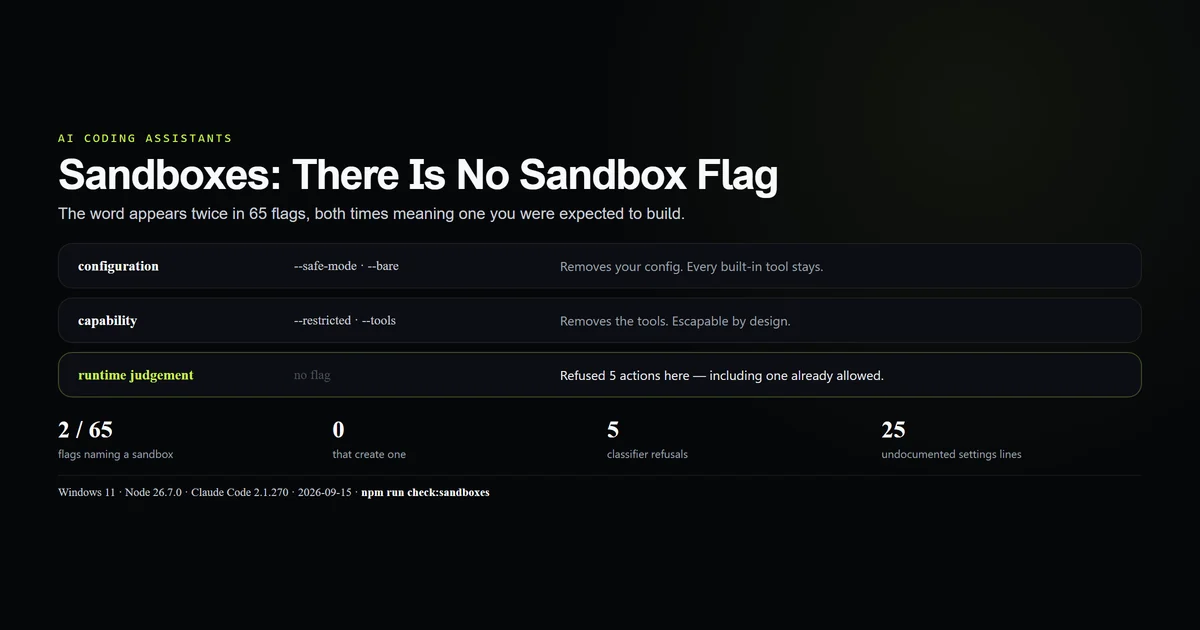
Start with the primary source, because the search term and the product disagree. Across 65 flags on 2.1.270, sandbox occurs twice, attached to the two skip-permissions flags:
claude --help | grep -c sandbox
# → 2
Both are this sentence: "Bypass all permission checks. Recommended only for sandboxes with no internet access." That is not a feature description. It is a warning that assumes you already have isolation and are choosing to disarm the thing that would otherwise stand in for it.
So the honest framing for an isolated Claude is: the sandbox is your job, and the CLI's contribution is a set of flags that reduce what the session can reach inside it. Ten of the 65 flags are relevant to that, and they do not do the same kind of work.
| Flag | What it removes |
|---|---|
--restricted | Capability |
--tools | Capability |
--safe-mode | Configuration |
--bare | Configuration |
--strict-mcp-config | Configuration |
--dangerously-skip-permissions | Nothing — it removes a check |
Three layers, not one switch
Sorting those flags by what they take away produces three layers, and most confusion about claude code sandboxes is two of them being treated as one.
- Configuration.
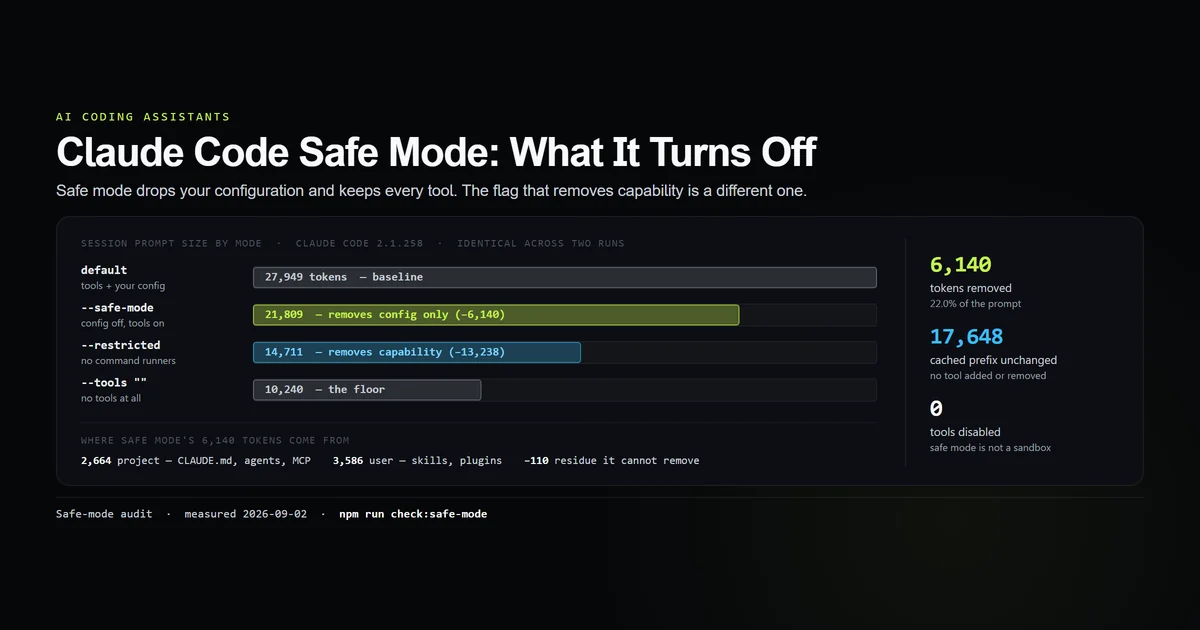
--safe-modeand--bareremove your customizations — CLAUDE.md, skills, hooks, MCP servers, custom commands. The session keeps every built-in tool. We measured this in safe mode: 6,140 prompt tokens removed, zero tools disabled. - Capability.
--restrictedand--toolsremove the tools themselves. A session that cannot run a command cannot run a command regardless of what any settings file says. - Runtime judgement. A classifier that inspects the individual action and can refuse it even when the tool exists and a permission rule allows it. No flag. Not in the help output.
What restricted mode removes
--restricted is the flag with the security shape, and its help entry is unusually specific. Quoted from the binary on 2.1.270, restricted mode:
removes the built-in tools that run commands or code (Bash, PowerShell, REPL
and the other code-running tools) and WebFetch unless --tools names them, and
ignores user, project and local settings files (managed settings and --settings
still apply; add --strict-mcp-config to skip MCP servers too). Also confines the
file tools to the working directories (--add-dir included), refuses
bypassPermissions, and lets only a person or the configured permission handler
approve writes to settings, git and tool-configuration files.
Six distinct behaviours are packed in there, and they are worth separating:
| Behaviour | Effect |
|---|---|
| Drops code-running tools and WebFetch | Removes capability |
| Ignores user, project, local settings | Your own config cannot re-arm it |
| Managed settings still apply | An administrator's policy outranks it |
| Confines file tools to working dirs | Bounds the filesystem |
Refuses bypassPermissions | Closes the usual escape |
| Gates settings, git and tool-config writes | Stops self-modification |
The fourth is the one that most resembles a sandbox: file tools are bounded by the working directories, --add-dir included. The rest is capability and precedence work of the kind Claude Code permissions describes, applied with a harder default.
The two ways out of restricted mode
Restricted mode is deliberately not a cage, and reading its help entry closely tells you where the door is.
--tools names tools back in. The removal is conditional — "unless --tools names them". So --restricted --tools Bash is a valid combination and it restores the single most consequential thing restricted mode took away. That is a feature, not a bug, but it means the flag on its own is not a claim about what a session can do.
MCP servers still load. The parenthetical is explicit: "add --strict-mcp-config to skip MCP servers too." An MCP server is arbitrary tool surface arriving from a config file, so a restricted session that still loads your MCP servers has removed the built-in code-running tools and left a door for third-party ones. If you are running restricted mode for containment rather than tidiness, --strict-mcp-config belongs on the same command line.
The layer that stopped us
Here is the part we did not plan to write. This article set out to exercise the flags above — spawn a restricted session, diff the tool list against a default one, try to read a file outside the working directory. Not one of those probes ran. Five separate actions were refused by a runtime classifier, returning two distinct reason codes:
| Attempted action | Reason returned |
|---|---|
Nested claude -p session via Bash | Auto-Mode Bypass |
| The same via PowerShell, with an allow rule already present | Auto-Mode Bypass |
| Reading the installed binary | Auto-Mode Bypass |
| Listing the install directory | Auto-Mode Bypass |
| Parsing transcript file contents | PII Data Handling |
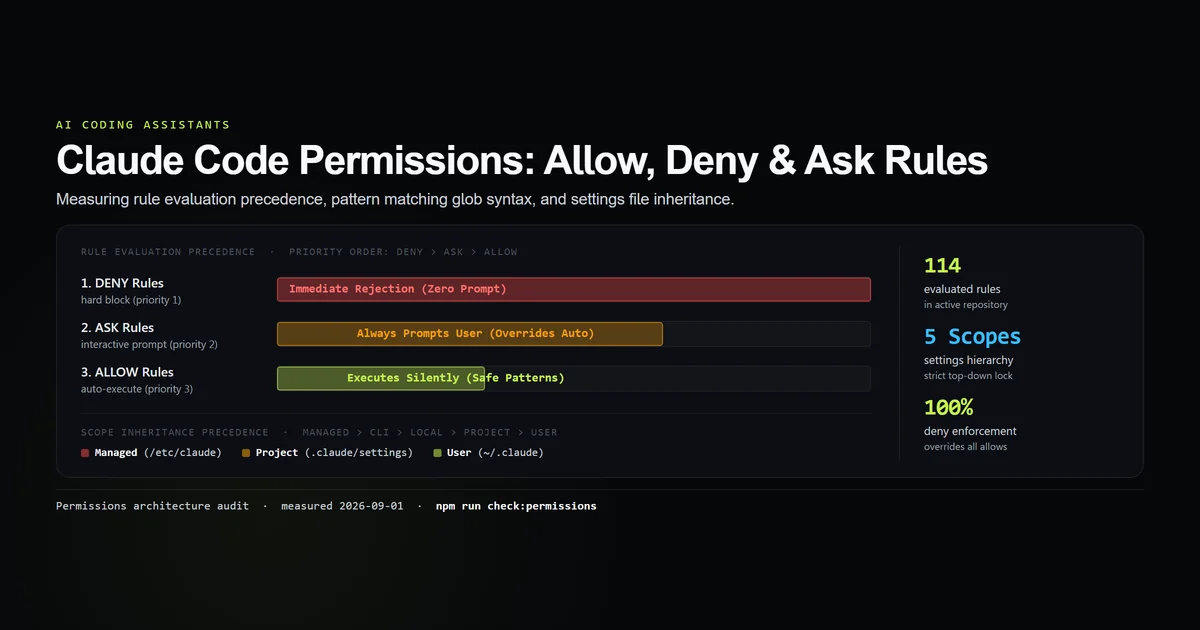
The second row is the finding. PowerShell(claude *) was already in this project's .claude/settings.local.json allow list, so the permission system said yes and the session still could not run the command. A matching allow rule is not sufficient for an action to happen. Whatever mental model you hold of settings precedence — enterprise over project over user — sits entirely inside the permissions layer, and the classifier is not in that stack.
That is the practical answer to what contains a Claude Code session today. On this machine it was not a flag, not a settings file, and not a container. It was a judgement made per action, at runtime, that no documented switch controls.
The settings block nobody documents
There is a trace of that layer on disk. ~/.claude/settings.json on this machine carries an autoMode.environment key holding 25 entries — a structured description of the trust boundary the classifier reasons against, organised under two headings, of which 14 read "None configured":
### Org-wide
**Organization**: None configured
**Network posture**: None configured
**Host containment**: None configured — assume Claude Code runs on an ordinary
  developer machine or CI runner with open internet
**Sensitive remote targets**: any namespace, host, or container whose name
  carries `prod` or `production` as a whole word or name segment
### User-specific
**Primary use of Claude Code**: software development
Two things follow. First, the layer that actually refuses work is configurable, just not from the CLI — nothing in claude --help mentions autoMode. Second, its defaults are conservative on purpose: with host containment unset it assumes an ordinary machine with open internet, which is exactly the posture that makes it refuse a nested session.
Building the isolation yourself
Since the CLI supplies none, here is the shape that the help text's own recommendation implies, in the order that actually reduces risk:
- Isolate the process. A container or VM with no network route, or an allowlisted egress proxy. This is the part that makes
--dangerously-skip-permissionsdefensible, and nothing short of it does. - Bound the filesystem by starting the session in the directory you are willing to lose, and adding nothing with
--add-diryou would not hand over. - Remove capability with
--restricted, and add--strict-mcp-configso third-party tool surface does not walk back in. - Separate the credentials. A container with your real keys mounted is not isolated in the way that matters; scope the token to what the task needs.
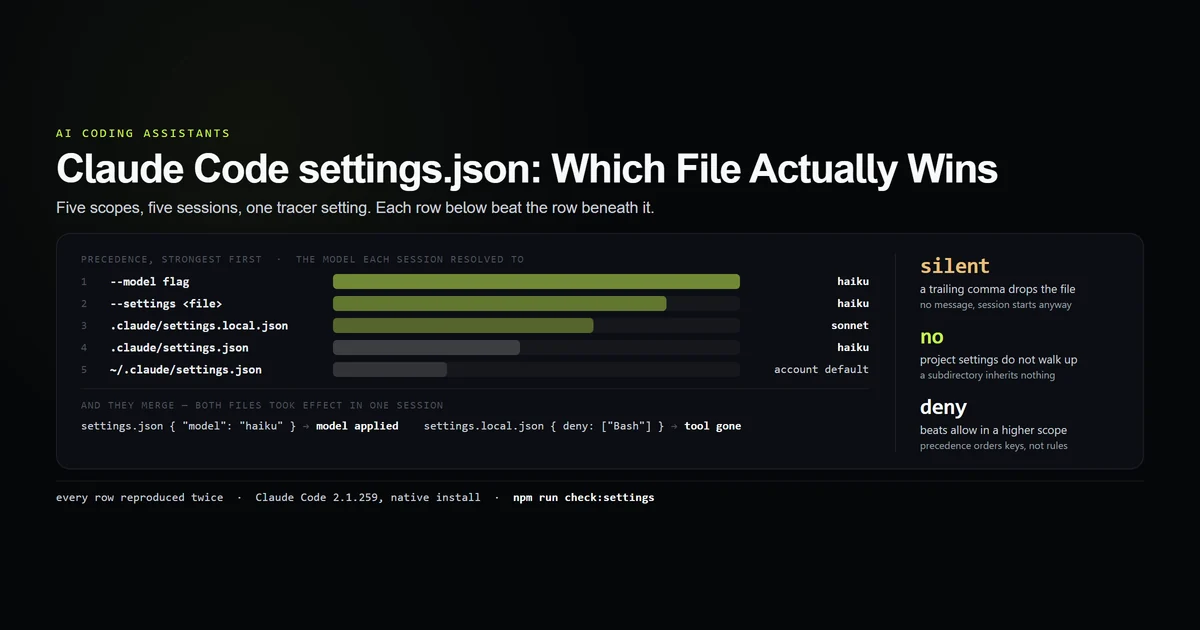
- Do not rely on settings files for any of it. Restricted mode ignores user, project and local settings by design, and a classifier can refuse an action your allow list permits — the precedence runs in both directions.
What did not work
Not one flag in this article was exercised. Every claim about what --restricted removes is read out of the binary's own help text on 2.1.270 and labelled as such. The tool-list diff this site normally publishes — default versus restricted, counted from two live sessions — does not exist here, because every nested claude -p invocation was refused. An article about containment that quietly read as a measurement would be worse than one that admits it is a close reading.
CLAUDE_CODE_FORCE_SANDBOX could not be confirmed to exist. It was filed in our own roadmap as present in the 2.1.270 binary and it is named here as unverified, not described. Reading the installed binary is refused on this machine, and claude --help does not mention it. We are not going to document an environment variable we could not observe.
The refusal was first read as a permissions problem, and it is not one. The initial assumption was that adding a settings rule would fix it; the rule was already there. That mistake is how the three-layer split in this article was found rather than assumed, and it is the single most useful thing the failed probes produced.
Best practices
- Supply the sandbox before you disarm the checks.
--dangerously-skip-permissionsis only defensible inside isolation you built, which is precisely what its own help text says. - Pair
--restrictedwith--strict-mcp-configwhenever the goal is containment rather than a quieter session. - Do not substitute
--safe-modefor--restricted. One removes your configuration, the other removes capability, and only the second changes what a session can do. - Put policy in managed settings if it must survive. Restricted mode ignores user, project and local files and honours managed ones.
- Start the session in the narrowest directory that works, because restricted mode's filesystem bound is the working directories and nothing smaller.
- Expect refusals you did not configure, and read the reason code before assuming a permission rule is missing.
Common mistakes
Searching for a sandbox flag. There is not one. The two mentions in the help output are a prerequisite, not a feature.
Believing --restricted cannot be escaped. --tools names tools back in and MCP servers still load. Both are documented and intended.
Hardening with --safe-mode. It leaves every built-in tool in place. We measured zero tools disabled.
Assuming an allow rule guarantees execution. Ours matched and the action was still refused. The permission stack is not the only thing in the path.
Treating a container with your real credentials as isolation. The process is contained; the blast radius of the token is not.
Conclusion
Stop looking for the flag — build the container, then use --restricted --strict-mcp-config inside it to cut what the session can reach, and keep --safe-mode for the entirely different job of debugging a broken config. The number worth carrying is the one from the help text: two mentions of "sandbox" in 65 flags, both of them assuming you brought your own. And if you want to know what will actually stop a session on your machine, do what we ended up doing by accident — try something ordinary and read the reason it gets refused.
Frequently asked questions
Does Claude Code have a sandbox mode?
What does --restricted actually do?
Is --restricted the same as --safe-mode?
How do I run an isolated Claude in a container?
What stops a Claude Code session in practice?
Muhammad Kashif
Founder and editor of Devventa, covering AI coding assistants, Next.js and the modern AI development stack.